






ABP Framework version: v8.0.4
UI Type: Blazor Server
Database System: EF Core (SQL Server)
Tiered (for MVC) or Auth Server Separated (for Angular): no
Steps to reproduce the issue: Create a page generated with ABP Suite and start it in a low-performance environment (in our case in combination with Redis) and sort the entries, for example.
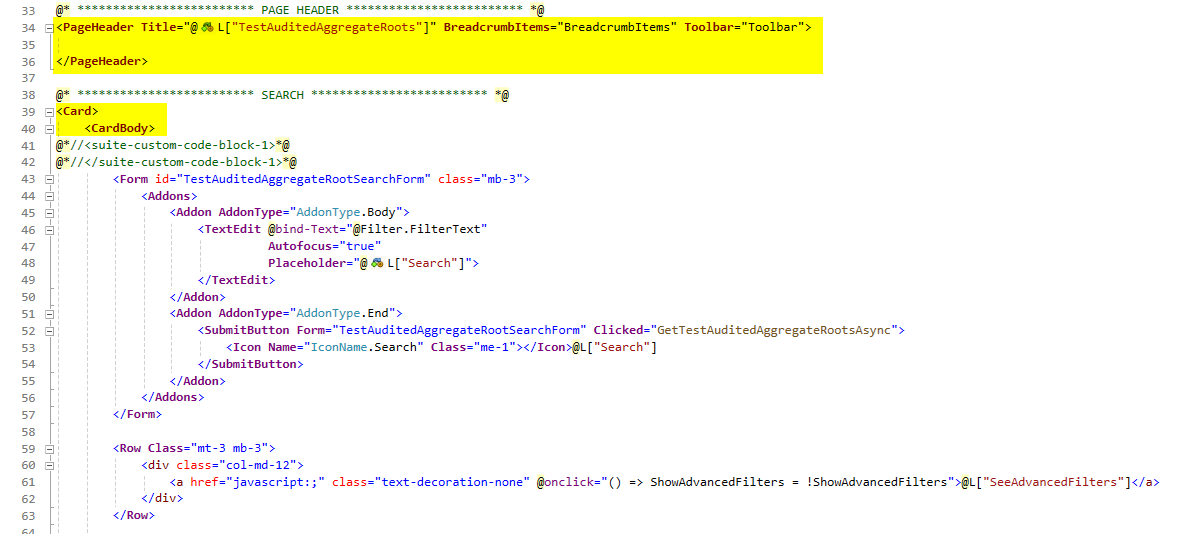
In relation to Redis and the associated poorer performance, we have noticed a bug in the page generated with the ABP Suite. If the page is re-rendered with await InvokeAsync(StateHasChanged);, this can cause the toolbar buttons to flicker. This can only be seen if the performance is not optimal, so it was probably not noticed during development.
Since this is not the case with the admin pages, I have compared the code with that of the user list. I could see the difference as follows:
My generated page:
abp/modules/identity/src/Volo.Abp.Identity.Blazor/Pages/Identity/UserManagement.razor:
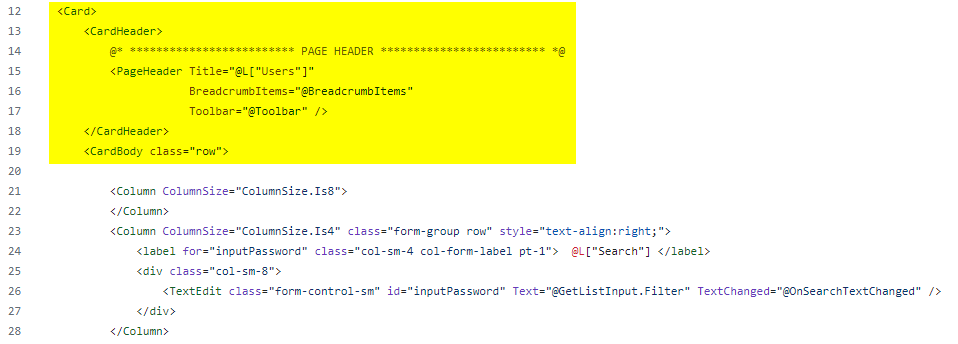
If I change it so that the PageHeader is in the CardHeader, then the problem is solved and the toolbar is not re-rendered every time.
I realize that this is not ideal, as the PageHeader does not belong to the Search-Card, but maybe you can find a better way to solve the problem.
Other question: Loading Spinner:
Can you also add the loading spinner to the DataGrid when you update this template? How can I add the same one that you are already using?

12 Answer(s)
-
0
I will check it
Markdown supported.Copy, paste, or drag & drop images and files (max 100 MB per file, 100 MB total per post) -
0
Hi,
Could you try this to check if it work
[ExposeServices(typeof(PageHeader))]
public partial class MyPageHeader : PageHeader
{
    protected override async Task OnParametersSetAsync()
    {
        if (Toolbar != null)
        {
            var toolbarItems = await PageToolbarManager.GetItemsAsync(Toolbar);

            if (ShouldRenderToolbarItems(toolbarItems))
            {

                PageLayout.ToolbarItems.Clear();
                foreach (var item in toolbarItems)
                {
                    PageLayout.ToolbarItems.Add(item);
                }
            }
        }
    }

    private bool ShouldRenderToolbarItems(PageToolbarItem[] items)
    {
        if (items.Length != PageLayout.ToolbarItems.Count)
        {
            return true;
        }

        return items.Where((t, i) => t.ComponentType != PageLayout.ToolbarItems[i].ComponentType).Any();
    }
}
Markdown supported.Copy, paste, or drag & drop images and files (max 100 MB per file, 100 MB total per post) -
0
Can you also add the loading spinner to the DataGrid when you update this template? How can I add the same one that you are already using?
Sorry, I didn't get it.
Markdown supported.Copy, paste, or drag & drop images and files (max 100 MB per file, 100 MB total per post) -
0
Can you also add the loading spinner to the DataGrid when you update this template? How can I add the same one that you are already using?
Sorry, I didn't get it.
In your DataGrids in the admin panel you have a loading animation / loading spinner. How can I also integrate this into the DataGrid generated by the Suite? And can you include this as a default?
Markdown supported.Copy, paste, or drag & drop images and files (max 100 MB per file, 100 MB total per post) -
0
In your DataGrids in the admin panel you have a loading animation / loading spinner. How can I also integrate this into the DataGrid generated by the Suite? And can you include this as a default?
You can edit the suite template to add a loading spinner; we will support it in the next version.
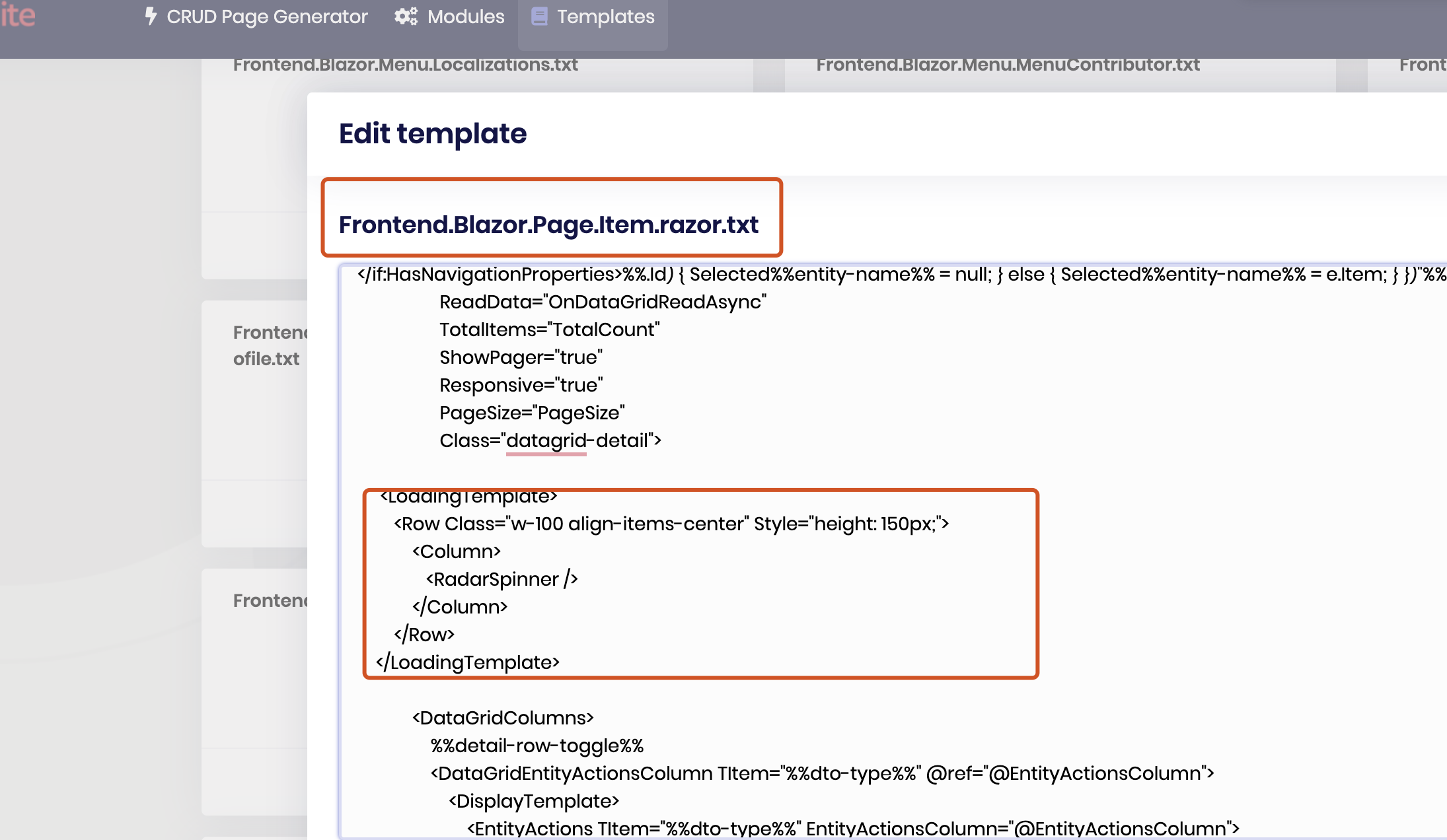
Yes, that seems to work. Will you include this in the next release?
Yes, we will
Markdown supported.Copy, paste, or drag & drop images and files (max 100 MB per file, 100 MB total per post) -
0
Perfect, thank you very much! Can you refund me the question (at least one was a bug)?
Yes, sure.
Can you tell me how I can replace the color of the RadarSpinner? (CSS)
You can replace the color using CSS
Markdown supported.Copy, paste, or drag & drop images and files (max 100 MB per file, 100 MB total per post) -
0
Hi
https://github.com/abpframework/abp/blob/dev/framework/src/Volo.Abp.BlazoriseUI/Components/RadarSpinner.razor https://github.com/abpframework/abp/blob/dev/framework/src/Volo.Abp.BlazoriseUI/wwwroot/volo.abp.blazoriseui.css
Markdown supported.Copy, paste, or drag & drop images and files (max 100 MB per file, 100 MB total per post) -
0
https://github.com/abpframework/abp/issues/19325
Markdown supported.Copy, paste, or drag & drop images and files (max 100 MB per file, 100 MB total per post) -
0
Here my solution:
.radar-spinner .circle-inner {
    border-left-color: var(--lpx-brand) !important;
    border-right-color: var(--lpx-brand) !important;
}
Thanks for help, liangshiwei
Markdown supported.Copy, paste, or drag & drop images and files (max 100 MB per file, 100 MB total per post)


