- ABP Framework version: v8.2
- UI Type: Blazor Server
- Database System: EF Core (SQL Server)
- Tiered (for MVC) or Auth Server Separated (for Angular): yes
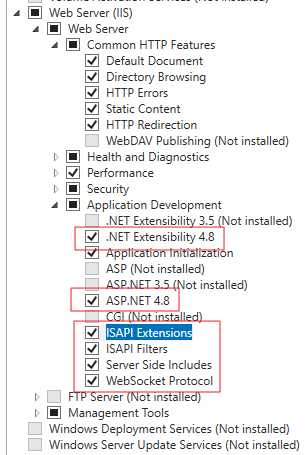
V8.1.1 project has been upgraded to v8.2. Upgraded project executed using local redis and db. And it worked. Project was published and was executed on remote IIS server with redis and db of remote server. It gave us "invalid_grant" error. New empty blazor server project created using abp suite. Then it executed on debug mode on visual studio using db and redis of remote server. It worked. We got blazor ui successfully. Same new project published and deployed on IIS of development pc using remote server db and redis. It worked again. Published new project deployed on remote server IIS using remote server db and remote redis. It gives us "invalid_grant" error. Auth server and api works properly. We can login on api swagger. Every try, redis and database were reset. And migrator is executed.
We set access urls as domain for remote server.
We can send you project via email to reproduce.
45 Answer(s)
-
0
hi
These logs are not complete, Please share full debug request logs of backend.
2024-07-19 16:18:58.436 +03:00 [WRN] ---------- RemoteServiceErrorInfo ----------
{
  "code": "Volo.Authorization:010001",
  "message": "Authorization failed! Given policy has not granted.",
  "details": null,
  "data": {},
  "validationErrors": null
}

2024-07-19 16:18:58.437 +03:00 [WRN] Exception of type 'Volo.Abp.Authorization.AbpAuthorizationException' was thrown.
Volo.Abp.Authorization.AbpAuthorizationException: Exception of type 'Volo.Abp.Authorization.AbpAuthorizationException' was thrown.
   at Microsoft.AspNetCore.Authorization.AbpAuthorizationServiceExtensions.CheckAsync(IAuthorizationService authorizationService, AuthorizationPolicy policy)
   at Volo.Abp.Authorization.MethodInvocationAuthorizationService.CheckAsync(MethodInvocationAuthorizationContext context)
   at Volo.Abp.Authorization.AuthorizationInterceptor.AuthorizeAsync(IAbpMethodInvocation invocation)
   at Volo.Abp.Authorization.AuthorizationInterceptor.InterceptAsync(IAbpMethodInvocation invocation)
   at Volo.Abp.Castle.DynamicProxy.CastleAsyncAbpInterceptorAdapter`1.InterceptAsync[TResult](IInvocation invocation, IInvocationProceedInfo proceedInfo, Func`3 proceed)
   at Castle.DynamicProxy.AsyncInterceptorBase.ProceedAsynchronous[TResult](IInvocation invocation, IInvocationProceedInfo proceedInfo)
   at Volo.Abp.Castle.DynamicProxy.CastleAbpMethodInvocationAdapterWithReturnValue`1.ProceedAsync()
   at Volo.Abp.GlobalFeatures.GlobalFeatureInterceptor.InterceptAsync(IAbpMethodInvocation invocation)
   at Volo.Abp.Castle.DynamicProxy.CastleAsyncAbpInterceptorAdapter`1.InterceptAsync[TResult](IInvocation invocation, IInvocationProceedInfo proceedInfo, Func`3 proceed)
   at Castle.DynamicProxy.AsyncInterceptorBase.ProceedAsynchronous[TResult](IInvocation invocation, IInvocationProceedInfo proceedInfo)
   at Volo.Abp.Castle.DynamicProxy.CastleAbpMethodInvocationAdapterWithReturnValue`1.ProceedAsync()
   at Volo.Abp.Validation.ValidationInterceptor.InterceptAsync(IAbpMethodInvocation invocation)
   at Volo.Abp.Castle.DynamicProxy.CastleAsyncAbpInterceptorAdapter`1.InterceptAsync[TResult](IInvocation invocation, IInvocationProceedInfo proceedInfo, Func`3 proceed)
   at Castle.DynamicProxy.AsyncInterceptorBase.ProceedAsynchronous[TResult](IInvocation invocation, IInvocationProceedInfo proceedInfo)
   at Volo.Abp.Castle.DynamicProxy.CastleAbpMethodInvocationAdapterWithReturnValue`1.ProceedAsync()
   at Volo.Abp.Uow.UnitOfWorkInterceptor.InterceptAsync(IAbpMethodInvocation invocation)
   at Volo.Abp.Castle.DynamicProxy.CastleAsyncAbpInterceptorAdapter`1.InterceptAsync[TResult](IInvocation invocation, IInvocationProceedInfo proceedInfo, Func`3 proceed)
   at Aizanoi.Controllers.ViopContracts.ViopContractController.ListOfViopContractPaginateForClientPackAsync() in D:\FINTECH\PROJECTS\Aizanoi\src\Aizanoi.HttpApi\Controllers\ViopContracts\ViopContractController.Extended.cs:line 49
   at Microsoft.AspNetCore.Mvc.Infrastructure.ActionMethodExecutor.TaskOfIActionResultExecutor.Execute(ActionContext actionContext, IActionResultTypeMapper mapper, ObjectMethodExecutor executor, Object controller, Object[] arguments)
   at Microsoft.AspNetCore.Mvc.Infrastructure.ControllerActionInvoker.<InvokeActionMethodAsync>g__Logged|12_1(ControllerActionInvoker invoker)
   at Microsoft.AspNetCore.Mvc.Infrastructure.ControllerActionInvoker.<InvokeNextActionFilterAsync>g__Awaited|10_0(ControllerActionInvoker invoker, Task lastTask, State next, Scope scope, Object state, Boolean isCompleted)
   at Microsoft.AspNetCore.Mvc.Infrastructure.ControllerActionInvoker.Rethrow(ActionExecutedContextSealed context)
   at Microsoft.AspNetCore.Mvc.Infrastructure.ControllerActionInvoker.Next(State& next, Scope& scope, Object& state, Boolean& isCompleted)
   at Microsoft.AspNetCore.Mvc.Infrastructure.ControllerActionInvoker.InvokeInnerFilterAsync()
--- End of stack trace from previous location ---
   at Microsoft.AspNetCore.Mvc.Infrastructure.ResourceInvoker.<InvokeNextExceptionFilterAsync>g__Awaited|26_0(ResourceInvoker invoker, Task lastTask, State next, Scope scope, Object state, Boolean isCompleted)
Markdown supported.Copy, paste, or drag & drop images and files (max 100 MB per file, 100 MB total per post) -
0
hi
I can log successfully on the
https://fa.fintechxxx.net.tr/website without any exception.But the logs you shared show the following:
An error occurred using a transaction.The request was aborted by the client.Could not find a sessionDoes this happen every time?
Markdown supported.Copy, paste, or drag & drop images and files (max 100 MB per file, 100 MB total per post) -
0
By the way, you can try to override the
IdentitySessionManagerin yourAizanoi.AuthServerproject.using System; using System.Threading.Tasks; using Microsoft.Extensions.Logging; using Volo.Abp.Caching; using Volo.Abp.Identity.Settings; using Volo.Abp.Settings; using Volo.Abp.Uow; using Volo.Abp.Users; namespace Volo.Abp.Identity.Pro.DemoApp; public class MyIdentitySessionManager : IdentitySessionManager { protected IUnitOfWorkManager UnitOfWorkManager { get; } public MyIdentitySessionManager( IIdentitySessionRepository identitySessionRepository, ICurrentUser currentUser, IDistributedCache<IdentitySessionCacheItem> cache, ISettingProvider settingProvider, IdentityDynamicClaimsPrincipalContributorCache identityDynamicClaimsPrincipalContributorCache, IUnitOfWorkManager unitOfWorkManager) : base(identitySessionRepository, currentUser, cache, settingProvider, identityDynamicClaimsPrincipalContributorCache) { UnitOfWorkManager = unitOfWorkManager; } public async override Task<IdentitySession> CreateAsync(string sessionId, string device, string deviceInfo, Guid userId, Guid? tenantId, string clientId, string ipAddresses) { Check.NotNullOrWhiteSpace(sessionId, nameof(sessionId)); Check.NotNullOrWhiteSpace(device, nameof(device)); var session = await IdentitySessionRepository.FindAsync(sessionId); if (session == null) { using (var uow = UnitOfWorkManager.Begin(requiresNew: true)) { Logger.LogInformation($"Creating identity session for session id: {sessionId}, device: {device}, user id: {userId}, tenant id: {tenantId}, client id: {clientId}"); session = await IdentitySessionRepository.InsertAsync(new IdentitySession( GuidGenerator.Create(), sessionId, device, deviceInfo, userId, tenantId, clientId, ipAddresses, Clock.Now )); await uow.SaveChangesAsync(); } } var preventConcurrentLoginBehaviour = await IdentityProPreventConcurrentLoginBehaviourSettingHelper.Get(SettingProvider); switch (preventConcurrentLoginBehaviour) { case IdentityProPreventConcurrentLoginBehaviour.LogoutFromSameTypeDevices: await RevokeAllAsync(userId, device, session.Id); break; case IdentityProPreventConcurrentLoginBehaviour.LogoutFromAllDevices: await RevokeAllAsync(userId, session.Id); break; } return session; } }Markdown supported.Copy, paste, or drag & drop images and files (max 100 MB per file, 100 MB total per post) -
0
We have tried to sent request api over client using passwordTokenRequest and ClientCredentialsTokenRequest. But when we sent request using PasswordTokenRequest, we are getting error. I have shared project via email. You can test it.
Markdown supported.Copy, paste, or drag & drop images and files (max 100 MB per file, 100 MB total per post) -
0
hi
The anonymous request to
https://fa-api.xxx.net.tr/api/app/viop-contracts/client-packwill also get 500 error.Maybe it is unrelated to the access token. What are the error logs?
Thanks.
Markdown supported.Copy, paste, or drag & drop images and files (max 100 MB per file, 100 MB total per post) -
0
Hi I shared log files with you. There are previous logs named previous contain your request logs. And there are logs named new contain only request logs of our demo client Project that we shared to you . When IsDynamicClaimsEnabled is false, we get successul result. But IsDynamicClaimsEnabled is true, we are getting (500) internal server error.And gives Volo.Abp.Authorization.AbpAuthorizationException. We are getting this error without access token regardless IsDynamicClaimsEnabled state.
Markdown supported.Copy, paste, or drag & drop images and files (max 100 MB per file, 100 MB total per post) -
0
hi
I have checked the new logs. The problem is still about the
session.The
sessiondoesn't seem to be stored in the database. It throws an exception.An error occurred using a transaction. An exception occurred, but response has already started!Can you also try to remove the
UseUnitOfWorkfromOnApplicationInitialization?Markdown supported.Copy, paste, or drag & drop images and files (max 100 MB per file, 100 MB total per post) -
0
Hi We thought that we solve IIS server issues, so we did not try our release in kestrel mode. We run release that runs on IIS in kestrel mode without removing
UseUnitOfWork. In Kestrel mode release worked on same domain. When release, domain and everything are same, it works in kestrel mode but it did not work on IIS. I think problem is on IIS Server config.Markdown supported.Copy, paste, or drag & drop images and files (max 100 MB per file, 100 MB total per post) -
0
We found an IIS config option that makes our problem temporarily solved.
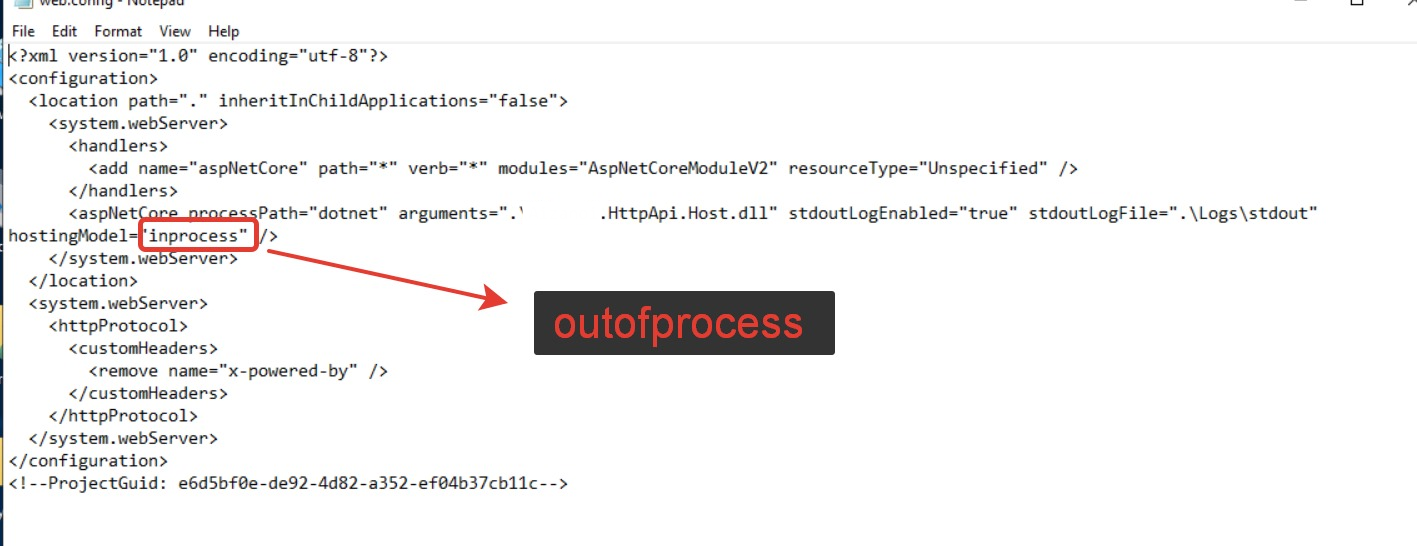 This is IIS webconfig. When hosting model is inprocess, we can not get successfully response over demo client. But when we change it to outofprocess it works. On outofprocess option IIS gives low performance. We want to run release on IIS with hostingmodel is inprocess.Markdown supported.Copy, paste, or drag & drop images and files (max 100 MB per file, 100 MB total per post)