- ABP Framework version: v8.2
- UI Type: Blazor Server
- Database System: EF Core (SQL Server)
- Tiered (for MVC) or Auth Server Separated (for Angular): yes
V8.1.1 project has been upgraded to v8.2. Upgraded project executed using local redis and db. And it worked. Project was published and was executed on remote IIS server with redis and db of remote server. It gave us "invalid_grant" error. New empty blazor server project created using abp suite. Then it executed on debug mode on visual studio using db and redis of remote server. It worked. We got blazor ui successfully. Same new project published and deployed on IIS of development pc using remote server db and redis. It worked again. Published new project deployed on remote server IIS using remote server db and remote redis. It gives us "invalid_grant" error. Auth server and api works properly. We can login on api swagger. Every try, redis and database were reset. And migrator is executed.
We set access urls as domain for remote server.
We can send you project via email to reproduce.
45 Answer(s)
-
0
hi
Please share the
Logs.txtfile on your remote IIS.Thanks, liming.ma@volosoft.com
I have shared with you Logs and sample project that occurs mentioned error.
Markdown supported.Copy, paste, or drag & drop images and files (max 100 MB per file, 100 MB total per post) -
0
hi
The error related to the session management.
Can you set IIS log level to debug to see more details?
public class Program
{
    public async static Task<int> Main(string[] args)
    {
        Log.Logger = new LoggerConfiguration()
            .MinimumLevel.Information()
            .MinimumLevel.Override("Microsoft.EntityFrameworkCore", LogEventLevel.Warning)
            .Enrich.FromLogContext()
            .WriteTo.Async(c => c.File("Logs/logs.txt"))
            .WriteTo.Async(c => c.Console())
            .CreateLogger();
Error:
invalid_grant => The token is no longer valid because the user's session expired.https://docs.abp.io/en/commercial/latest/modules/identity/session-management https://docs.abp.io/en/commercial/latest/modules/account/session-management
Markdown supported.Copy, paste, or drag & drop images and files (max 100 MB per file, 100 MB total per post) -
0
hi
There is an exception on your IIS, so the problem exists in the Database. You can troubleshoot it.
2024-07-15 16:37:46.002 +03:00 [ERR] An unhandled exception has occurred while executing the request.
Microsoft.EntityFrameworkCore.DbUpdateException: An error occurred while saving the entity changes. See the inner exception for details.
 ---> Microsoft.Data.SqlClient.SqlException (0x80131904): A severe error occurred on the current command.  The results, if any, should be discarded.
Operation cancelled by user.
Markdown supported.Copy, paste, or drag & drop images and files (max 100 MB per file, 100 MB total per post) -
0
hi
I think the
context.RequestAbortedhappened. that isrequest is abortedCan you share your
web.config? This is not a code problem instead of environment.Thanks.
Markdown supported.Copy, paste, or drag & drop images and files (max 100 MB per file, 100 MB total per post) -
0
hi
1.
Can you try to disable the
IsDynamicClaimsEnabled?context.Services.Configure<AbpClaimsPrincipalFactoryOptions>(options => { options.IsDynamicClaimsEnabled = false; });2.
Can you use a new SQL server to test this?
You can use the SQL server in Docker to try again.
https://learn.microsoft.com/en-us/sql/linux/quickstart-install-connect-docker?view=sql-server-ver16&tabs=cli&pivots=cs1-bash
3.
Can you share a website URL to let me check it online?
Thanks
Markdown supported.Copy, paste, or drag & drop images and files (max 100 MB per file, 100 MB total per post) -
0
Hi We have applied your first suggestion. It solved problem on one of our server. But we do not know why and how it works. It works somehow. Can you illuminate us on this topic. Why we change IsDynamicClaimsEnabled to false and why does it work? We also created new server and database and implemented same working released project. I it gave us Unauthorized error.
<br> We supplied error logs to you via email.
Markdown supported.Copy, paste, or drag & drop images and files (max 100 MB per file, 100 MB total per post) -
0
hi
Why we change IsDynamicClaimsEnabled to false and why does it work?
The framework will create session entities if this IsDynamicClaimsEnabled is true. However on your server it fails.
Unauthorized error 2024-07-17 12:54:05.676 +03:00 [INF] Authorization failed. These requirements were not met: PermissionRequirement: Aizanoi.Countries
Please check the permission of the current user.
Markdown supported.Copy, paste, or drag & drop images and files (max 100 MB per file, 100 MB total per post) -
0
On AbpPermissionGrant table there are permission for admin.
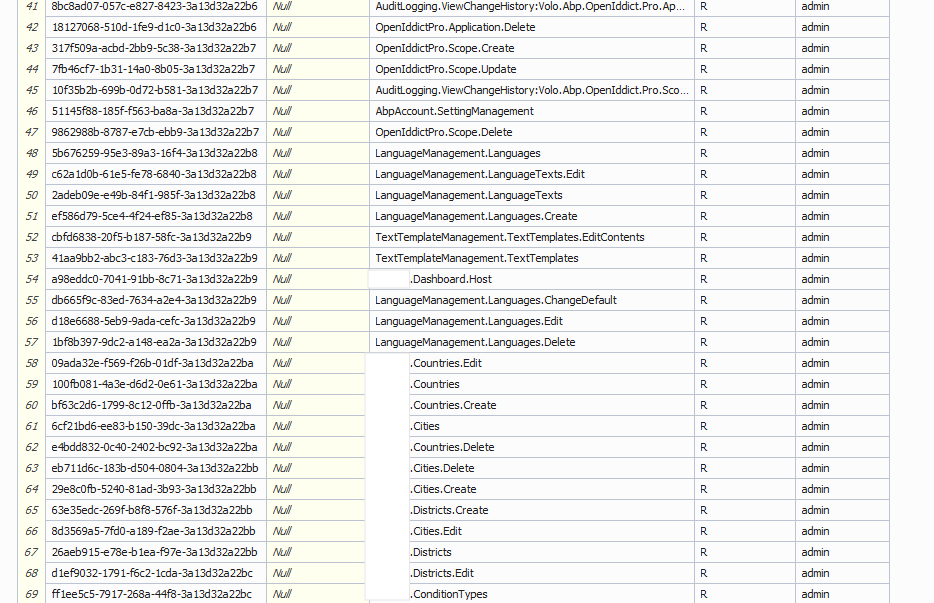 As you see at sample image of AbpPermissionGrant all permission are assigned to admin from role. admin role is also assigned to admin user. We are trying to login in using admin user. Also you can see Country permissions are given to admin role.Markdown supported.Copy, paste, or drag & drop images and files (max 100 MB per file, 100 MB total per post)
 -
1
In this situation we can not use session feature. Because of IsDynamicClaimsEnabled is false.
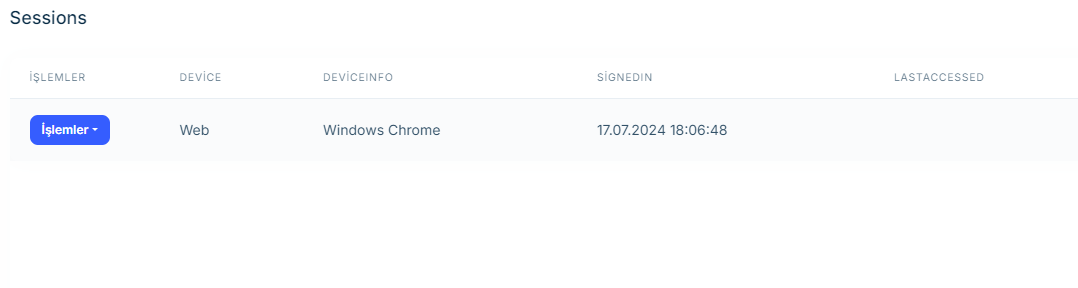 Normally on this screen there is a circle light near the device name. But it ain`t now.
 No option like session user menu. How can we use session feature?Markdown supported.Copy, paste, or drag & drop images and files (max 100 MB per file, 100 MB total per post)
 -
0
I have the same problem turning IsDynamicClaimsEnabled to false is solving the problem But I need a Fix also I'm using MongoDB Not SQL
2024-07-18 19:28:10.504 +03:30 [ERR] Error when dispatching 'OnDisconnectedAsync' on hub. System.Threading.Tasks.TaskCanceledException: A task was canceled. at Volo.Abp.Threading.SemaphoreSlimExtensions.LockAsync(SemaphoreSlim semaphoreSlim, CancellationToken cancellationToken) at Volo.Abp.Caching.DistributedCache
2.GetOrAddAsync(TCacheKey key, Func1 factory, Func1 optionsFactory, Nullable1 hideErrors, Boolean considerUow, CancellationToken token) at Volo.Abp.Identity.IdentityDynamicClaimsPrincipalContributorCache.GetAsync(Guid userId, Nullable1 tenantId) at Volo.Abp.Identity.IdentityDynamicClaimsPrincipalContributor.ContributeAsync(AbpClaimsPrincipalContributorContext context) at Volo.Abp.Security.Claims.AbpClaimsPrincipalFactory.InternalCreateAsync(AbpClaimsPrincipalFactoryOptions options, ClaimsPrincipal existsClaimsPrincipal, Boolean isDynamic) at Volo.Abp.Security.Claims.AbpClaimsPrincipalFactory.CreateDynamicAsync(ClaimsPrincipal existsClaimsPrincipal) at Volo.Abp.AspNetCore.SignalR.Authentication.AbpAuthenticationHubFilter.HandleDynamicClaimsPrincipalAsync(ClaimsPrincipal claimsPrincipal, IServiceProvider serviceProvider, HubCallerContext hubCallerContext, Boolean skipCheckDynamicClaimsInterval) at Volo.Abp.AspNetCore.SignalR.Authentication.AbpAuthenticationHubFilter.OnDisconnectedAsync(HubLifetimeContext context, Exception exception, Func3 next) at Microsoft.AspNetCore.SignalR.Internal.HubFilterFactory.OnDisconnectedAsync(HubLifetimeContext context, Exception exception, Func3 next) at Microsoft.AspNetCore.SignalR.Internal.HubFilterFactory.OnDisconnectedAsync(HubLifetimeContext context, Exception exception, Func3 next) at Microsoft.AspNetCore.SignalR.Internal.HubFilterFactory.OnDisconnectedAsync(HubLifetimeContext context, Exception exception, Func3 next) at Microsoft.AspNetCore.SignalR.Internal.HubFilterFactory.OnDisconnectedAsync(HubLifetimeContext context, Exception exception, Func3 next) at Microsoft.AspNetCore.SignalR.Internal.DefaultHubDispatcher1.OnDisconnectedAsync(HubConnectionContext connection, Exception exception) at Microsoft.AspNetCore.SignalR.Internal.DefaultHubDispatcher1.OnDisconnectedAsync(HubConnectionContext connection, Exception exception) at Microsoft.AspNetCore.SignalR.HubConnectionHandler`1.HubOnDisconnectedAsync(HubConnectionContext connection, Exception exception)2024-07-18 19:28:10.506 +03:30 [ERR] Failed disposing connection pnR_OJExNOOme-cZKvHczw. System.Threading.Tasks.TaskCanceledException: A task was canceled. at Volo.Abp.Threading.SemaphoreSlimExtensions.LockAsync(SemaphoreSlim semaphoreSlim, CancellationToken cancellationToken) at Volo.Abp.Caching.DistributedCache
2.GetOrAddAsync(TCacheKey key, Func1 factory, Func1 optionsFactory, Nullable1 hideErrors, Boolean considerUow, CancellationToken token) at Volo.Abp.Identity.IdentityDynamicClaimsPrincipalContributorCache.GetAsync(Guid userId, Nullable1 tenantId) at Volo.Abp.Identity.IdentityDynamicClaimsPrincipalContributor.ContributeAsync(AbpClaimsPrincipalContributorContext context) at Volo.Abp.Security.Claims.AbpClaimsPrincipalFactory.InternalCreateAsync(AbpClaimsPrincipalFactoryOptions options, ClaimsPrincipal existsClaimsPrincipal, Boolean isDynamic) at Volo.Abp.Security.Claims.AbpClaimsPrincipalFactory.CreateDynamicAsync(ClaimsPrincipal existsClaimsPrincipal) at Volo.Abp.AspNetCore.SignalR.Authentication.AbpAuthenticationHubFilter.HandleDynamicClaimsPrincipalAsync(ClaimsPrincipal claimsPrincipal, IServiceProvider serviceProvider, HubCallerContext hubCallerContext, Boolean skipCheckDynamicClaimsInterval) at Volo.Abp.AspNetCore.SignalR.Authentication.AbpAuthenticationHubFilter.OnDisconnectedAsync(HubLifetimeContext context, Exception exception, Func3 next) at Microsoft.AspNetCore.SignalR.Internal.HubFilterFactory.OnDisconnectedAsync(HubLifetimeContext context, Exception exception, Func3 next) at Microsoft.AspNetCore.SignalR.Internal.HubFilterFactory.OnDisconnectedAsync(HubLifetimeContext context, Exception exception, Func3 next) at Microsoft.AspNetCore.SignalR.Internal.HubFilterFactory.OnDisconnectedAsync(HubLifetimeContext context, Exception exception, Func3 next) at Microsoft.AspNetCore.SignalR.Internal.HubFilterFactory.OnDisconnectedAsync(HubLifetimeContext context, Exception exception, Func3 next) at Microsoft.AspNetCore.SignalR.Internal.DefaultHubDispatcher1.OnDisconnectedAsync(HubConnectionContext connection, Exception exception) at Microsoft.AspNetCore.SignalR.Internal.DefaultHubDispatcher1.OnDisconnectedAsync(HubConnectionContext connection, Exception exception) at Microsoft.AspNetCore.SignalR.HubConnectionHandler1.HubOnDisconnectedAsync(HubConnectionContext connection, Exception exception) at Microsoft.AspNetCore.SignalR.HubConnectionHandler1.RunHubAsync(HubConnectionContext connection) at Microsoft.AspNetCore.SignalR.HubConnectionHandler1.OnConnectedAsync(ConnectionContext connection) at Microsoft.AspNetCore.SignalR.HubConnectionHandler1.OnConnectedAsync(ConnectionContext connection) at Microsoft.AspNetCore.Http.Connections.Internal.HttpConnectionContext.ExecuteApplication(ConnectionDelegate connectionDelegate) at Microsoft.AspNetCore.Http.Connections.Internal.HttpConnectionContext.WaitOnTasks(Task applicationTask, Task transportTask, Boolean closeGracefully) at Microsoft.AspNetCore.Http.Connections.Internal.HttpConnectionContext.DisposeAsync(Boolean closeGracefully) at Microsoft.AspNetCore.Http.Connections.Internal.HttpConnectionManager.DisposeAndRemoveAsync(HttpConnectionContext connection, Boolean closeGracefully, HttpConnectionStopStatus status)2024-07-18 19:28:10.600 +03:30 [ERR] Message contains error: 'invalid_grant', error_description: 'The token is no longer valid because the user's session expired.', error_uri: 'error_uri is null', status code '400'. 2024-07-18 19:28:10.604 +03:30 [ERR] Exception occurred while processing message. Microsoft.IdentityModel.Protocols.OpenIdConnect.OpenIdConnectProtocolException: Message contains error: 'invalid_grant', error_description: 'The token is no longer valid because the user's session expired.', error_uri: 'error_uri is null'. at Microsoft.AspNetCore.Authentication.OpenIdConnect.OpenIdConnectHandler.RedeemAuthorizationCodeAsync(OpenIdConnectMessage tokenEndpointRequest) at Microsoft.AspNetCore.Authentication.OpenIdConnect.OpenIdConnectHandler.HandleRemoteAuthenticateAsync() 2024-07-18 19:28:10.605 +03:30 [INF] Error from RemoteAuthentication: Message contains error: 'invalid_grant', error_description: 'The token is no longer valid because the user's session expired.', error_uri: 'error_uri is null'.. 2024-07-18 19:28:10.607 +03:30 [ERR] An unhandled exception has occurred while executing the request. Microsoft.AspNetCore.Authentication.AuthenticationFailureException: An error was encountered while handling the remote login. ---> Microsoft.IdentityModel.Protocols.OpenIdConnect.OpenIdConnectProtocolException: Message contains error: 'invalid_grant', error_description: 'The token is no longer valid because the user's session expired.', error_uri: 'error_uri is null'. at Microsoft.AspNetCore.Authentication.OpenIdConnect.OpenIdConnectHandler.RedeemAuthorizationCodeAsync(OpenIdConnectMessage tokenEndpointRequest) at Microsoft.AspNetCore.Authentication.OpenIdConnect.OpenIdConnectHandler.HandleRemoteAuthenticateAsync() --- End of inner exception stack trace --- at Microsoft.AspNetCore.Authentication.RemoteAuthenticationHandler`1.HandleRequestAsync() at Microsoft.AspNetCore.Authentication.AuthenticationMiddleware.Invoke(HttpContext context) at Volo.Abp.AspNetCore.Security.AbpSecurityHeadersMiddleware.InvokeAsync(HttpContext context, RequestDelegate next) at Microsoft.AspNetCore.Builder.UseMiddlewareExtensions.InterfaceMiddlewareBinder.<>c__DisplayClass2_0.<<CreateMiddleware>b__0>d.MoveNext() --- End of stack trace from previous location --- at Volo.Abp.AspNetCore.Tracing.AbpCorrelationIdMiddleware.InvokeAsync(HttpContext context, RequestDelegate next) at Microsoft.AspNetCore.Builder.UseMiddlewareExtensions.InterfaceMiddlewareBinder.<>c__DisplayClass2_0.<<CreateMiddleware>b__0>d.MoveNext() --- End of stack trace from previous location --- at Microsoft.AspNetCore.Localization.RequestLocalizationMiddleware.Invoke(HttpContext context) at Microsoft.AspNetCore.RequestLocalization.AbpRequestLocalizationMiddleware.InvokeAsync(HttpContext context, RequestDelegate next) at Microsoft.AspNetCore.Builder.UseMiddlewareExtensions.InterfaceMiddlewareBinder.<>c__DisplayClass2_0.<<CreateMiddleware>b__0>d.MoveNext() --- End of stack trace from previous location --- at Microsoft.AspNetCore.Diagnostics.DeveloperExceptionPageMiddlewareImpl.Invoke(HttpContext context)
Markdown supported.Copy, paste, or drag & drop images and files (max 100 MB per file, 100 MB total per post) -
0
It works on development but on staging environment (iis) returns 404 !???
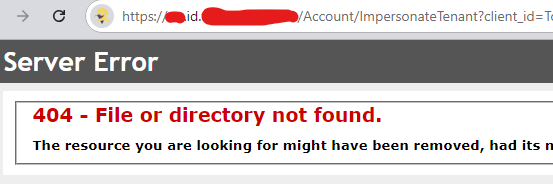 Markdown supported.Copy, paste, or drag & drop images and files (max 100 MB per file, 100 MB total per post)
 -
0
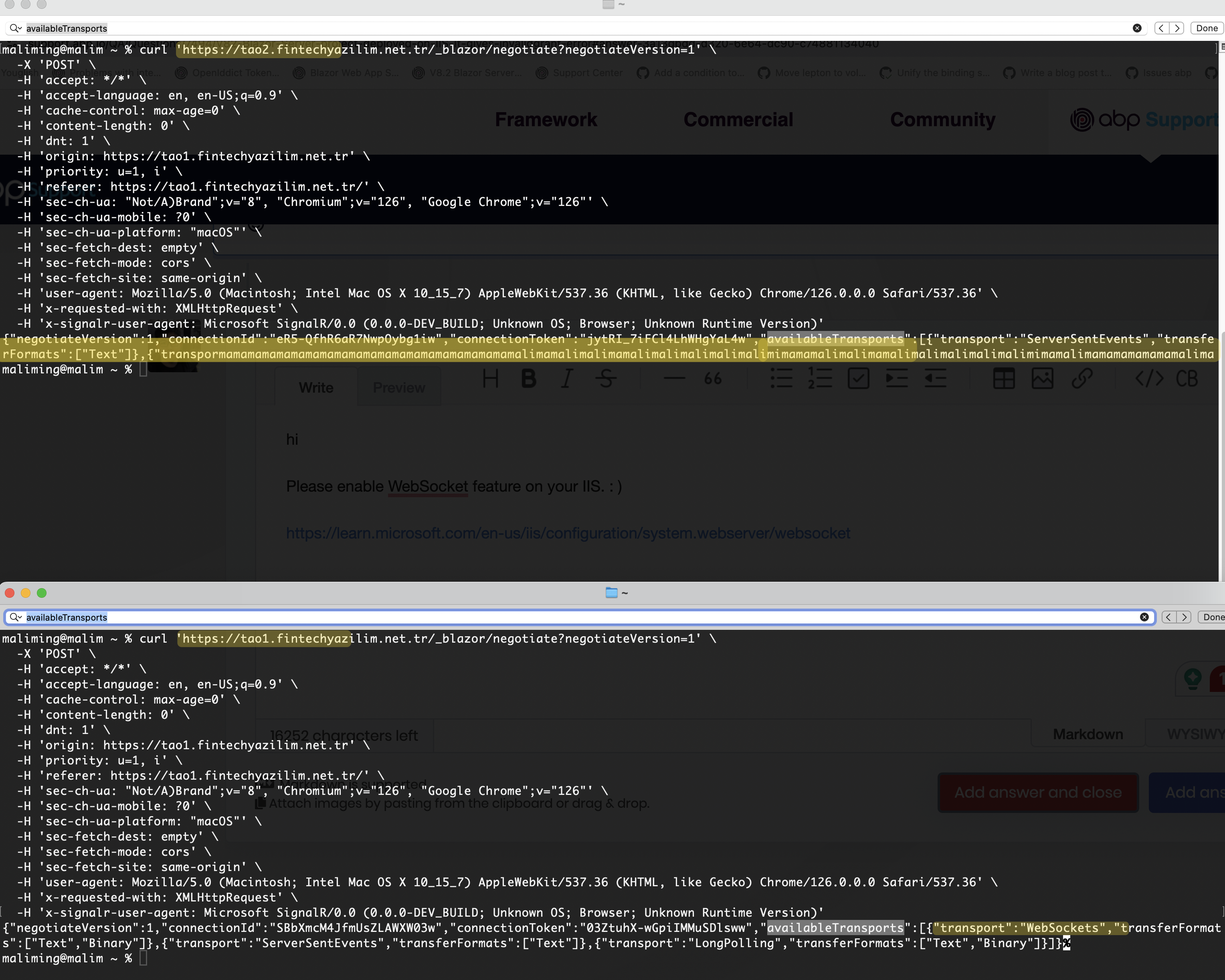
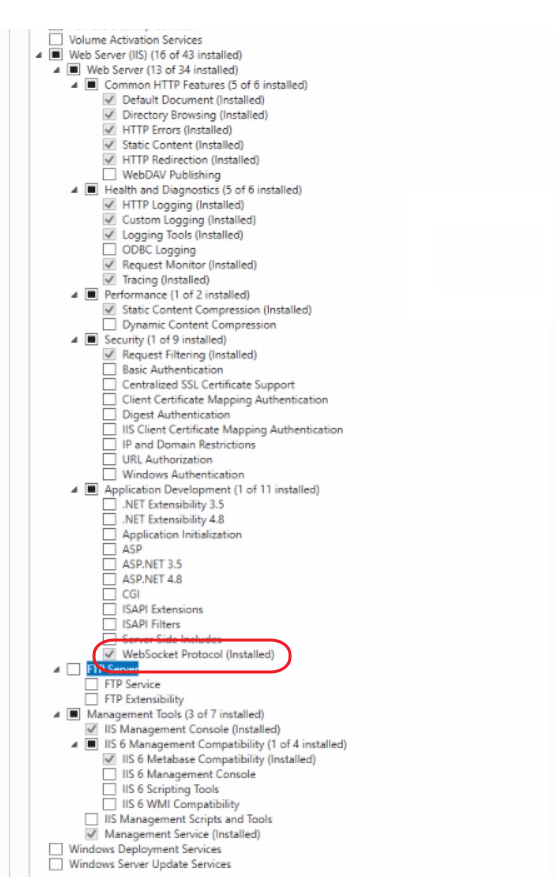
Hi We have tried our project on both kestrel and IIS mode on newly created server. IsDynamicClaimsEnabled is true. On Kestrel mode project works smoothly. We can get session info. But on IIS we are getting Unauthorized.
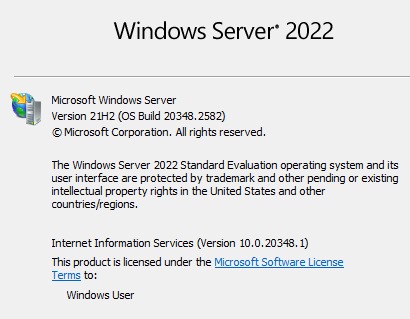 Here is deployment server version and IIS version.
https://tao1.xxx.net.tr -> Kestrel
https://tao2.xxx.net.tr -> IIS
Here is deployment server version and IIS version.
https://tao1.xxx.net.tr -> Kestrel
https://tao2.xxx.net.tr -> IISYou can change subdomain to access swagger and auth. https://tao2-auth.xxx.net.tr -> IIS Auth Server https://tao2-api.xxx.net.tr -> IIS Api Host
Markdown supported.Copy, paste, or drag & drop images and files (max 100 MB per file, 100 MB total per post)