






Hello :) We are experiencing an issue using abp bundle on the new cli.
- ABP Framework version: v8.2.2
- UI Type: Blazor WASM
first I updated the cli - or better - replaced it by the new thing:
repos dotnet tool install -g Volo.Abp.Studio.Cli
Tool 'volo.abp.studio.cli' failed to update due to the following:
Failed to create shell shim for tool 'volo.abp.studio.cli': Command 'abp' conflicts with an existing command from another tool.
Tool 'volo.abp.studio.cli' failed to install.
repos ^C
repos dotnet tool uninstall -g Volo.Abp.Cli
Tool 'volo.abp.cli' (version '8.2.0') was successfully uninstalled.
repos dotnet tool install -g Volo.Abp.Studio.Cli
You can invoke the tool using the following command: abp
Tool 'volo.abp.studio.cli' (version '0.7.8') was successfully installed.
repos abp suite update
[12:43:55 INF] You are running the second generation of the ABP CLI. If you're interested in the legacy CLI, see https://abp.io/new-cli
📌 ABP CLI 0.7.8 (Beta)
🧩 Extensions downloaded: Volo.Abp.Studio.Extensions.StandardSolutionTemplates
🚲 The CLI is restarting to apply the changes with arguments: suite update
JackFistelmann repos [12:44:05 INF] You are running the second generation of the ABP CLI. If you're interested in the legacy CLI, see https://abp.io/new-cli
[12:44:06 INF] Updating ABP Suite ...
Tool 'volo.abp.suite' was successfully updated from version '8.2.0' to version '8.2.2'.
using abp bundle:
abp bundle
[12:45:13 INF] You are running the second generation of the ABP CLI. If you're interested in the legacy CLI, see https://abp.io/new-cli
System.NullReferenceException: Object reference not set to an instance of an object.
  at async Task<string> Volo.Abp.Studio.Modifying.CsprojFileManager.GetAbpVersionAsync(string filePath)
  at async Task<string> Volo.Abp.Studio.Cli.Commands.StudioBundleCommand.yClRDND67t(string  )
  at async Task Volo.Abp.Studio.Cli.Commands.StudioBundleCommand.ExecuteAsync(CommandLineArgs commandLineArgs)
  at async Task Volo.Abp.Studio.Cli.StudioCliService.RunInternalAsync(CommandLineArgs commandLineArgs)
  at async Task Volo.Abp.Studio.Cli.StudioCliService.RunAsync(string[] args)
Unhandled exception. System.NullReferenceException: Object reference not set to an instance of an object.
   at Volo.Abp.Studio.Modifying.CsprojFileManager.GetAbpVersionAsync(String filePath)
   at Volo.Abp.Studio.Cli.Commands.StudioBundleCommand.yClRDND67t(String  )
   at Volo.Abp.Studio.Cli.Commands.StudioBundleCommand.ExecuteAsync(CommandLineArgs commandLineArgs)
   at Volo.Abp.Studio.Cli.StudioCliService.RunInternalAsync(CommandLineArgs commandLineArgs)
   at Volo.Abp.Studio.Cli.StudioCliService.RunAsync(String[] args)
   at Volo.Abp.Studio.Cli.Program.x2J81t685(Object  )
   at Volo.Abp.Studio.Cli.Program.<Main>(String[] args)
I expect the issue to be that we are using central package management as well as a variable for the version:
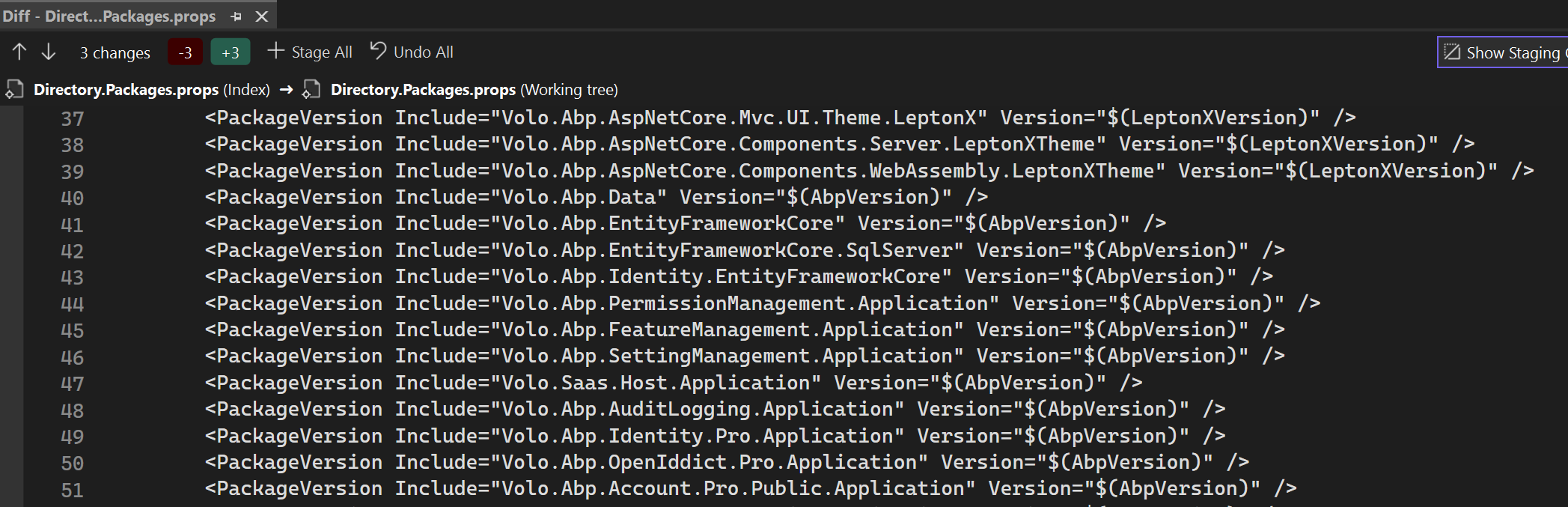
running abp help bundle
[12:46:13 INF] You are running the second generation of the ABP CLI. If you're interested in the legacy CLI, see https://abp.io/new-cli
[12:46:13 INF]
Usage:

  abp bundle [options]

Options:

-wd|--working-directory <directory-path>                (default: empty)
-f | --force                                            (default: false)
-t | --project-type                                     (default: webassembly)

See the documentation for more info: https://abp.io/docs/latest/cli
we would need to get a parameter to pass our version or a fix or a workaround please.
as a workaround I uninstalled the new cli - and things do not die anymore:
repos dotnet tool uninstall -g Volo.Abp.Studio.Cli
Tool 'volo.abp.studio.cli' (version '0.7.8') was successfully uninstalled.
repos dotnet tool install -g Volo.Abp.Cli
You can invoke the tool using the following command: abp
Tool 'volo.abp.cli' (version '8.2.2') was successfully installed.
repos cd .\cb\dev\dth-cantor-administration\
dth-cantor-administration cd .\src\Dth.CantorAdministration.Blazor.Client\
Dth.CantorAdministration.Blazor.Client abp bundle
ABP CLI 8.2.2
Generating style bundle...
Style bundle has been generated successfully.
Generating script bundle...
Script bundle has been generated successfully.
JackFistelmann Dth.CantorAdministration.Blazor.Client 3429-portatours ≡ ~3
6 Answer(s)
-
0
Hi,
You may use command to install abp cli, mention your version
dotnet tool install -g volo.abp.cli --version 8.2.2thanks
Markdown supported.Copy, paste, or drag & drop images and files (max 100 MB per file, 100 MB total per post) -
0
Hi,
You may use command to install abp cli, mention your version
dotnet tool install -g volo.abp.cli --version 8.2.2thanks
how does that correspond to the issue?
Markdown supported.Copy, paste, or drag & drop images and files (max 100 MB per file, 100 MB total per post) -
0
Hi,
I apologize if I misunderstood your case, can you please elaborate in detail on what you expect?
regards,
Markdown supported.Copy, paste, or drag & drop images and files (max 100 MB per file, 100 MB total per post) -
0
Hi,
I apologize if I misunderstood your case, can you please elaborate in detail on what you expect?
regards,
I thought I did that in my question. Can you please tell me which part is unclear, so I can explain it better?
thanks for your efforts
Markdown supported.Copy, paste, or drag & drop images and files (max 100 MB per file, 100 MB total per post) -
0
Hi,
yes, this is a problem,
New CLI and old CLI can be used at the same time.
try
abp bundle --oldwe will fix the problem, thanks. your ticket was refunded.
Markdown supported.Copy, paste, or drag & drop images and files (max 100 MB per file, 100 MB total per post) -
0
https://github.com/abpframework/abp/pull/20673
Markdown supported.Copy, paste, or drag & drop images and files (max 100 MB per file, 100 MB total per post)



