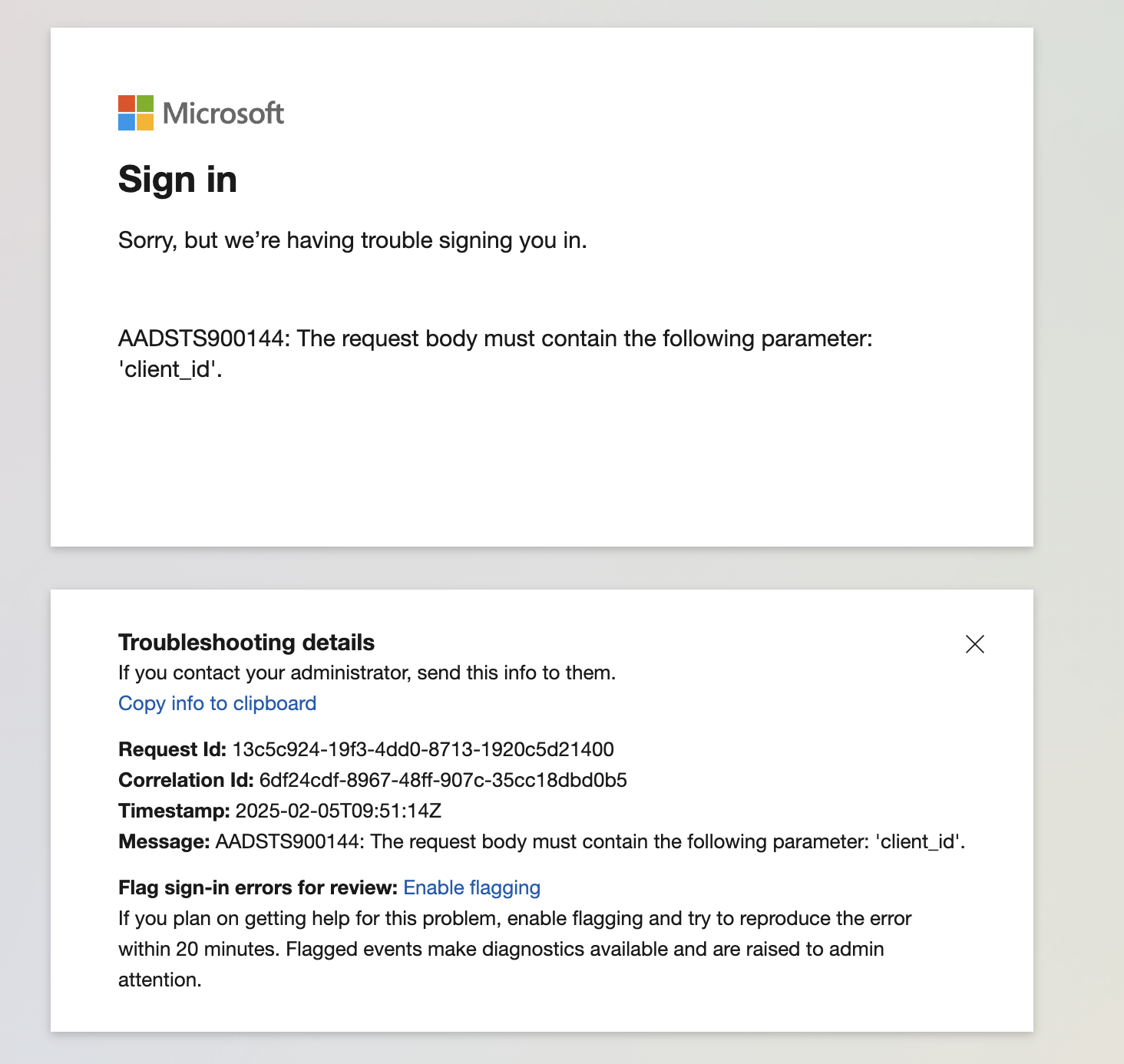
- ABP Framework version: v9.0.2
- UI Type: MVC
- Database System: EF Core (SQL Server)
- **Tiered (for MVC) or Auth Server Separated: yes
- Exception message and full stack trace: I am back and forward on redirect URL after authenticating with Microsoft Azure AD
- Steps to reproduce the issue: I have added my configuration for OpenIdConnect and after that I am facing that issue. Also I am attaching video for reference as well. Video https://jmp.sh/jrphAyUq

These are the logs
2025-01-31 16:46:27.271 +05:30 [INF] Request starting HTTP/2 GET https://localhost:44362/Identity/OrganizationUnits - null null 2025-01-31 16:46:27.274 +05:30 [DBG] The event OpenIddict.Validation.OpenIddictValidationEvents+ProcessRequestContext was successfully processed by OpenIddict.Validation.AspNetCore.OpenIddictValidationAspNetCoreHandlers+ResolveRequestUri. 2025-01-31 16:46:27.275 +05:30 [DBG] The event OpenIddict.Server.OpenIddictServerEvents+ProcessRequestContext was successfully processed by OpenIddict.Server.AspNetCore.OpenIddictServerAspNetCoreHandlers+ResolveRequestUri. 2025-01-31 16:46:27.275 +05:30 [DBG] The event OpenIddict.Server.OpenIddictServerEvents+ProcessRequestContext was successfully processed by OpenIddict.Server.OpenIddictServerHandlers+InferEndpointType. 2025-01-31 16:46:27.275 +05:30 [DBG] The event OpenIddict.Server.OpenIddictServerEvents+ProcessRequestContext was successfully processed by Volo.Abp.Account.Web.Pages.Account.OpenIddictImpersonateInferEndpointType. 2025-01-31 16:46:27.275 +05:30 [DBG] The event OpenIddict.Server.OpenIddictServerEvents+ProcessRequestContext was successfully processed by OpenIddict.Server.AspNetCore.OpenIddictServerAspNetCoreHandlers+ValidateTransportSecurityRequirement. 2025-01-31 16:46:27.275 +05:30 [DBG] The event OpenIddict.Server.OpenIddictServerEvents+ProcessRequestContext was successfully processed by OpenIddict.Server.AspNetCore.OpenIddictServerAspNetCoreHandlers+ValidateHostHeader. 2025-01-31 16:46:27.287 +05:30 [DBG] The event OpenIddict.Validation.OpenIddictValidationEvents+ProcessAuthenticationContext was successfully processed by OpenIddict.Validation.AspNetCore.OpenIddictValidationAspNetCoreHandlers+ValidateHostHeader. 2025-01-31 16:46:27.287 +05:30 [DBG] The event OpenIddict.Validation.OpenIddictValidationEvents+ProcessAuthenticationContext was successfully processed by OpenIddict.Validation.OpenIddictValidationHandlers+EvaluateValidatedTokens. 2025-01-31 16:46:27.288 +05:30 [DBG] The event OpenIddict.Validation.OpenIddictValidationEvents+ProcessAuthenticationContext was successfully processed by OpenIddict.Validation.AspNetCore.OpenIddictValidationAspNetCoreHandlers+ExtractAccessTokenFromAuthorizationHeader. 2025-01-31 16:46:27.288 +05:30 [DBG] The event OpenIddict.Validation.OpenIddictValidationEvents+ProcessAuthenticationContext was successfully processed by OpenIddict.Validation.AspNetCore.OpenIddictValidationAspNetCoreHandlers+ExtractAccessTokenFromBodyForm. 2025-01-31 16:46:27.288 +05:30 [DBG] The event OpenIddict.Validation.OpenIddictValidationEvents+ProcessAuthenticationContext was successfully processed by OpenIddict.Validation.AspNetCore.OpenIddictValidationAspNetCoreHandlers+ExtractAccessTokenFromQueryString. 2025-01-31 16:46:27.288 +05:30 [DBG] The event OpenIddict.Validation.OpenIddictValidationEvents+ProcessAuthenticationContext was successfully processed by OpenIddict.Validation.OpenIddictValidationHandlers+ValidateRequiredTokens. 2025-01-31 16:46:27.288 +05:30 [DBG] The event OpenIddict.Validation.OpenIddictValidationEvents+ProcessAuthenticationContext was marked as rejected by OpenIddict.Validation.OpenIddictValidationHandlers+ValidateRequiredTokens. 2025-01-31 16:46:27.288 +05:30 [DBG] AuthenticationScheme: OpenIddict.Validation.AspNetCore was not authenticated. 2025-01-31 16:46:27.295 +05:30 [INF] Authorization failed. These requirements were not met: PermissionRequirement: AbpIdentity.OrganizationUnits 2025-01-31 16:46:27.296 +05:30 [INF] AuthenticationScheme: OpenIdConnect was challenged. 2025-01-31 16:46:27.300 +05:30 [INF] Request finished HTTP/2 GET https://localhost:44362/Identity/OrganizationUnits - 302 null null 29.4896ms
115 Answer(s)
-
0
What if I do not set credentials for host and add for Tenant only?
Markdown supported.Copy, paste, or drag & drop images and files (max 100 MB per file, 100 MB total per post) -
0
Ok it is working if i add the credentials for Host as well. If i just enable the provider then override value for Tenant then I am getting an error.
Markdown supported.Copy, paste, or drag & drop images and files (max 100 MB per file, 100 MB total per post) -
0
Ok it is working if i add the credentials for Host as well. If i just enable the provider then override value for Tenant then I am getting an error.
Can you share more details?
How can I get the same error with https://github.com/maliming/NextGenPortal
Thanks.
Markdown supported.Copy, paste, or drag & drop images and files (max 100 MB per file, 100 MB total per post) -
0
First remove the Azure Open Id credentials from host and just checked Enable checkbox.
Make sure Tenant have the credentials that I shared and check.
Markdown supported.Copy, paste, or drag & drop images and files (max 100 MB per file, 100 MB total per post) -
0
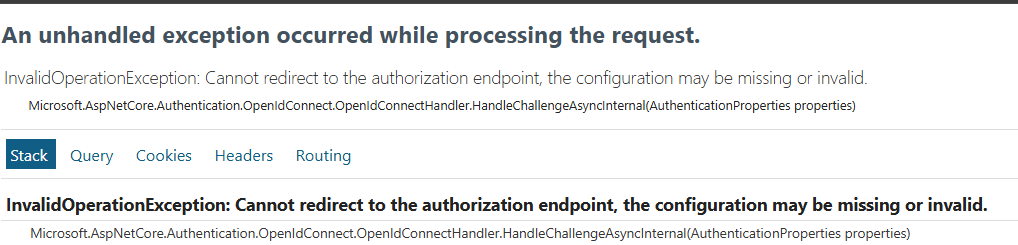
Also is it compulsory to have Azure AD credentials in appsettings.json file as we already added credentials for the tenant using UI? Because if you remove the credentials then you will get this error
 Markdown supported.Copy, paste, or drag & drop images and files (max 100 MB per file, 100 MB total per post)
 -
0
This commit will disable for host if the client id is null or empty
https://github.com/maliming/NextGenPortal/commit/07f8638fdc1023785428e7e63a1f27ebbedd48d5
Markdown supported.Copy, paste, or drag & drop images and files (max 100 MB per file, 100 MB total per post) -
0
Because if you remove the credentials then you will get this error
You have to set a value but the setting will override it.
The azure will check the clientid and throw exception if if empty.
Markdown supported.Copy, paste, or drag & drop images and files (max 100 MB per file, 100 MB total per post) -
0
I removed the Azure AD credentials from appsettings.json file and set the values for Tenant using UI.
I am getting the error which I mentioned in the previous comment with screenshot.
Can you please try that and let me know?
Markdown supported.Copy, paste, or drag & drop images and files (max 100 MB per file, 100 MB total per post) -
0
hi
You have to set some values for it. but the values will be overridden by abp.
You can set any value but there must have value when app start.
Markdown supported.Copy, paste, or drag & drop images and files (max 100 MB per file, 100 MB total per post) -
0
hi
You have to set some values for it. but the values will be overridden by abp.
You can set any value but there must have value when app start.
eg: clientid=123123 it also works
Markdown supported.Copy, paste, or drag & drop images and files (max 100 MB per file, 100 MB total per post) -
0
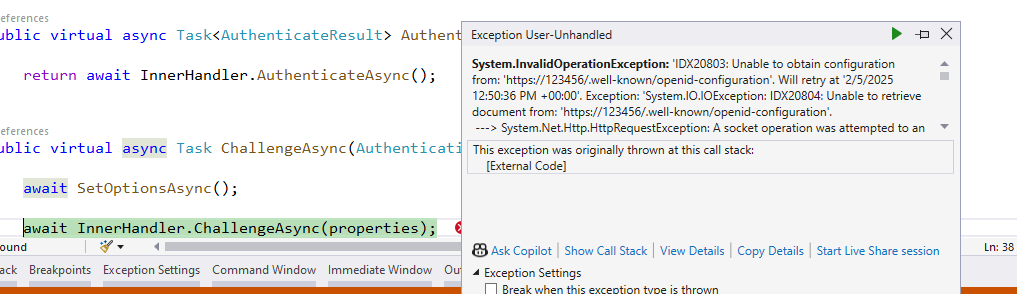
I have set initial values like this and

After that I am getting this error
 Markdown supported.Copy, paste, or drag & drop images and files (max 100 MB per file, 100 MB total per post)
 -
0
we need to pass the correct values for clientId and client secret also else it throws above error. So there is no option to remove these settings from appsetting?
Markdown supported.Copy, paste, or drag & drop images and files (max 100 MB per file, 100 MB total per post) -
0
Also, Can we deploy and run app on IIS with http?
Markdown supported.Copy, paste, or drag & drop images and files (max 100 MB per file, 100 MB total per post) -
0
hi
we need to pass the correct values for clientId and client secret also else it throws above error. So there is no option to remove these settings from appsetting?
I will find a way.
Also, Can we deploy and run app on IIS with http?
Can you create a new question?
Thanks
Markdown supported.Copy, paste, or drag & drop images and files (max 100 MB per file, 100 MB total per post) -
0
Ok thanks
Markdown supported.Copy, paste, or drag & drop images and files (max 100 MB per file, 100 MB total per post) -
0
hi
we need to pass the correct values for clientId and client secret also else it throws above error. So there is no option to remove these settings from appsetting?
Can you test this commit?
https://github.com/maliming/NextGenPortal/commit/cfd5a88a06eafc03b97981763b16b17199dbc526
Markdown supported.Copy, paste, or drag & drop images and files (max 100 MB per file, 100 MB total per post) -
0
 Markdown supported.Copy, paste, or drag & drop images and files (max 100 MB per file, 100 MB total per post)
 -
0
Ok let me check now
Markdown supported.Copy, paste, or drag & drop images and files (max 100 MB per file, 100 MB total per post) -
0
So on app start at least we need to pass authority url. I applied changes like this
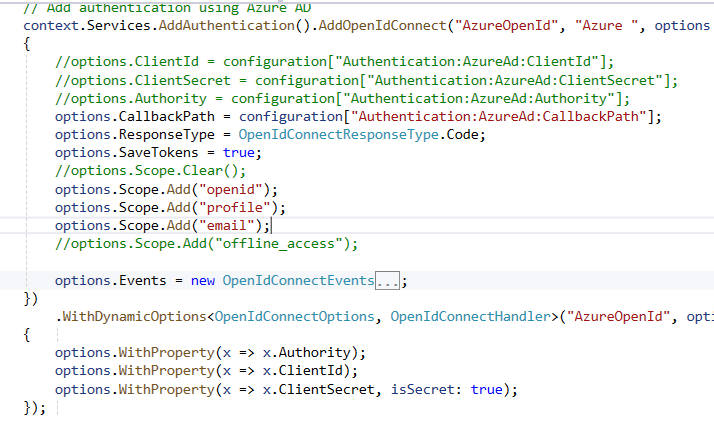
And after that I am getting this error
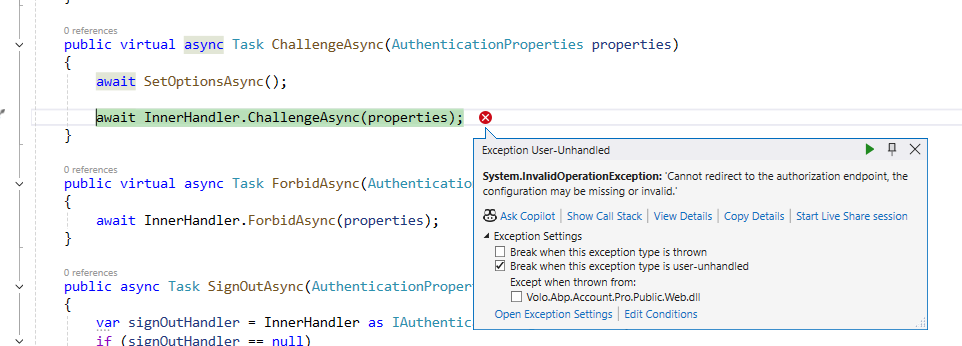 Markdown supported.Copy, paste, or drag & drop images and files (max 100 MB per file, 100 MB total per post)