






Check the docs before asking a question: https://abp.io/docs/latest
Check the samples to see the basic tasks: https://abp.io/docs/latest/samples
The exact solution to your question may have been answered before, and please first use the search on the homepage.
Provide us with the following info:
🧐 Hint: If you are using the ABP Studio, you can see all the information about your solution from the configuration window, which opens when you right-click on the solution and click on the Solution Configuration button.
- ABP Framework version: v9.0.5
- UI Type: Angular
- Database System: EF Core (SQL Server)
- Tiered (for MVC) or Auth Server Separated (for Angular): yes/no
- Exception message and full stack trace:
- Steps to reproduce the issue:
Hi,
After updating the solution to abp version 9.0.5 I am getting the following error:
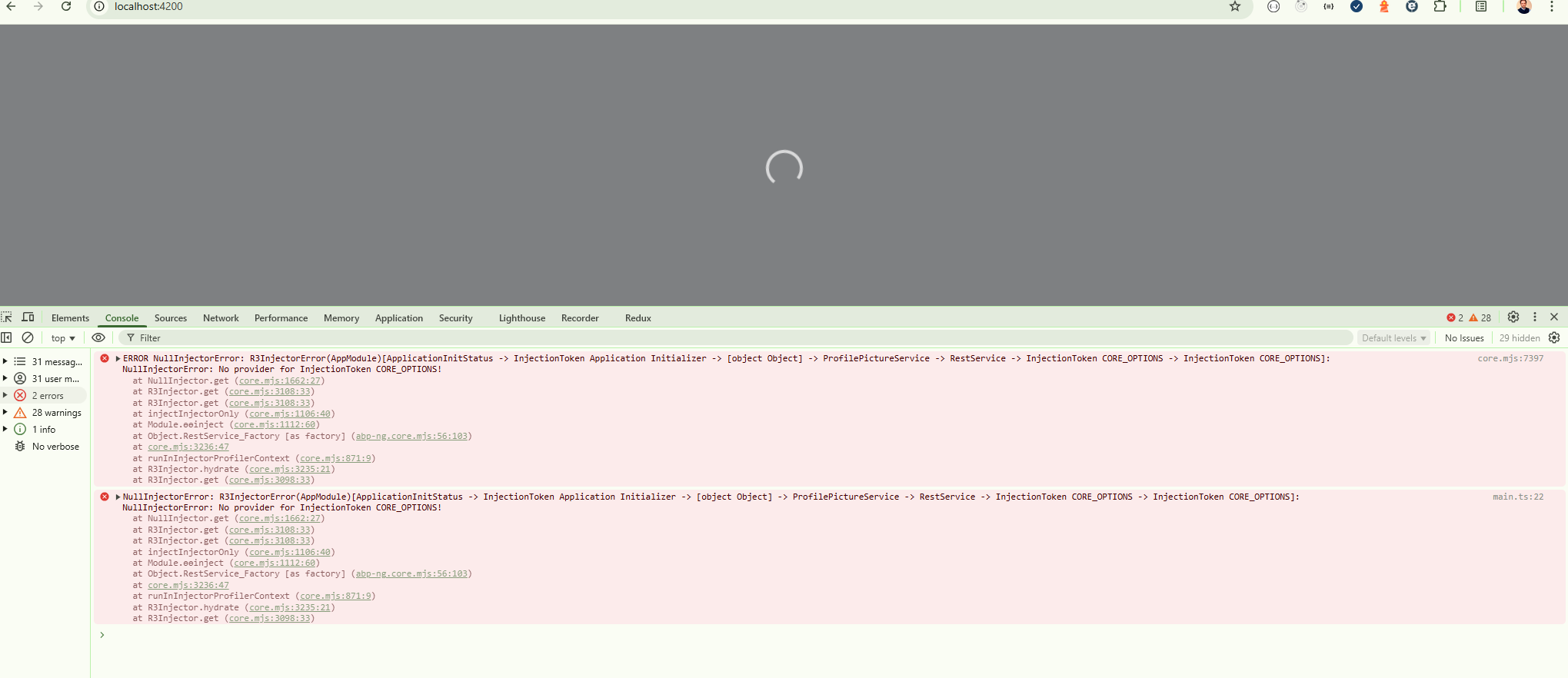
5 Answer(s)
-
0
Hello, I cannot produce the same problem on my end. Could you provide the update details in your
package.json?Markdown supported.Copy, paste, or drag & drop images and files (max 100 MB per file, 100 MB total per post) -
0
{ "name": "@acquisition/angular", "version": "0.0.0", "scripts": { "ng": "node --max_old_space_size=8048 ./node_modules/@angular/cli/bin/ng", "start": "node --max_old_space_size=8048 ./node_modules/@angular/cli/bin/ng serve", "build": "node --max_old_space_size=8048 ./node_modules/@angular/cli/bin/ng build", "build:prod": "node --max_old_space_size=8048 ./node_modules/@angular/cli/bin/ng build --configuration production", "watch": "ng build --watch --configuration development", "test": "ng test", "lint": "ng lint" }, "private": true, "dependencies": { "@abp/ng.components": "~9.0.5", "@abp/ng.core": "~9.0.5", "@abp/ng.oauth": "~9.0.5", "@abp/ng.setting-management": "~9.0.5", "@abp/ng.theme.shared": "~9.0.5", "@angular/animations": "~18.2.4", "@angular/common": "~18.2.4", "@angular/compiler": "~18.2.4", "@angular/core": "~18.2.4", "@angular/forms": "~18.2.4", "@angular/localize": "~18.2.4", "@angular/platform-browser": "~18.2.4", "@angular/platform-browser-dynamic": "~18.2.4", "@angular/router": "~18.2.4", "@progress/kendo-angular-buttons": "^16.11.0", "@progress/kendo-angular-common": "^16.11.0", "@progress/kendo-angular-dateinputs": "^16.11.0", "@progress/kendo-angular-dialog": "^16.11.0", "@progress/kendo-angular-dropdowns": "^16.11.0", "@progress/kendo-angular-excel-export": "^16.11.0", "@progress/kendo-angular-icons": "^16.11.0", "@progress/kendo-angular-indicators": "^16.11.0", "@progress/kendo-angular-inputs": "^16.11.0", "@progress/kendo-angular-intl": "^16.11.0", "@progress/kendo-angular-l10n": "^16.11.0", "@progress/kendo-angular-label": "^16.11.0", "@progress/kendo-angular-navigation": "^16.11.0", "@progress/kendo-angular-pager": "^16.11.0", "@progress/kendo-angular-pdf-export": "^16.11.0", "@progress/kendo-angular-pdfviewer": "^16.11.0", "@progress/kendo-angular-popup": "^16.11.0", "@progress/kendo-angular-treelist": "^16.11.0", "@progress/kendo-angular-treeview": "^16.11.0", "@progress/kendo-angular-utils": "^16.11.0", "@progress/kendo-data-query": "1.7.0", "@progress/kendo-draggable": "3.1.0", "@progress/kendo-drawing": "1.20.4", "@progress/kendo-licensing": "^1.3.5", "@progress/kendo-svg-icons": "3.0.0", "@progress/kendo-theme-material": "^10.0.1", "@syncfusion/ej2-angular-base": "~28.1.33", "@syncfusion/ej2-angular-buttons": "~28.1.33", "@syncfusion/ej2-angular-documenteditor": "~27.2.3", "@syncfusion/ej2-angular-dropdowns": "28.1.33", "@syncfusion/ej2-angular-grids": "28.1.33", "@syncfusion/ej2-angular-lists": "~28.1.33", "@syncfusion/ej2-angular-navigations": "~28.1.33", "@syncfusion/ej2-angular-pdfviewer": "~28.1.33", "@syncfusion/ej2-angular-popups": "~28.1.33", "@syncfusion/ej2-angular-splitbuttons": "~28.1.33", "@syncfusion/ej2-base": "~28.1.33", "@syncfusion/ej2-buttons": "~28.1.33", "@syncfusion/ej2-charts": "~28.1.33", "@syncfusion/ej2-compression": "~28.1.33", "@syncfusion/ej2-data": "~28.1.33", "@syncfusion/ej2-documenteditor": "~28.1.33", "@syncfusion/ej2-dropdowns": "~28.1.33", "@syncfusion/ej2-file-utils": "~28.1.33", "@syncfusion/ej2-grids": "28.1.33", "@syncfusion/ej2-inputs": "~28.1.33", "@syncfusion/ej2-lists": "~28.1.33", "@syncfusion/ej2-navigations": "~28.1.33", "@syncfusion/ej2-popups": "~28.1.33", "@syncfusion/ej2-splitbuttons": "~28.1.33", "@syncfusion/ej2-pdf-export": "~28.1.33", "@volo/abp.commercial.ng.ui": "~9.0.5", "@volo/abp.ng.account": "~9.0.5", "@volo/abp.ng.audit-logging": "~9.0.5", "@volo/abp.ng.chat": "~9.0.5", "@volo/abp.ng.file-management": "~9.0.5", "@volo/abp.ng.gdpr": "~9.0.5", "@volo/abp.ng.identity": "~9.0.5", "@volo/abp.ng.language-management": "~9.0.5", "@volo/abp.ng.openiddictpro": "~9.0.5", "@volo/abp.ng.saas": "~9.0.5", "@volo/abp.ng.text-template-management": "~9.0.5", "@volosoft/abp.ng.theme.lepton-x": "~4.0.5", "angular-expressions": "^1.2.1", "devextreme": "24.2.3", "devextreme-angular": "24.2.3", "@devexpress/analytics-core": "24.2.3", "devexpress-reporting-angular": "24.2.3", "devextreme-aspnet-data-nojquery": "4.0.2", "docxtemplater": "^3.54.0", "exceljs": "4.4.0", "file-saver": "^2.0.5", "file-saver-es": "2.0.5", "jspdf": "^2.5.2", "jspdf-autotable": "^3.8.4", "lodash-es": "^4.17.21", "moment": "^2.30.1", "pizzip": "^3.1.7", "rxjs": "~7.8.0", "stimulsoft-viewer-angular": "2025.1.3", "tslib": "^2.0.0", "zone.js": "~0.14.0" }, "devDependencies": { "@abp/ng.schematics": "~9.0.5", "@angular-devkit/build-angular": "~18.2.4", "@angular-eslint/builder": "~18.3.1", "@angular-eslint/eslint-plugin": "~18.3.1", "@angular-eslint/eslint-plugin-template": "~18.3.1", "@angular-eslint/schematics": "~18.3.1", "@angular-eslint/template-parser": "~18.3.1", "@angular/cli": "~18.2.4", "@angular/compiler-cli": "~18.2.4", "@angular/language-service": "~18.2.4", "@types/jasmine": "~3.6.0", "@types/node": "^12.0.0", "@typescript-eslint/eslint-plugin": "6.9.1", "@typescript-eslint/parser": "6.9.1", "eslint": "^8.0.0", "jasmine-core": "~4.0.0", "karma": "~6.3.0", "karma-chrome-launcher": "~3.1.0", "karma-coverage": "~2.1.0", "karma-jasmine": "~4.0.0", "karma-jasmine-html-reporter": "^1.0.0", "ng-packagr": "~18.2.1", "typescript": "~5.5.4" } }
Markdown supported.Copy, paste, or drag & drop images and files (max 100 MB per file, 100 MB total per post) -
0
Thank you for sharing details. However, I cannot produce the problem yet. Could you tell me which package manager you are using? Also, can you try updating
@volosoft/abp.ng.theme.lepton-xpackage to4.0.6and confirm whether the problem persists?Markdown supported.Copy, paste, or drag & drop images and files (max 100 MB per file, 100 MB total per post) -
0
Thank you for providing more information. Since I could not produce your problem, could you send a sample project to this e-mail sumeyye.kurtulus@volosoft.com?
Markdown supported.Copy, paste, or drag & drop images and files (max 100 MB per file, 100 MB total per post)


