






- ABP Framework version: v3.3.2
- UI type: Angular
- DB provider: EF Core
- Tiered (MVC) or Identity Server Seperated (Angular): yes
- Exception message and stack trace:
- Steps to reproduce the issue:
Hi, I have requirement that need to force user to logout and re-login if they are inactive for 30 minutes, is there any configuration/setting to achieve it?
6 Answer(s)
-
1
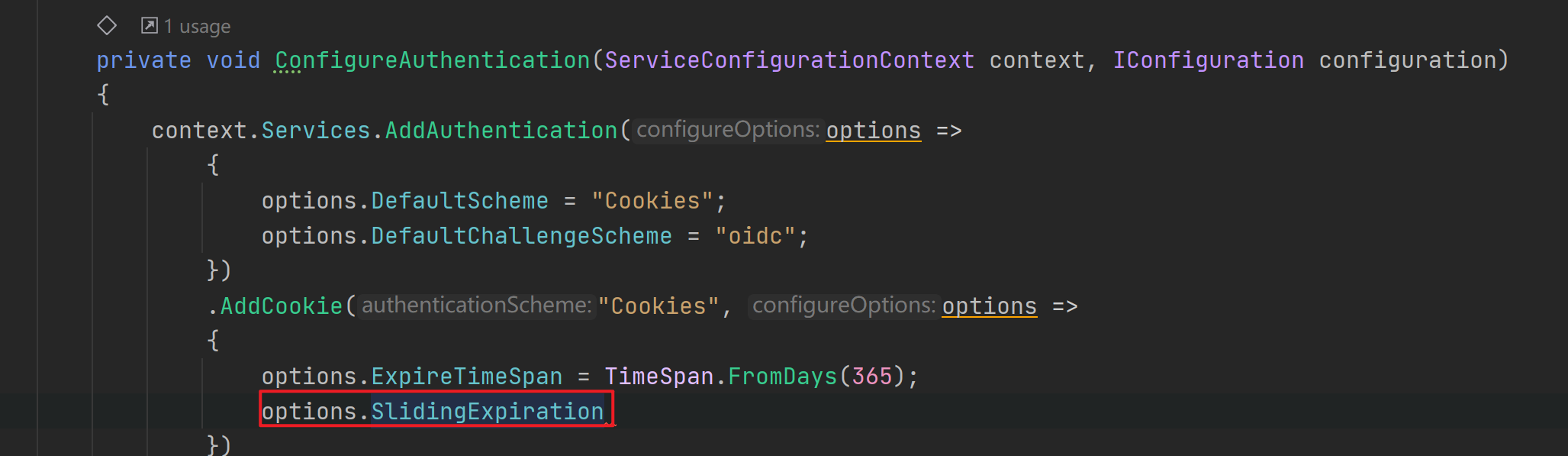
Hi nhontran, Perhaps you can set the relative expiration parameters of the cookie.
 Markdown supported.Copy, paste, or drag & drop images and files (max 100 MB per file, 100 MB total per post)
 -
0
Hi @Moyaoxiang, thanks for your prompt reply.
I have tried but it does not seem work, I set the ExpireTimeSpan = 10 mins and SlidingExpiration = true, then I left the application inactive for 11 mins, it did not force me to re-login, I was still able to using it.
context.Services.AddAuthentication(JwtBearerDefaults.AuthenticationScheme)
                .AddJwtBearer(options =>
                {
                    options.Authority = configuration["AuthServer:Authority"];
                    options.RequireHttpsMetadata = Convert.ToBoolean(configuration["AuthServer:RequireHttpsMetadata"]);
                    options.Audience = "TestingApplication";
                })
                .AddCookie("Cookies", options =>
                {
                    options.ExpireTimeSpan = TimeSpan.FromMinutes(10);
                    options.SlidingExpiration = true;
                });
Markdown supported.Copy, paste, or drag & drop images and files (max 100 MB per file, 100 MB total per post) -
0
Hi nhontran, As Issue 975 said, Angular uses JWT for authentication and cannot actively log out on the front end. Currently JWT is issued through Identity Server 4. Perhaps you can change the LifeTime of AccessToken in Identity Data Seeder. This is the documentation: http://docs.identityserver.io/en/latest/reference/client.html
Markdown supported.Copy, paste, or drag & drop images and files (max 100 MB per file, 100 MB total per post) -
0
This question has been automatically marked as stale because it has not had recent activity.
Markdown supported.Copy, paste, or drag & drop images and files (max 100 MB per file, 100 MB total per post)



