






Hello, I hope you are doing well
I need some assistance or direction on a few things in regards to the LeptonX theme.
- I would like to hide the side-bar when a user is not authenticated, and only once they log in, the side-bar displays.
- I would also like to add our footer to the side-bar instead of using the <abp-footer> tag.
Is this possible on LeptonX Commercial?
We are currently using the commercial ABP Angular project.
Thank you
9 Answer(s)
-
0
Hello,
You can use component replacement to achieve these points. You can find a reference in the documentation. I can also provide a sample implementation for the keys that you have been looking for:
import { AuthService, ReplaceableComponentsService } from '@abp/ng.core';
import { Component, inject } from '@angular/core';
import { eThemeLeptonXComponents } from '@volosoft/abp.ng.theme.lepton-x';
import { YourNewFooterComponent } from './your-new-footer/your-new-footer.component';
import { YourNewToolbarComponent } from './your-new-toolbar/your-new-toolbar.component';
import { YourNewSettingsComponent } from './your-new-settings/your-new-settings.component';

@Component({
  selector: 'app-root',
  template: `
    ...
  `,
})
export class AppComponent {
  private replaceableComponents = inject(ReplaceableComponentsService);
  private authService = inject(AuthService);
  constructor() {
    this.replaceableComponents.add({
      component: YourNewFooterComponent,
      key: eThemeLeptonXComponents.Footer,
    });

    if (!this.authService.isAuthenticated) {
      this.replaceableComponents.add({
        component: YourNewToolbarComponent,
        key: eThemeLeptonXComponents.Toolbar,
      });
      this.replaceableComponents.add({
        component: YourNewSettingsComponent,
        key: eThemeLeptonXComponents.Settings,
      });
    }
  }
}
You can let us know if you need further assistance.
Markdown supported.Copy, paste, or drag & drop images and files (max 100 MB per file, 100 MB total per post) -
0
Hello there,
Thank you for the above, I have used the replaceableComponent for the footer, but I want to move the footer to the <abp-sidebar>
Also I want to hide the <abp-sidebar> if a user is not authenticated, and then display it when a user logs in successfully
Markdown supported.Copy, paste, or drag & drop images and files (max 100 MB per file, 100 MB total per post) -
0
You cannot technically move the footer to the sidebar for the time being. However, I can suggest you to add your custom footer to the Settings component key.
This approach would serve the hide/show requirement of the sidebar as in here. If you think that this does not cover your case, I can assist further.
if (!this.authService.isAuthenticated) { this.replaceableComponents.add({ component: YourNewToolbarComponent, key: eThemeLeptonXComponents.Toolbar, }); this.replaceableComponents.add({ component: YourNewSettingsComponent, key: eThemeLeptonXComponents.Settings, }); } Markdown supported.Copy, paste, or drag & drop images and files (max 100 MB per file, 100 MB total per post)
 -
0
Hello, thank you for your response,
So I think we misunderstanding each other,
I want to hide this sidebar if user is not authenticated:

I want to inject my footerComponent into the above sidebar,
Can you perhaps just give me a direction to look for the sidebar or to customize this? I do not want to lose the sidebar which is pre-configured
Markdown supported.Copy, paste, or drag & drop images and files (max 100 MB per file, 100 MB total per post) -
0
Thank you for your clarification. You can use
eThemeLeptonXComponents.Navbarkey instead ofToolbarandSettings. If you override this component, you can also add your footer to the sidebar.Can you perhaps just give me a direction to look for the sidebar or to customize this? I do not want to lose the sidebar which is pre-configured
If you do not want to override the whole navbar and create from scratch, you can check the
NavbarComponentinside@volo/ngx-lepton-x.corepackage.You can integrate the source code to your project by using this command
abp add-package @volo/ngx-lepton-x.core --with-source-code.Markdown supported.Copy, paste, or drag & drop images and files (max 100 MB per file, 100 MB total per post) -
0
Thank you for the clarification, so if I understand your comment correctly, I can add the above components to my project and I should be able to replicate what I would like to do?
Markdown supported.Copy, paste, or drag & drop images and files (max 100 MB per file, 100 MB total per post) -
0
Yes, exactly. It depends on how you want to implement the override. You can use the component replacement along with the
NavbarComponentwhich may be shorter and easier. You can also give a path reference in yourtsconfig.jsonas in the screenshot.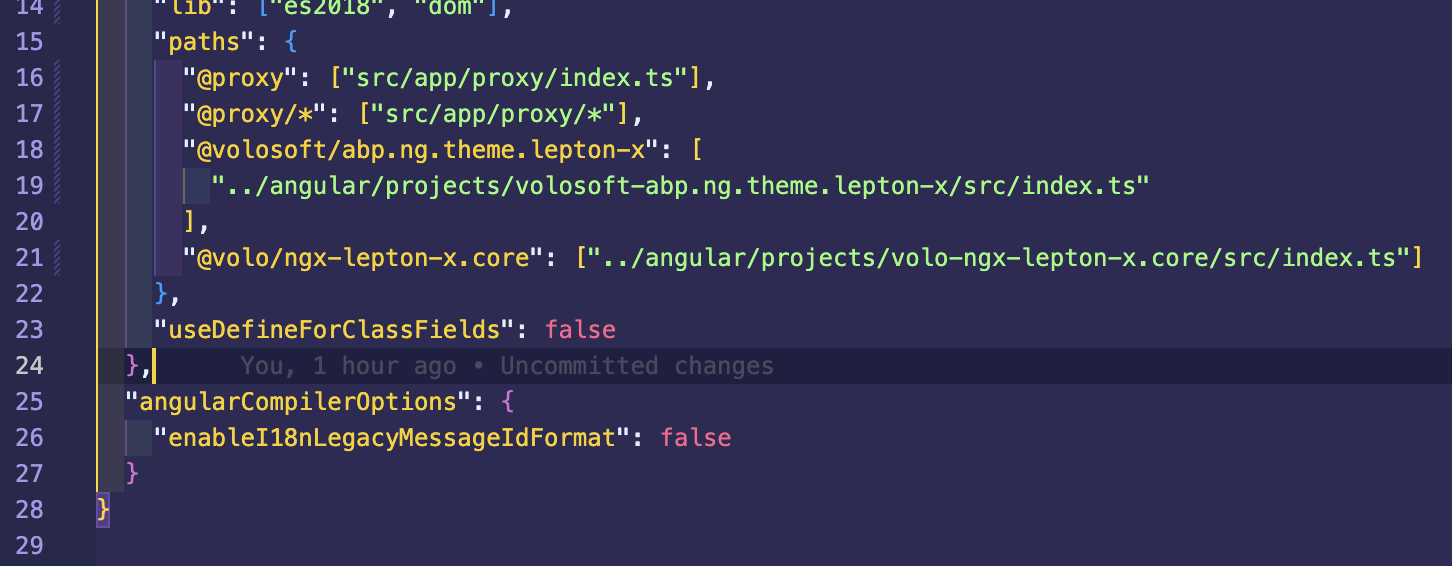 Markdown supported.Copy, paste, or drag & drop images and files (max 100 MB per file, 100 MB total per post)
 -
0
You're very welcome! I'm happy to assist and look forward to hearing how it goes. Please don't hesitate to reach out if you need any further support.
Markdown supported.Copy, paste, or drag & drop images and files (max 100 MB per file, 100 MB total per post)


