






Can a multi-tenant Angular app support logging in to the same auth server from different domains, while preventing switching to other tenants? Below is my Angular dynamic-env.json configuration.
{ "production": true, "application": { "baseUrl": "https://{0}.koimpact.tw", "name": "Sroi" }, "oAuthConfig": { "issuer": "https://auth-imm.koimpact.tw/", "redirectUri": "https://{0}.koimpact.tw", "clientId": "Sroi_App", "responseType": "code", "scope": "offline_access Sroi", "requireHttps": true }, "apis": { "default": { "url": "https://api-imm.koimpact.tw", "rootNamespace": "Aws.Sroi" }, "AbpAccountPublic": { "url": "https://api-imm.koimpact.tw", "rootNamespace": "AbpAccountPublic" } } }
24 Answer(s)
-
0
To restrict tenant access by domain in a multi-tenant Angular app using ABP Framework, and to prevent users from switching to other tenants, you should use the domain/subdomain tenant resolver both on the backend and frontend. This ensures that each tenant is only accessible from its assigned domain, and tenant switching is disabled.
Solution Steps:
- Frontend (Angular) Configuration:
- Set the
baseUrlin your environment configuration to use the{0}placeholder for the tenant name:
- Set the
application: { baseUrl: "https://{0}.koimpact.tw", name: "Sroi" }
- With this setup, when the app runs on `https://imm.koimpact.tw`, the tenant name will be resolved as `imm`. The Angular app will send the `__tenant` header automatically based on the subdomain. - When you use the `{0}` placeholder in `baseUrl`, the tenant switching component (e.g., on the login page) will be hidden, so users cannot switch tenants from the UI. 2. **Backend Configuration:** - In your backend (e.g., in `YourProjectNameHttpApiHostModule`), configure the domain tenant resolver: ```csharp Configure<AbpTenantResolveOptions>(options => { options.AddDomainTenantResolver("{0}.koimpact.tw"); });- This ensures that the backend only resolves the tenant from the subdomain and does not allow switching tenants via headers or query strings.
Identity Server / Auth Server:
- Make sure your IdentityServer or OpenIddict client configuration allows redirect URIs for each tenant domain (e.g.,
https://imm.koimpact.tw). - Do not use wildcards like
https://*.koimpact.twin CORS or redirect URIs; instead, explicitly list each allowed tenant domain.
- Make sure your IdentityServer or OpenIddict client configuration allows redirect URIs for each tenant domain (e.g.,
Preventing Tenant Switching:
- With the above configuration, the Angular app will not show the tenant switcher, and the backend will only resolve tenants by domain. Users cannot switch tenants by manipulating headers or query strings.
Summary:
- Use
{0}inbaseUrlfor tenant isolation. - Configure backend to resolve tenants only by domain.
- List each tenant domain explicitly in your auth server's allowed origins and redirect URIs.
- Tenant switching is automatically disabled in the UI with this setup.
Sources:
This response was generated by AI. If it didn’t solve your problem, feel free to post a new answer — our support team will jump in to help you soon.
Markdown supported.Copy, paste, or drag & drop images and files (max 100 MB per file, 100 MB total per post) - Frontend (Angular) Configuration:
-
0
AuthServer
`public override void PreConfigureServices(ServiceConfigurationContext context) { var hostingEnvironment = context.Services.GetHostingEnvironment(); var configuration = context.Services.GetConfiguration();
    PreConfigure<OpenIddictBuilder>(builder =>
    {
        builder.AddValidation(options =>
        {
            options.AddAudiences("Sroi");
            options.UseLocalServer();
            options.UseAspNetCore();
        });
    });

    if (!hostingEnvironment.IsDevelopment())
    {
        PreConfigure<AbpOpenIddictAspNetCoreOptions>(options =>
        {
            options.AddDevelopmentEncryptionAndSigningCertificate = false;
        });

        PreConfigure<OpenIddictServerBuilder>(serverBuilder =>
        {
            serverBuilder.AddProductionEncryptionAndSigningCertificate("openiddict.pfx", configuration["AuthServer:CertificatePassPhrase"]!);
            serverBuilder.SetIssuer(new Uri(configuration["AuthServer:Authority"]!));
        });

        PreConfigure<AbpOpenIddictWildcardDomainOptions>(options =>
        {
            options.EnableWildcardDomainSupport = true;

            var domainsFormat = configuration.GetValue<string>("App:DomainsFormat");

            if (!string.IsNullOrWhiteSpace(domainsFormat))
            {
                foreach (var domainFormat in domainsFormat.Split(',', StringSplitOptions.RemoveEmptyEntries | StringSplitOptions.TrimEntries))
                {
                    options.WildcardDomainsFormat.Add(domainFormat);
                }
            }
        });
    }
}`
Markdown supported.Copy, paste, or drag & drop images and files (max 100 MB per file, 100 MB total per post) -
0
docker-compose.yml
sroi-auth: image: sroi-authserver:0.0.10 environment: - App__CorsOrigins=https://*.koimpact.tw,https://sroi-admin.awesome-tech.link - App__SelfUrl=https://auth-imm.koimpact.tw - App__RedirectAllowedUrls=https://imm.koimpact.tw,https://sroi-admin.awesome-tech.link - App__domainsFormat=https://{0}.koimpact.tw - AuthServer__Authority=https://auth-imm.koimpact.tw
Markdown supported.Copy, paste, or drag & drop images and files (max 100 MB per file, 100 MB total per post) -
0
Hello, first of all, when attempting to log in to the website, it successfully reaches the authserver but shows a tenant switching option.
However, in the Angular app, I can see that it retrieves the IMM tenant based on the base application URL.
Then, in the authserver, whether I try to log in with the host account credentials or the IMM (tenant) account credentials, the login fails. The Angular app keeps redirecting back and forth to the authserver in a loop.
Markdown supported.Copy, paste, or drag & drop images and files (max 100 MB per file, 100 MB total per post) -
0
hi
whether I try to log in with the host account credentials or the IMM (tenant) account credentials, the login fails. The Angular app keeps redirecting back and forth to the authserver in a loop.
Please share the Debug logs.txt of the AuthServer. https://abp.io/support/questions/8622/How-to-enable-Debug-logs-for-troubleshoot-problems
Thanks.
Markdown supported.Copy, paste, or drag & drop images and files (max 100 MB per file, 100 MB total per post) -
0
Host Admin Site: We plan to use http://sroi-admin.awesome-tech.link/ as the host admin site.
Auth Server: Configured as https://imm-auth.koimpact.tw/ API Endpoint: Configured as https://imm-api.koimpact.tw/
First Tenant: The first tenant is set up as https://imm.koimpact.tw/. In the future, we expect to add other tenants, such as https://other-tenant.koimpact.tw/.
Question: Can this setup work as intended?
Markdown supported.Copy, paste, or drag & drop images and files (max 100 MB per file, 100 MB total per post) -
0
hi
Auth Server: Configured as https://imm-auth.koimpact.tw/ API Endpoint: Configured as https://imm-api.koimpact.tw/
Is the
immthe tenant's name?If you have a new tenant
testAuth Server: Configured as https://test-auth.koimpact.tw/ API Endpoint: Configured as https://test-api.koimpact.tw/
Markdown supported.Copy, paste, or drag & drop images and files (max 100 MB per file, 100 MB total per post) -
0
So, we cannot have multiple tenants pointing to the same auth server (e.g., auth.koimpact.tw)? Instead, does each tenant require its own dedicated configuration, like:
https://{0}-auth.koimpact.tw/
https://{0}-api.koimpact.tw/
And is this configured via:
csharp Configure<AbpTenantResolveOptions>(options =>
{
options.AddDomainTenantResolver(configuration["TenantDomain"]);
});
Is that correct?Markdown supported.Copy, paste, or drag & drop images and files (max 100 MB per file, 100 MB total per post) -
0
[maliming] said: hi
Auth Server: Configured as https://imm-auth.koimpact.tw/ API Endpoint: Configured as https://imm-api.koimpact.tw/
Is the
immthe tenant's name?If you have a new tenant
testAuth Server: Configured as https://test-auth.koimpact.tw/ API Endpoint: Configured as https://test-api.koimpact.tw/
Is the
immthe tenant's name? Yes.Markdown supported.Copy, paste, or drag & drop images and files (max 100 MB per file, 100 MB total per post) -
0
Option 1 (Preferred Approach) For all tenants:
Auth Server: https://auth.koimpact.tw/
API: https://api.koimpact.tw/
For each tenant's Angular app:
https://{0}-app.koimpact.tw/
Option 2 For each tenant:
Auth Server: https://{0}-auth.koimpact.tw/
API: https://{0}-api.koimpact.tw/
Angular App: https://{0}-app.koimpact.tw/
Question: Are both of these options feasible, or is only Option 2 possible?
Markdown supported.Copy, paste, or drag & drop images and files (max 100 MB per file, 100 MB total per post) -
0
hi
You can use same authserver and api domain for different domains angular apps.
The current error is from angular.
Can you make your angular home component doesn’t require authorization?
Which means I have to click login button in angular website then redirect to authserver.
Thanks.
Markdown supported.Copy, paste, or drag & drop images and files (max 100 MB per file, 100 MB total per post) -
0
[maliming] said: hi
You can use same authserver and api domain for different domains angular apps.
The current error is from angular.
Can you make your angular home component doesn’t require authorization?
Which means I have to click login button in angular website then redirect to authserver.
Thanks.
It will have to wait until I release a new version. Thank you.
Markdown supported.Copy, paste, or drag & drop images and files (max 100 MB per file, 100 MB total per post) -
0
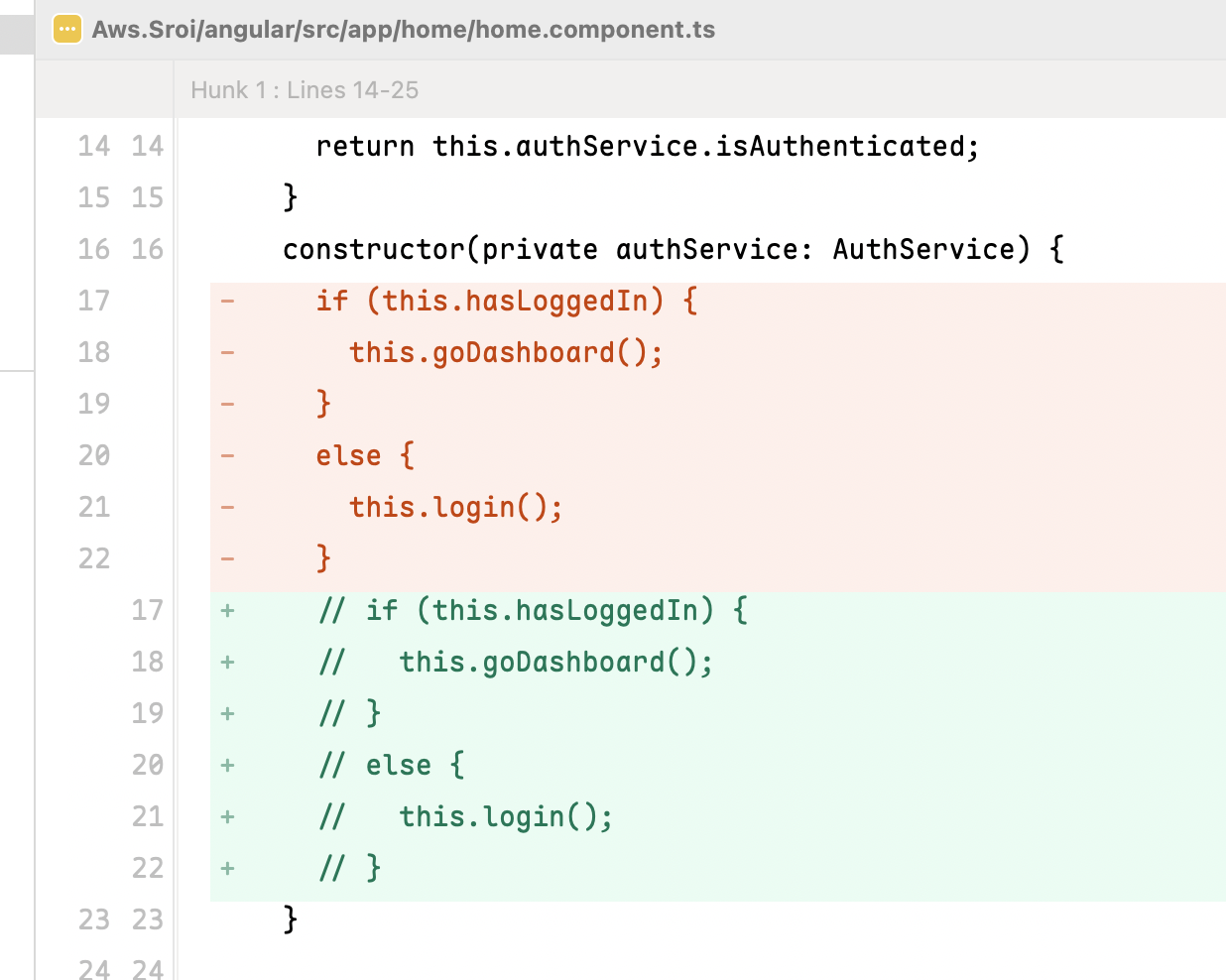
You're right. I removed the following code, and now the login works fine—manually going to the dashboard works as expected. https://imm.koimpact.tw/dashboard
However, for my tenant Angular app, how should it reach the auth server with tenant identification? Currently, it can switch tenants, which is not the result we want.
Markdown supported.Copy, paste, or drag & drop images and files (max 100 MB per file, 100 MB total per post) -
0
import { AuthService } from '@abp/ng.core';
import { Component, inject } from '@angular/core';
import { Router } from '@angular/router';

@Component({
  standalone: false,
  selector: 'app-home',
  templateUrl: './home.component.html',
  styleUrls: ['./home.component.scss'],
})
export class HomeComponent {
  private router = inject(Router);
  get hasLoggedIn(): boolean {
    return this.authService.isAuthenticated;
  }
  constructor(private authService: AuthService) {
    // if (this.hasLoggedIn) {
    //   this.goDashboard();
    // }
    // else {
    //   this.login();
    // }
  }

  login() {
    this.authService.navigateToLogin();
  }

  goDashboard() {
    this.router.navigate([`/dashboard`]);
  }
}
Why can't we do it this way?
Markdown supported.Copy, paste, or drag & drop images and files (max 100 MB per file, 100 MB total per post) -
0
[maliming] said: hi
You can use same authserver and api domain for different domains angular apps.
The current error is from angular.
Can you make your angular home component doesn’t require authorization?
Which means I have to click login button in angular website then redirect to authserver.
Thanks.
How can I configure it so that the tenant app does not display the tenant switching feature when redirecting to the authserver?
Markdown supported.Copy, paste, or drag & drop images and files (max 100 MB per file, 100 MB total per post) -
0
hi
The
HomeComponentwill also usecodeto get an access token. We will enhance it in the next version. Please follow https://github.com/abpframework/abp/issues/23286
this.authService.navigateToLogin();You can pass the
__tenantto the query string when doing the code flow.I will ask Angular how to do this.
Thanks.
Markdown supported.Copy, paste, or drag & drop images and files (max 100 MB per file, 100 MB total per post) -
0
Thanks.
Clients have reported that the SessionStateService frequently fails to retrieve the correct tenant information in new web environments or incognito mode. Our tests confirm this issue. Has there been any solution to this problem yet?
Markdown supported.Copy, paste, or drag & drop images and files (max 100 MB per file, 100 MB total per post) -
0
Hello,
As my colleague has mentioned, you can pass the
__tenantparameter for theauthService.navigateToLogin()function.
https://github.com/abpframework/abp/blob/dev/npm/ng-packs/packages/oauth/src/lib/strategies/auth-code-flow-strategy.ts#L78-L86Here is how you could achieve that:
import { SessionStateService } from '@abp/ng.core';
// ...
export class HomeComponent {
	// ...
	sessionStateService = inject(SessionStateService);

	login(){
		const tenantId = this.sessionStateService.getTenant().id || null;
		if(tenantId){
			this.authService.navigateToLogin({
				__tenant: `${tenantId}`
			});
		} else {
			this.authService.navigateToLogin();
		}
	}
}
Markdown supported.Copy, paste, or drag & drop images and files (max 100 MB per file, 100 MB total per post)



