






- Steps to reproduce the issue:When migraded volo to 9.2.3 from 9.0.4 Users page is not showing up in the UI.
7/31/2025 1:23:36 PM [Information] Executed action method "Volo.Abp.Identity.IdentityUserController.GetListAsync (Volo.Abp.Identity.Pro.HttpApi)", returned result "Microsoft.AspNetCore.Mvc.ObjectResult" in 211.5706ms. 7/31/2025 1:23:36 PM [Information] Executing "ObjectResult", writing value of type '"Volo.Abp.Application.Dtos.PagedResultDto`1[[Volo.Abp.Identity.IdentityUserDto, Volo.Abp.Identity.Pro.Application.Contracts, Version=9.2.3.0, Culture=neutral, PublicKeyToken=null]]"'. 7/31/2025 1:23:36 PM [Information] Executed action "Volo.Abp.Identity.IdentityUserController.GetListAsync (Volo.Abp.Identity.Pro.HttpApi)" in 240.5675ms 7/31/2025 1:23:36 PM [Information] Executed endpoint '"Volo.Abp.Identity.IdentityUserController.GetListAsync (Volo.Abp.Identity.Pro.HttpApi)"' 7/31/2025 1:23:36 PM [Information] Request finished "HTTP/2" "GET" "https"://"auth.cpat.com:44346""""/api/identity/users""?filter=&roleId=&organizationUnitId=&id=&userName=&phoneNumber=&emailAddress=&name=&surname=&isLockedOut=¬Active=false&emailConfirmed=&isExternal=&maxCreationTime=&minCreationTime=&maxModifitionTime=&minModifitionTime=&skipCount=0&maxResultCount=10" - 200 null "application/json; charset=utf-8" 247.6542ms
11 Answer(s)
-
0
After upgrading from ABP 9.0.4 to 9.2.3, if the Users page is not showing up in the UI but the backend API returns a successful response (HTTP 200 with a valid PagedResultDto), the issue is likely related to a breaking change or a required migration step in the ABP 9.2 upgrade.
Please ensure you have followed all steps in the official ABP 9.2 migration guide, especially for the Identity module and UI changes. Some breaking changes in ABP 9.2 may require you to update your front-end code, permissions, or menu configuration.
Key steps to check:
- Clear browser cache and restart your application after the upgrade.
- Check permissions: Ensure your user/role has the correct permissions to view the Users page.
- Menu configuration: If you have custom menu or navigation code, verify it is compatible with ABP 9.2.
- UI dependencies: If you have customizations or use a commercial theme, update all related NPM/NuGet packages to 9.2.x.
- Database migrations: Ensure all database migrations have been applied successfully.
- Review the migration guide for any additional steps or breaking changes that may affect the Identity module or UI.
If the API returns data but the UI does not display it, the problem is almost always in the front-end (JavaScript/TypeScript, Razor, or menu/permission configuration).
Sources:
This response was generated by AI. If it didn’t solve your problem, feel free to post a new answer — our support team will jump in to help you soon.
Markdown supported.Copy, paste, or drag & drop images and files (max 100 MB per file, 100 MB total per post) -
0
how do we fix " If the API returns data but the UI does not display it, the problem is almost always in the front-end (JavaScript/TypeScript, Razor, or menu/permission configuration)"
Markdown supported.Copy, paste, or drag & drop images and files (max 100 MB per file, 100 MB total per post) -
0
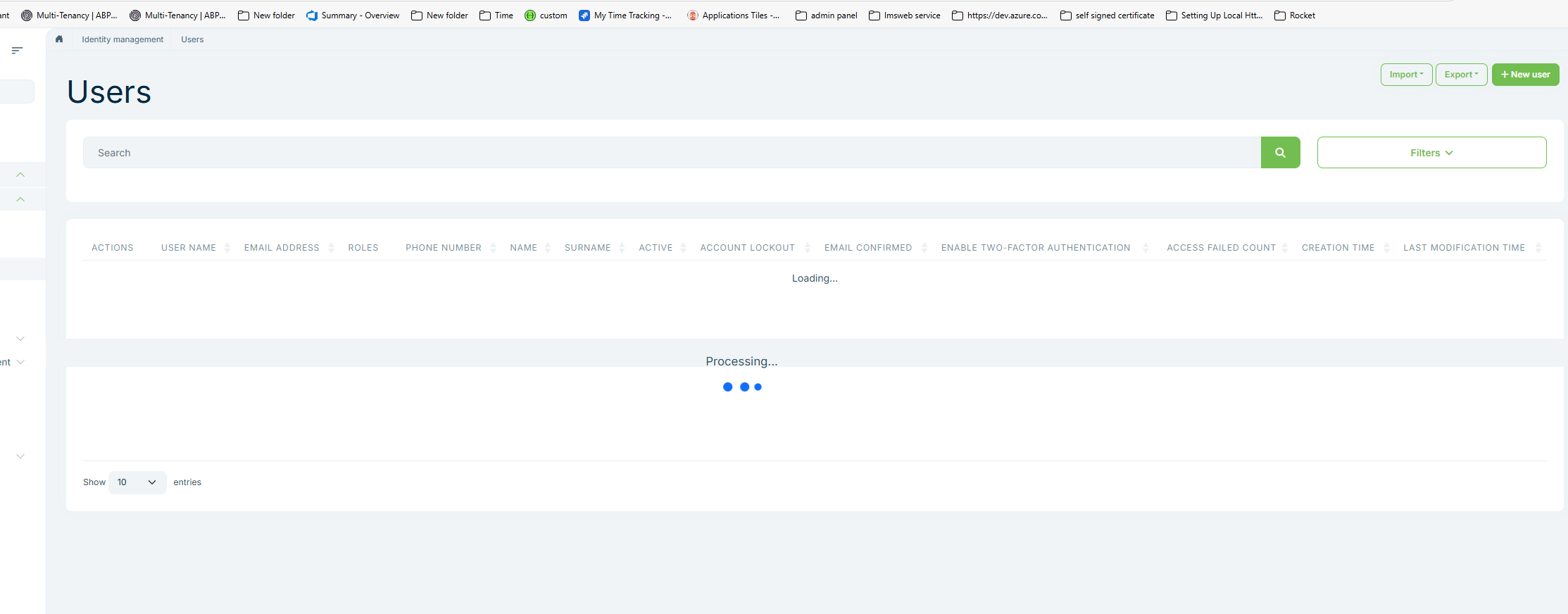 Markdown supported.Copy, paste, or drag & drop images and files (max 100 MB per file, 100 MB total per post)
 -
0
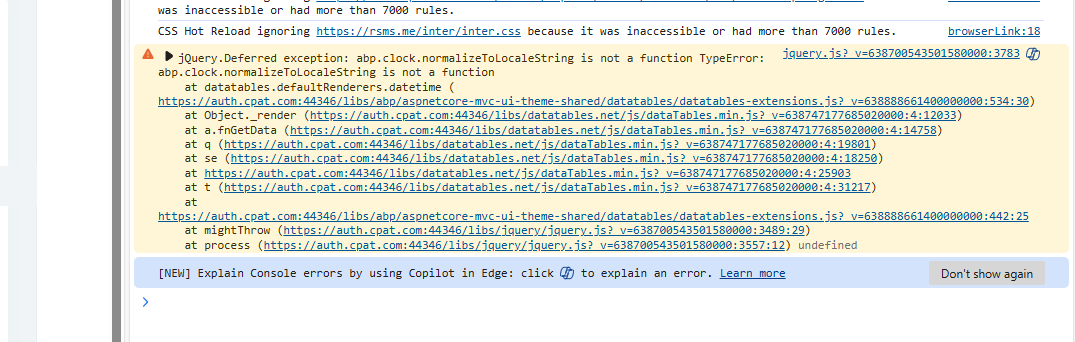
This is MVC no npm upgrade was done
Markdown supported.Copy, paste, or drag & drop images and files (max 100 MB per file, 100 MB total per post) -
0
Good one, Thank you very much. Let me try and will update you.
Markdown supported.Copy, paste, or drag & drop images and files (max 100 MB per file, 100 MB total per post) -
0
oh ok.. Let me do that
Markdown supported.Copy, paste, or drag & drop images and files (max 100 MB per file, 100 MB total per post) -
0
It is working now. Thank you very much for your support.
Markdown supported.Copy, paste, or drag & drop images and files (max 100 MB per file, 100 MB total per post)



