






0
yunusemrecaglar created
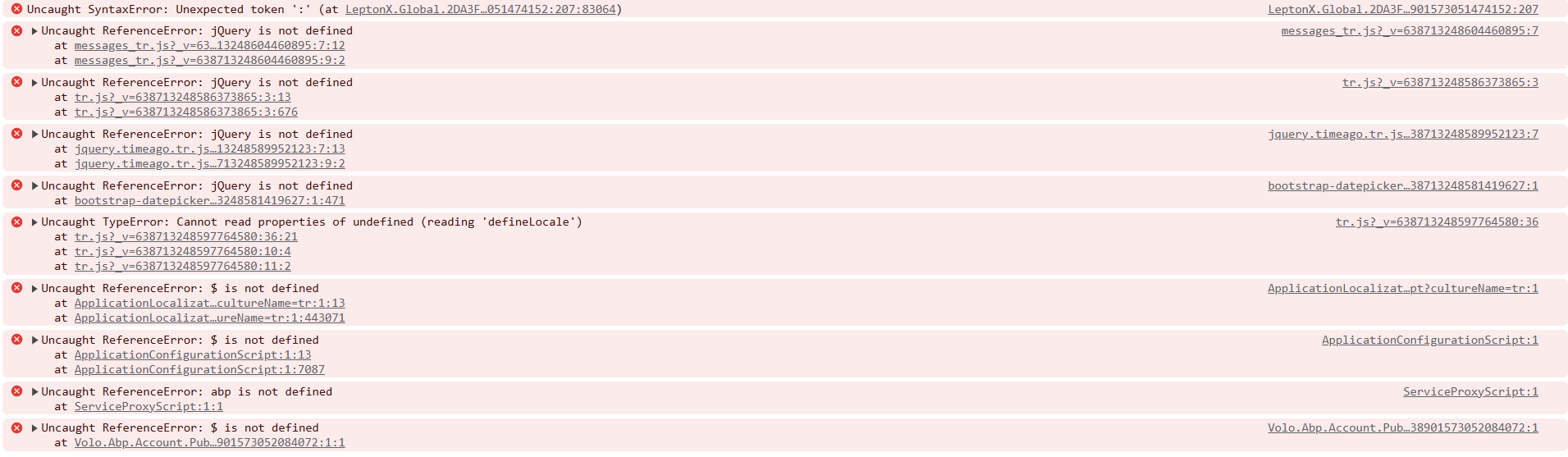
It works locally, but after publishing to the server, I get this error. What could be the reason?
Markdown supported.
Copy, paste, or drag & drop images and files (max 100 MB per file, 100 MB total per post)
5 Answer(s)
-
0
- The errors in your screenshot (e.g., "Uncaught ReferenceError: jQuery is not defined", "$ is not defined", "abp is not defined") indicate that required JavaScript files (like jQuery and ABP scripts) are not being loaded on the server, even though it works locally.
- This is a common issue after publishing to IIS or another server, often caused by missing, blocked, or incorrectly referenced static files (JavaScript, CSS, etc.).
How to Fix:
Ensure Static Files Are Published:
- Make sure all
wwwrootcontent (includinglibs,js,cssfolders) is published to the server. - If using Visual Studio, check that the "Remove additional files at destination" option is not deleting your static files.
- Make sure all
Check Static File Middleware:
- In your
Startup.csorProgram.cs, ensure you have:
- In your
app.UseStaticFiles();- This is required for serving static files in ASP.NET Core.
Verify File Paths and Case Sensitivity:
- Ensure the script references in your HTML/layout files match the actual file names and paths (case-sensitive on Linux).
Check IIS Static File Handling:
- Make sure the IIS Static Content feature is installed and enabled.
- See: ABP IIS Deployment Guide
Check for URL Rewrite or Path Issues:
- If you use URL rewriting or a virtual directory, ensure static file paths are correct.
Browser Network Tab:
- Open the browser's DevTools "Network" tab and refresh the page. Look for 404 errors for JS/CSS files. This will show which files are missing or blocked.
Clear Browser Cache:
- Sometimes, old cached files cause issues after deployment. Clear your browser cache and try again.
- Validated sources:
This response was generated by AI. If it didn’t solve your problem, feel free to post a new answer — our support team will jump in to help you soon.
Markdown supported.Copy, paste, or drag & drop images and files (max 100 MB per file, 100 MB total per post) -
0
I tried app.UseStaticFiles();, but it didn't work.
Markdown supported.Copy, paste, or drag & drop images and files (max 100 MB per file, 100 MB total per post) -
0
hi
Have you run the
abp install-libscommand before publishing it to the server?Which means the
wwwroot\libsfolder needs to be created and the libraries restored.Thanks.
Markdown supported.Copy, paste, or drag & drop images and files (max 100 MB per file, 100 MB total per post) -
0
I solved the issue, can I get a refund for the ticket? :)
Markdown supported.Copy, paste, or drag & drop images and files (max 100 MB per file, 100 MB total per post)



