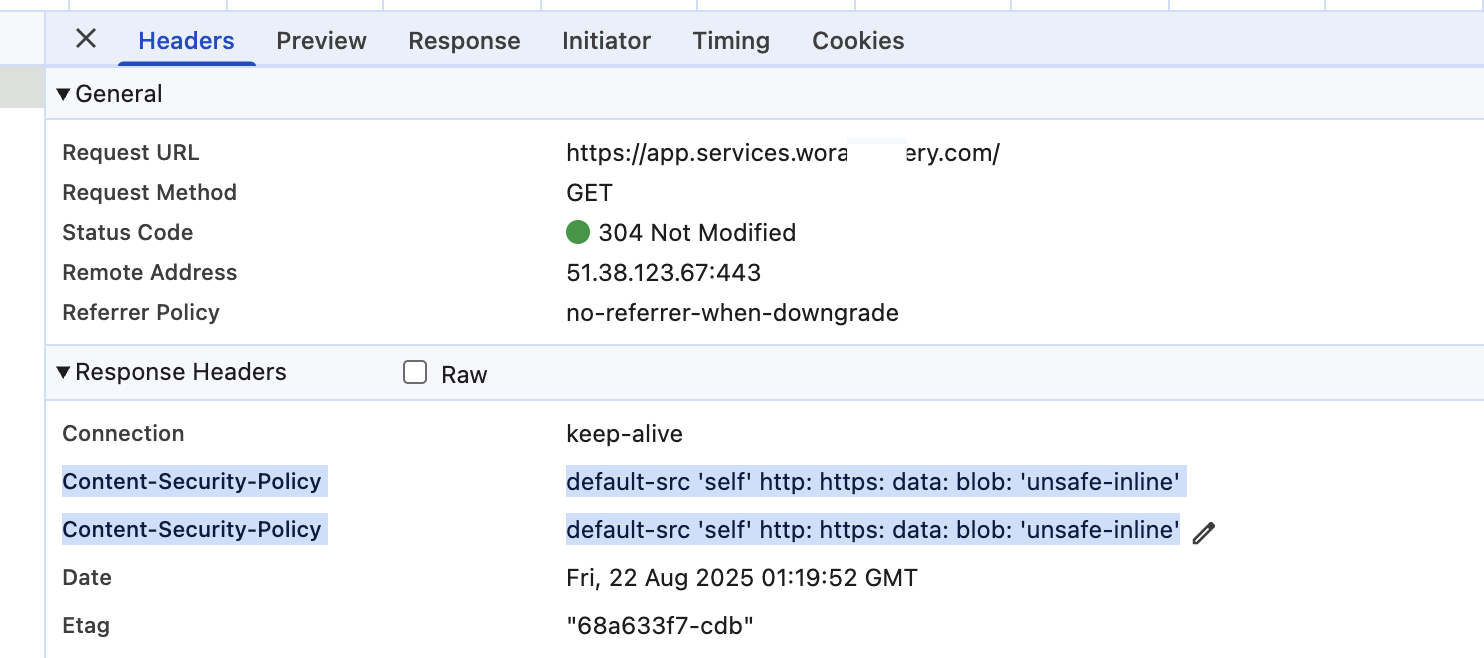
I'm in abp 7.4.5.
I've a reverse proxy made via nginx on exposed sever and a second server, also in linux, with abp dotnet services. I've correctly pubblicated auth, app (agular) and api gateway but I've a signalr separed microservice but when try to start conncection i get an error:
Refused to connect to 'wss://signalr.mydomain.com/signalr-hubs/instant-message?id=***&access_token=****' because it violates the following Content Security Policy directive: "default-src 'self' http: https: data: blob: 'unsafe-inline'". Note that 'connect-src' was not explicitly set, so 'default-src' is used as a fallback.
I remembre that was a specific configuration to use signalr with nginx but I did't find it in docs
15 Answer(s)
-
0
To use SignalR behind Nginx with ABP on Linux, you need to ensure both your Nginx configuration and your application's Content Security Policy (CSP) are set up to allow WebSocket connections.
Solution:
Nginx Configuration for WebSockets
Make sure your Nginx reverse proxy forwards WebSocket connections. Add the following to your Nginx site configuration for the SignalR endpoint:
location /signalr-hubs/ {
       proxy_pass http://your_backend_server;
       proxy_http_version 1.1;
       proxy_set_header Upgrade $http_upgrade;
       proxy_set_header Connection "Upgrade";
       proxy_set_header Host $host;
       proxy_set_header X-Forwarded-For $proxy_add_x_forwarded_for;
       proxy_set_header X-Forwarded-Proto $scheme;
   }
Replace
your_backend_serverwith the internal address of your SignalR service.Content Security Policy (CSP) Update
The error message indicates your CSP is blocking
wss://connections. Update your CSP header to explicitly allow WebSocket connections from your SignalR domain. For example:
Content-Security-Policy: default-src 'self' http: https: data: blob: 'unsafe-inline'; connect-src 'self' wss://signalr.mydomain.com https://signalr.mydomain.com;Add or update the
connect-srcdirective to include your SignalR domain with bothwss://andhttps://.ABP SignalR Integration
Ensure your SignalR hub is correctly configured in your ABP application and that the endpoint is mapped as shown in the official ABP documentation.
app.UseEndpoints(endpoints =>
   {
       endpoints.MapHub<YourHub>("/signalr-hubs/instant-message");
   });
And make sure your frontend connects to the correct URL.
References:
- ABP SignalR Integration Documentation
- Community Article: Real-time Notifications via SignalR
- Community Article: SignalR Client Results in ABP
These steps will allow your SignalR service to work correctly behind Nginx with proper WebSocket and CSP configuration.
This response was generated by AI. If it didn’t solve your problem, feel free to post a new answer — our support team will jump in to help you soon.
Markdown supported.Copy, paste, or drag & drop images and files (max 100 MB per file, 100 MB total per post) -
0
I see that in response header I've a lot of duplicated tag example
content-security-policy
default-src 'self' http: https: data: blob: 'unsafe-inline'
content-security-policy
default-src 'self'; connect-src 'self' wss://signalr.***.com https://signalr.**.com ws://signalr.***.com; script-src 'self' 'unsafe-inline' 'unsafe-eval'; style-src 'self' 'unsafe-inline'; font-src 'self' data:; img-src 'self' data: https:;

content-type
This issue happen also in 9.x on nginx but not in IIS
Markdown supported.Copy, paste, or drag & drop images and files (max 100 MB per file, 100 MB total per post) -
0
I send data via email I also add this to NGINX
proxy_hide_header X-Content-Type-Options;
        proxy_hide_header X-XSS-Protection;
        proxy_hide_header X-Frame-Options;
        proxy_hide_header Referrer-Policy;
        proxy_hide_header Content-Security-Policy;
With this I'm able to remove duplicated header
Markdown supported.Copy, paste, or drag & drop images and files (max 100 MB per file, 100 MB total per post) -
0
Ok, now it works as expected.
- I remove UseAbpSecurityHeaders from all projects
- In SignalR, I check the scope and headers
- In Nginx,x ,where host the Angular app on an internal machine, I remove all headers for normal connections
- In Nginx, I removed CSP
- I leave the header only for getEnv for JSON
Markdown supported.Copy, paste, or drag & drop images and files (max 100 MB per file, 100 MB total per post)