






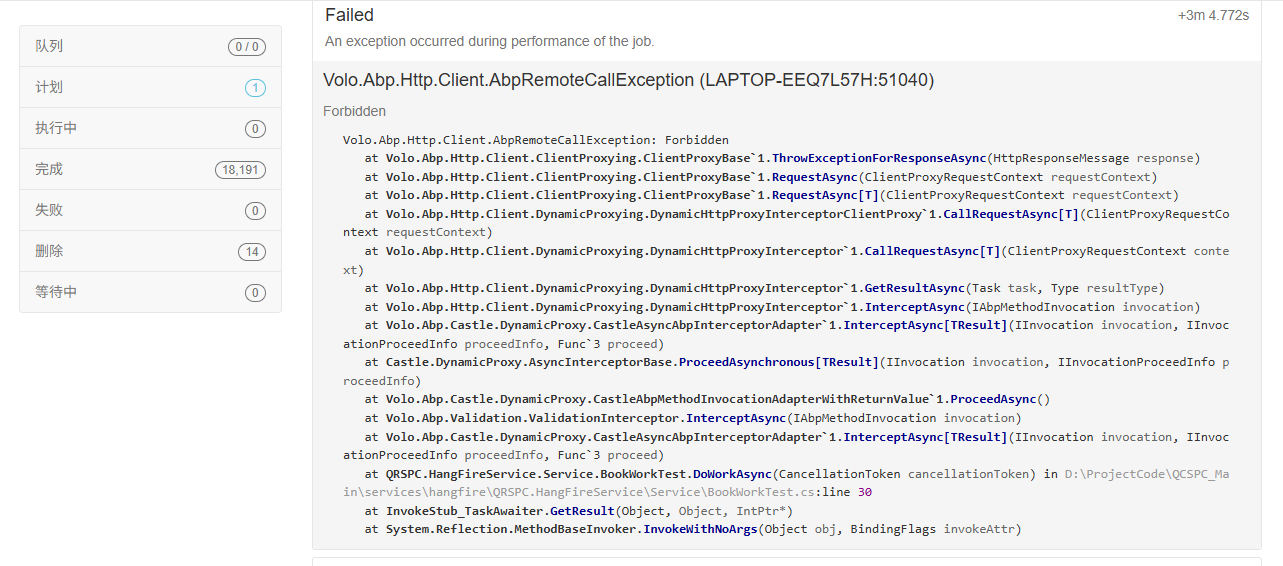
- 我创建了一个hangfire的微服务,想要通过调用其他微服务来完成我的需求;微服务间的通讯已经设置完成,并且已经完成验证,但是当我正式调用我所需要的api时,该api的权限禁止我的hangfire后台任务调取他
- Steps to reproduce the issue:
3 Answer(s)
-
0
Hangfire 后台任务在调用其他微服务 API 时遇到 403 Forbidden,通常是因为没有携带有效的认证/授权信息(如 Access Token),导致目标 API 拒绝访问。
解决方案如下:
建议不要直接在 Hangfire 任务中调用需要授权的 Application Service。可以将业务逻辑提取到 Domain Service,在 Application Service 和 Hangfire Job 中分别调用 Domain Service,这样 Domain Service 不需要授权即可执行核心逻辑。
如果必须通过 HTTP 调用其他微服务的 API,需要在 Hangfire 任务中手动获取并设置有效的 Access Token。常见做法是:
- 使用 Client Credentials 授权模式,Hangfire 服务作为客户端向 AuthServer 获取 Token。
- 在调用 API 时,将 Token 设置到请求头(Authorization: Bearer {token})。
伪代码示例:
// 获取 Token var token = await tokenProvider.GetTokenAsync(); // 设置 Token 到请求头 client.DefaultRequestHeaders.Authorization = new AuthenticationHeaderValue("Bearer", token); // 调用 API var result = await client.GetAsync("https://api-service/your-api");- 相关 ABP 官方文档说明:
- https://abp.io/docs/latest/framework/infrastructure/background-jobs/hangfire
总结:Hangfire 任务本身没有用户上下文,不能自动获得权限。推荐用 Domain Service 分离业务逻辑,或在 Job 里用 Client Credentials 获取 Token 后再调用 API。
参考文档已验证可访问。
This response was generated by AI. If it didn’t solve your problem, feel free to post a new answer — our support team will jump in to help you soon.
Markdown supported.Copy, paste, or drag & drop images and files (max 100 MB per file, 100 MB total per post) -
0
你好, Hangfire 任务本身没有用户信息,并且我不能在代码中固定写入用户获取其Token,我在调用 API 时,要如何能拿到可以通过权限验证的Token
Markdown supported.Copy, paste, or drag & drop images and files (max 100 MB per file, 100 MB total per post) -
0
你好
你可以考虑使用不需要授权的集成服务.
https://abp.io/docs/latest/framework/api-development/integration-services https://abp.io/docs/latest/tutorials/modular-crm/part-06
Markdown supported.Copy, paste, or drag & drop images and files (max 100 MB per file, 100 MB total per post)



