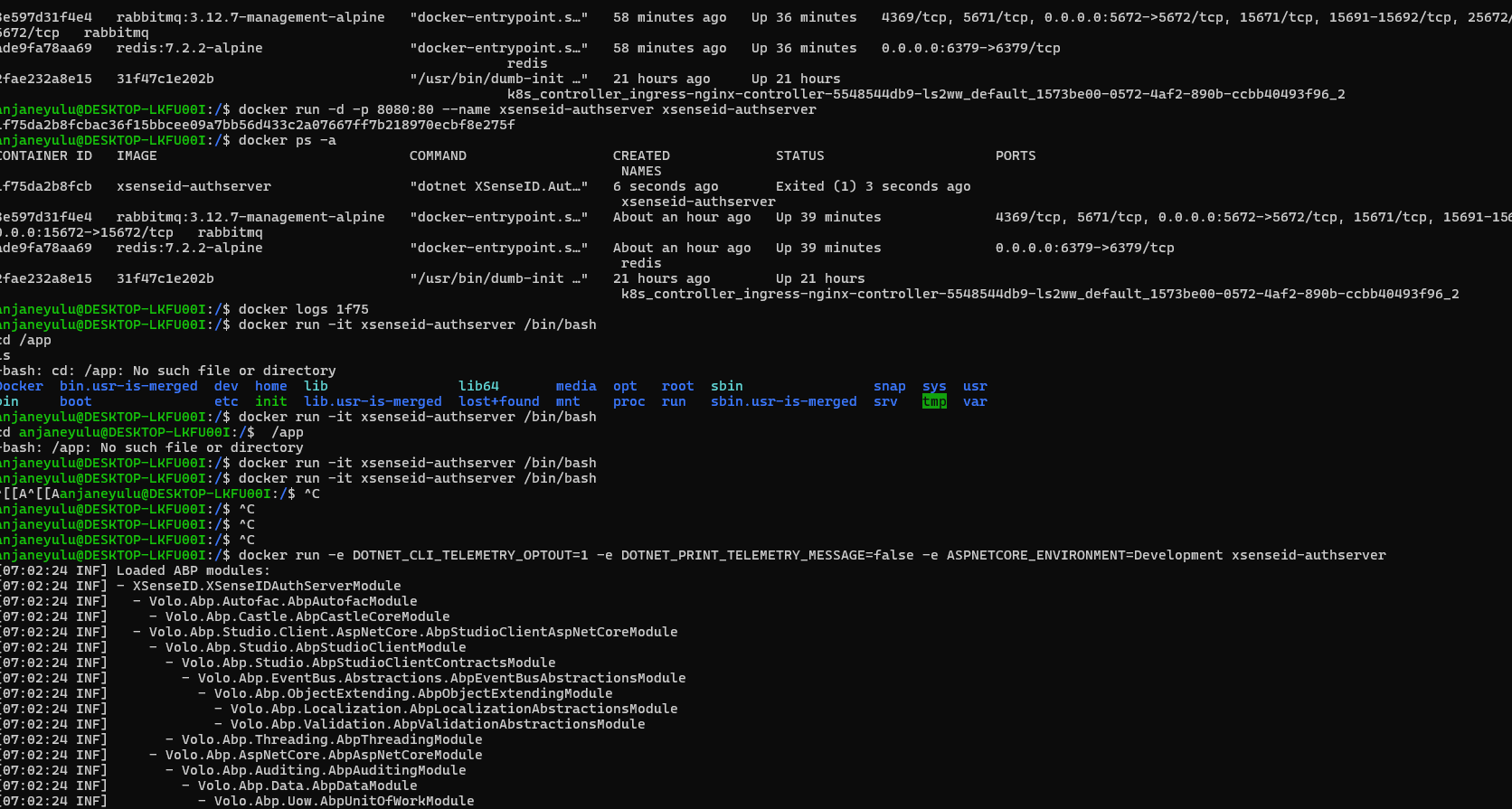
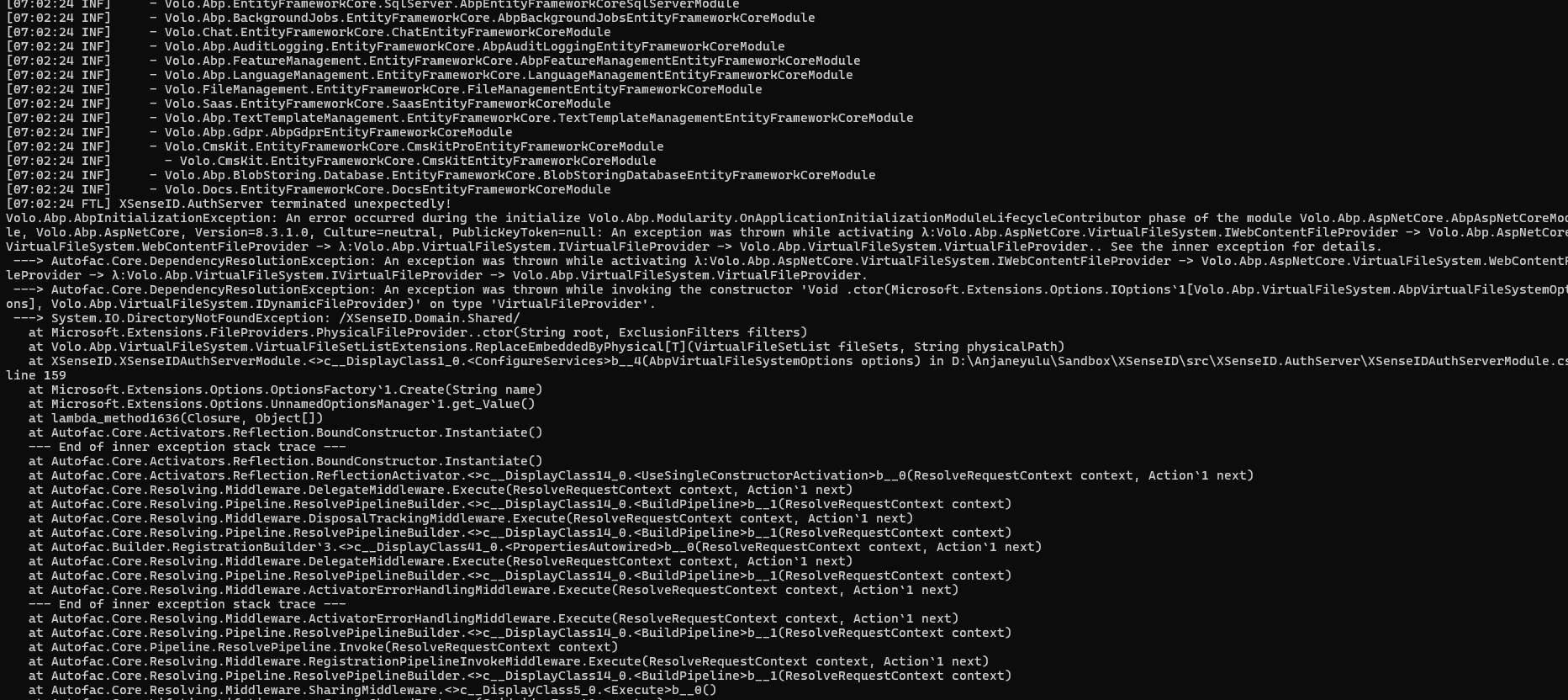
Does virtual file system doesnt work with docker ?
I tried but no luck.
What i additional tried is to comment the virtual file explorer intialization code in the webodule and it moved forward where i had redis connection issue which i can understand.
Any update for this ?
Hello this is my docker file
FROM mcr.microsoft.com/dotnet/aspnet:8.0 COPY bin/Release/net8.0/publish/ app/ WORKDIR /app ENV ASPNETCORE_URLS=http://+:80 ENTRYPOINT ["dotnet", "XSenseID.AuthServer.dll"]
This is the command i have used for build -> dotnet publish -c Release -o ./bin/Release/net8.0/publish
Check the samples to see the basic tasks: https://abp.io/docs/latest/samples
The exact solution to your question may have been answered before, and please first use the search on the homepage.
Provide us with the following info:
🧐 Hint: If you are using the ABP Studio, you can see all the information about your solution from the configuration window, which opens when you right-click on the solution and click on the Solution Configuration button.
 Check the docs before asking a question: https://abp.io/docs/latest
HI,
make sure your project, CLI and suite are the same version
** I have tried that as well.
C:\Users\anjaneyulu.u>abp suite [13:14:59 INF] ABP CLI 7.0.0 Starting Suite v7.0.0 ... Opening http://localhost:3000 Press Ctrl+C to shut down. [13:16:02 ERR] ---------- RemoteServiceErrorInfo ---------- { "code": null, "message": "An internal error occurred during your request!", "details": null, "data": {}, "validationErrors": null }
[13:16:02 ERR] Error converting value {null} to type 'System.Int32'. Path 'Properties[2].EnumValues.Individual', line 69, position 26. Newtonsoft.Json.JsonSerializationException: Error converting value {null} to type 'System.Int32'. Path 'Properties[2].EnumValues.Individual', line 69, position 26. ---> System.InvalidCastException: Null object cannot be converted to a value type.
[15:46:52 ERR] Error converting value {null} to type 'System.Int32'. Path 'Properties[2].EnumValues.Individual', line 69, position 26.
Newtonsoft.Json.JsonSerializationException: Error converting value {null} to type 'System.Int32'. Path 'Properties[2].EnumValues.Individual', line 69, position 26.
---> System.InvalidCastException: Null object cannot be converted to a value type.
at System.Convert.ChangeType(Object value, Type conversionType, IFormatProvider provider)
at Newtonsoft.Json.Serialization.JsonSerializerInternalReader.EnsureType(JsonReader reader, Object value, CultureInfo culture, JsonContract contract, Type targetType)
--- End of inner exception stack trace ---
at Newtonsoft.Json.Serialization.JsonSerializerInternalReader.EnsureType(JsonReader reader, Object value, CultureInfo culture, JsonContract contract, Type targetType)
at Newtonsoft.Json.Serialization.JsonSerializerInternalReader.CreateValueInternal(JsonReader reader, Type objectType, JsonContract contract, JsonProperty member, JsonContainerContract containerContract, JsonProperty containerMember, Object existingValue)
at Newtonsoft.Json.Serialization.JsonSerializerInternalReader.PopulateDictionary(IDictionary dictionary, JsonReader reader, JsonDictionaryContract contract, JsonProperty containerProperty, String id)
at Newtonsoft.Json.Serialization.JsonSerializerInternalReader.CreateObject(JsonReader reader, Type objectType, JsonContract contract, JsonProperty member, JsonContainerContract containerContract, JsonProperty containerMember, Object existingValue)
at Newtonsoft.Json.Serialization.JsonSerializerInternalReader.CreateValueInternal(JsonReader reader, Type objectType, JsonContract contract, JsonProperty member, JsonContainerContract containerContract, JsonProperty containerMember, Object existingValue)
at Newtonsoft.Json.Serialization.JsonSerializerInternalReader.SetPropertyValue(JsonProperty property, JsonConverter propertyConverter, JsonContainerContract containerContract, JsonProperty containerProperty, JsonReader reader, Object target)
at Newtonsoft.Json.Serialization.JsonSerializerInternalReader.PopulateObject(Object newObject, JsonReader reader, JsonObjectContract contract, JsonProperty member, String id)
at Newtonsoft.Json.Serialization.JsonSerializerInternalReader.CreateObject(JsonReader reader, Type objectType, JsonContract contract, JsonProperty member, JsonContainerContract containerContract, JsonProperty containerMember, Object existingValue)
at Newtonsoft.Json.Serialization.JsonSerializerInternalReader.CreateValueInternal(JsonReader reader, Type objectType, JsonContract contract, JsonProperty member, JsonContainerContract containerContract, JsonProperty containerMember, Object existingValue)
at Newtonsoft.Json.Serialization.JsonSerializerInternalReader.PopulateList(IList list, JsonReader reader, JsonArrayContract contract, JsonProperty containerProperty, String id)
at Newtonsoft.Json.Serialization.JsonSerializerInternalReader.CreateList(JsonReader reader, Type objectType, JsonContract contract, JsonProperty member, Object existingValue, String id)
at Newtonsoft.Json.Serialization.JsonSerializerInternalReader.CreateValueInternal(JsonReader reader, Type objectType, JsonContract contract, JsonProperty member, JsonContainerContract containerContract, JsonProperty containerMember, Object existingValue)
at Newtonsoft.Json.Serialization.JsonSerializerInternalReader.SetPropertyValue(JsonProperty property, JsonConverter propertyConverter, JsonContainerContract containerContract, JsonProperty containerProperty, JsonReader reader, Object target)
at Newtonsoft.Json.Serialization.JsonSerializerInternalReader.PopulateObject(Object newObject, JsonReader reader, JsonObjectContract contract, JsonProperty member, String id)
at Newtonsoft.Json.Serialization.JsonSerializerInternalReader.CreateObject(JsonReader reader, Type objectType, JsonContract contract, JsonProperty member, JsonContainerContract containerContract, JsonProperty containerMember, Object existingValue)
at Newtonsoft.Json.Serialization.JsonSerializerInternalReader.CreateValueInternal(JsonReader reader, Type objectType, JsonContract contract, JsonProperty member, JsonContainerContract containerContract, JsonProperty containerMember, Object existingValue)
at Newtonsoft.Json.Serialization.JsonSerializerInternalReader.Deserialize(JsonReader reader, Type objectType, Boolean checkAdditionalContent)
at Newtonsoft.Json.JsonSerializer.DeserializeInternal(JsonReader reader, Type objectType)
at Newtonsoft.Json.JsonSerializer.Deserialize(JsonReader reader, Type objectType)
at Newtonsoft.Json.JsonSerializer.Deserialize(TextReader reader, Type objectType)
at Volo.Abp.Suite.Services.PersistanceService.xgJr3Tcf2f(String )
at System.Linq.Enumerable.SelectIPartitionIterator2.MoveNext() at System.Collections.Generic.List1.AddRange(IEnumerable1 collection) at Volo.Abp.Suite.Services.PersistanceService.GetEntitiesAsync(Guid solutionId) at Volo.Abp.Suite.Controllers.CrudPageGeneratorController.GetEntitiesAsync(Guid solutionId) at lambda_method1946(Closure, Object) at Microsoft.AspNetCore.Mvc.Infrastructure.ActionMethodExecutor.AwaitableObjectResultExecutor.Execute(ActionContext actionContext, IActionResultTypeMapper mapper, ObjectMethodExecutor executor, Object controller, Object[] arguments) at Microsoft.AspNetCore.Mvc.Infrastructure.ControllerActionInvoker.<InvokeActionMethodAsync>g__Awaited|12_0(ControllerActionInvoker invoker, ValueTask1 actionResultValueTask)
at Microsoft.AspNetCore.Mvc.Infrastructure.ControllerActionInvoker.<InvokeNextActionFilterAsync>g__Awaited|10_0(ControllerActionInvoker invoker, Task lastTask, State next, Scope scope, Object state, Boolean isCompleted)
at Microsoft.AspNetCore.Mvc.Infrastructure.ControllerActionInvoker.Rethrow(ActionExecutedContextSealed context)
at Microsoft.AspNetCore.Mvc.Infrastructure.ControllerActionInvoker.Next(State& next, Scope& scope, Object& state, Boolean& isCompleted)
at Microsoft.AspNetCore.Mvc.Infrastructure.ControllerActionInvoker.InvokeInnerFilterAsync()
--- End of stack trace from previous location ---
at Microsoft.AspNetCore.Mvc.Infrastructure.ResourceInvoker.<InvokeNextExceptionFilterAsync>g__Awaited|26_0(ResourceInvoker invoker, Task lastTask, State next, Scope scope, Object state, Boolean isCompleted)
Steps to reproduce the issue:
Im having a abp project and when im trying to open the solution in in ABP Suite, Im getting the above error.
I have updated the cli to 8.0.0., but still the same error.
We have created few entities without using suite, and application is building and working fine. Is it an issue because of the manual creation of the entities ?
*** Jquery validation version is showing 1.17.0 , but we have got a security scan report which wants us to update to 1.19.5 for security patch
*** I want your help in upgrading the version asap. Thanks.
ABP Framework version: v3.0.0
UI Type: MVC
Database System: EF Core (SQL Server)
Tiered (for MVC) or Auth Server Separated (for Angular): yes/no
Exception message and full stack trace:
Steps to reproduce the issue:
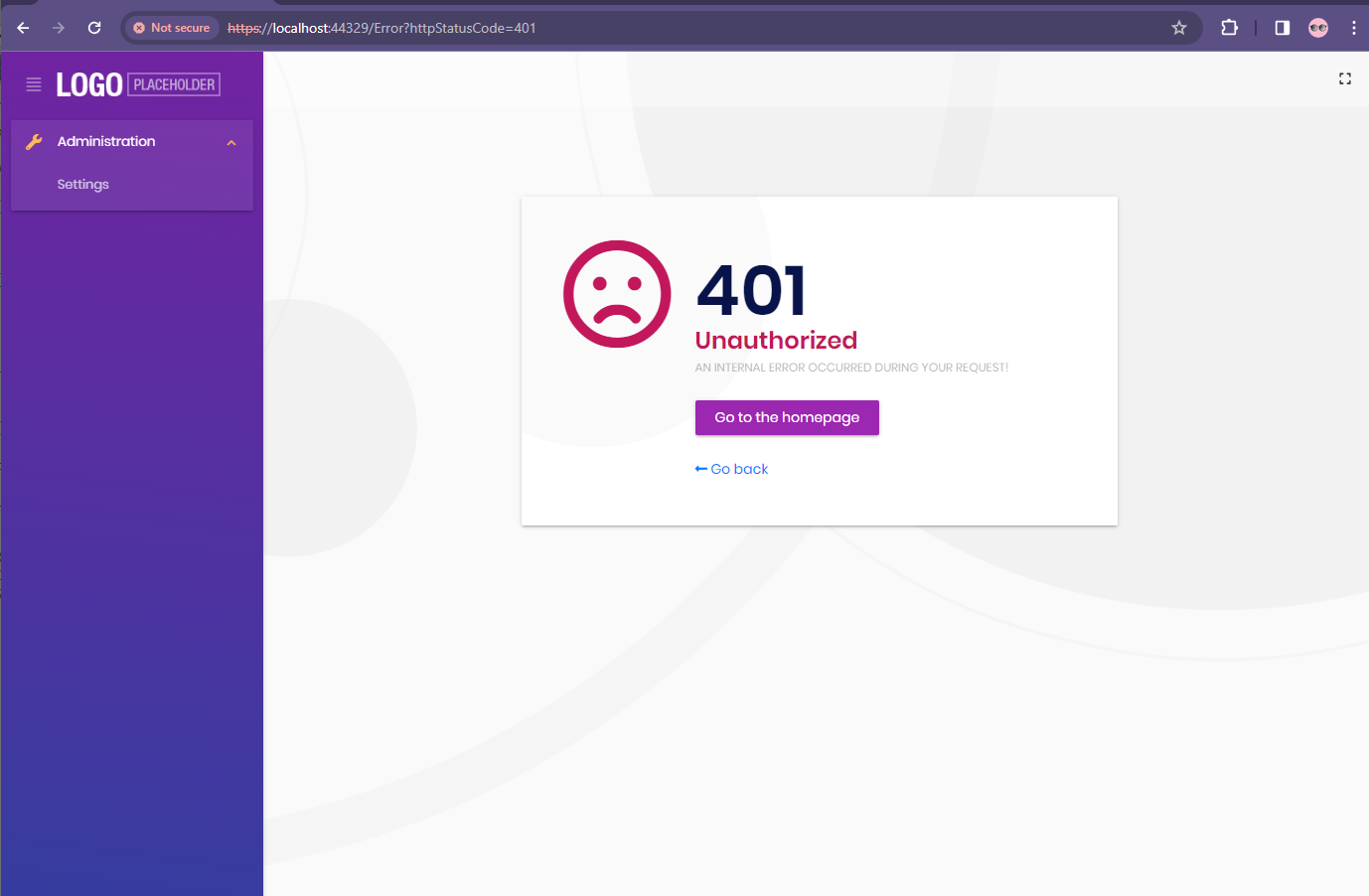
Im seeing administrator, settings in the error screen side menu, which i dont want.
How do i overide so that i only show status code.
Still is there anyway we can encrypt ?









