I've restarted the computer and Studio many times. Studio is updated.
Check the docs before asking a question: https://abp.io/docs/latest: yes
System.UriFormatException: Invalid URI: The URI is empty. at void Uri.CreateThis(string uri, bool dontEscape, UriKind uriKind, in UriCreationOptions creationOptions) at async Task<string> Volo.Abp.Studio.UI.Services.FilePicker.PickSingleFileAsync(Action<FileDialogOptions> configAction) at async Task Volo.Abp.Studio.UI.Commands.OpenSolutionCommandFactory.G38j5j4X3q()
1 Open Studio 2 Click "Open Solution"
(New solution opens dialog)
By the way, I opened an issue to add Blazor Web App to the deployment document. See: https://github.com/abpframework/abp/issues/22654
Can/will this cover CLI and YAML .. or do we need a ticket for each topic/issue?
Each caused a misdirection and should be followed-through especially with self-similar vocabulary.
okay i removed hundreds of lines of stuff like the following (and more). (see below) I don't know where/when this was introduced. not something i would of done manually. So now is working more like expected as when i was introducing the missing files myself.
Now I have a new error.. that got introduced when I started shifting abp libraries from 9.0.5 to 9.2. to 9.1.1, to 9.1.0 which i'm on now. no matter which version i'm on now I get the same behavior in my app and i can't click on any menus. No idea how to debug it:
blazor.web.js:1 ManagedError: AggregateException_ctor_DefaultMessage (EndOfStringNotFound LineNumber: 13 | BytePositionInLine: 24.) at sn (dotnet.runtime.cymp1amu5g.js:3:26894) at Kt.resolve_or_reject (dotnet.runtime.cymp1amu5g.js:3:26449) at dotnet.runtime.cymp1amu5g.js:3:172526 at dotnet.runtime.cymp1amu5g.js:3:172590 at fr (dotnet.runtime.cymp1amu5g.js:3:35046) at Fc (dotnet.runtime.cymp1amu5g.js:3:172173) at 00afeac2:0x18b2c at 00afeac2:0x1625f at 00afeac2:0x8627 at 00afeac2:0x18615
any ideas?
here is smple of the hundreds of lines i removed
<Content Remove="wwwroot\libs\prismjs\components\prism-ejs.min.js" />
<Content Remove="wwwroot\libs\prismjs\components\prism-prolog.js" />
<Content Remove="wwwroot\libs\lodash\lodash.min.js" />
<Content Remove="wwwroot\libs\jquery-form\jquery.form.min.js" />
<Content Remove="wwwroot\libs\prismjs\prism.js" />
<Content Remove="wwwroot\libs\prismjs\LICENSE" />
<Content Remove="wwwroot\libs\prismjs\CHANGELOG.md" />
<Content Remove="wwwroot\libs\prismjs\README.md" />
<Content Remove="wwwroot\libs\prismjs\components.js" />
<Content Remove="wwwroot\libs\prismjs\package.json" />
<Content Remove="wwwroot\libs\prismjs\dependencies.js" />
<Content Remove="wwwroot\libs\prismjs\components.json" />
<Content Remove="wwwroot\libs\prismjs\plugins\wpd\prism-wpd.css" />
<Content Remove="wwwroot\libs\prismjs\plugins\wpd\prism-wpd.js" />
<Content Remove="wwwroot\libs\prismjs\plugins\wpd\prism-wpd.min.js" />
<Content Remove="wwwroot\libs\prismjs\plugins\wpd\prism-wpd.min.css" />
<Content Remove="wwwroot\libs\prismjs\plugins\show-invisibles\prism-show-invisibles.css" />
<Content Remove="wwwroot\libs\prismjs\plugins\show-invisibles\prism-show-invisibles.min.js" />
<Content Remove="wwwroot\libs\prismjs\plugins\show-invisibles\prism-show-invisibles.min.css" />
<Content Remove="wwwroot\libs\prismjs\plugins\command-line\prism-command-line.min.js" /> <Content Remove="wwwroot\libs\prismjs\plugins\command-line\prism-command-line.js" /> <Content Remove="wwwroot\libs\prismjs\plugins\command-line\prism-command-line.css" /> <Content Remove="wwwroot\libs\prismjs\plugins\show-language\prism-show-language.min.js" /> <Content Remove="wwwroot\libs\prismjs\plugins\show-language\prism-show-language.js" /> <Content Remove="wwwroot\libs\prismjs\plugins\inline-color\prism-inline-color.js" /> <Content Remove="wwwroot\libs\prismjs\plugins\inline-color\prism-inline-color.min.js" /> <Content Remove="wwwroot\libs\prismjs\plugins\inline-color\prism-inline-color.min.css" /> <Content Remove="wwwroot\libs\prismjs\plugins\inline-color\prism-inline-color.css" /> <Content Remove="wwwroot\libs\prismjs\plugins\line-highlight\prism-line-highlight.css" /> <Content Remove="wwwroot\libs\prismjs\plugins\line-highlight\prism-line-highlight.js" /> <Content Remove="wwwroot\libs\prismjs\plugins\line-highlight\prism-line-highlight.min.js" /> <Content Remove="wwwroot\libs\prismjs\plugins\line-highlight\prism-line-highlight.min.css" /> <Content Remove="wwwroot\libs\prismjs\plugins\file-highlight\prism-file-highlight.min.js" /> <Content Remove="wwwroot\libs\prismjs\plugins\file-highlight\prism-file-highlight.js" /> <Content Remove="wwwroot\libs\prismjs\plugins\normalize-whitespace\prism-normalize-whitespace.min.js" /> <Content Remove="wwwroot\libs\prismjs\plugins\normalize-whitespace\prism-normalize-whitespace.js" /> <Content Remove="wwwroot\libs\prismjs\plugins\match-braces\prism-match-braces.min.js" /> <Content Remove="wwwroot\libs\prismjs\plugins\match-braces\prism-match-braces.css" /> <Content Remove="wwwroot\libs\prismjs\plugins\match-braces\prism-match-braces.min.css" /> <Content Remove="wwwroot\libs\prismjs\plugins\match-braces\prism-match-braces.js" /> <Content Remove="wwwroot\libs\prismjs\plugins\line-numbers\prism-line-numbers.js" /> <Content Remove="wwwroot\libs\prismjs\plugins\line-numbers\prism-line-numbers.min.css" /> <Content Remove="wwwroot\libs\prismjs\plugins\line-numbers\prism-line-numbers.min.js" /> <Content Remove="wwwroot\libs\prismjs\plugins\line-numbers\prism-line-numbers.css" /> <Content Remove="wwwroot\libs\prismjs\plugins\unescaped-markup\prism-unescaped-markup.css" /> <Content Remove="wwwroot\libs\prismjs\plugins\unescaped-markup\prism-unescaped-markup.js" /> <Content Remove="wwwroot\libs\prismjs\plugins\unescaped-markup\prism-unescaped-markup.min.css" /> <Content Remove="wwwroot\libs\prismjs\plugins\unescaped-markup\prism-unescaped-markup.min.js" />
..
Can you access which folders are under
wwwroot/libsfolder on the server? If so we can verify if/lodash/lodash.min.jsexists. We can also verify if other client-side libraries have been installed.
Okay okay okay .. this gets in to the conversation i mentioned .. i needed to compare the projects. for some reason if have 100's of lines of <content remove=""> mostly Prismjs lines. but also Jquery and Lodash. Comparing to my brand-new project from this morning... your Blazor.csproj file is nearly EMPTY with NO REMOVES in it.. where as i'm basically removing everything. clearly this is LEGACY from a previous library combination.
cleaning house now . rebuilding.
May need some intellegence added when up/downgrading abp versions . possibly node could do that when doing the install-libs.
brb
I have successfully deployed a new instance (empty) sln of a webapp/interactive following the same publish process.
i also did what i did last week and redeployed manually my main solution by removing the following: <Content Remove="wwwroot\libs\prismjs\components\prism-prolog.js" /> <!--Content Remove="wwwroot\libs\lodash\lodash.min.js" /> <Content Remove="wwwroot\libs\jquery-form\jquery.form.min.js" /--> which seems to get me in. So I think I've been closer than I thought all-along. except now I can't get my stylesheets in.
But this seems wrong. As if i'm not using the embedded login module or something. or something is missing. Or did I find a bug and i'm working around it?
An unhandled exception occurred while processing the request. AbpException: Could not find file '/libs/lodash/lodash.min.js' i'm using dotnet publish to go manually. so I guess you lost me on when i would run abp install-libs again in that process. intermediary, and locally in the build package? (if not using the automated ci/cd pipelines)
You can run it just before the build.
We are crossing topics. I I'm pursuing manual build and automated pipeline for which the instructions/yaml does not align with the SLN structure.
as for 2) Yes.. the Yaml does not align we need to get it updated to end confusion. If I could get help on that. now.. perhaps I could pursue that now too. Or perhaps resolving the manual build is best and finding the path to the missing files.
and 2b) update CLI to be explicit that the default is blazor-interactive/webapp 2c) and the docs (drop down on instruction page) the same. ;-)
<Content Remove="wwwroot\libs\prismjs\components\prism-prolog.js" />
<!--Content Remove="wwwroot\libs\lodash\lodash.min.js" />
<Content Remove="wwwroot\libs\jquery-form\jquery.form.min.js" /-->
<Content Remove="wwwroot\libs\prismjs\prism.js" />
i'd tried uncommenting these last week.. with partial success. i'm redeploying now
i think the missing lodash is a misdirection
here is the meaningful error stream via the enabling of PII:
An unhandled exception occurred while processing the request. AbpException: Could not find file '/libs/lodash/lodash.min.js'
So i got around this before by adding it and jquery back manually. ( bug commenting-out the removal in the csproj )
i'm using dotnet publish to go manually. so I guess you lost me on when i would run abp install-libs again in that process. intermediary, and locally in the build package? (if not using the automated ci/cd pipelines). Otherwise, to be clear, I run "abp install-libs" constantly and consistently pre-build and pre-deploy (dotnet build , or dotnet publish commands), in fact, religiously, since trying to burp my system from the bad npm situation.
as per the call can you confirm the mappings
  - name: Run migrations
    run: dotnet run -- "${{ secrets.CONNECTION_STRING }}" # Set your connection string as a secret in your repository settings
    working-directory: ./src/blazorservertierdemo.DbMigrator  # Replace with your project name

  - name: dotnet publish apihost
    run: dotnet publish -c Release -o ${{env.DOTNET_ROOT}}/apihost
    working-directory: ./src/blazorservertierdemo.HttpApi.Host # Replace with your project name

  - name: Generate authserver.pfx
    run: dotnet dev-certs https -v -ep ${{env.DOTNET_ROOT}}/apihost/authserver.pfx -p 2D7AA457-5D33-48D6-936F-C48E5EF468ED # Replace with your password

  - name: dotnet publish webapp
    run: dotnet publish -c Release -o ${{env.DOTNET_ROOT}}/webapp
    working-directory: ./src/blazorservertierdemo.Blazor # Replace with your project name
... which of these are viable for a Layered / non-tiered Blazor-interactive?
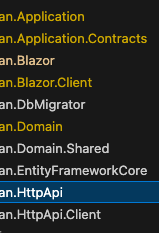
where the app projects of note are: .Blazor .Client .HttpApi .Http.Client ....etc