Done. Slated 9:30 Lisbon time (Tuesday/tomorrow, unfortunately) I'm sure we can step through whatever I don't resolve today quickly. Perhaps today I'll have resolution from Microsoft, etc.
Actually I did just try that —clearing the cache on the Pc (I have been working 2 machines now to try to solve this). I found yesterday on the PC that nuget had files locked and i had to move them delete them manually. and was able to get them out of the way. So on the pc was file corruption. On OSX due to using Sudo. Why sudo? Because was the only way to run Studio. Though, now, today, it seems Studio can run without Sudo. so i've cleared the cache using Sudo (as I could not without) and starting over based on your tip. logically, i was having other issues due to that before.
This leaves remaining issues with Studio that have been hiding further delaying getting to build/publish processes confidently. On Monday -- i am in desperate need and would to schedule a meeting with someone to work through these issues quickly as part of a support request. I'm sure we can work through these issues quickly. I need to be on a plane to Tokyo in 48 hours so i really need to hop on this.
leading me to....
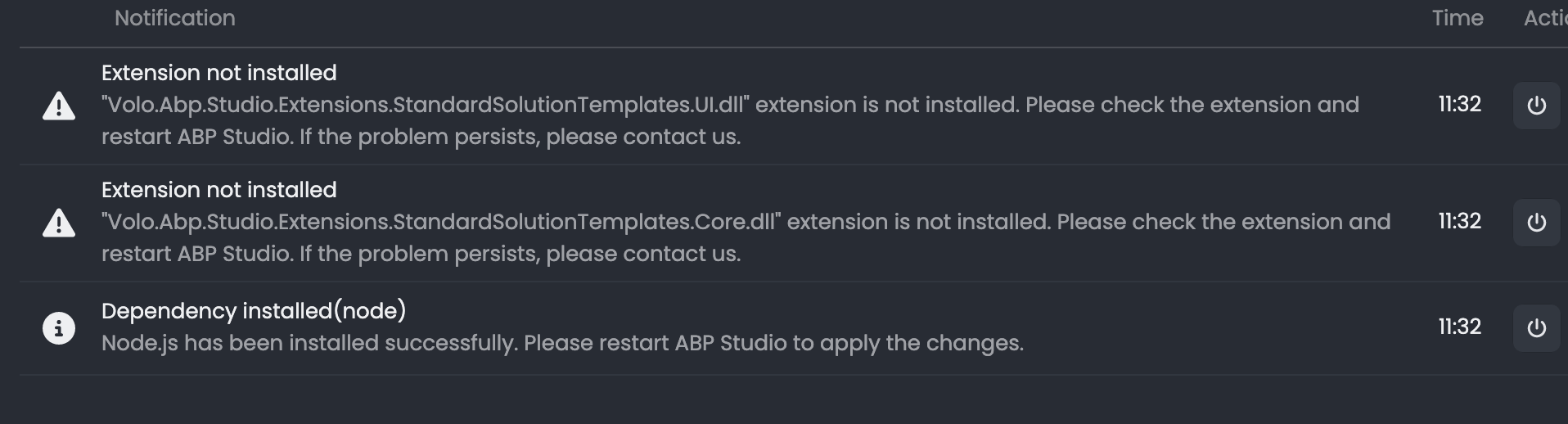
Abp Bundle Documents state i should use it. .but does not work on my OSX install or PC;.. but as I was getting template errors I wasn’t sure why. It still does not work as of clearing NPM and reinstalling. I really need to get past this so i can publish manually. Is “App bundle” required or dos “Dotnet build/publish” trigger the same flow ? I am IN A BIND as I leave for Tokyo in 48 hours. I need to get this site launched to Azure before i leave and i can't honestly figure out whats going on. see below for errors.
I'm super confused what documentation to use for Blazor-webapp/interactive/non-tiered for build and deployment processes. The documents on the site don't specifically align with this scenario. though there are many docs... they just don't fit the language or the vocabulary. Further, I'm trying to go manually as going through Github i'm getting some parallelism errors and i'm still waiting for microsoft to get back to me to allow the build. So i'm trapped.
As for the partial deploy i do have in the cloud.. i get the site to load, kinda. I have db connectivity. but** /account/login* is a broken page. I got it to work somehow before.. but now i can't. I've been jumping from 4.0.3 to 4.2.2 and now am on 4.1.1 which I think i've settled in on... if i can just get the login page to work and be confident i'm publishing correctly. when I run (in local dev mode) against the site locally, the /account/login page works fine. I read somewhere i need to configure something in Azure -- but i just can't seem to figure what that is in this context. Sadly -- i had no intention on thowing this in to Azure but my boss threw this at me short notice. this was supposed to be a IIS/lan install for the demo so now i'm moving fast in this new direction.
Please lets set up a call on Monday
bundle error:
Unhandled exception. System.ComponentModel.Win32Exception (2): Failed to start a process with file path '"/Users/martinpetersensysadmin/.abp/studio/cli/old/abp-old"'. Target file or working directory doesn't exist, or the provided credentials are invalid. ---> System.ComponentModel.Win32Exception (2): An error occurred trying to start process '"/Users/martinpetersensysadmin/.abp/studio/cli/old/abp-old"' with working directory '/Users/martinpetersensysadmin/CLIENTS/abptest/ProductionMan/src/ProductionMan.Blazor.Client'. No such file or directory
at System.Diagnostics.Process.ForkAndExecProcess(ProcessStartInfo startInfo, String resolvedFilename, String[] argv, String[] envp, String cwd, Boolean setCredentials, UInt32 userId, UInt32 groupId, UInt32[] groups, Int32& stdinFd, Int32& stdoutFd, Int32& stderrFd, Boolean usesTerminal, Boolean throwOnNoExec)
at System.Diagnostics.Process.StartCore(ProcessStartInfo startInfo)
at CliWrap.Utils.ProcessEx.Start() in //CliWrap/Utils/ProcessEx.cs:line 56
at CliWrap.Utils.ProcessEx.Start() in //CliWrap/Utils/ProcessEx.cs:line 68
at CliWrap.Command.ExecuteAsync(CancellationToken forcefulCancellationToken, CancellationToken gracefulCancellationToken) in /_/CliWrap/Command.Execution.cs:line 307
at CliWrap.EventStream.EventStreamCommandExtensions.<>c__DisplayClass4_0.<Observe>b__0(IObserver1 observer) in /_/CliWrap/EventStream/PushEventStreamCommandExtensions.cs:line 49 at CliWrap.Utils.Observable.<>c__DisplayClass1_01.<CreateSynchronized>b__0(IObserver1 observer) in /_/CliWrap/Utils/Observable.cs:line 18 at CliWrap.Utils.Observable1.Subscribe(IObserver1 observer) in /_/CliWrap/Utils/Observable.cs:line 7 at System.Reactive.Linq.QueryLanguage.ForEachAsync_[TSource](IObservable1 source, Action`1 onNext, CancellationToken cancellationToken)
--- End of stack trace from previous location ---
at Volo.Abp.Studio.Cli.OldCli.OldCliRunner.RunAsync(String[] args)
at Volo.Abp.Studio.Cli.Commands.StudioBundleCommand.ExecuteAsync(CommandLineArgs commandLineArgs)
at Volo.Abp.Studio.Cli.StudioCliService.RunInternalAsync(CommandLineArgs commandLineArgs)
at Volo.Abp.Studio.Cli.StudioCliService.RunAsync(String[] args)
at Volo.Abp.Studio.Cli.Program.DFo79blp0(Object )
at Volo.Abp.Studio.Cli.Program.
studio installation problems... told to email
this has been a real problem for months and months.. Studio is always broken and i havn't been able to use it really. between it and the problems between the CLI it's been hard to debug problems of solutions when i'm told to use studio. i'm really stuck now and need a fresh app using studio... but i can't!
how can i resolve this? I keep trying to reinstall but the problem persists.
OSX: M1/apple silicon.
Reproduction is 1/2 way there ;-). Note the screencaps of the "variable" missing during the forced debug. I think there is a hash/array that went out of bounds and everything breaks. Probably i went past original-designed upper bounds of "normal app use" and moved us in to edge/extreme. "128 fields, yeah! thats enough!". Nope.
This is a manufacturing floor Line-of-business app. The dashboard will-have literally 300 fields once pivoted.
Oh.. btw. .i'm continuing to onboard my entities. I have about 7 that have over 150 fields. and 2 with 256 fields. For now i'm just onboarding them without any filters enabled in the default constructors, nor then, thus, the default List pages built by CRUD, which is NOT the intent. But to get moving , thats what I'm doing until this detail is resolved.
Well yes. thats the point. i've ran many experiments already proving that it's the parameter limit. i've done this both manually and with constructing of the parameters via the Suite. So . no need for me to recreate - i've already done that test, at infinitum, before i submitted.
As stated, if you look closely at the GetCountAsync error.. when no filter is passed there is .. oddly, a filter being passed; with a iterator of 128. I suspect that either ABP, or something lower can not handle more than 128 variables. But as .mssql can(2000 parameters), Thus, I suspect ABP.
How can we definitively debug ABP. it should not be inserting the following whatsoever:
**WHERE [a].[Aaa128] <= @__aaa128Max_Value_0**
On a first-page load. This should not be there; and it's not if you have less than 127 fields.
Sent in test scaffolding project (not the actual project) showing the same issue.
Note: OSX, Apple M1
 Note the signature of all filters being passed...
As for the JSON from Suite: All properties/fields 1-131 have isFilterable = true Just a simple Entity ( which is why audit logging confused me but could of still be possibility )
I've run this in my current large project as well as a new standalone 'host' app created from Studio Here is a basic Json i use in test... first 3 fields so you can see the basics without the whole code(i can't seem to attach the whole thing here)
{ "Id": "5a972b55-3bb5-4847-bd62-8d7b8cd49c74", "Name": "TestThree", "OriginalName": "TestThree", "NamePlural": "TestThrees", "DatabaseTableName": "TestThree", "Namespace": "TestThreeNs", "Type": 1, "MasterEntityName": null, "MasterEntity": null, "BaseClass": "Entity", "PageTitle": "Test Three", "MenuIcon": "file-alt", "PrimaryKeyType": "Guid", "PreserveCustomCode": true, "IsMultiTenant": false, "CheckConcurrency": false, "BulkDeleteEnabled": false, "ShouldCreateUserInterface": true, "ShouldCreateBackend": true, "ShouldExportExcel": false, "ShouldAddMigration": true, "ShouldUpdateDatabase": true, "CreateTests": false, "Properties": [ { "Id": "b94be8aa-77fd-452a-a068-c81c06b99883", "Name": "Aaa1", "Type": "string", "EnumType": null, "EnumNamespace": null, "EnumAngularImport": null, "EnumFilePath": null, "DefaultValue": null, "IsNullable": false, "IsRequired": true, "IsFilterable": true, "AllowEmptyStrings": false, "IsTextArea": false, "MinLength": null, "MaxLength": 50, "SortOrder": 0, "SortType": 0, "Regex": null, "EmailValidation": false, "ShowOnList": true, "ShowOnCreateModal": true, "ShowOnEditModal": true, "ReadonlyOnEditModal": false, "EnumValues": null, "IsSelected": true, "MaxFileSize": null, "OrdinalIndex": 0 }, { "Id": "e84ed642-0c97-46db-a4ef-731cf500195d", "Name": "Aaa2", "Type": "int", "EnumType": null, "EnumNamespace": null, "EnumAngularImport": null, "EnumFilePath": null, "DefaultValue": null, "IsNullable": false, "IsRequired": true, "IsFilterable": true, "AllowEmptyStrings": false, "IsTextArea": false, "MinLength": null, "MaxLength": null, "SortOrder": 0, "SortType": 0, "Regex": null, "EmailValidation": false, "ShowOnList": true, "ShowOnCreateModal": true, "ShowOnEditModal": true, "ReadonlyOnEditModal": false, "EnumValues": null, "IsSelected": true, "MaxFileSize": null, "OrdinalIndex": 1 }, { "Id": "f7b3a928-ad23-4ecd-ac6b-d32bdd29795e", "Name": "Aaa3", "Type": "int", "EnumType": null, "EnumNamespace": null, "EnumAngularImport": null, "EnumFilePath": null, "DefaultValue": null, "IsNullable": true, "IsRequired": false, "IsFilterable": true, "AllowEmptyStrings": false, "IsTextArea": false, "MinLength": null, "MaxLength": null, "SortOrder": 0, "SortType": 0, "Regex": null, "EmailValidation": false, "ShowOnList": true, "ShowOnCreateModal": true, "ShowOnEditModal": true, "ReadonlyOnEditModal": false, "EnumValues": null, "IsSelected": true, "MaxFileSize": null, "OrdinalIndex": 2 }... repeat to 130+ fields
..continue. Aaa4-131 as type:int, same type with that: "IsNullable": true, (i have tried combinations of this as well) "IsRequired": false, "IsFilterable": true,
I can send the whole file to email or something... but it's this basic.
a few days ago i did a simple test like yours as well with column names AA1, - AA130.. just to rule-out weird column names or anyting, as well.
All boilerplate code gen from ABP Suite. Literally -- generate, compile, (migrate), run. Nothing particularly special. Which is why i went down the path of confirming the SQL server installation was not in the way and tried another.
I'm executing the query from the app, or from a direct Api URL ( for quick testing) ..
Is the continuous 'invisible' breakpoints a clue? How can we get some additional debug from the depths? I've messed with the settings in Blazor/program.cs which is how i got the addition sql debug from eFCore. Any other suggestions?









