After upgrading an Angular application to ABP 10.5, sidebar parent menu items can become current and update the expanded-route state while their nested submenu remains hidden. The SaaS parent is a reproducible example: the host user can retrieve the tenant data, but the Tenants and Editions submenu entries do not become visible.
The application uses Lepton Style 4 and the corresponding lepton4 CSS bundle. The click and authorization flow are working; the failure occurs in the final CSS/layout state.
10.5.021.2.x@volo/abp.ng.theme.lepton version 10.5.0lepton4 bundle)lp-opened-sidebar)ABP Studio's Solution Configuration reports:
appClassic0.8.13.0.6YesAngularLeptonX (not sure why - we're using Lepton classic)systemNoEFSQL ServerYesnoneNoThere is an apparent metadata/runtime discrepancy: Solution Configuration identifies the theme as LeptonX, while the current runtime source uses the legacy Lepton Angular package (@volo/abp.ng.theme.lepton), provideThemeLepton(), the legacy Volo.Abp.LeptonTheme server modules, and Lepton Style 4 (lepton4.css). This should be considered when diagnosing the issue.
current class.The route state contains the expected expanded SaaS entry:
expandedRoutes = Set(1) { 'Saas::Menu:Saas1' }
The route node contains the expected child entries (Tenants and Editions), and the API returns the expected tenant data.
expandedRoutes is updated.current.display remains none.abp-application-layout lp-opened-sidebar lp-body-fixed.d-block overflow-hidden class that the Lepton RoutesComponent uses for the sidebar placement.The loaded Lepton Style 4 CSS contains the rule that hides nested sidebar lists:
.lp-opened-sidebar .lp-sidebar .lp-sidebar-navi > ul ul {
  display: none;
}
This indicates a layout/CSS state mismatch: the route is marked current and expanded, but the template does not apply the class that makes the nested list visible for the active layout.
The console warning observed during diagnosis concerned Angular animation of overflow. It is not the cause of the hidden submenu.
The application-side configuration was checked for interference:
Left.AlwaysOpened.lepton4 bundle is loaded.RoutesComponent, abp-routes, or the sidebar component.Top or manually manages the Lepton body layout classes.The body correctly reports the left-sidebar state, so the mismatch appears to be within Lepton's layout state/route component interaction rather than an application override.
The application keeps current submenus visible in the opened sidebar:
// ABP 10.5/Lepton can render a sidebar route as `current` while its layout
// state omits the template's `d-block` class. lepton4.css then hides every
// nested UL under `.lp-opened-sidebar`, leaving expanded submenus at display:none.
// Keep current sidebar submenus visible until the upstream layout/CSS mismatch
// is resolved.
.lp-opened-sidebar .lp-sidebar .lp-sidebar-navi ul li.current > ul {
  display: block !important;
}
After applying this workaround, the SaaS submenu opens correctly.
The application uses the latest stable Lepton package currently available from the npm registry:
@volo/abp.ng.theme.lepton: 10.5.0lepton4.min.css.The 10.6.0-rc.1 package was also inspected. Its lepton4.min.css is unchanged, and its compiled RoutesComponent retains the same isMenuPlacementTop() && !smallScreen() conditions. It does not appear to fix this issue. It is built for the ABP 10.6/Angular 22 package line and should be evaluated only as part of a coordinated upgrade.
Please confirm whether this is a known regression or layout detection issue in the Angular Lepton Style 4 theme. Specifically:
RoutesComponent render a sidebar route without d-block overflow-hidden while the document is in lp-opened-sidebar mode?The following references may be relevant, although neither is an exact match to this reproduction:
We are using the Lepton Theme (non-X) and after upgrading to ABP 9.3.2 (from 9.2.x) we face some styling issues. We think the issue might be related to the order in which our styles are loaded.
This seems similar to https://abp.io/support/questions/9821/Angular-Style-Declaration-Order-is-ignored-when-injecting-styles-into-the-DOM-since-upgrade-to-ABP-931, but this was for LeptonX.
Our app in production (9.2.x):
<link rel="stylesheet" href="lepton4-X4OK76EB.css">
<link rel="stylesheet" href="ngx-datatable-index-ALC7J2LN.css">
<link rel="stylesheet" href="ngx-datatable-icons-YZZVGCGU.css">
<link rel="stylesheet" href="ngx-datatable-material-QROZ42NV.css">
<link rel="stylesheet" href="fontawesome-all.min-V43YH5Q7.css">
<link rel="stylesheet" href="fontawesome-v4-shims.min-5GHJGPBV.css">
<link rel="stylesheet" href="styles-3O3IHLFY.css">
Our development app (same app, but upgraded to 9.3.2):
<link rel="stylesheet" href="lepton4.css">
<link rel="stylesheet" href="styles.css">
<link rel="stylesheet" href="ngx-datatable-index.css">
<link rel="stylesheet" href="ngx-datatable-icons.css">
<link rel="stylesheet" href="ngx-datatable-material.css">
<link rel="stylesheet" href="fontawesome-all.min.css">
<link rel="stylesheet" href="fontawesome-v4-shims.min.css">
We are facing issues with the ngx-datatable not being styled correctly.
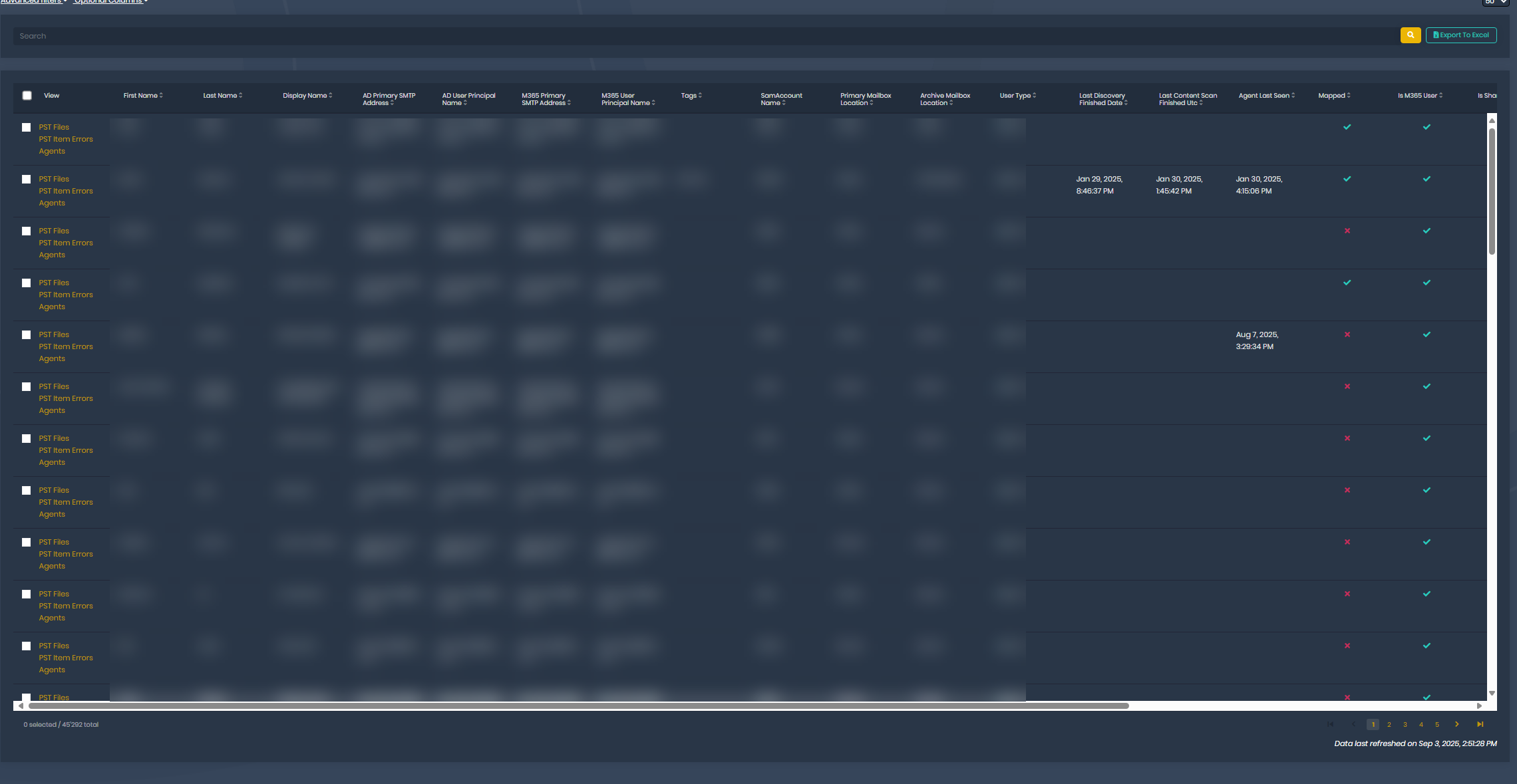
Here's our app in production, styled to full page height:
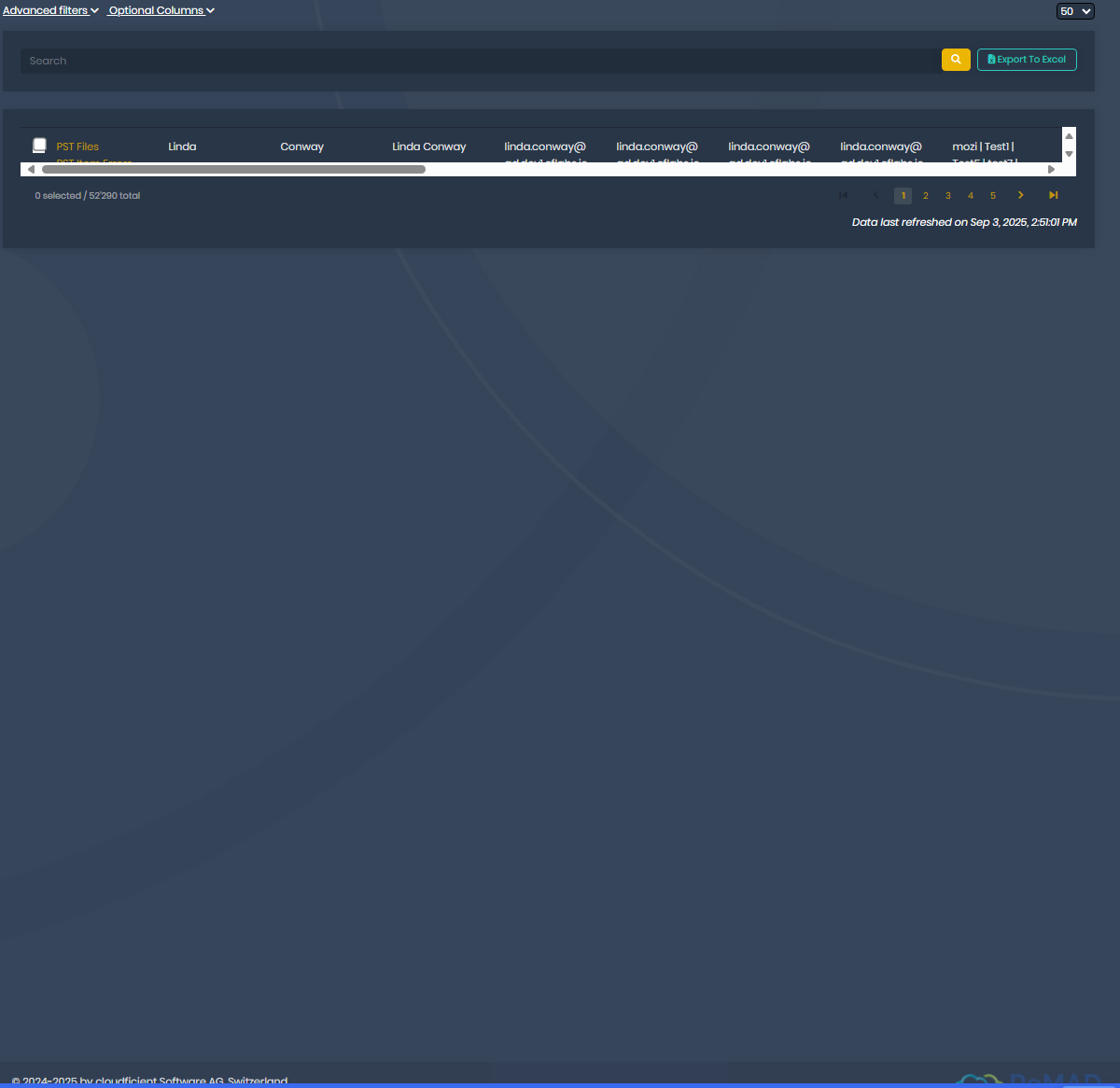
Here's the App in development, not styled to full height:
It also exhibits other style issues, but only in the ngx-datatable:
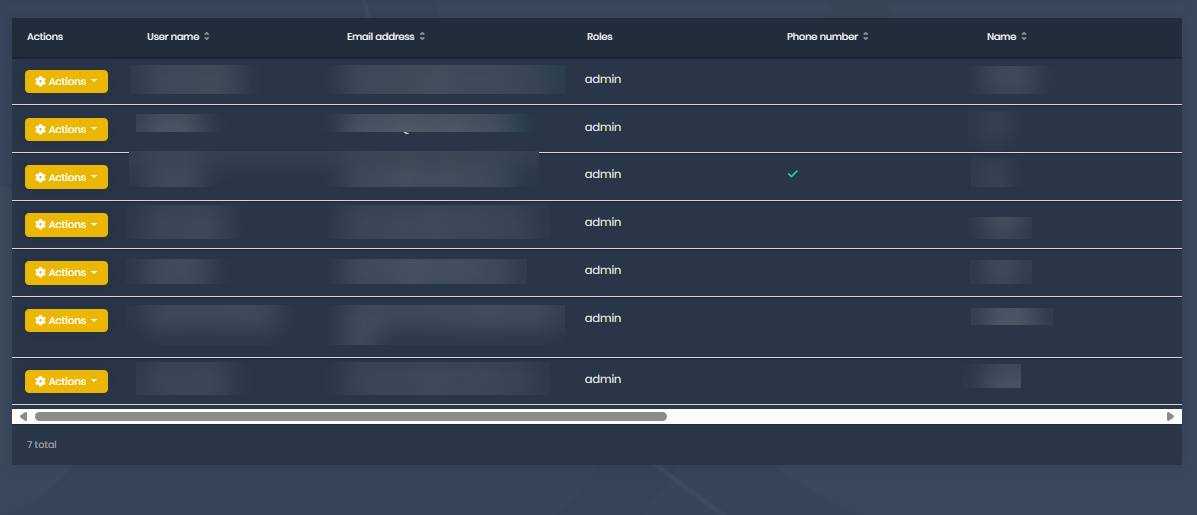
Which seems to suggest to us that the loading of the styles is the issue, as we correctly override things in the lepton4.css from the base theme, but certain ngx-datatable stuff does not get overridden correctly, as the style.css is loaded before the ngx-datatable.css stuff.
ABP Version 9.3.1
2025-08-28T11:44:30|ERROR|P:163720|T:20|AbpExceptionFilter||An exception was thrown while activating Volo.Saas.Host.TenantController -> company.product.Tenants.productTenantAppService -> Volo.Abp.Account.AccountAppService -> Volo.Abp.BlobStoring.BlobContainer`1[[Volo.Abp.Account.AccountProfilePictureContainer, Volo.Abp.Account.Pro.Public.Application, Version=9.3.1.0, Culture=neutral, PublicKeyToken=null]].
EXCEPTION: Autofac.Core.DependencyResolutionException: An exception was thrown while activating Volo.Saas.Host.TenantController -> company.product.Tenants.productTenantAppService -> Volo.Abp.Account.AccountAppService -> Volo.Abp.BlobStoring.BlobContainer`1[[Volo.Abp.Account.AccountProfilePictureContainer, Volo.Abp.Account.Pro.Public.Application, Version=9.3.1.0, Culture=neutral, PublicKeyToken=null]].
---> Autofac.Core.DependencyResolutionException: An exception was thrown while invoking the constructor 'Void .ctor(Volo.Abp.BlobStoring.IBlobContainerFactory)' on type 'BlobContainer`1'.
---> Volo.Abp.AbpException: Could not find the BLOB Storage provider with the type (Volo.Abp.BlobStoring.Database.DatabaseBlobProvider, Volo.Abp.BlobStoring.Database.Domain, Version=9.3.1.0, Culture=neutral, PublicKeyToken=null) configured for the container account-profile-pictures and no default provider was set.
at Volo.Abp.BlobStoring.DefaultBlobProviderSelector.Get(String containerName)
at Volo.Abp.BlobStoring.BlobContainerFactory.Create(String name)
at lambda_method3887(Closure, Object[])
at Autofac.Core.Activators.Reflection.BoundConstructor.Instantiate()
--- End of inner exception stack trace ---
at Autofac.Core.Activators.Reflection.BoundConstructor.Instantiate()
at Autofac.Core.Activators.Reflection.ReflectionActivator.<>c__DisplayClass14_0.<UseSingleConstructorActivation>b__0(ResolveRequestContext context, Action`1 next)
at Autofac.Core.Resolving.Middleware.DisposalTrackingMiddleware.Execute(ResolveRequestContext context, Action`1 next)
at Autofac.Builder.RegistrationBuilder`3.<>c__DisplayClass41_0.<PropertiesAutowired>b__0(ResolveRequestContext context, Action`1 next)
at Autofac.Core.Resolving.Middleware.ActivatorErrorHandlingMiddleware.Execute(ResolveRequestContext context, Action`1 next)
--- End of inner exception stack trace ---
at Autofac.Core.Resolving.Middleware.ActivatorErrorHandlingMiddleware.Execute(ResolveRequestContext context, Action`1 next)
at Autofac.Core.Resolving.Middleware.SharingMiddleware.Execute(ResolveRequestContext context, Action`1 next)
at Autofac.Core.Resolving.Middleware.CircularDependencyDetectorMiddleware.Execute(ResolveRequestContext context, Action`1 next)
at Autofac.Core.Resolving.ResolveOperation.GetOrCreateInstance(ISharingLifetimeScope currentOperationScope, ResolveRequest& request)
at Autofac.Core.Resolving.ResolveOperation.ExecuteOperation(ResolveRequest& request)
at Microsoft.Extensions.DependencyInjection.ServiceProviderServiceExtensions.GetRequiredService(IServiceProvider provider, Type serviceType)
at Microsoft.AspNetCore.Mvc.Controllers.ControllerFactoryProvider.<>c__DisplayClass6_0.<CreateControllerFactory>g__CreateController|0(ControllerContext controllerContext)
at Microsoft.AspNetCore.Mvc.Infrastructure.ControllerActionInvoker.Next(State& next, Scope& scope, Object& state, Boolean& isCompleted)
at Microsoft.AspNetCore.Mvc.Infrastructure.ControllerActionInvoker.InvokeInnerFilterAsync()
--- End of stack trace from previous location ---
at Microsoft.AspNetCore.Mvc.Infrastructure.ResourceInvoker.<InvokeNextExceptionFilterAsync>g__Awaited|26_0(ResourceInvoker invoker, Task lastTask, State next, Scope scope, Object state, Boolean isCompleted)
We have added the Minio BLOB provider to create new containers. We have added this to the ConfigureServices of the productHttpApiHostModule.cs:
Configure<AbpBlobStoringOptions>(options =>
 {
     options.Containers.ConfigureDefault(container =>
     {
         container.UseDatabase();
     });

     options.Containers.Configure<AIModelBlobContainer>(container =>
     {
         container.IsMultiTenant = false;

         container.UseMinio(minio =>
         {
             // Manual configuration binding - ABP's automatic binding is failing
             var configuration = context.Services.GetConfiguration();
             var blobSection = configuration.GetSection("BlobStoring:Containers:AIModelBlobContainer:Minio");

             minio.EndPoint = blobSection["EndPoint"];
             minio.AccessKey = blobSection["AccessKey"];
             minio.SecretKey = blobSection["SecretKey"];
             minio.BucketName = blobSection["BucketName"];
             minio.WithSSL = bool.Parse(blobSection["WithSSL"] ?? "true");
         });
     });
 });
After updating to 9.3.1, when trying to log in using OpenID (Microsoft Azure), we get this exception:
2025-08-12T07:54:13|ERROR|authserver-69f45bbbbb-g444g |authserver-69f45bbbbb-g444g\app |10.51.2.244 | |T:34 |OpenIdConnectHandler | | || |Exception occurred while processing message.
EXCEPTION: System.MissingMethodException: Method not found: 'Void Microsoft.IdentityModel.Tokens.TokenValidationResult..ctor(Microsoft.IdentityModel.Tokens.SecurityToken, Microsoft.IdentityModel.Tokens.TokenHandler, Microsoft.IdentityModel.Tokens.TokenValidationParameters, System.String, System.Collections.Generic.List`1<Microsoft.IdentityModel.Tokens.Experimental.ValidatedToken>)'.
at Microsoft.AspNetCore.Authentication.OpenIdConnect.OpenIdConnectHandler.ValidateTokenUsingHandlerAsync(String idToken, AuthenticationProperties properties, TokenValidationParameters validationParameters)
at Microsoft.AspNetCore.Authentication.OpenIdConnect.OpenIdConnectHandler.HandleRemoteAuthenticateAsync()
2025-08-12T07:54:13|ERROR|authserver-69f45bbbbb-g444g |authserver-69f45bbbbb-g444g\app |10.51.2.244 | |T:34 |ExceptionHandlerMiddleware | | || |An unhandled exception has occurred while executing the request.
EXCEPTION: Microsoft.AspNetCore.Authentication.AuthenticationFailureException: An error was encountered while handling the remote login.
---> System.MissingMethodException: Method not found: 'Void Microsoft.IdentityModel.Tokens.TokenValidationResult..ctor(Microsoft.IdentityModel.Tokens.SecurityToken, Microsoft.IdentityModel.Tokens.TokenHandler, Microsoft.IdentityModel.Tokens.TokenValidationParameters, System.String, System.Collections.Generic.List`1<Microsoft.IdentityModel.Tokens.Experimental.ValidatedToken>)'.
at Microsoft.AspNetCore.Authentication.OpenIdConnect.OpenIdConnectHandler.ValidateTokenUsingHandlerAsync(String idToken, AuthenticationProperties properties, TokenValidationParameters validationParameters)
at Microsoft.AspNetCore.Authentication.OpenIdConnect.OpenIdConnectHandler.HandleRemoteAuthenticateAsync()
--- End of inner exception stack trace ---
at Microsoft.AspNetCore.Authentication.RemoteAuthenticationHandler`1.HandleRequestAsync()
at Microsoft.AspNetCore.Authentication.AuthenticationMiddleware.Invoke(HttpContext context)
at Volo.Abp.AspNetCore.Security.AbpSecurityHeadersMiddleware.InvokeAsync(HttpContext context, RequestDelegate next)
at Microsoft.AspNetCore.Builder.UseMiddlewareExtensions.InterfaceMiddlewareBinder.<>c__DisplayClass2_0.<<CreateMiddleware>b__0>d.MoveNext()
--- End of stack trace from previous location ---
at Volo.Abp.AspNetCore.Tracing.AbpCorrelationIdMiddleware.InvokeAsync(HttpContext context, RequestDelegate next)
at Microsoft.AspNetCore.Builder.UseMiddlewareExtensions.InterfaceMiddlewareBinder.<>c__DisplayClass2_0.<<CreateMiddleware>b__0>d.MoveNext()
--- End of stack trace from previous location ---
at Microsoft.AspNetCore.Diagnostics.ExceptionHandlerMiddlewareImpl.<Invoke>g__Awaited|10_0(ExceptionHandlerMiddlewareImpl middleware, HttpContext context, Task task)
Microsoft Packages are all updated, Microsoft.IdentityModel.Tokens resolved Version seems to be 8.12.1
The release notes for this Version do say they had a little accident with leaking experimental code:
https://github.com/AzureAD/azure-activedirectory-identitymodel-extensions-for-dotnet/releases/tag/8.12.1
(PR https://github.com/AzureAD/azure-activedirectory-identitymodel-extensions-for-dotnet/pull/3259 for remediation)
I don't know if this is something in ABP to solve or upstream, but external login for us does not work in 9.3.1.
└─ Volo.Abp.AspNetCore.MultiTenancy (v9.3.1)
   │     └─ Volo.Abp.AspNetCore (v9.3.1)
   │        └─ Microsoft.AspNetCore.Authentication.OpenIdConnect (v9.0.8)
   │           └─ Microsoft.IdentityModel.Protocols.OpenIdConnect (v8.12.0)
   │              ├─ Microsoft.IdentityModel.Protocols (v8.12.0)
   │              │  └─ Microsoft.IdentityModel.Tokens (v8.12.1)
   │              └─ System.IdentityModel.Tokens.Jwt (v8.12.0)
   │                 ├─ Microsoft.IdentityModel.JsonWebTokens (v8.12.0)
   │                 │  └─ Microsoft.IdentityModel.Tokens (v8.12.1)
   │                 └─ Microsoft.IdentityModel.Tokens (v8.12.1)
We currently got an error when trying to create a Tenant:
EXCEPTION: Volo.Abp.UserFriendlyException: The tenant connection string 'Default' is not valid at Volo.Saas.Host.TenantAppService.CheckConnectionStringAsync(Tenant tenant) at Volo.Saas.Host.TenantAppService.<>c__DisplayClass27_0.ETBg5kcYQAHiA0HJrJL.MoveNext() --- End of stack trace from previous location --- at Volo.Saas.Host.TenantAppService.CreateAsync(SaasTenantCreateDto input)
We think this started happening after upgrading to 9.2.0. We have changed ABP to store connection strings encrypted. For this, we assign an encrypted connection string to SaasTenantCreateDto.ConnectionString.Default. This used to work fine, but now results in the error message above.
We have found a method to override on the ITenantAppService which looked promising:
  public override Task<bool> CheckConnectionStringAsync(string connectionString)
  {
      var decrypted = _stringEncryptionService.Decrypt(connectionString);
      return base.CheckConnectionStringAsync(decrypted);
  }
This however did not lead to success.
Any idea how we can fix this?
For further reference, this is how our overridden CreateAsync looks like:
  public override async Task<SaasTenantDto> CreateAsync(SaasTenantCreateDto input)
  {
      var servers = await _availableSqlServerAppService.GetListAsync(new GetAvailableSqlServersInput {AvailableForTenantDatabase = true});
      var first = servers.Items.OrderBy(i => i.NrOfTenants).First();

      var defaultConnectionString = new SqlConnectionStringBuilder(DbConnectionOptions.ConnectionStrings.Default);
      var baseDBName = string.Join('.', defaultConnectionString.InitialCatalog.Split(".").SkipLast(1));

      var connectionString = new SqlConnectionStringBuilder {InitialCatalog = $"{baseDBName}.Tenant.{input.Name}", DataSource = first.SqlServerName, UserID = first.LoginUser, Password = _stringEncryptionService.Decrypt(first.EncryptedPassword), TrustServerCertificate = true};
      input.ConnectionStrings.Default = _stringEncryptionService.Encrypt(connectionString.ConnectionString);

      await CreateAzureDatabaseIfNotExists(connectionString);
      return await base.CreateAsync(input);
  }
Thx
Hi
We are currently using ABP 9.2.0 with the Lepton Theme, Angular.
At some point probably during one of the last version updates (maybe 9.1.3?) it seems that our Homepage lost it's localizations.
Just the Homepage though (the one with the "LongWelcomeMessage" localization) - all other pages are fine.
We're not aware of any changes from our side specifically to the Home Component, and we have no idea where to start looking for the error.
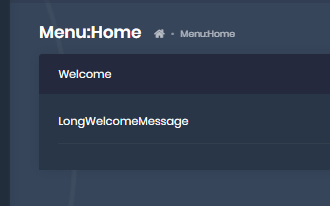
We rarely look at this page, I noticed it on the Update from 9.2.0, but we're also seeing it in an environment that still has 9.1.3...
There are no errors on the console, however we find these warnings: The localization source separator (::) not found.
We are trying to add a login hint to the login page on the Auth Server (MVC), and thought that's an easy task, but for some reason can't get it to work :(
We are overriding the Login.cs page by having a OurProductLogin.cshtml.cs file in /Pages/Account (as well as the _ViewImports.cshtml)
Content of OurProductLogin.cshtml.cs:
using System.Threading.Tasks;
using company.Product.Saas;
using Microsoft.AspNetCore.Authentication;
using Microsoft.AspNetCore.Identity;
using Microsoft.AspNetCore.Mvc;
using Microsoft.Extensions.Options;
using Owl.reCAPTCHA;
using Volo.Abp.Account.ExternalProviders;
using Volo.Abp.Account.Public.Web;
using Volo.Abp.Account.Public.Web.Pages.Account;
using Volo.Abp.Account.Security.Recaptcha;
using Volo.Abp.Auditing;
using Volo.Abp.DependencyInjection;
using Volo.Abp.Security.Claims;
using Volo.Abp.Uow;

namespace company.Product.Pages.Account;

[DisableAuditing]
[Dependency(ReplaceServices = true)]
[ExposeServices(typeof(LoginModel))]
public class OurProductLoginModel: LoginModel
{
    [BindProperty(SupportsGet = true)]
    public string? test { get; set; }

    public OurProductLoginModel(
        IAuthenticationSchemeProvider schemeProvider,
        IOptions<AbpAccountOptions> accountOptions,
        IAbpRecaptchaValidatorFactory recaptchaValidatorFactory,
        IAccountExternalProviderAppService accountExternalProviderAppService,
        ICurrentPrincipalAccessor currentPrincipalAccessor,
        IOptions<IdentityOptions> identityOptions,
        IOptionsSnapshot<reCAPTCHAOptions> reCaptchaOptions) : base(schemeProvider, accountOptions, recaptchaValidatorFactory, accountExternalProviderAppService, currentPrincipalAccessor, identityOptions, reCaptchaOptions)
    {
    }

    public override async Task<IActionResult> OnGetAsync()
    {
        var result = await base.OnGetAsync();

        if (!string.IsNullOrEmpty(test))
        {
            LoginInput.UserNameOrEmailAddress = test;
        }

        return result;
    }
}
As you can see, this seems as simple as it can get :)
However, when using a Browser GET request to /Account/Login?test=test@test.com, the Username field is not pre-filled as we'd expect.
What are we doing wrong?
(Note: We have also tried this permutation of the OnGetAsync() function, without relying on the base.OnGetAsync()):
public override async Task<IActionResult> OnGetAsync()
{
    LoginInput = new LoginInputModel();
    if (!string.IsNullOrEmpty(test))
    {
        LoginInput.UserNameOrEmailAddress = test;
    }

    var localLoginResult = await CheckLocalLoginAsync();
    if (localLoginResult != null)
    {
        return localLoginResult;
    }

    IsSelfRegistrationEnabled = await SettingProvider.IsTrueAsync(AccountSettingNames.IsSelfRegistrationEnabled);

    UseCaptcha = await UseCaptchaOnLoginAsync();

    IsLinkLogin = await VerifyLinkTokenAsync();
    if (IsLinkLogin)
    {
        if (CurrentUser.IsAuthenticated)
        {
            await IdentitySecurityLogManager.SaveAsync(new IdentitySecurityLogContext
            {
                Identity = IdentitySecurityLogIdentityConsts.Identity,
                Action = IdentitySecurityLogActionConsts.Logout
            });

            await SignInManager.SignOutAsync();

            return Redirect(HttpContext.Request.GetDisplayUrl());
        }
    }

    return Page();
}
Also note: While debugging, the Property test is indeed null in the OnGetAsync() method.
Edit: The more I try to understand this, the more questions I have :)
What's the deal with OpenIddictSupportedLoginModel, do I need to use this? (I can't really find any official documentation about this, so I assume not? If yes -> Documentation definitely needs to be improved).
In there, it seems that it <could> use a LoginHint already, but the base.OnGetAsync() overwrites the LoginInput property and would erase the value again, right?
Thanks Michel
ABP Framework version: v8.0.4
UI Type: Angular
Database System: EF Core (SQL Server)
Tiered (for MVC) or Auth Server Separated (for Angular): yes
Exception message and full stack trace:
EXCEPTION: System.InvalidOperationException: The instance of entity type 'IdentityUserLogin' cannot be tracked because another instance with the same key value for {'UserId', 'LoginProvider'} is already being tracked. When attaching existing entities, ensure that only one entity instance with a given key value is attached. Consider using 'DbContextOptionsBuilder.EnableSensitiveDataLogging' to see the conflicting key values. at Microsoft.EntityFrameworkCore.ChangeTracking.Internal.IdentityMap1.ThrowIdentityConflict(InternalEntityEntry entry)
at Microsoft.EntityFrameworkCore.ChangeTracking.Internal.IdentityMap1.Add(TKey key, InternalEntityEntry entry, Boolean updateDuplicate) at Microsoft.EntityFrameworkCore.ChangeTracking.Internal.IdentityMap1.Add(TKey key, InternalEntityEntry entry)
at Microsoft.EntityFrameworkCore.ChangeTracking.Internal.NullableKeyIdentityMap1.Add(InternalEntityEntry entry) at Microsoft.EntityFrameworkCore.ChangeTracking.Internal.StateManager.StartTracking(InternalEntityEntry entry) at Microsoft.EntityFrameworkCore.ChangeTracking.Internal.InternalEntityEntry.SetEntityState(EntityState oldState, EntityState newState, Boolean acceptChanges, Boolean modifyProperties) at Microsoft.EntityFrameworkCore.ChangeTracking.Internal.InternalEntityEntry.SetEntityState(EntityState entityState, Boolean acceptChanges, Boolean modifyProperties, Nullable1 forceStateWhenUnknownKey, Nullable1 fallbackState) at Microsoft.EntityFrameworkCore.ChangeTracking.Internal.EntityGraphAttacher.PaintAction(EntityEntryGraphNode1 node)
at Microsoft.EntityFrameworkCore.ChangeTracking.Internal.EntityEntryGraphIterator.TraverseGraph[TState](EntityEntryGraphNode1 node, Func2 handleNode)
at Microsoft.EntityFrameworkCore.ChangeTracking.Internal.EntityGraphAttacher.AttachGraph(InternalEntityEntry rootEntry, EntityState targetState, EntityState storeGeneratedWithKeySetTargetState, Boolean forceStateWhenUnknownKey)
at Microsoft.EntityFrameworkCore.ChangeTracking.Internal.NavigationFixer.NavigationCollectionChanged(InternalEntityEntry entry, INavigationBase navigationBase, IEnumerable1 added, IEnumerable1 removed)
at Microsoft.EntityFrameworkCore.ChangeTracking.Internal.InternalEntityEntryNotifier.NavigationCollectionChanged(InternalEntityEntry entry, INavigationBase navigationBase, IEnumerable1 added, IEnumerable1 removed)
at Microsoft.EntityFrameworkCore.ChangeTracking.Internal.ChangeDetector.DetectNavigationChange(InternalEntityEntry entry, INavigationBase navigationBase)
at Microsoft.EntityFrameworkCore.ChangeTracking.Internal.ChangeDetector.LocalDetectChanges(InternalEntityEntry entry)
at Microsoft.EntityFrameworkCore.ChangeTracking.Internal.ChangeDetector.DetectChanges(IStateManager stateManager)
at Microsoft.EntityFrameworkCore.ChangeTracking.ChangeTracker.DetectChanges()
at Microsoft.EntityFrameworkCore.Internal.InternalDbSet1.get_Local() at Volo.Abp.Domain.Repositories.EntityFrameworkCore.EfCoreRepository2.UpdateAsync(TEntity entity, Boolean autoSave, CancellationToken cancellationToken)
at Castle.DynamicProxy.AsyncInterceptorBase.ProceedAsynchronous[TResult](IInvocation invocation, IInvocationProceedInfo proceedInfo)
at Volo.Abp.Castle.DynamicProxy.CastleAbpMethodInvocationAdapterWithReturnValue1.ProceedAsync() at Volo.Abp.Uow.UnitOfWorkInterceptor.InterceptAsync(IAbpMethodInvocation invocation) at Volo.Abp.Castle.DynamicProxy.CastleAsyncAbpInterceptorAdapter1.InterceptAsync[TResult](IInvocation invocation, IInvocationProceedInfo proceedInfo, Func3 proceed) at Volo.Abp.Identity.IdentityUserStore.UpdateAsync(IdentityUser user, CancellationToken cancellationToken) at Microsoft.AspNetCore.Identity.UserManager1.UpdateUserAsync(TUser user)
at Castle.DynamicProxy.AsyncInterceptorBase.ProceedAsynchronous[TResult](IInvocation invocation, IInvocationProceedInfo proceedInfo)
at Volo.Abp.Castle.DynamicProxy.CastleAbpMethodInvocationAdapterWithReturnValue1.ProceedAsync() at Volo.Abp.Uow.UnitOfWorkInterceptor.InterceptAsync(IAbpMethodInvocation invocation) at Volo.Abp.Castle.DynamicProxy.CastleAsyncAbpInterceptorAdapter1.InterceptAsync[TResult](IInvocation invocation, IInvocationProceedInfo proceedInfo, Func3 proceed) at Microsoft.AspNetCore.Identity.UserManager1.AddLoginAsync(TUser user, UserLoginInfo login)
at Castle.DynamicProxy.AsyncInterceptorBase.ProceedAsynchronous[TResult](IInvocation invocation, IInvocationProceedInfo proceedInfo)
at Volo.Abp.Castle.DynamicProxy.CastleAbpMethodInvocationAdapterWithReturnValue1.ProceedAsync() at Volo.Abp.Uow.UnitOfWorkInterceptor.InterceptAsync(IAbpMethodInvocation invocation) at Volo.Abp.Castle.DynamicProxy.CastleAsyncAbpInterceptorAdapter1.InterceptAsync[TResult](IInvocation invocation, IInvocationProceedInfo proceedInfo, Func3 proceed) at Volo.Abp.Account.Public.Web.Pages.Account.LoginModel.OnGetExternalLoginCallbackAsync(String remoteError) at Microsoft.AspNetCore.Mvc.RazorPages.Infrastructure.ExecutorFactory.GenericTaskHandlerMethod.Convert[T](Object taskAsObject) at Microsoft.AspNetCore.Mvc.RazorPages.Infrastructure.ExecutorFactory.GenericTaskHandlerMethod.Execute(Object receiver, Object[] arguments) at Microsoft.AspNetCore.Mvc.RazorPages.Infrastructure.PageActionInvoker.InvokeHandlerMethodAsync() at Microsoft.AspNetCore.Mvc.RazorPages.Infrastructure.PageActionInvoker.InvokeNextPageFilterAsync() at Microsoft.AspNetCore.Mvc.RazorPages.Infrastructure.PageActionInvoker.Rethrow(PageHandlerExecutedContext context) at Microsoft.AspNetCore.Mvc.RazorPages.Infrastructure.PageActionInvoker.Next(State& next, Scope& scope, Object& state, Boolean& isCompleted) at Microsoft.AspNetCore.Mvc.RazorPages.Infrastructure.PageActionInvoker.InvokeInnerFilterAsync() at Microsoft.AspNetCore.Mvc.Infrastructure.ResourceInvoker.<InvokeNextExceptionFilterAsync>g__Awaited|26_0(ResourceInvoker invoker, Task lastTask, State next, Scope scope, Object state, Boolean isCompleted) at Microsoft.AspNetCore.Mvc.Infrastructure.ResourceInvoker.Rethrow(ExceptionContextSealed context) at Microsoft.AspNetCore.Mvc.Infrastructure.ResourceInvoker.Next(State& next, Scope& scope, Object& state, Boolean& isCompleted) at Microsoft.AspNetCore.Mvc.Infrastructure.ResourceInvoker.<InvokeNextResourceFilter>g__Awaited|25_0(ResourceInvoker invoker, Task lastTask, State next, Scope scope, Object state, Boolean isCompleted) at Microsoft.AspNetCore.Mvc.Infrastructure.ResourceInvoker.Rethrow(ResourceExecutedContextSealed context) at Microsoft.AspNetCore.Mvc.Infrastructure.ResourceInvoker.Next(State& next, Scope& scope, Object& state, Boolean& isCompleted) at Microsoft.AspNetCore.Mvc.Infrastructure.ResourceInvoker.<InvokeFilterPipelineAsync>g__Awaited|20_0(ResourceInvoker invoker, Task lastTask, State next, Scope scope, Object state, Boolean isCompleted) at Microsoft.AspNetCore.Mvc.Infrastructure.ResourceInvoker.<InvokeAsync>g__Logged|17_1(ResourceInvoker invoker) at Microsoft.AspNetCore.Mvc.Infrastructure.ResourceInvoker.<InvokeAsync>g__Logged|17_1(ResourceInvoker invoker) at company.Product.Common.AspNetCore.logMiddleware.InvokeAsync(HttpContext context, RequestDelegate next) in /src/src/company.Product.Common.AspNetCore/logMiddleware.cs:line 42 at Microsoft.AspNetCore.Builder.UseMiddlewareExtensions.InterfaceMiddlewareBinder.<>c__DisplayClass2_0.<<CreateMiddleware>b__0>d.MoveNext() --- End of stack trace from previous location --- at Volo.Abp.AspNetCore.Auditing.AbpAuditingMiddleware.InvokeAsync(HttpContext context, RequestDelegate next) at Microsoft.AspNetCore.Builder.UseMiddlewareExtensions.InterfaceMiddlewareBinder.<>c__DisplayClass2_0.<<CreateMiddleware>b__0>d.MoveNext() --- End of stack trace from previous location --- at Microsoft.AspNetCore.Authorization.AuthorizationMiddleware.Invoke(HttpContext context) at Volo.Abp.AspNetCore.Uow.AbpUnitOfWorkMiddleware.InvokeAsync(HttpContext context, RequestDelegate next) at Microsoft.AspNetCore.Builder.UseMiddlewareExtensions.InterfaceMiddlewareBinder.<>c__DisplayClass2_0.<<CreateMiddleware>b__0>d.MoveNext() --- End of stack trace from previous location --- at Volo.Abp.AspNetCore.ExceptionHandling.AbpExceptionHandlingMiddleware.InvokeAsync(HttpContext context, RequestDelegate next) at Volo.Abp.AspNetCore.ExceptionHandling.AbpExceptionHandlingMiddleware.InvokeAsync(HttpContext context, RequestDelegate next) at Microsoft.AspNetCore.Builder.UseMiddlewareExtensions.InterfaceMiddlewareBinder.<>c__DisplayClass2_0.<<CreateMiddleware>b__0>d.MoveNext() --- End of stack trace from previous location --- at Volo.Abp.AspNetCore.MultiTenancy.MultiTenancyMiddleware.InvokeAsync(HttpContext context, RequestDelegate next) at Microsoft.AspNetCore.Builder.UseMiddlewareExtensions.InterfaceMiddlewareBinder.<>c__DisplayClass2_0.<<CreateMiddleware>b__0>d.MoveNext() --- End of stack trace from previous location --- at Microsoft.AspNetCore.Builder.ApplicationBuilderAbpOpenIddictMiddlewareExtension.<>c__DisplayClass0_0.<<UseAbpOpenIddictValidation>b__0>d.MoveNext() --- End of stack trace from previous location --- at Microsoft.AspNetCore.Authentication.AuthenticationMiddleware.Invoke(HttpContext context) at Volo.Abp.AspNetCore.Security.AbpSecurityHeadersMiddleware.InvokeAsync(HttpContext context, RequestDelegate next) at Microsoft.AspNetCore.Builder.UseMiddlewareExtensions.InterfaceMiddlewareBinder.<>c__DisplayClass2_0.<<CreateMiddleware>b__0>d.MoveNext() --- End of stack trace from previous location --- at Volo.Abp.AspNetCore.Tracing.AbpCorrelationIdMiddleware.InvokeAsync(HttpContext context, RequestDelegate next) at Microsoft.AspNetCore.Builder.UseMiddlewareExtensions.InterfaceMiddlewareBinder.<>c__DisplayClass2_0.<<CreateMiddleware>b__0>d.MoveNext() --- End of stack trace from previous location --- at Microsoft.AspNetCore.Diagnostics.ExceptionHandlerMiddlewareImpl.<Invoke>g__Awaited|10_0(ExceptionHandlerMiddlewareImpl middleware, HttpContext context, Task task)
Steps to reproduce the issue: After updating to ABP 8.0.4, we have a problem logging in with External Authentication, we get a 500 error. Any ideas?
After updating from v6.x we are now trying to generate the Angular proxies, but we are getting:
Cannot read properties of null (reading 'replace')
when executing:
abp generate-proxy -t ng -u http://localhost:5101
We can reach the api-definition document on: http://localhost:5101/api/abp/api-definition
Any pointers how to troubleshoot this? Does the abp cli generate logs or something we can use?
We are using ICancellationTokenProvider for our repositories with the GetCancellationToken() method, so we don't have to sprinkle the CancellationTokens into every method. This works well with the HttpContext Token Provider.
We would like to do the same thing with Background Workers (we are using HangfireBackgroundWorkerBase) - but we are not sure how to... any pointers? Or do we need to convert our Repositories to take CancellationTokens as parameters for this to work properly?
Thanks









