Hi @maliming,
We tried the same approach in our setup. Our Project A is an ABP solution with Angular UI + .NET backend.
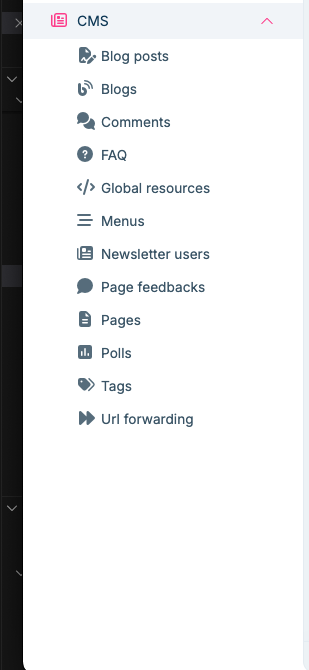
Would appreciate guidance on the best supported path for an Angular UI solution where tenants need CMS management capabilities.
Hi ABP Support Team,
We have an ABP Commercial project A (our main product) that is already live and running in production.
Now we have a new requirement for a subset of tenants: we want to provide CMS functionality (CMS Kit + Public Website) for those tenants.
To explore this, we created a separate ABP project B using the ABP template with CMS Kit and Public Website enabled, and we’ve already done some customizations in project B.
At this point, we want to bring this CMS capability into our main project A, and we are considering two approaches:
Option 1: Convert project B into a module and integrate it into project A
Make B a reusable module and then include it in A.
Option 2: Install CMS Kit + Public Website into project A directly, and migrate our customizations from project B
We need guidance on:
Our goal is to keep one main solution (A), enable CMS features only where needed, and avoid creating an architecture that becomes difficult to maintain across ABP upgrades.
Thanks in advance for your recommendation and the best-practice steps to implement it.
I’m reviewing it now and will verify whether it’s working. I’ll get back to you with a response.
We are using CMS Kit Pro in our application. https://abp.io/docs/commercial/8.1/modules/cms-kit
Right now, the host admin (host) configures CMS Kit Pro and our users can use the features that the host admin has created (pages, blogs, etc.). Now we want to enable multi‑tenancy for CMS Kit Pro. https://abp.io/docs/2.1/Multi-Tenancy
The requirement is: Each tenant should be able to use CMS Kit Pro to create blogs, pages, newsletters, etc.
The end users of that tenant should be able to access this content without login (public website), similar to a WordPress site.
Questions:
1.What is the recommended way to implement this scenario with CMS Kit Pro in a multi‑tenant application?
2.Is there any built‑in feature or recommended pattern for exposing tenant‑specific CMS content (pages newsletter subscription, FAQ, etc.)
3.Publicly without requiring authentication?
Do we need a separate public web site host per tenant, or can we have a single public site that serves different content based on the current tenant?
Any guidance or example configuration (especially for the public website + multi‑tenancy setup) would be very helpful.
Hi Thanks, we are done, Need one advice :
How to implement this in our custom layout component.
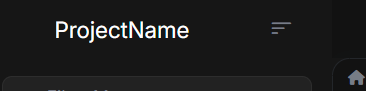
[sumeyye.kurtulus] said: Hello again, I am glad that your problems are almost resolved. Could you clarify that you do not duplicate the theme providers in your
app.config.ts?//... providers: [ provideThemeLeptonX(), provideSideMenuLayout(), //You need to remove these if you have them //importProvidersFrom([ //ThemeLeptonxModule.forRoot(), //SideMenuLayoutModule.forRoot() //]) ] //...
no this is my app.config.ts code
import { provideAbpCore, SubscriptionService, withOptions } from '@abp/ng.core';
import { provideAbpOAuth } from '@abp/ng.oauth';
import { provideSettingManagementConfig } from '@abp/ng.setting-management/config';
import { provideFeatureManagementConfig } from '@abp/ng.feature-management';
import {
  provideAbpThemeShared,
  withValidationBluePrint,
  withHttpErrorConfig,
} from '@abp/ng.theme.shared';
import { provideIdentityConfig } from '@volo/abp.ng.identity/config';
import { provideCommercialUiConfig } from '@volo/abp.commercial.ng.ui/config';
import { provideAccountAdminConfig } from '@volo/abp.ng.account/admin/config';
import { provideAccountPublicConfig } from '@volo/abp.ng.account/public/config';
import { provideGdprConfig, withCookieConsentOptions } from '@volo/abp.ng.gdpr/config';
import { provideAuditLoggingConfig } from '@volo/abp.ng.audit-logging/config';
import { provideLanguageManagementConfig } from '@volo/abp.ng.language-management/config';
import { registerLocale } from '@volo/abp.ng.language-management/locale';
import { provideSaasConfig } from '@volo/abp.ng.saas/config';
import { provideTextTemplateManagementConfig } from '@volo/abp.ng.text-template-management/config';
import { provideOpeniddictproConfig } from '@volo/abp.ng.openiddictpro/config';
import { HttpErrorComponent, provideThemeLeptonX } from '@volosoft/abp.ng.theme.lepton-x';
import { provideSideMenuLayout } from '@volosoft/abp.ng.theme.lepton-x/layouts';
import { provideLogo, withEnvironmentOptions } from '@volo/ngx-lepton-x.core';
import { ApplicationConfig } from '@angular/core';
import {  importProvidersFrom } from '@angular/core';
import { provideAnimations } from '@angular/platform-browser/animations';
import { provideRouter } from '@angular/router';
import { environment } from '../environments/environment';
import { APP_ROUTES } from './app.routes';
import { APP_ROUTE_PROVIDER } from './route.provider';
import { CODE_STANDARDS_CODE_STANDARD_ROUTE_PROVIDER } from './code-standards/code-standard/providers/code-standard-route.provider';
import { CODE_VERSIONS_CODE_VERSION_ROUTE_PROVIDER } from './code-versions/code-version/providers/code-version-route.provider';
import { JURISDICTIONS_JURISDICTION_ROUTE_PROVIDER } from './jurisdictions/jurisdiction/providers/jurisdiction-route.provider';
import {
  CUSTOM_LAYOUT_PROVIDERS,
  myDynamicLayouts,
} from './shared/layouts/custom-application-layout/custom-application-layout';


import { CommonModule } from '@angular/common';
import { FormsModule } from '@angular/forms';
import { NgbModule } from '@ng-bootstrap/ng-bootstrap';
import { ThemeSharedModule } from '@abp/ng.theme.shared';
import { CoreModule } from '@abp/ng.core';
import { ThemeLeptonXModule } from '@volosoft/abp.ng.theme.lepton-x';
import { SideMenuLayoutModule } from '@volosoft/abp.ng.theme.lepton-x/layouts';
import { AccountLayoutModule } from '@volosoft/abp.ng.theme.lepton-x/account';
import { LpxSideMenuLayoutModule } from '@volosoft/ngx-lepton-x/layouts';
import { LpxResponsiveModule } from '@volo/ngx-lepton-x.core';
import { IdentityConfigModule } from '@volo/abp.ng.identity/config';
import { AccountAdminConfigModule } from '@volo/abp.ng.account/admin/config';
import { GdprConfigModule } from '@volo/abp.ng.gdpr/config';
import { AuditLoggingConfigModule } from '@volo/abp.ng.audit-logging/config';

export const appConfig: ApplicationConfig = {
  providers: [
    provideRouter(APP_ROUTES),
    APP_ROUTE_PROVIDER,
    CUSTOM_LAYOUT_PROVIDERS,

    // Import all required modules for LeptonX components
    importProvidersFrom(CommonModule),
    importProvidersFrom(FormsModule),
    importProvidersFrom(NgbModule),
    importProvidersFrom(ThemeSharedModule),
    importProvidersFrom(CoreModule),
    importProvidersFrom(ThemeLeptonXModule.forRoot()),
    importProvidersFrom(SideMenuLayoutModule.forRoot()),
    importProvidersFrom(AccountLayoutModule.forRoot()),
    importProvidersFrom(LpxSideMenuLayoutModule),
    importProvidersFrom(LpxResponsiveModule),
    importProvidersFrom(IdentityConfigModule),
    importProvidersFrom(AccountAdminConfigModule),
    importProvidersFrom(GdprConfigModule),
    importProvidersFrom(AuditLoggingConfigModule),

    provideAnimations(),


    provideAbpCore(
      withOptions({
        dynamicLayouts: myDynamicLayouts, // Essential for dynamic layout switching
        environment,
        registerLocaleFn: registerLocale(),
      })
    ),

    provideAbpOAuth(),
    provideIdentityConfig(),
    provideSettingManagementConfig(),
    provideFeatureManagementConfig(),
    provideAccountAdminConfig(),
    provideAccountPublicConfig(),
    provideCommercialUiConfig(),
    provideThemeLeptonX(),
    provideSideMenuLayout(),
    provideAbpThemeShared(
      withHttpErrorConfig({
        errorScreen: {
          component: HttpErrorComponent,
          forWhichErrors: [401, 403, 404, 500],
          hideCloseIcon: true,
        },
      }),
      withValidationBluePrint({
        wrongPassword: 'Please choose 1q2w3E*',
      })
    ),
    provideGdprConfig(
      withCookieConsentOptions({
        cookiePolicyUrl: '/gdpr-cookie-consent/cookie',
        privacyPolicyUrl: '/gdpr-cookie-consent/privacy',
      })
    ),
    provideLanguageManagementConfig(),
    provideSaasConfig(),
    provideAuditLoggingConfig(),
    provideOpeniddictproConfig(),
    provideTextTemplateManagementConfig(),
    CODE_STANDARDS_CODE_STANDARD_ROUTE_PROVIDER,
    CODE_VERSIONS_CODE_VERSION_ROUTE_PROVIDER,
    JURISDICTIONS_JURISDICTION_ROUTE_PROVIDER,
    SubscriptionService
  ],
};
Following the latest doucmentation, I am able to resolve the issue, now my leptonX components are working fine,
But i am encountering an issue with this,
we are getting two filter menus, which we don't want.
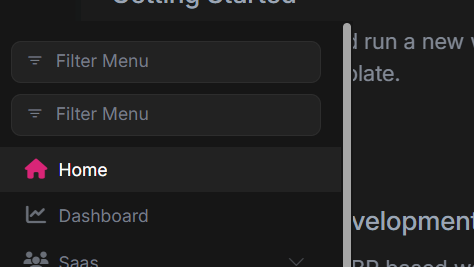
Can you guide me how to solve this issue.
You can refer to this up-to-date documentation for custom layout usage for lepton-x components: https://abp.io/docs/latest/ui-themes/lepton-x/how-to-use-lepton-x-components-with-angular-custom-layout
I followed the article and made the imports according to that, but still it's not working,
I mean unable to see the lpx components in the UI like lpx-navbar, lpx-settings.
Can we do one approach, will provide my code snippets how I am implementing the Customisations of the sidebar and you can better tell us how to fix this.
Can we get an quick response on this thread.
[AI-Bot] said: To use LeptonX components (like <lpx-navbar>, <lpx-footer>, etc.) in a custom layout with the new ABP Studio standalone API-based configuration (app.config.ts), you must ensure that the LeptonX modules are properly registered in the providers array, since standalone configuration does not use NgModules in the traditional way.
Here's how you can resolve the issue:
Instead of importing LeptonX modules in app.config.ts as you would in app.module.ts, you need to add them to the providers array using the provide* functions exported by those modules.
For LeptonX, use the provideLpxSideMenuLayout() and provideLpxResponsive() (if needed) functions.
Example for app.config.ts:
import { ApplicationConfig } from '@angular/core';
import { provideLpxSideMenuLayout } from '@volosoft/ngx-lepton-x/layouts';
import { provideLpxResponsive } from '@volosoft/ngx-lepton-x.core'; // optional

export const appConfig: ApplicationConfig = {
  providers: [
    // ...other providers
    provideLpxSideMenuLayout(),
    provideLpxResponsive(), // only if you use lpxResponsive directive
  ]
};
Remove any direct module imports (like LpxSideMenuLayoutModule) from app.config.ts, as they are not compatible with standalone API-based configuration.
Ensure your custom layout component is declared as a standalone component and imports the necessary LeptonX components in its imports array.
Example:
import { Component } from '@angular/core';
import { LpxNavbarComponent, LpxFooterComponent } from '@volosoft/ngx-lepton-x/components';

@Component({
  selector: 'app-custom-layout',
  standalone: true,
  imports: [LpxNavbarComponent, LpxFooterComponent /*, ...other LeptonX components*/],
  templateUrl: './custom-layout.component.html',
})
export class CustomLayoutComponent {}
- Use the LeptonX components in your template as before:
<lpx-navbar></lpx-navbar>
<!-- ... -->
<lpx-footer></lpx-footer>
By registering the LeptonX providers and importing the components in your standalone component, the LeptonX elements will render correctly in the UI.
Sources:
- https://abp.io/docs/latest/framework/ui/angular/component-replacement?_redirected=B8ABF606AA1BDF5C629883DF1061649A#how-to-replace-a-layout
- https://github.com/abpio/abp-commercial-docs/blob/dev/en/themes/lepton-x/how-to-use-lepton-x-components-with-angular-custom-layout.md
This response was generated by AI. If it didn’t solve your problem, feel free to post a new answer — our support team will jump in to help you soon.
with this response of AI,
import { LpxNavbarComponent, LpxFooterComponent } from '@volosoft/ngx-lepton-x/components';
we dont have @volosoft/ngx-lepton-x/components
and unable to find this too import { provideLpxResponsive } from '@volosoft/ngx-lepton-x.core'; // optional
Please help me in this.









