Hi,
in the classes generated by the ABP Suite, I’ve encountered various warnings, mainly relating to the using statements, which I’d really rather not have to suppress. Ideally, I’d like this to be generated correctly from the outset. At the moment, I have several thousand warnings in the generated code… which is rather unpleasant.
Could you please implement a fix for the following issues?
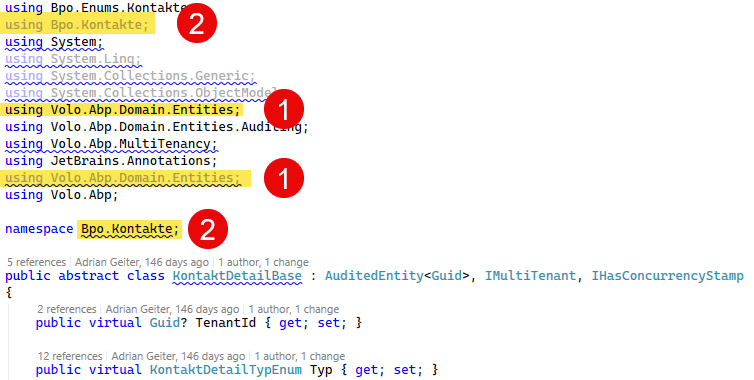
using statements that are sorted incorrectly (the standard sorting would probably be system namespaces first, followed by alphabetical order).using statement is added anew each time for certain classes. (So please also test multiple generation)Perhaps it would be possible to run “Remove and sort usings” (Ctrl + R, Ctrl + G) at the end for each generated class? I’m currently doing this across the whole solution, but it’s obviously tedious to have to repeat this every time after generation.
I'm using ABP Studio 3.06.
Here are some examples:
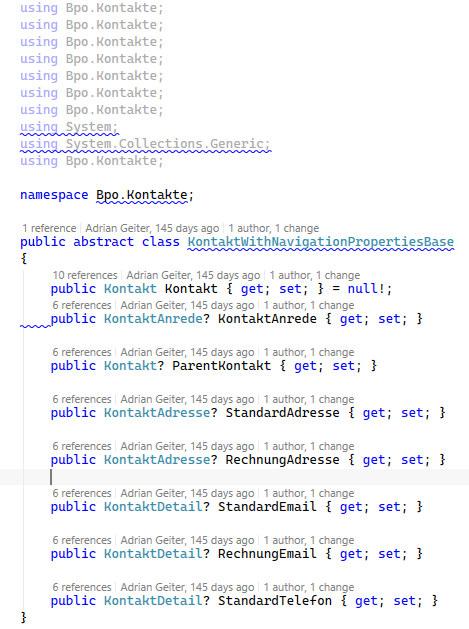
CS0105: The using directive for 'Bpo.Kontakte' appeared previously in this namespace
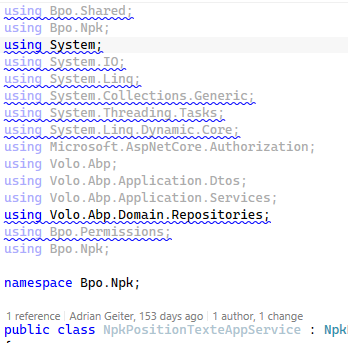
SA1208: Using directive for 'System' should appear before directive for 'Bpo.Npk'
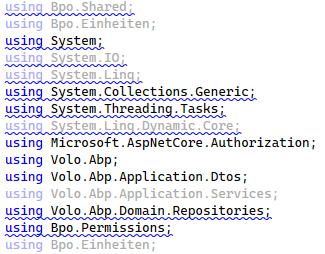
SA1210: Using directives should be ordered alphabetically by the namespaces
Miscellaneous:
We're running ABP Framework 10.4 with an Angular 21 frontend. Our angular/ project uses Yarn Berry 4.12.0 (nodeLinker: node-modules in .yarnrc.yml), not Yarn Classic — this is required for our dependency setup (private npm registry scopes for FontAwesome Pro, etc.).
The problem: abp install-libs appears to only support/detect Yarn Classic 1.x, so our local setup script has to explicitly switch Yarn versions back and forth via Corepack around it:
corepack prepare yarn@1.22.22 --activate
abp install-libs

corepack prepare yarn@4.12.0 --activate
yarn install
This is fragile in practice: abp install-libs internally runs an unfrozen yarn install under whichever Yarn version is currently active. When it runs under Yarn 1, it silently rewrites yarn.lock back into the old v1 lockfile format. If the script is ever interrupted, or someone runs abp install-libs in isolation without the follow-up corepack prepare yarn@4.x --activate && yarn install, the repository can end up with a Yarn-1-format lockfile committed on top of a Yarn-Berry project — completely silently, since a plain local yarn install doesn't complain about it. This happened to us once and was hard to trace back.
Questions:
abp install-libs work with an already-active Yarn Berry installation, instead of requiring Yarn 1 specifically?install-libs is meant for MVC/Razor Pages/Blazor Server only — is it actually required at all for an Angular project, or is calling it in our setup script simply unnecessary legacy boilerplate we can drop?Any clarification would help us remove this two-Yarn-version workaround entirely.
We’d like to implement an undo/redo feature in our application. I’m aware that this can be a complex issue, particularly when dealing with dependent entities. And yet it’s a feature for which most applications require a solution.
Have you written anything on this subject before? (I haven’t been able to find anything, unfortunately)
How would you implement this using the existing ABP functionality?
EntityChanges and EntityPropertyChanges would certainly be one possible approach, but this is probably not quite enough to implement the functionality fully.
Would EF’s change tracking be suitable for storing the complete changes of a transaction, e.g. in a cache? Or does that stop working once you’ve called SaveChanges?
Do you have any ideas on how you would solve this (best practices) and whether there might already be something implemented in ABP that could be used?
Another big question is how to go about this when ‘delete cascading’ is configured… or when the entities are not fully audited entities.
I look forward to your answer.
Best, Adrian
What we really miss in the entities generated by the ABP Suite is a GetList-Method that returns the data without pagination. By customizing certain templates, we have now added these missing methods ourselves.
Here are some examples of our customizations:
Server.Controller.ItemController.txt:
[HttpGet]
        public virtual Task<List<%%entity-name%%Dto>> GetListAsync(Get%%entity-name-plural%%Input input)
        {
            return _%%entity-name-plural-camelcase%%AppService.GetListAsync(input);
        }

        [HttpGet]
        [Route("paged")]
        public virtual Task<PagedResultDto<%%entity-name%%Dto>> GetPagedListAsync(Get%%entity-name-plural%%Input input)
        {
            return _%%entity-name-plural-camelcase%%AppService.GetPagedListAsync(input);
        }
Server.AppService.AppService.txt:
public virtual async Task<List<%%entity-name%%Dto>> GetListAsync(Get%%entity-name-plural%%Input input)
        {
            var items = await _%%entity-name-camelcase%%Repository.GetListAsync(input.FilterText, %%input-properties%%%%<if:HasFilterableProperties>%%, %%</if:HasFilterableProperties>%%input.Sorting);

            return ObjectMapper.Map<List<%%entity-name%%>, List<%%entity-name%%Dto>>(items);
        }

        public virtual async Task<PagedResultDto<%%entity-name%%Dto>> GetPagedListAsync(Get%%entity-name-plural%%Input input)
        {
            var totalCount = await _%%entity-name-camelcase%%Repository.GetCountAsync(input.FilterText%%<if:HasFilterableProperties>%%, %%</if:HasFilterableProperties>%%%%input-properties%%);
            var items = await _%%entity-name-camelcase%%Repository.GetListAsync(input.FilterText, %%input-properties%%%%<if:HasFilterableProperties>%%, %%</if:HasFilterableProperties>%%input.Sorting, input.MaxResultCount, input.SkipCount);

            return new PagedResultDto<%%entity-name%%Dto>
            {
                TotalCount = totalCount,
                Items = ObjectMapper.Map<List<%%entity-name%%>, List<%%entity-name%%Dto>>(items)
            };
        }
Here's my problem / my question:
For my GetListAsync method, I used the same input class that’s also used for the paged list. The problem, however, is that Angular requires a value to be set for MaxResultCount, even if that value isn’t used. This is poor design and confuses developers.
How could I use the ABP Suite to generate a custom input class for this? Ideally, of course, I’d be able to create a Server.AppService.GetItemsPagedInput.txt file in addition to the Server.AppService.GetItemsInput.txt template.
Is it possible to create your own templates? If so, where would they be saved?
Thanks, Adrian
Environment:
In our application, we have a service that writes a very large amount of data to the database. This generates more than 1 million inserts into the database.
I’ve now optimized this service so that it completes in about 100 seconds. I disabled transactions for the UnitOfWork to avoid additional overhead (isTransactional: false). The data is now stored in the database after just under 2 minutes.
Problem: Completing the UoW (uow.CompleteAsync()) takes about 17 hours !!!
Since I don’t see any log messages, I have no idea what’s taking so long. My guess is that events are being generated (which are completely unnecessary in my case).
The affected entities are not auditable. I also added a [DisableAuditing] attribute to the AppService methods.
I’ve now moved the service call to a background job so that it doesn’t block anything. But it’s still very unsatisfying this way.
What can be done to optimize this?
protected override async Task ExecuteWithContextAsync(InstallationJobArgs args)
    {
        await _jobStatusStore.SetRunningAsync(args.JobId);

        try
        {
            var data = await LoadDataAsync(args);

            using var uow = _unitOfWorkManager.Begin(requiresNew: true, isTransactional: false);

            await _installer.InstallAsync(data); // Takes 100 seconds

            await uow.CompleteAsync(); // Takes 17 hours

            await _jobStatusStore.SetSucceededAsync(args.JobId);
        }
        catch (Exception ex)
        {
            await _jobStatusStore.SetFailedAsync(args.JobId, ex.Message);
            throw;
        }
    }
Hi,
I already know that, unfortunately, I cannot configure any features on the tenant other than those in the assigned edition. This has already been communicated in the following post: #6579
Now I will describe our situation and I am interested to hear how you would resolve it.
We have various subscriptions (PayPlans, which are assigned to the editions). Depending on the subscription, the tenant gets a different number of maximum users. Identity.MaxUserCount is therefore set on the edition. Now, as an exception, we need to allow a higher number of users for one tenant.
What can we do? Unfortunately, the features cannot be overridden on the tenant. We don't really want to allow a higher number of users for the edition in general.
Could we create a new edition and assign it to the tenant? That would be a good solution. But since a subscription already exists, I cannot change the edition on the tenant (disabled in the UI). What would happen if I changed this in the database? And what effect would this have on subscription renewals, etc.?
Thanks, Adrian
We frequently use tenant impersonation via the tenant list. However, we want to call it directly via our dashboard, as we have a client list there and want to avoid the detour via your tenant list in the SaaS module.
Since the source for this is not public, I have unfortunately not been able to figure out how to implement this. Can you tell me how I should do this?
I want exactly the same behavior. Click on a link on the tenant, then the pop-up should open to enter the username, etc.
Thanks, Adrian
Hi,
I can activate the cookie consent message in the Blazor app.
But how does this work with the public website (MVC)?
Thanks, Adrian
The public website (MVC) is hosted in Azure. We have enabled AlwaysOn for the app service. Now we very often (but not always) have an error message in the log file and AbpAuditLogs. I have now logged at debug level and found out that the error could be related to FeatureManagement. On our homepage, which is called by AlwaysOn, we only have static context and do not initiate any database calls ourselves.
AbpAuditLogs:
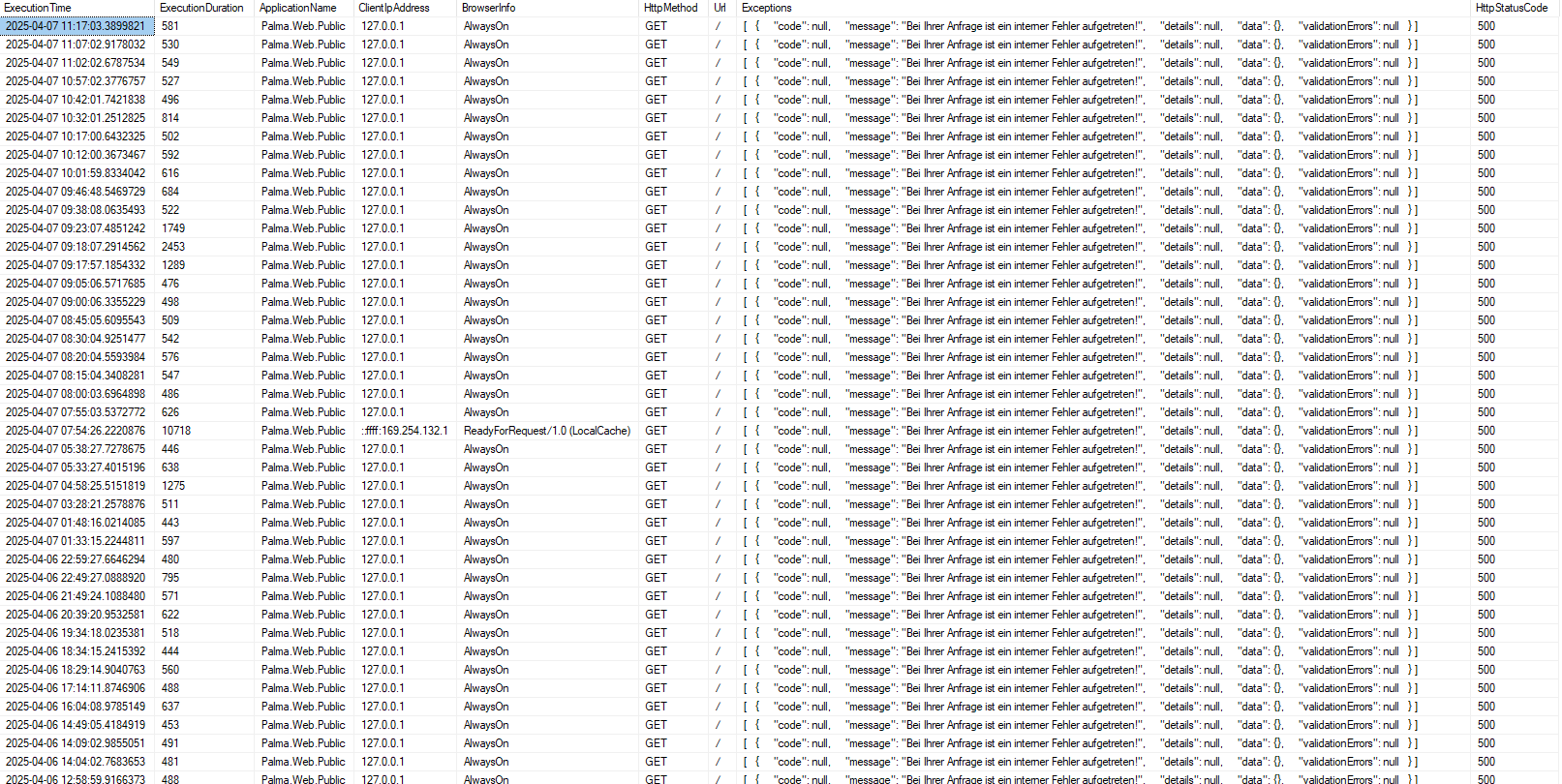
Exception message and full stack trace:
[2025-04-07 10:02:00 WRN] The operation was canceled.
System.OperationCanceledException: The operation was canceled.
   at System.Threading.CancellationToken.ThrowOperationCanceledException()
   at Microsoft.Extensions.Caching.StackExchangeRedis.RedisCache.GetAsync(String key, CancellationToken token)
   at Volo.Abp.Caching.DistributedCache`2.GetAsync(TCacheKey key, Nullable`1 hideErrors, Boolean considerUow, CancellationToken token)
[2025-04-07 10:02:00 DBG] Entity Framework Core 8.0.4 initialized 'FeatureManagementDbContext' using provider 'Microsoft.EntityFrameworkCore.SqlServer:8.0.4' with options: QuerySplittingBehavior=SplitQuery AbpOptionsExtension
[2025-04-07 10:02:00 DBG] Creating DbConnection.
[2025-04-07 10:02:00 DBG] Created DbConnection. (2ms).
[2025-04-07 10:02:00 DBG] Opening connection to database 'Palma-Prod' on server 'tcp:palma-sqlserver.database.windows.net,1433'.
[2025-04-07 10:02:00 ERR] An error occurred using the connection to database 'Palma-Prod' on server 'tcp:palma-sqlserver.database.windows.net,1433'.
[2025-04-07 10:02:00 DBG] A query was canceled for context type 'Volo.Abp.FeatureManagement.EntityFrameworkCore.FeatureManagementDbContext'.
[2025-04-07 10:02:00 INF] Executed page /Index in 598.3426ms
[2025-04-07 10:02:00 INF] Executed endpoint '/Index'
Any ideas?
Thanks, Adrian
Description:
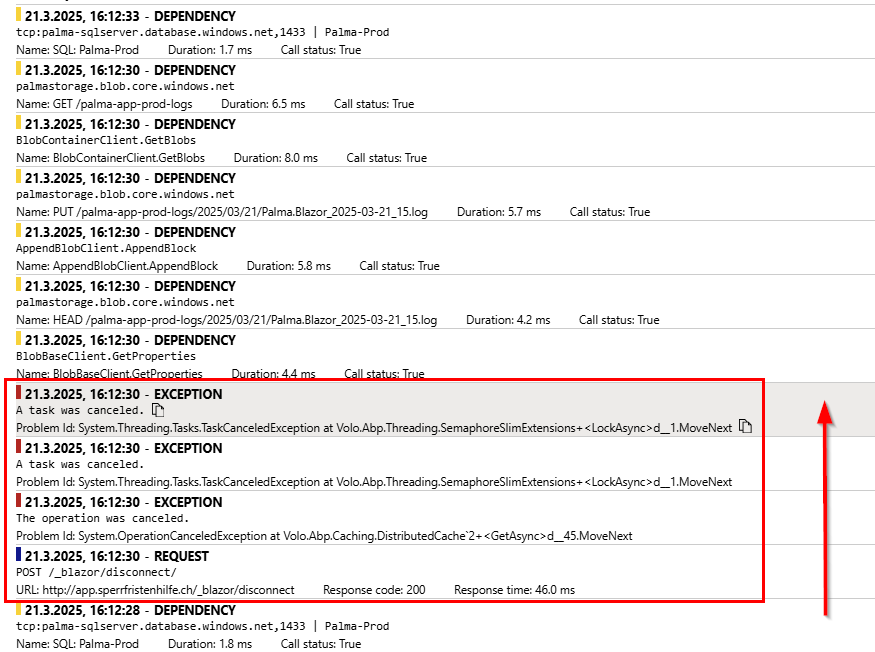
I have been annoyed for a while, because my log file of my Blazor application is full of the exceptions shown below. Locally on my development computer as well as on Azure. There are no visible effects, but a log file / Azure monitoring overflowing with errors is still disturbing.
Now I have finally found out when the error occurs. Every time the browser tab in which the Blazor app is running is closed. I.e. if I have the application open in 5 tabs and then close them all, I have these 3 exceptions in the log 5 times.
The problem only occurs when I am in the Blazor app, but not on the login page, which runs with MVC. However, it also occurs when I switch from the Blazor app to the profile page, which also runs with MVC.
Conclusion: As soon as I close the Blazor app in any way, I have the error in the log.
Unfortunately I haven't found a solution yet... Can this be solved by configuration? You should also have this problem, because I have generated my project with your template.
In my earlier ABP Blazor projects (ABP version 8.0.4 and 8.1.0) this problem does not exist.
Exception message and full stack trace:
2025-03-21T15:12:30.498594964Z [15:12:30 WRN] The operation was canceled.
2025-03-21T15:12:30.498626168Z System.OperationCanceledException: The operation was canceled.
2025-03-21T15:12:30.498630914Z    at System.Threading.CancellationToken.ThrowOperationCanceledException()
2025-03-21T15:12:30.499695960Z    at Microsoft.Extensions.Caching.StackExchangeRedis.RedisCache.GetAsync(String key, CancellationToken token)
2025-03-21T15:12:30.499710156Z    at Volo.Abp.Caching.DistributedCache`2.GetAsync(TCacheKey key, Nullable`1 hideErrors, Boolean considerUow, CancellationToken token)

2025-03-21T15:12:30.508186494Z [15:12:30 ERR] Error when dispatching 'OnDisconnectedAsync' on hub.
2025-03-21T15:12:30.508204006Z System.Threading.Tasks.TaskCanceledException: A task was canceled.
2025-03-21T15:12:30.508208351Z    at Volo.Abp.Threading.SemaphoreSlimExtensions.LockAsync(SemaphoreSlim semaphoreSlim, CancellationToken cancellationToken)
2025-03-21T15:12:30.508212734Z    at Volo.Abp.Caching.DistributedCache`2.GetOrAddAsync(TCacheKey key, Func`1 factory, Func`1 optionsFactory, Nullable`1 hideErrors, Boolean considerUow, CancellationToken token)
2025-03-21T15:12:30.508216835Z    at Volo.Abp.Identity.IdentityDynamicClaimsPrincipalContributorCache.GetAsync(Guid userId, Nullable`1 tenantId)
2025-03-21T15:12:30.508220579Z    at Volo.Abp.Identity.IdentityDynamicClaimsPrincipalContributor.ContributeAsync(AbpClaimsPrincipalContributorContext context)
2025-03-21T15:12:30.508224471Z    at Volo.Abp.Security.Claims.AbpClaimsPrincipalFactory.InternalCreateAsync(AbpClaimsPrincipalFactoryOptions options, ClaimsPrincipal existsClaimsPrincipal, Boolean isDynamic)
2025-03-21T15:12:30.508228453Z    at Volo.Abp.Security.Claims.AbpClaimsPrincipalFactory.CreateDynamicAsync(ClaimsPrincipal existsClaimsPrincipal)
2025-03-21T15:12:30.508232343Z    at Volo.Abp.AspNetCore.SignalR.Authentication.AbpAuthenticationHubFilter.HandleDynamicClaimsPrincipalAsync(ClaimsPrincipal claimsPrincipal, IServiceProvider serviceProvider, HubCallerContext hubCallerContext, Boolean skipCheckDynamicClaimsInterval)
2025-03-21T15:12:30.508237154Z    at Volo.Abp.AspNetCore.SignalR.Authentication.AbpAuthenticationHubFilter.OnDisconnectedAsync(HubLifetimeContext context, Exception exception, Func`3 next)
2025-03-21T15:12:30.508240927Z    at Microsoft.AspNetCore.SignalR.Internal.HubFilterFactory.OnDisconnectedAsync(HubLifetimeContext context, Exception exception, Func`3 next)
2025-03-21T15:12:30.508259520Z    at Microsoft.AspNetCore.SignalR.Internal.HubFilterFactory.OnDisconnectedAsync(HubLifetimeContext context, Exception exception, Func`3 next)
2025-03-21T15:12:30.508263733Z    at Microsoft.AspNetCore.SignalR.Internal.HubFilterFactory.OnDisconnectedAsync(HubLifetimeContext context, Exception exception, Func`3 next)
2025-03-21T15:12:30.508267595Z    at Microsoft.AspNetCore.SignalR.Internal.HubFilterFactory.OnDisconnectedAsync(HubLifetimeContext context, Exception exception, Func`3 next)
2025-03-21T15:12:30.508271986Z    at Microsoft.AspNetCore.SignalR.Internal.DefaultHubDispatcher`1.OnDisconnectedAsync(HubConnectionContext connection, Exception exception)
2025-03-21T15:12:30.508275817Z    at Microsoft.AspNetCore.SignalR.Internal.DefaultHubDispatcher`1.OnDisconnectedAsync(HubConnectionContext connection, Exception exception)
2025-03-21T15:12:30.508279633Z    at Microsoft.AspNetCore.SignalR.HubConnectionHandler`1.HubOnDisconnectedAsync(HubConnectionContext connection, Exception exception)

2025-03-21T15:12:30.509313222Z [15:12:30 ERR] Failed disposing connection RfusBEBpFoUp9uL-jjOGqQ.
2025-03-21T15:12:30.509330226Z System.Threading.Tasks.TaskCanceledException: A task was canceled.
2025-03-21T15:12:30.509609315Z    at Volo.Abp.Threading.SemaphoreSlimExtensions.LockAsync(SemaphoreSlim semaphoreSlim, CancellationToken cancellationToken)
2025-03-21T15:12:30.509620537Z    at Volo.Abp.Caching.DistributedCache`2.GetOrAddAsync(TCacheKey key, Func`1 factory, Func`1 optionsFactory, Nullable`1 hideErrors, Boolean considerUow, CancellationToken token)
2025-03-21T15:12:30.509825846Z    at Volo.Abp.Identity.IdentityDynamicClaimsPrincipalContributorCache.GetAsync(Guid userId, Nullable`1 tenantId)
2025-03-21T15:12:30.509854785Z    at Volo.Abp.Identity.IdentityDynamicClaimsPrincipalContributor.ContributeAsync(AbpClaimsPrincipalContributorContext context)
2025-03-21T15:12:30.510047633Z    at Volo.Abp.Security.Claims.AbpClaimsPrincipalFactory.InternalCreateAsync(AbpClaimsPrincipalFactoryOptions options, ClaimsPrincipal existsClaimsPrincipal, Boolean isDynamic)
2025-03-21T15:12:30.510056019Z    at Volo.Abp.Security.Claims.AbpClaimsPrincipalFactory.CreateDynamicAsync(ClaimsPrincipal existsClaimsPrincipal)
2025-03-21T15:12:30.510059319Z    at Volo.Abp.AspNetCore.SignalR.Authentication.AbpAuthenticationHubFilter.HandleDynamicClaimsPrincipalAsync(ClaimsPrincipal claimsPrincipal, IServiceProvider serviceProvider, HubCallerContext hubCallerContext, Boolean skipCheckDynamicClaimsInterval)
2025-03-21T15:12:30.510063008Z    at Volo.Abp.AspNetCore.SignalR.Authentication.AbpAuthenticationHubFilter.OnDisconnectedAsync(HubLifetimeContext context, Exception exception, Func`3 next)
2025-03-21T15:12:30.510066606Z    at Microsoft.AspNetCore.SignalR.Internal.HubFilterFactory.OnDisconnectedAsync(HubLifetimeContext context, Exception exception, Func`3 next)
2025-03-21T15:12:30.510070016Z    at Microsoft.AspNetCore.SignalR.Internal.HubFilterFactory.OnDisconnectedAsync(HubLifetimeContext context, Exception exception, Func`3 next)
2025-03-21T15:12:30.510072984Z    at Microsoft.AspNetCore.SignalR.Internal.HubFilterFactory.OnDisconnectedAsync(HubLifetimeContext context, Exception exception, Func`3 next)
2025-03-21T15:12:30.510084402Z    at Microsoft.AspNetCore.SignalR.Internal.HubFilterFactory.OnDisconnectedAsync(HubLifetimeContext context, Exception exception, Func`3 next)
2025-03-21T15:12:30.510087658Z    at Microsoft.AspNetCore.SignalR.Internal.DefaultHubDispatcher`1.OnDisconnectedAsync(HubConnectionContext connection, Exception exception)
2025-03-21T15:12:30.510090636Z    at Microsoft.AspNetCore.SignalR.Internal.DefaultHubDispatcher`1.OnDisconnectedAsync(HubConnectionContext connection, Exception exception)
2025-03-21T15:12:30.510093493Z    at Microsoft.AspNetCore.SignalR.HubConnectionHandler`1.HubOnDisconnectedAsync(HubConnectionContext connection, Exception exception)
2025-03-21T15:12:30.510096451Z    at Microsoft.AspNetCore.SignalR.HubConnectionHandler`1.RunHubAsync(HubConnectionContext connection)
2025-03-21T15:12:30.510099320Z    at Microsoft.AspNetCore.SignalR.HubConnectionHandler`1.OnConnectedAsync(ConnectionContext connection)
2025-03-21T15:12:30.510114188Z    at Microsoft.AspNetCore.SignalR.HubConnectionHandler`1.OnConnectedAsync(ConnectionContext connection)
2025-03-21T15:12:30.510118175Z    at Microsoft.AspNetCore.Http.Connections.Internal.HttpConnectionContext.ExecuteApplication(ConnectionDelegate connectionDelegate)
2025-03-21T15:12:30.510121767Z    at Microsoft.AspNetCore.Http.Connections.Internal.HttpConnectionContext.WaitOnTasks(Task applicationTask, Task transportTask, Boolean closeGracefully)
2025-03-21T15:12:30.510125314Z    at Microsoft.AspNetCore.Http.Connections.Internal.HttpConnectionContext.DisposeAsync(Boolean closeGracefully)
2025-03-21T15:12:30.510128896Z    at Microsoft.AspNetCore.Http.Connections.Internal.HttpConnectionManager.DisposeAndRemoveAsync(HttpConnectionContext connection, Boolean closeGracefully, HttpConnectionStopStatus status)
Thanks for help, Adrian









