Set ASPNETCORE_ENVIRONMENT to Release.
Hi,
There are 2 ABP secret keys that are custom to your organization:
ApiKey: The private key to access nuget.abp.io server. All organizations have a dedicated private ApiKey. This key is stored in the NuGet.config file. If your ApiKey is exposed, you can send an email to info@abp.io, and we can change your ApiKey. When we change it, the old key is invalidated and projects that still use that old ApiKey will stop restoring ABP packages. If your system is on production, it will still run without any problem because you are not restoring packages. But it's advised to manually update your ApiKey for your CI/CD pipeline.
AbpLicenseCode: The license code is used to validate how many and which developers are working on the ABP solution. Each developer must sign in via ABP CLI or ABP Studio to be able to write code on their ABP project. This code is stored in several appsettings.secrets.json files in your startup projects. If your AbpLicenseCode is exposed, you can send an email to info@abp.io, and we can reset your AbpLicenseCode. When we change it, the old license code is invalidated, and developers will see errors when they run their ABP project. As we use caching, the errors will arise after some time. You must manually update the old AbpLicenseCode. To get your new AbpLicenseCode, you must create a new dummy project with the same project name and copy the new AbpLicenseCode from this new project into your existing project.
ohh sorry, in your first message I just saw you tried the free version. @Engincan, why can we not get the source code of LeptonX PRO with that command?
Use this CLI command:
abp get-source Volo.Abp.LeptonXTheme.Pro
you have 2 organizations. the first one is "AKA" and it's expired. probably that's why you cannot get the new source-code. login again via ABP CLI
There's a super feature coming to the ABP Studio. We'll make the annoucement once it's ready.
you can send an email to info@abp.io for manual registration
there's a condition like this:
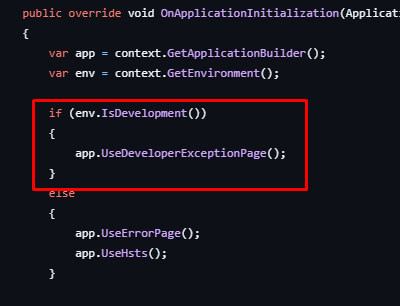
this is development page for errors, try to run it in release mode also environment variable = release
did you download the source-code project and couldn't find angular code?









