Hi,
Thanks for the clarification! Maybe this detail of setting Applications["MVC"].RootUrl should be in the documentation, since although not required for the subdomain tenant resolver to work, it's certainly something that should be done for a complete implementation.
Awesome, thank you.
Hi there. Any updates on this?
[maliming] said: hi
the distributed handler creates a separate UoW to run the migrations in with _unitOfWorkManager.Begin(requiresNew: true), which queries the database before the original UoW commits. Result: tenantConfiguration.ConnectionStrings.Default is null, so migrations don't run when they should.
The
TenantCreatedEtoevent should be published when a tenant is created. Which means the new tenant is already in the database.Thanks.
As I understand, the tenant technically is already in the database, but the transaction is not yet committed at that point, correct? Since if my TenantCreatedEto handler throws, the transaction is rolled back and it's like the entity was never added.
So, since the transaction is not yet committed, when MyAppTenantDatabaseMigrationHandler starts a completely new UoW with requiresNew=true before applying the migrations, it will not "see" the connection string I just set to the tenant in the previous handler, causing the migrations to not be applied. That is the problem.
Hi there.
Any way to get this behavior in the permissions modal?
I appreciate the AI-generated response, but I'd like to hear the ABP team's input on this matter.
Thanks!
I have verified that adding UseAbpTimeZone to my application initialization does seem to solve the issue in the /audit-logs page and it now shows the correct local time:

Still, it's not clear to me when to have UseAbpTimeZone or not (I couldn't find any documentation on it besides your article).
The inconsistency shown in my previous post does seem like a bug... 🤔
Hi there.
I have migrated my application to ABP 9.2.0 and applied the migrations that updated all timestamp columns in the database to type timestamp without time zone. I'm using both Npgsql.EnableLegacyTimestampBehavior and AbpClockOptions.Kind = DateTimeKind.Utc. With this, I believe now I have the correct time zone configurations both in application and database according to your instructions.
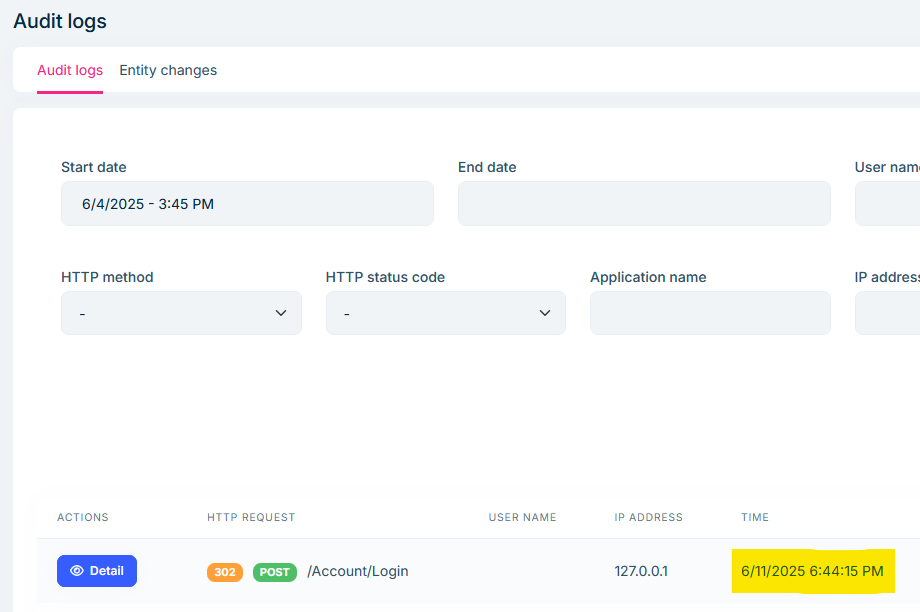
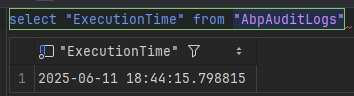
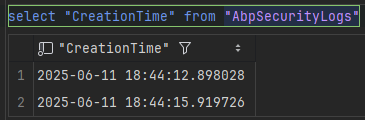
With that said, I still observe the issue I reported initially, where the time displayed in the audit logs page is incorrect, ignoring the time zone settings (application or account). Here are some screenshots:
/audit-logs page, showing UTC time (❌ incorrect)
AbpAuditLogs table, storing UTC time (✅ correct)
/Account/SecurityLogs page, showing local time (✅ correct)

AbpSecurityLogs table, storing UTC time (✅ correct)
Sorry for the delay on this. I think it's important to explain in more details my concern regarding the correct time zone settings.
When we initially migrated to PostgreSQL, the migration guide didn't include the instruction to use the EnableLegacyTimestampBehavior setting. That means that when we followed the old version of the guide, we got the same error reported here, and in this same thread you can see that the solution is to set AbpClockOptions.Kind to DateTimeKind.Utc to fix the error, so that's what we did and it worked.
So now that the migration guide has been updated to include the EnableLegacyTimestampBehavior setting, the AbpClockOptions setting we used seems no longer needed.
However, if I try to include the EnableLegacyTimestampBehavior setting now, that results in changes to all timestamp columns in the DB (migrations) since this setting controls the type for these columns. For example:
// ...
migrationBuilder.AlterColumn<DateTime>(
    name: "DeletionTime",
    table: "AbpUsers",
    type: "timestamp without time zone",
    nullable: true,
    oldClrType: typeof(DateTime),
    oldType: "timestamp with time zone",
    oldNullable: true);
// ...
I have not applied this migration since I'm not sure if it's the right thing to do in this case.
Considering this situation, what would be the recommended course of action? I think that before I can reliably report any problem related to time zone, first I need to ensure everything is correct in my application and database.
Hi,
I see that there were a bunch of changes related to time zones in 9.2.0, so I updated to it to test and the issue I described above still persists in 9.2.0. The article you linked is the same one I linked.
Also, I would appreciate if you could confirm the correct settings to use in our case.
Thanks!









