Hi there. We have configured ABP’s built-in subdomain tenant resolver using AddDomainTenantResolver(...), and inbound tenant resolution works as expected. Requests to tenant subdomains correctly resolve CurrentTenant.
However, we noticed that Account module emails, like the password reset email sent when a tenant user uses “Forgot password”, do not use the tenant subdomain URL. The generated reset link points to the configured host/base URL, so the link does not work correctly for tenant users in our subdomain setup.
We found that setting the MVC application root URL to the tenant-aware template (replacing it's default value of configuration["App:SelfUrl"]) appears to solve it:
Configure<AppUrlOptions>(options =>
{
    options.Applications["MVC"].RootUrl = "https://{0}.example.com";
});
Can you confirm whether configuring options.Applications["MVC"].RootUrl this way is the correct approach for tenant-aware Account email links? We could not find anything related to this in the documentation, so we want to make sure we are not doing anything we shouldn't that could cause unwanted side effects.
Thanks!
When using LeptonX with Blazorise <Select>, validation runs but the visible select control does not show the validation state.
A required Blazorise text input correctly shows:
A required Blazorise select on the same form does not show:
This appears to happen because Blazorise applies validation state and feedback to the native <select>, but LeptonX hides that native element and renders a .custom-select-display proxy. The proxy does not mirror is-invalid, aria-invalid, or aria-describedby, and the validation feedback is not shown visually.
@page "/leptonx-select-validation-repro"
@using System.ComponentModel.DataAnnotations

<PageTitle>LeptonX Select Validation Repro</PageTitle>

<Card Width="Width.Is25">
    <CardHeader>
        <Heading Size="HeadingSize.Is4">LeptonX Select Validation Repro</Heading>
    </CardHeader>
    <CardBody>
        <Form>
            <Validations @ref="ValidationsRef"
                         Mode="ValidationMode.Auto"
                         Model="@Model"
                         ValidateOnLoad="false">
                <Validation>
                    <Field>
                        <FieldLabel>Required Text *</FieldLabel>
                        <TextInput @bind-Value="@Model.RequiredText">
                            <Feedback>
                                <ValidationError />
                            </Feedback>
                        </TextInput>
                    </Field>
                </Validation>

                <Validation>
                    <Field>
                        <FieldLabel>Required Select *</FieldLabel>
                        <Select TValue="string" @bind-Value="@Model.RequiredSelect">
                            <ChildContent>
                                <SelectItem Value="@string.Empty"></SelectItem>
                                <SelectItem Value="@("one")">Option one</SelectItem>
                                <SelectItem Value="@("two")">Option two</SelectItem>
                            </ChildContent>
                            <Feedback>
                                <ValidationError />
                            </Feedback>
                        </Select>
                    </Field>
                </Validation>
            </Validations>

            <Button Color="Color.Primary" Clicked="ValidateAsync">
                Validate
            </Button>
        </Form>
    </CardBody>
</Card>

@code {
    private Validations ValidationsRef { get; set; } = new();

    private ReproModel Model { get; } = new();

    private Task ValidateAsync() => ValidationsRef.ValidateAll();

    private sealed class ReproModel
    {
        [Required(ErrorMessage = "The Required Text field is required.")]
        public string? RequiredText { get; set; }

        [Required(ErrorMessage = "The Required Select field is required.")]
        public string? RequiredSelect { get; set; } = string.Empty;
    }

}

There seems to be a bug in the way permissions are checked on toolbar buttons when the required policy is specified in the AddButton method, where we will get a spam of unnecessarily permissions checks on every minimal interaction with the page, like on every key press, for instance.
[15:26:29 DBG] PermissionStore.GetCacheItemAsync: pn:U,pk:3a1beb3d-8133-1e8d-48ee-2869932f2b57,n:AbpIdentity.Users.Import
[15:26:29 DBG] Found in the cache: pn:U,pk:3a1beb3d-8133-1e8d-48ee-2869932f2b57,n:AbpIdentity.Users.Import
[15:26:29 DBG] PermissionStore.GetCacheItemAsync: pn:R,pk:admin,n:AbpIdentity.Users.Import
[15:26:29 DBG] Found in the cache: pn:R,pk:admin,n:AbpIdentity.Users.Import
[15:26:29 DBG] PermissionStore.GetCacheItemAsync: pn:U,pk:3a1beb3d-8133-1e8d-48ee-2869932f2b57,n:AbpIdentity.Users.Export
[15:26:29 DBG] Found in the cache: pn:U,pk:3a1beb3d-8133-1e8d-48ee-2869932f2b57,n:AbpIdentity.Users.Export
[15:26:29 DBG] PermissionStore.GetCacheItemAsync: pn:R,pk:admin,n:AbpIdentity.Users.Export
[15:26:29 DBG] Found in the cache: pn:R,pk:admin,n:AbpIdentity.Users.Export
[15:26:29 DBG] PermissionStore.GetCacheItemAsync: pn:U,pk:3a1beb3d-8133-1e8d-48ee-2869932f2b57,n:AbpIdentity.Users.Create
[15:26:29 DBG] Found in the cache: pn:U,pk:3a1beb3d-8133-1e8d-48ee-2869932f2b57,n:AbpIdentity.Users.Create
[15:26:29 DBG] PermissionStore.GetCacheItemAsync: pn:R,pk:admin,n:AbpIdentity.Users.Create
[15:26:29 DBG] Found in the cache: pn:R,pk:admin,n:AbpIdentity.Users.Create
[15:26:29 DBG] PermissionStore.GetCacheItemAsync: pn:U,pk:3a1beb3d-8133-1e8d-48ee-2869932f2b57,n:AbpIdentity.Users.Import
[15:26:29 DBG] Found in the cache: pn:U,pk:3a1beb3d-8133-1e8d-48ee-2869932f2b57,n:AbpIdentity.Users.Import
[15:26:29 DBG] PermissionStore.GetCacheItemAsync: pn:R,pk:admin,n:AbpIdentity.Users.Import
[15:26:29 DBG] Found in the cache: pn:R,pk:admin,n:AbpIdentity.Users.Import
[15:26:29 DBG] PermissionStore.GetCacheItemAsync: pn:U,pk:3a1beb3d-8133-1e8d-48ee-2869932f2b57,n:AbpIdentity.Users.Export
[15:26:29 DBG] Found in the cache: pn:U,pk:3a1beb3d-8133-1e8d-48ee-2869932f2b57,n:AbpIdentity.Users.Export
[15:26:29 DBG] PermissionStore.GetCacheItemAsync: pn:R,pk:admin,n:AbpIdentity.Users.Export
[15:26:29 DBG] Found in the cache: pn:R,pk:admin,n:AbpIdentity.Users.Export
[15:26:29 DBG] PermissionStore.GetCacheItemAsync: pn:U,pk:3a1beb3d-8133-1e8d-48ee-2869932f2b57,n:AbpIdentity.Users.Create
[15:26:29 DBG] Found in the cache: pn:U,pk:3a1beb3d-8133-1e8d-48ee-2869932f2b57,n:AbpIdentity.Users.Create
[15:26:29 DBG] PermissionStore.GetCacheItemAsync: pn:R,pk:admin,n:AbpIdentity.Users.Create
[15:26:29 DBG] Found in the cache: pn:R,pk:admin,n:AbpIdentity.Users.Create
[15:26:29 DBG] PermissionStore.GetCacheItemAsync: pn:U,pk:3a1beb3d-8133-1e8d-48ee-2869932f2b57,n:AbpIdentity.Users
[15:26:29 DBG] Found in the cache: pn:U,pk:3a1beb3d-8133-1e8d-48ee-2869932f2b57,n:AbpIdentity.Users
[15:26:29 DBG] PermissionStore.GetCacheItemAsync: pn:R,pk:admin,n:AbpIdentity.Users
[15:26:29 DBG] Found in the cache: pn:R,pk:admin,n:AbpIdentity.Users
[15:26:29 DBG] PermissionStore.GetCacheItemAsync: pn:U,pk:3a1beb3d-8133-1e8d-48ee-2869932f2b57,n:AbpIdentity.Users.Import
[15:26:29 DBG] Found in the cache: pn:U,pk:3a1beb3d-8133-1e8d-48ee-2869932f2b57,n:AbpIdentity.Users.Import
[15:26:29 DBG] PermissionStore.GetCacheItemAsync: pn:R,pk:admin,n:AbpIdentity.Users.Import
[15:26:29 DBG] Found in the cache: pn:R,pk:admin,n:AbpIdentity.Users.Import
[15:26:29 DBG] PermissionStore.GetCacheItemAsync: pn:U,pk:3a1beb3d-8133-1e8d-48ee-2869932f2b57,n:AbpIdentity.Users.Export
[15:26:29 DBG] Found in the cache: pn:U,pk:3a1beb3d-8133-1e8d-48ee-2869932f2b57,n:AbpIdentity.Users.Export
[15:26:29 DBG] PermissionStore.GetCacheItemAsync: pn:R,pk:admin,n:AbpIdentity.Users.Export
[15:26:29 DBG] Found in the cache: pn:R,pk:admin,n:AbpIdentity.Users.Export
[15:26:29 DBG] PermissionStore.GetCacheItemAsync: pn:U,pk:3a1beb3d-8133-1e8d-48ee-2869932f2b57,n:AbpIdentity.Users.Create
[15:26:29 DBG] Found in the cache: pn:U,pk:3a1beb3d-8133-1e8d-48ee-2869932f2b57,n:AbpIdentity.Users.Create
[15:26:29 DBG] PermissionStore.GetCacheItemAsync: pn:R,pk:admin,n:AbpIdentity.Users.Create
[15:26:29 DBG] Found in the cache: pn:R,pk:admin,n:AbpIdentity.Users.Create
[15:26:29 DBG] PermissionStore.GetCacheItemAsync: pn:U,pk:3a1beb3d-8133-1e8d-48ee-2869932f2b57,n:AbpIdentity.Users.Import
[15:26:29 DBG] Found in the cache: pn:U,pk:3a1beb3d-8133-1e8d-48ee-2869932f2b57,n:AbpIdentity.Users.Import
[15:26:29 DBG] PermissionStore.GetCacheItemAsync: pn:R,pk:admin,n:AbpIdentity.Users.Import
[15:26:29 DBG] Found in the cache: pn:R,pk:admin,n:AbpIdentity.Users.Import
[15:26:29 DBG] PermissionStore.GetCacheItemAsync: pn:U,pk:3a1beb3d-8133-1e8d-48ee-2869932f2b57,n:AbpIdentity.Users.Export
[15:26:29 DBG] Found in the cache: pn:U,pk:3a1beb3d-8133-1e8d-48ee-2869932f2b57,n:AbpIdentity.Users.Export
[15:26:29 DBG] PermissionStore.GetCacheItemAsync: pn:R,pk:admin,n:AbpIdentity.Users.Export
[15:26:29 DBG] Found in the cache: pn:R,pk:admin,n:AbpIdentity.Users.Export
[15:26:29 DBG] PermissionStore.GetCacheItemAsync: pn:U,pk:3a1beb3d-8133-1e8d-48ee-2869932f2b57,n:AbpIdentity.Users.Create
[15:26:29 DBG] Found in the cache: pn:U,pk:3a1beb3d-8133-1e8d-48ee-2869932f2b57,n:AbpIdentity.Users.Create
[15:26:29 DBG] PermissionStore.GetCacheItemAsync: pn:R,pk:admin,n:AbpIdentity.Users.Create
[15:26:29 DBG] Found in the cache: pn:R,pk:admin,n:AbpIdentity.Users.Create
[15:26:32 DBG] Get dynamic claims cache for user: 3a1beb3d-8133-1e8d-48ee-2869932f2b57
Default implementation where we observe the problem above, with the required permissions being specified as a parameter of the AddButton method:
private ValueTask SetToolbarItemsAsync()
{
    Toolbar.AddButton(L["Page:Button:ButtonA"],
        async () =>
        {
            await SomeActionAsync();
        },
        IconName.Sync,
        Blazorise.Color.Primary,
        requiredPolicyName: MyPermissions.MyPage.Default);

    Toolbar.AddButton(L["Page:Button:ButtonB"],
        async () =>
        {
            await SomeOtherActionAsync();
        },
        IconName.Download,
        Blazorise.Color.Secondary,
        requiredPolicyName: MyPermissions.MyPage.Default);

    return ValueTask.CompletedTask;
}
As a workaround, when we wrap the permission check around the AddButton method while removing it as a parameter, we no longer observe the permission check spam:
private async ValueTask SetToolbarItemsAsync()
{
    if (await PermissionChecker.IsGrantedAsync(MyPermissions.MyPage.Default))
    {
        Toolbar.AddButton(L["Page:Button:ButtonA"],
            async () =>
            {
                await SomeActionAsync();
            },
            IconName.Sync,
            Color.Primary);
        Toolbar.AddButton(L["Page:Button:ButtonB"],
            async () =>
            {
                await SomeOtherActionAsync();
            },
            IconName.Download,
            Color.Secondary);
    }
}
We are testing a service to automatically provision the database and user for a tenant whenever a tenant is created, ensuring proper tenant isolation at a database level. Although the provisioning is working as we expect, the events that should be triggered after a tenant is created are not.
The current implementation consists of two handlers that listen to TenantCreatedEto:
1. Local handler (order -1): Runs first. Provisions database and sets connection string to the new tenant:
// Inside TenantDatabaseProvisioner.ProvisionAsync()
await CreateDatabaseAsync(hostConnectionString, databaseName);
await CreateUserAsync(hostConnectionString, userName, password);
await GrantPrivilegesAsync(hostConnectionString, databaseName, userName);

var tenantConnectionString = BuildTenantConnectionString(hostConnectionString, databaseName, userName, password);

var tenant = await tenantRepository.FindByIdAsync(tenantId);
tenant.SetDefaultConnectionString(tenantConnectionString);
await tenantRepository.UpdateAsync(tenant, true);  // Still within the original UoW
2. Default MyAppTenantDatabaseMigrationHandler: This is default ABP code to run migrations/seeding:
private async Task MigrateAndSeedForTenantAsync(Guid tenantId, string adminEmail, string adminPassword)
{
    using (_currentTenant.Change(tenantId))
    {
        // Creates a NEW Unit of Work
        using (var uow = _unitOfWorkManager.Begin(requiresNew: true, isTransactional: false))
        {
            var tenantConfiguration = await _tenantStore.FindAsync(tenantId);

            // THIS CHECK FAILS - configuration/connection string is still null here, so migrations don't run
            if (tenantConfiguration?.ConnectionStrings != null &&
                !tenantConfiguration.ConnectionStrings.Default.IsNullOrWhiteSpace())
            {
                foreach (var migrator in _dbSchemaMigrators)
                {
                    await migrator.MigrateAsync();
                }
            }
            await uow.CompleteAsync();
        }

        // Seed data
        // ...
    }
}
Problem: the distributed handler creates a separate UoW to run the migrations in with _unitOfWorkManager.Begin(requiresNew: true), which queries the database before the original UoW commits. Result: tenantConfiguration.ConnectionStrings.Default is null, so migrations don't run when they should.
Thanks!
Hi there. In our application we implemented a page that utilizes the default ABP app services IIdentityUserAppService and IIdentityRoleAppService to list users and roles. Therefore, this page requires the permissions "AbpIdentity.Users" and "AbpIdentity.Roles" to work correctly.
So, to avoid unexpected permission errors when setting up the roles for our application, we need to implement a proper permission dependency when defining our own permissions, as explained in the documentation here and here.
With this in mind, we added the dependencies to our permission definition:
public class MyModulePermissionDefinitionProvider : PermissionDefinitionProvider
{
    public override void Define(IPermissionDefinitionContext context)
    {
        var myModuleGroupDefinition = context.AddGroup(MyModulePermissions.GroupName, L("Permission:MyModule"));
        var myModuleGroup = myModuleGroupDefinition.AddPermission(MyModulePermissions.Home, L("Permission:MyModule:Home"), MultiTenancySides.Tenant);

        var reportsPermissions = myModuleGroup.AddChild(MyModulePermissions.Reports.Default, L("Permission:MyModule:Reports"), MultiTenancySides.Tenant);
        reportsPermissions.AddChild(MyModulePermissions.Reports.ReportManagement, L("Permission:MyModule:Reports:ReportManagement"), MultiTenancySides.Tenant)
            .RequirePermissions("AbpIdentity.Users", "AbpIdentity.Roles"); // this is what we added
    }

    private static LocalizableString L(string name)
    {
        return LocalizableString.Create<MyModuleResource>(name);
    }
}
What I expected to happen: for my custom permission MyModulePermissions.Reports.ReportManagement to always require the permissions "AbpIdentity.Users" and "AbpIdentity.Roles", in a way that they should be automatically selected in the permissions pop-up when my custom permission is selected, or at least give me an error and not allow me to save until the dependent permissions are also selected, making the permission dependencies clear and mandatory when setting up the permissions for users or roles.
What actually happens: in the permissions pop-up I can select my custom permission MyModulePermissions.Reports.ReportManagement and save without any action or feedback that my custom permission depends on other permissions. From my tests, all RequirePermissions does is consider my custom permission not granted unless the other required permissions are also granted, which is very confusing since my menu entry won't appear for the user even when they have that permission granted (but not its dependencies).
Am I missing something or is this the expected behavior? If so, is there a way to implement permission dependencies in the way I described?
Thanks!
Hi,
From what I could find in the documentation and in this article, bundling JavaScript or CSS files is only mentioned for Blazor WebAssembly, no mention of Blazor Server. From my tests the BundleContributor approach does not seem to work for Blazor Server.
For now the workaround has been collocated JavaScript files with specific components.
Does ABP offer any way to do file bundling in Blazor Server? What would be the correct approach?
Hi there.
We have identified an inconsistency in the audit logs page (/audit-logs), where the time shown in the log entries is always fixed to the value saved in the database (UTC), so any time zone setting is ignored in this page (host time zone or user account time zone setting).
This does not happen in the security logs (/Account/SecurityLogs) where I can verify that it correctly displays the time based on the time zone setting.
Is this intended or a bug?
For added context, we are currently using the following settings related to the time zone:
Npgsql.EnableLegacyTimestampBehavior enabled, since we are using PostgreSQL (as instructed here).AbpClockOptions.Kind set to DateTimeKind.Utc (as instructed here).Should both of these settings be used at the same time? I just want to ensure we are configuring time zones correctly in the application.
We are having an odd issue with the feature check where a feature can be considered both enabled and disabled depending on where it's checked.
For instance, we have a feature check on the menu contributor to only show the corresponding menu if the feature is enabled:
if (context.Menu.Name == StandardMenus.Main && await featureChecker.IsEnabledAsync(MyDefinitionProvider.MyFeature))
{
    // this correctly shows or hides the menu depending on the feature status
    await ConfigureMainMenuAsync(context);
}
However, when doing the same check on a background worker, sometimes we get a different result:
protected override async Task DoWorkAsync(PeriodicBackgroundWorkerContext workerContext)
{
    await Parallel.ForEachAsync(await TenantStore.GetListAsync(), tenantParallelOptions, async (tenant, ct) =>
    {
        try
        {
            using (CurrentTenant.Change(tenant.Id))
            {
                if (!await featureChecker.IsEnabledAsync(MyDefinitionProvider.MyFeature))
                    return;

                // some logic here that should only execute when the feature is enabled
                // this is where we get the inconsistency, since even with the feature enabled and menu visible, sometimes this is not executed
            }
        }
        catch (Exception ex)
        {
            Logger.LogError(ex, "Error for tenant {TenantId}", tenant.Id);
        }
    });
}
This is a bit convoluted to reproduce, but from what we could gather it has something to do with enabling/disabling the feature for the tenant or edition, and the edition being assigned/unassigned from the tenant.
This can result in the scenario below where the row that holds the tenant status for the feature is simply deleted from the table. And THIS is when we observe the inconsistency stated above.
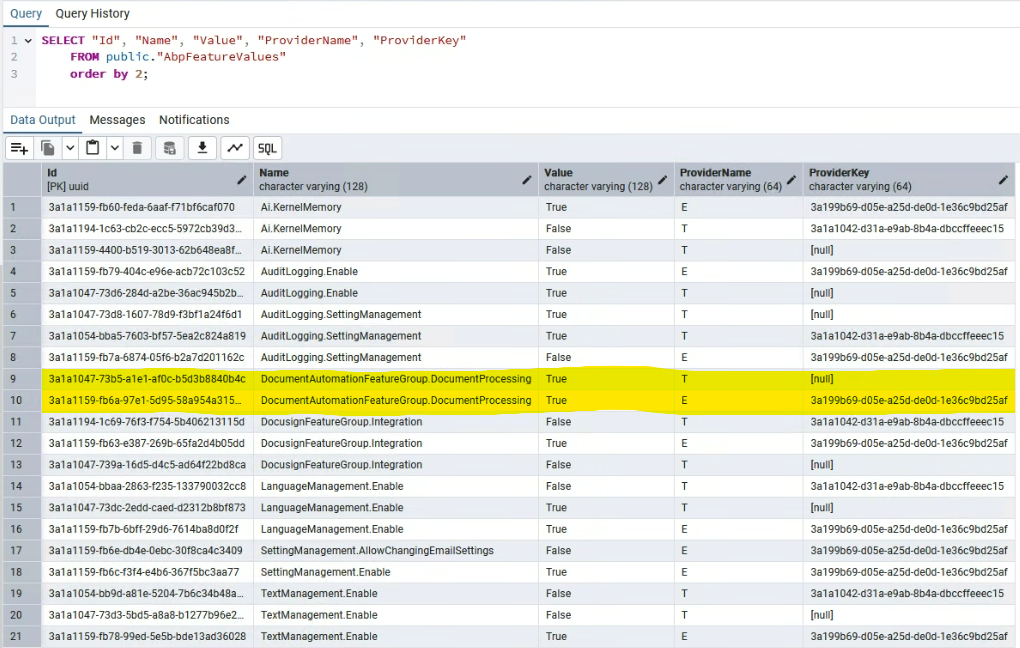
I know it's a little confusing, but if necessary we can schedule a call to explain in detail.
Using the module entity extension system, I'm adding a few custom properties to the Plan entity from the Payment Module. That works as expected except for one of the properties, where I need the field in the UI to allow multiple lines (text area), but instead in the UI the field is still rendered as a simple single line text input, not allowing me to input what I need.
According to the documentation:
DataTypeAttributeis used to specify the type of the property. It is used to determine how to render the property on the user interface
So, my understanding was that by setting the data type of my property to DataType.MultilineText as shown below, it should result in a text area field where I can type multiple lines of text, but that is not the case. Am I missing something?
Here's my custom property definition:
ObjectExtensionManager.Instance.Modules()
    .ConfigurePayment(payment =>
    {
        payment.ConfigurePlan(plan => plan
            .AddOrUpdateProperty<string>("Features", property =>
            {
                property.DisplayName = LocalizableString.Create<PaymentGatewayResource>("PlanFeatures");
                property.Attributes.Add(new DataTypeAttribute(DataType.MultilineText));
                property.UI.OnTable.IsVisible = false;
            })
        );
    });
Hi there!
Currently, we have implemented a custom branding per tenant by overriding the properties available in the DefaultBrandingProvider. However, this class only has AppName, LogoUrl and LogoReverseUrl, which is the logo displayed on the login screen.
We need two additional overrides for the branding:
Is there a programmatic way to override these?
For the menu icon, we are able to simply replace the icon files in wwwroot, but that doesn't work for our dynamic per tenant branding we want. For the favicon, we are also able to replace the file, but for some reason while on the login page we still see the default LeptonX favicon.
Any suggestions? Thanks.









