Hi I need to have more threads that consume same queue on rabbitmq. It's no important the order of processing messages in queue, but only this must be fast as it as possibile. I see that on RabbitMq client library there is a parameter on ConnectionFactory ConsumerDispatchConcurrency that enable multithread consumer. This feature require that messages will be consumed using IAsyncBasicConsumer. Abp in AbpRabbitMqModule use AsyncEventingBasicConsumer. Set parameter ConsumerDispatchConcurrency greater then 1 on AbpRabbitMqModule is possible and enable multithread consumer? Many thanks. Marco
I have a question about FluentValidation in Blazor server. I use it with package Blazorise.FluentValditation, and also adding Volo.Abp.FluentValidation. I notice 2 problem:
 There are a best pratice for using with Abp and FluentValidation and blazorise?
Many thanks
Marco
There are a best pratice for using with Abp and FluentValidation and blazorise?
Many thanks
Marco
How I can fix it? Many thanks.
Check the docs before asking a question: https://abp.io/docs/latest
Check the samples to see the basic tasks: https://abp.io/docs/latest/samples
The exact solution to your question may have been answered before, and please first use the search on the homepage.
Provide us with the following info:
🧐 Hint: If you are using the ABP Studio, you can see all the information about your solution from the configuration window, which opens when you right-click on the solution and click on the Solution Configuration button.
 My final version of packages after update are this:
<ItemGroup>
<PackageReference Include="Blazorise.Charts" Version="1.7.0" /> <PackageReference Include="Blazorise.Components" Version="1.7.0" /> <PackageReference Include="Blazorise.DataGrid" Version="1.7.0" /> <PackageReference Include="Blazorise.Bootstrap5" Version="1.7.0" /> <PackageReference Include="Blazorise.Icons.FontAwesome" Version="1.7.0" /> <PackageReference Include="Blazorise.Licensing" Version="1.3.0" /> <PackageReference Include="Aspire.StackExchange.Redis" Version="9.0.0" /> <PackageReference Include="BouncyCastle.Cryptography" Version="2.4.0" /> <PackageReference Include="Microsoft.AspNetCore.DataProtection.StackExchangeRedis" Version="9.0.0" /> <PackageReference Include="Microsoft.Extensions.Caching.Memory" Version="9.0.0" /> <PackageReference Include="Microsoft.Extensions.Http.Polly" Version="9.0.0" />
<PackageReference Include="Microsoft.VisualStudio.Azure.Containers.Tools.Targets" Version="1.21.0" /> <PackageReference Include="Serilog.Sinks.OpenTelemetry" Version="4.1.1" /> <PackageReference Include="Volo.Abp.AspNetCore.Components.Web.Theming" Version="8.3.3" /> </ItemGroup> <ItemGroup> <PackageReference Include="Volo.Abp.Caching.StackExchangeRedis" Version="8.3.3" /> <PackageReference Include="Volo.Abp.EventBus.RabbitMQ" Version="8.3.3" /> <PackageReference Include="Volo.Abp.AspNetCore.Mvc.Client" Version="8.3.3" /> <PackageReference Include="Volo.Abp.AspNetCore.Authentication.OpenIdConnect" Version="8.3.3" /> <PackageReference Include="Volo.Abp.Http.Client.Web" Version="8.3.3" /> <PackageReference Include="Volo.Abp.Http.Client.IdentityModel.Web" Version="8.3.3" /> <PackageReference Include="Volo.Abp.Identity.Pro.Blazor.Server" Version="8.3.3" /> <PackageReference Include="Volo.Abp.OpenIddict.Pro.Blazor.Server" Version="8.3.3" /> <PackageReference Include="Volo.Abp.AuditLogging.Blazor.Server" Version="8.3.3" /> <PackageReference Include="Volo.Abp.LanguageManagement.Blazor.Server" Version="8.3.3" /> <PackageReference Include="Volo.Abp.Account.Pro.Admin.Blazor.Server" Version="8.3.3" /> <PackageReference Include="Volo.Abp.Account.Pro.Public.Blazor.Server" Version="8.3.3" /> <PackageReference Include="Volo.Abp.Account.Pro.Public.HttpApi.Client" Version="8.3.3" /> <PackageReference Include="Volo.Abp.Account.Pro.Public.Web.Impersonation" Version="8.3.3" /> <PackageReference Include="Volo.Abp.TextTemplateManagement.Blazor.Server" Version="8.3.3" /> <PackageReference Include="Volo.Saas.Host.Blazor.Server" Version="8.3.3" /> <PackageReference Include="Volo.Saas.Tenant.Blazor.Server" Version="8.3.3" /> <PackageReference Include="Volo.Payment.Admin.Blazor.Server" Version="8.3.3" /> </ItemGroup> <ItemGroup> <PackageReference Include="Volo.Abp.AspNetCore.Mvc.UI.Theme.LeptonX" Version="3.3.3" /> <PackageReference Include="Volo.Abp.AspNetCore.Components.Server.LeptonXTheme" Version="3.3.3" /> </ItemGroup>
many thanks
Check the docs before asking a question: https://abp.io/docs/latest
Check the samples to see the basic tasks: https://abp.io/docs/latest/samples
The exact solution to your question may have been answered before, and please first use the search on the homepage.
Provide us with the following info:
🧐 Hint: If you are using the ABP Studio, you can see all the information about your solution from the configuration window, which opens when you right-click on the solution and click on the Solution Configuration button.
Show raw exception details AuthenticationFailureException: An error was encountered while handling the remote login. Microsoft.AspNetCore.Authentication.RemoteAuthenticationHandler.HandleRequestAsync() Microsoft.AspNetCore.Authentication.AuthenticationMiddleware.Invoke(HttpContext context) Prometheus.HttpMetrics.HttpRequestDurationMiddleware.Invoke(HttpContext context) Prometheus.HttpMetrics.HttpRequestCountMiddleware.Invoke(HttpContext context) Prometheus.HttpMetrics.HttpInProgressMiddleware.Invoke(HttpContext context) Volo.Abp.AspNetCore.Security.AbpSecurityHeadersMiddleware.InvokeAsync(HttpContext context, RequestDelegate next) Microsoft.AspNetCore.Builder.UseMiddlewareExtensions+InterfaceMiddlewareBinder+<>c__DisplayClass2_0+<b__0>d.MoveNext() Volo.Abp.AspNetCore.Tracing.AbpCorrelationIdMiddleware.InvokeAsync(HttpContext context, RequestDelegate next) Microsoft.AspNetCore.Builder.UseMiddlewareExtensions+InterfaceMiddlewareBinder+<>c__DisplayClass2_0+<b__0>d.MoveNext() Microsoft.AspNetCore.Localization.RequestLocalizationMiddleware.Invoke(HttpContext context) Microsoft.AspNetCore.RequestLocalization.AbpRequestLocalizationMiddleware.InvokeAsync(HttpContext context, RequestDelegate next) Microsoft.AspNetCore.Builder.UseMiddlewareExtensions+InterfaceMiddlewareBinder+<>c__DisplayClass2_0+<b__0>d.MoveNext() Microsoft.AspNetCore.Diagnostics.DeveloperExceptionPageMiddlewareImpl.Invoke(HttpContext context) Log from authserver : [12:44:57 INF] The request URI matched a server endpoint: Authorization. 2768[12:44:57 INF] The authorization request was successfully extracted: { 2769 "client_id": "BlazorServer", 2770 "redirect_uri": "https://localhost:44314/signin-oidc";, 2771 "response_type": "code id_token", 2772 "scope": "openid profile roles email phone AccountService IdentityService AdministrationService SaasService ProductService", 2773 "response_mode": "form_post", 2774 "nonce": "638636354975130522.YzYyNTM3NDAtMTZhMS00YmY5LTlmNDItOWI1MDg2NDA1ODkzODJmOTRmNzQtNTQxNC00MDExLTkwMTAtNDg4Y2M1NDAyNzli", 2775 "access_token": "[redacted]", 2776 "tenantid": "a2564546-3834-a7a4-fcf3-3a14598c45c5", 2777 "tenantusername": "admin", 2778 "returnurl": "https://localhost:44314/Saas/Host/Tenants";, 2779 "state": "CfDJ8KoQ8VGwUkdDsYUxXZv-6E8fcA_8b5UprTYvEA1uKPZ0LmQdwcIW6DE7IMHYU1dybFTxFoz4kIAqLwRDpovpHq98_FRnm57Jdfo93ldLR2_RCEvow4HNii2ahe27iwjZyCqOBUZmBCJNWl0r66G49xfOwD6n4PIhs2tFIQKLc73F0UY-Xd5ADu32-hUWhHljbc9WNgIj_uLDVj7lLpkXJJSTI6OZ4sVYY4lgPEfz7glUIZOv8j-V_QrdD-qTBfLvLrlzCdsqP5F9BsTYKCU5V_q04Rw1tuNMOkBFJMVu0nXehJx7Hd70YvcOGQCL6wPupPwJz92mdFdCFke5JSKmVAf20E4Ym5Cauu3BlkaYTpzaE-CGq1yeZ7Ep68C76mrpAcZpG8dB2XuwbsV9ehvujxwadVPgBnpVSicyZFC3h2vv_pSO5Vy8JVaFoRUcx4DNvwP451nN0ilfHuZC_F1FoPYPZdS69ysJ839lD9GudZdi", 2780 "x-client-SKU": "ID_NET8_0", 2781 "x-client-ver": "7.5.1.0" 2782}. 2783[12:44:57 INF] The authorization request was successfully validated. 2784[12:44:57 ERR] SessionId is null. It's not possible to revoke the session. 2785[12:44:57 INF] AuthenticationScheme: Identity.Application signed out. 2786[12:44:57 INF] AuthenticationScheme: Identity.External signed out. 2787[12:44:57 INF] AuthenticationScheme: Identity.TwoFactorUserId signed out. 2788[12:44:57 INF] AuthenticationScheme: Identity.TwoFactorRememberMe signed out. 2789[12:44:57 INF] Identity.Application was not authenticated. Failure message: No principal. 2790[12:44:57 INF] Executing endpoint '/Account/ImpersonateTenant' 2791[12:44:57 INF] Route matched with {page = "/Account/ImpersonateTenant", area = "", action = "", controller = ""}. Executing page /Account/ImpersonateTenant 2792[12:44:57 INF] Skipping the execution of current filter as its not the most effective filter implementing the policy Microsoft.AspNetCore.Mvc.ViewFeatures.IAntiforgeryPolicy 2793[12:44:57 INF] Executing handler method Volo.Abp.Account.Public.Web.Pages.Account.ImpersonateTenantModel.OnGetAsync - ModelState is Valid 2794[12:44:57 WRN] Could not find a session with ID: bdf1c53d-b2be-4ad5-945f-6c99bc970ee2 2795[12:44:57 WRN] SessionId(bdf1c53d-b2be-4ad5-945f-6c99bc970ee2) not found for user: 25072dcb-678d-0dae-c88b-3a14598c509b, log out. 2796[12:44:57 INF] Executed handler method OnGetAsync, returned result Microsoft.AspNetCore.Mvc.SignInResult. 2797[12:44:57 INF] Executing SignInResult with authentication scheme (OpenIddict.Server.AspNetCore) and the following principal: System.Security.Claims.ClaimsPrincipal. 2798[12:44:57 INF] Creating identity session for session id: bdf1c53d-b2be-4ad5-945f-6c99bc970ee2, device: OAuth, user id: 25072dcb-678d-0dae-c88b-3a14598c509b, tenant id: a2564546-3834-a7a4-fcf3-3a14598c45c5, client id: BlazorServer 2799[12:44:57 INF] The authorization response was successfully returned to 'https://localhost:44314/signin-oidc'; using the form post response mode: { 2800 "code": "[redacted]", 2801 "id_token": "[redacted]", 2802 "state": "CfDJ8KoQ8VGwUkdDsYUxXZv-6E8fcA_8b5UprTYvEA1uKPZ0LmQdwcIW6DE7IMHYU1dybFTxFoz4kIAqLwRDpovpHq98_FRnm57Jdfo93ldLR2_RCEvow4HNii2ahe27iwjZyCqOBUZmBCJNWl0r66G49xfOwD6n4PIhs2tFIQKLc73F0UY-Xd5ADu32-hUWhHljbc9WNgIj_uLDVj7lLpkXJJSTI6OZ4sVYY4lgPEfz7glUIZOv8j-V_QrdD-qTBfLvLrlzCdsqP5F9BsTYKCU5V_q04Rw1tuNMOkBFJMVu0nXehJx7Hd70YvcOGQCL6wPupPwJz92mdFdCFke5JSKmVAf20E4Ym5Cauu3BlkaYTpzaE-CGq1yeZ7Ep68C76mrpAcZpG8dB2XuwbsV9ehvujxwadVPgBnpVSicyZFC3h2vv_pSO5Vy8JVaFoRUcx4DNvwP451nN0ilfHuZC_F1FoPYPZdS69ysJ839lD9GudZdi", 2803 "iss": "https://localhost:44322/"; 2804}. 2805[12:44:57 INF] Executed page /Account/ImpersonateTenant in 276.386ms 2806[12:44:57 INF] Executed endpoint '/Account/ImpersonateTenant' 2807[12:44:57 INF] The request URI matched a server endpoint: Token. 2808[12:44:57 INF] The token request was successfully extracted: { 2809 "client_id": "BlazorServer", 2810 "client_secret": "[redacted]", 2811 "code": "[redacted]", 2812 "grant_type": "authorization_code", 2813 "redirect_uri": "https://localhost:44314/signin-oidc"; 2814}. 2815[12:44:58 WRN] Could not find a session with ID: bdf1c53d-b2be-4ad5-945f-6c99bc970ee2 2816[12:44:58 WRN] The token is no longer valid because the user's session expired. 2817[12:44:58 INF] The response was successfully returned as a JSON document: { 2818 "error": "invalid_grant", 2819 "error_description": "The token is no longer valid because the user's session expired." 2820}.
<br>

Hi I would like to insert the "ApplicationLoadingIndicator" component into my Blazor Server UI. According to the blazorise help I should insert the <ApplicationLoadingIndicator /> tag in the App.razor file. The file in question is not present in the project. How can I fix it ? Thanks.
Hi I have created a solution with Blazor Server
ABP Framework version: v8.0.5
UI Type: Blazor Server
Database System: EF Core (SQL Server)
Tiered (for MVC) or Auth Server Separated (for Angular): yes
I have recently update all Blazorize package to versione 1.5.2, and the icon in the UI now is all wrong, example like this:
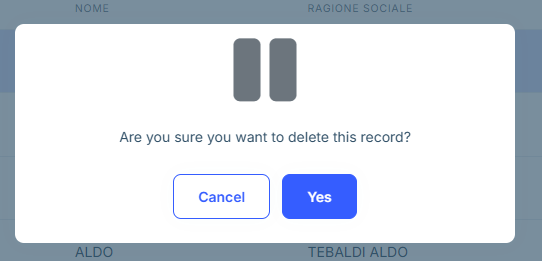
Why there is this problem? Abp must use with a specific version of Blazorise? How can I change it, if there is possibile ? Thanks Marco









