We have a commercial license. As soon as we replace packages with source code we are getting these errors all throughout our solution. I just picked a single module as an example.
It needs to be fixed.
You're missing the point! It appears EVERYWHERE that references Volo.Abp.Commercial.Core - this was just an example.
Are you saying that I don't need ANY references in any project to any of the commercial packages?
Do not run this on a machine which has the commercial source available (which is the environment your customers must use). When you use a machine which is configured the same way as your customers, you will see the following:
C:\Temp\ABPTest\Volo.Abp.TextTemplateManagement\host\Volo.Abp.TextTemplateManagement.Web.Unified\Volo.Abp.TextTemplateManagement.Web.Unified.csproj :
 error NU1106: Unable to satisfy conflicting requests for 'Volo.Abp.Core':
 Volo.Abp.Core (>= 8.3.1) (via package/Volo.Abp.Commercial.Core 8.3.1)
 Volo.Abp.Core (>= 8.3.1) (via package/Volo.Abp.Commercial.Core 8.3.1)
 Volo.Abp.Core (>= 8.3.1) (via package/Volo.Abp.Commercial.Core 8.3.1)
 Volo.Abp.Core (>= 8.3.1) (via package/Volo.Abp.Commercial.Core 8.3.1)
 Volo.Abp.Core (>= 8.3.1) (via package/Volo.Abp.Commercial.Core 8.3.1)
 Volo.Abp.Core (>= 8.3.1) (via package/Volo.Abp.Commercial.Core 8.3.1)
 externalProject/Volo.Abp.Core (>= 8.3.1) (via project/Volo.Abp.Castle.Core 8.3.1)
 Volo.Abp.Core (>= 8.3.1) (via package/Volo.Abp.Sms 8.3.1)
 Volo.Abp.Core (>= 8.3.1) (via package/Volo.Abp.Commercial.Core 8.3.1)
 Volo.Abp.Core (>= 8.3.1) (via package/Volo.Abp.Sms 8.3.1)
 Volo.Abp.Core (>= 8.3.1) (via package/Volo.Abp.BlobStoring 8.3.1)
 Volo.Abp.Core (>= 8.3.1) (via package/Volo.Abp.Commercial.Core 8.3.1)
 Volo.Abp.Core (>= 8.3.1) (via package/Volo.Abp.Commercial.Core 8.3.1)
 Volo.Abp.Core (>= 8.3.1) (via package/Volo.Abp.Commercial.Core 8.3.1)
 Volo.Abp.Core (>= 8.3.1) (via package/Volo.Abp.Commercial.Core 8.3.1)
 Volo.Abp.Core (>= 8.3.1) (via package/Volo.Abp.Commercial.Core 8.3.1)
 Volo.Abp.Core (>= 8.3.1) (via package/Volo.Abp.Commercial.Core 8.3.1)
 externalProject/Volo.Abp.Core (>= 8.3.1) (via project/Volo.Abp.ObjectMapping 8.3.1)
 Volo.Abp.Core (>= 8.3.1) (via package/Volo.Abp.Commercial.Core 8.3.1)
 externalProject/Volo.Abp.Core (>= 8.3.1) (via project/Volo.Abp.Security 8.3.1)
 externalProject/Volo.Abp.Core (>= 8.3.1) (via project/Volo.Abp.ObjectMapping 8.3.1)
 externalProject/Volo.Abp.Core (>= 8.3.1) (via project/Volo.Abp.ObjectMapping 8.3.1)
 externalProject/Volo.Abp.Core (>= 8.3.1) (via project/Volo.Abp.Http.Abstractions 8.3.1)
 externalProject/Volo.Abp.Core (>= 8.3.1) (via project/Volo.Abp.ObjectMapping 8.3.1)
 externalProject/Volo.Abp.Core (>= 8.3.1) (via project/Volo.Abp.Security 8.3.1)
 externalProject/Volo.Abp.Core (>= 8.3.1) (via project/Volo.Abp.Guids 8.3.1)
 externalProject/Volo.Abp.Core (>= 8.3.1) (via project/Volo.Abp.ObjectMapping 8.3.1)
 externalProject/Volo.Abp.Core (>= 8.3.1) (via project/Volo.Abp.Specifications 8.3.1)
 externalProject/Volo.Abp.Core (>= 8.3.1) (via project/Volo.Abp.ObjectMapping 8.3.1)
 externalProject/Volo.Abp.Core (>= 8.3.1) (via project/Volo.Abp.AspNetCore.Abstractions 8.3.1)
 Volo.Abp.Core (>= 8.3.1) (via package/Volo.Abp.Gdpr.Abstractions 8.3.1)
 externalProject/Volo.Abp.Core (>= 8.3.1) (via project/Volo.Abp.ObjectMapping 8.3.1)
 externalProject/Volo.Abp.Core (>= 8.3.1) (via project/Volo.Abp.AspNetCore.Abstractions 8.3.1)
 Volo.Abp.Core (>= 8.3.1) (via package/Volo.Abp.Gdpr.Abstractions 8.3.1)
 externalProject/Volo.Abp.Core (>= 8.3.1) (via project/Volo.Abp.VirtualFileSystem 8.3.1)
 externalProject/Volo.Abp.Core (>= 8.3.1) (via project/Volo.Abp.ObjectMapping 8.3.1)
 externalProject/Volo.Abp.Core (>= 8.3.1) (via project/Volo.Abp.AspNetCore.Abstractions 8.3.1)
This goes on for nearly 500 lines. It happens everywhere a commercial package is referenced that we cannot get source to.
# Run the abp list-modules command and capture the output
$moduleList = & abp list-modules

# Parse the module names from the command output
$moduleNames = $moduleList | ForEach-Object {
    if ($_ -match '^>\s(.+)') {
        $matches[1]
    }
}

# Iterate over each module name and run the abp get-source command
foreach ($module in $moduleNames) {
    Write-Output "Getting source for module: $module"
    & abp get-source $module --output-folder $module
}
Please provide specifics. What are the CLI command that should be used?
What is the recommended way to create a new solution and incorporate all ABP source code using the CLI? This should include the base framework as well as any module source required (both open source and PRO modules).
We have a license for ABP Commercial with includes full source code. Any time we have needed to make a temporary modification or fix to the source (could be a breaking change, an immediate need to reference an updated NuGet package with a security update, etc.), it is too time consuming and error prone to switch from packages to source, so we must build our production release from full source to begin with. We would like to use the CLI so that we can script it and reuse the code for each major release (create a new clean ABP solution, validate that it builds, then bring over our changes from the prior version).
powershell -Command "Invoke-WebRequest -Uri https://github.com/abpframework/abp/archive/refs/tags/8.3.1.zip -OutFile C:\Temp\AbpTest\abp-8.3.1.zip"
powershell -Command "Expand-Archive -Path 'C:\Temp\ABPTest\abp-8.3.1.zip' -DestinationPath 'C:\Temp\ABPTest'"
cd /d C:\Temp\ABPTest
ren abp-8.3.1 abp
abp get-source Volo.Abp.TextTemplateManagement --version 8.3.1 --output-folder Volo.Abp.TextTemplateManagement
dotnet build .\Volo.Abp.TextTemplateManagement\Volo.Abp.TextTemplateManagement.sln
@REM Successful
abp.exe switch-to-local --solution C:\Temp\ABPTest\Volo.Abp.TextTemplateManagement\Volo.Abp.TextTemplateManagement.sln --paths C:\Temp\ABPTest
dotnet clean .\Volo.Abp.TextTemplateManagement\Volo.Abp.TextTemplateManagement.sln
dotnet build .\Volo.Abp.TextTemplateManagement\Volo.Abp.TextTemplateManagement.sln
That's an incredibly frustrating answer - what's wrong with the information I already provided? Do you need me to explain how to run your CLI? How to use it to create a solution? How to download module source?
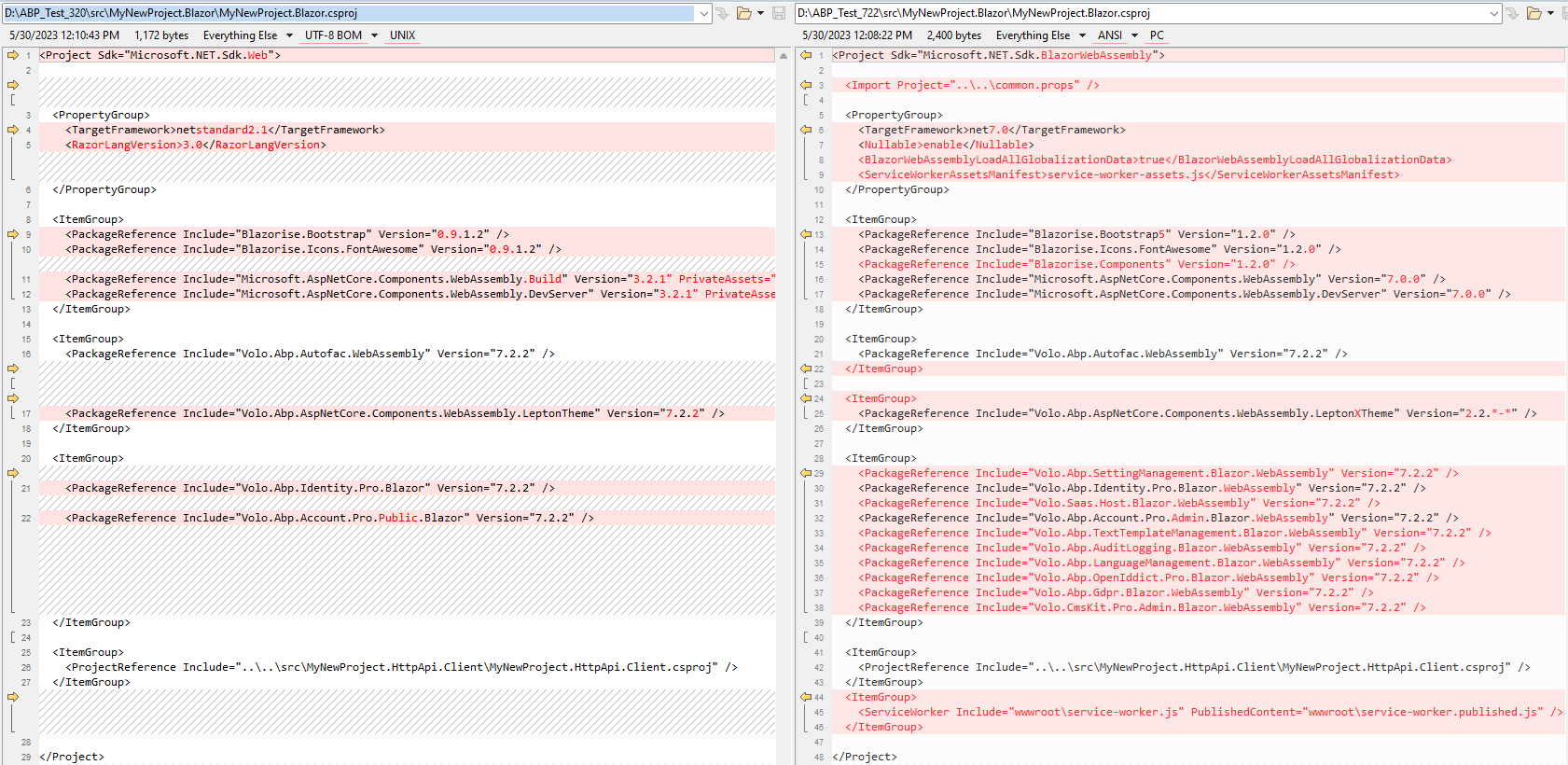
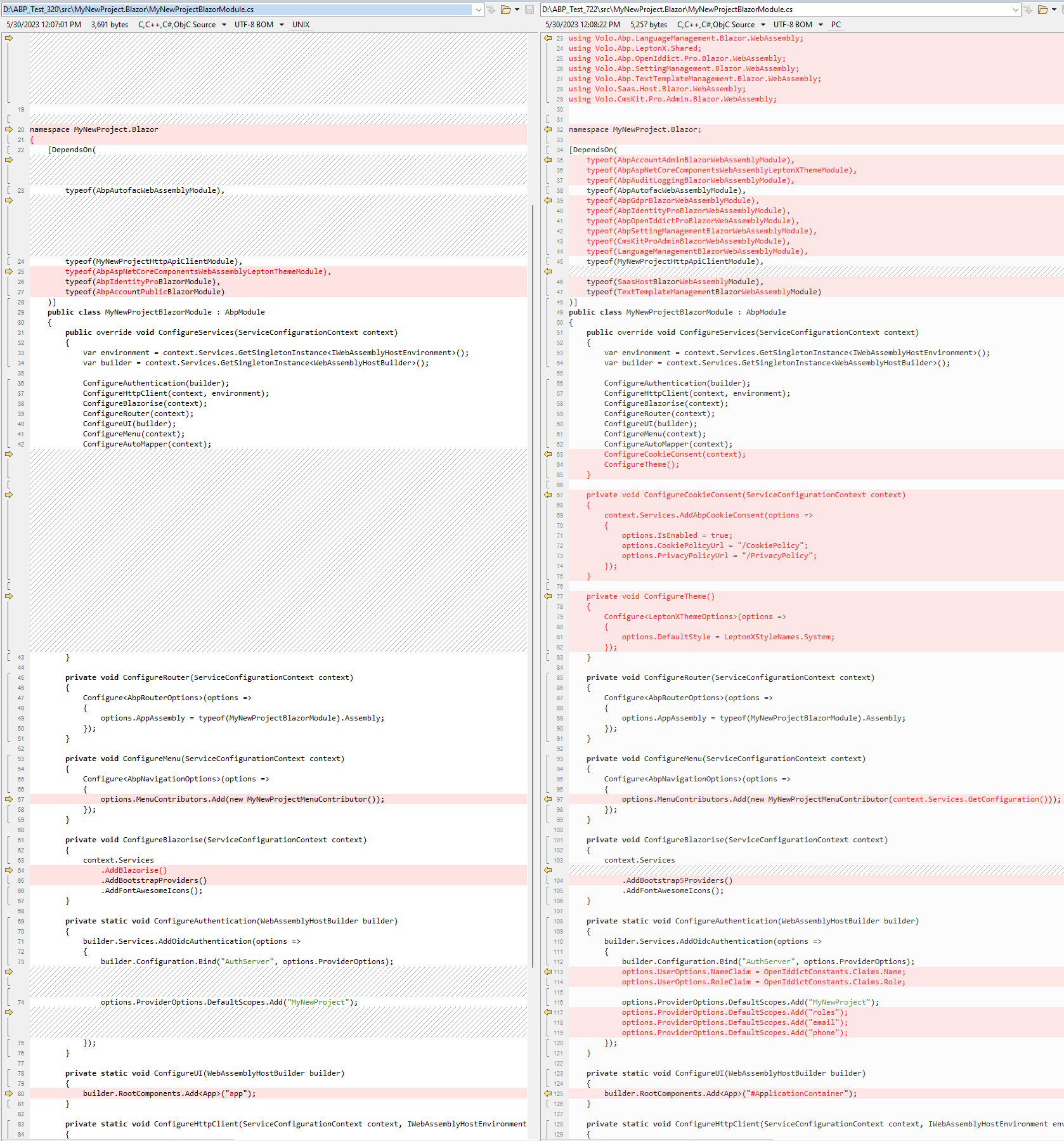
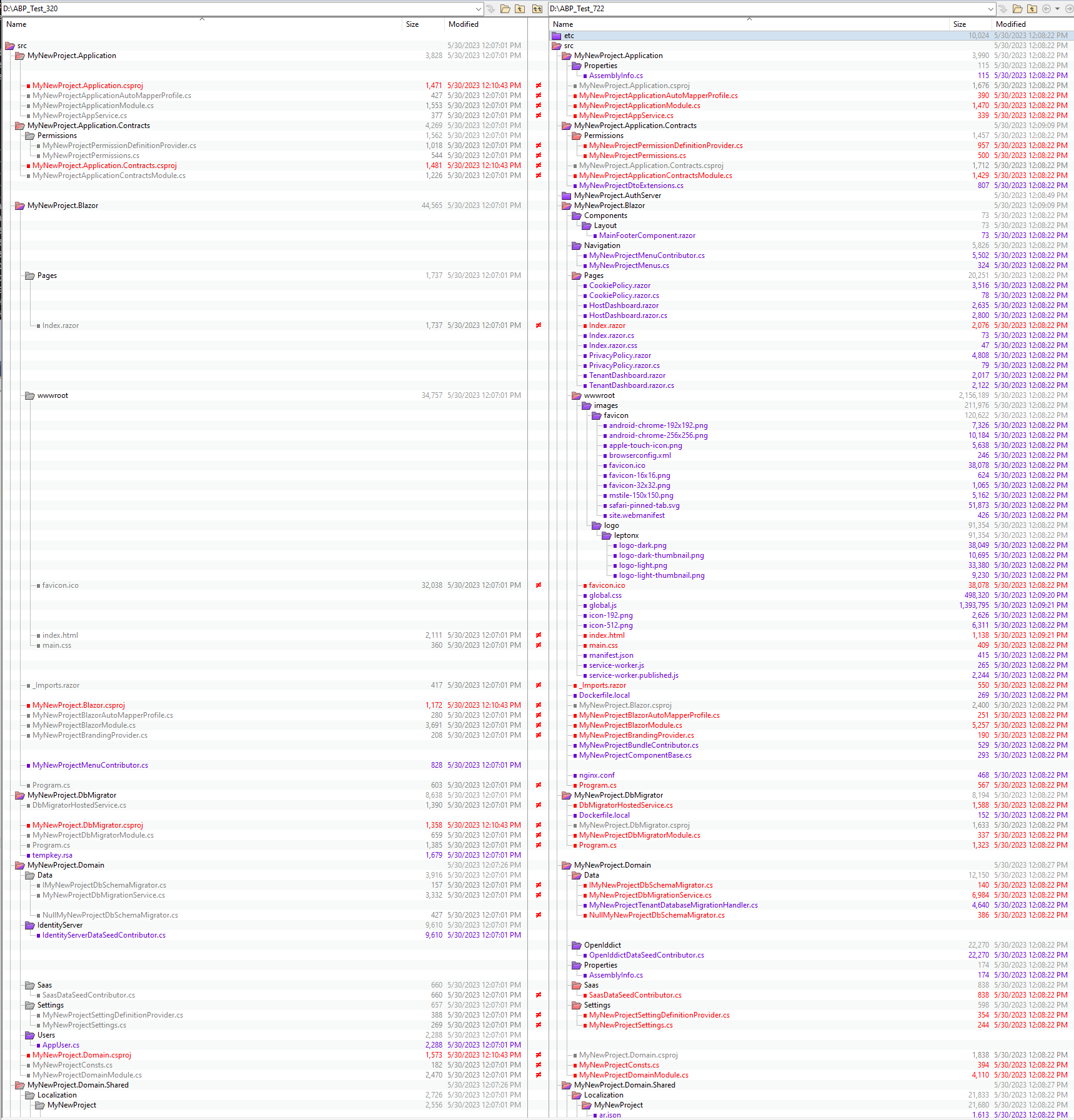
Jack, It is acceptable to simply replace the open source framework, but that doesn't begin to cover all of the complications related to updating the modules and the solution created by ABP. I made a trivial example by building a solution twice, once referencing the 3.2.0 version of ABP and another referencing 7.2.2. Once I had both created, I ran ABP UPDATE against the 3.2.0 version and compared the results. The ABP UPDATE command doesn't even come CLOSE to creating a project that is on-par with one built from 7.2.2 from scratch. I understand why this is, but the reason we pay for ABP year after year is to take advantage of all of the features and improvements that are constantly being made (which are great!). If we have to manually edit everything to update our solution then this could take days (and that's assuming that the documentation has each of these changes detailed, which it frequently does not!).
Look at the differences in the Blazor project and Module class alone: