The AI clearly understood my problem, but the workarounds are not feasible. Please let me know in which (future) version of the framework this will be fixed.
In my solution, there is a association between two entities Pilot and Customer, Pilot belongs to 0..1 Customer, and for business reasons, this association has not been named Pilot.Customer but Pilot.Partner. This has been set up properly in the ABP Suite metadata file as: (from pilot.json)
"NavigationProperties": [ { "EntityNameWithDuplicationNumber": "Partner", "EntitySetNameWithDuplicationNumber": "Partners", "ReferencePropertyName": "Partner", "UiPickType": "Typeahead", "IsRequired": false, "IncludeEntitiesFromModules": false, "FromAbpModule": false, "Name": "PartnerId", "DisplayProperty": "Name", "Namespace": "TVRS.People", "EntityName": "Customer", "EntitySetName": "Partners", "DtoNamespace": "TVRS.People", "DtoEntityName": "CustomerDto", "Type": "Guid", "IsFilterable": true } ],
The first time it worked perfectly. A few days later, when I had to make changes to Polit and related entities, I went wrong, and all of the Partner properties and fields where change to Customer. This could have been while upgrading the ABP framework from 10.0 to 10.3 and 10.4, or after upgrading ABP Studio.
It even gets worse, because the metadata of all the Child entities also contains the association that is now broker by ABP.
Every time I use the generator again, I have to do a lot of cleanup changes, until the solution builds again, and I can finally do a database update in EF. It is horrible.
Can you please explain how I got in this mess, and when ABP Studio / Suite will be fixed from this bug? Or, if there is something i can do to avoid it, let me know. But I definitely want to keep the "Partner" notion.
After carefully reviewing https://abp.io/docs/latest/framework/fundamentals/localization I had to make a few changes, repair a broken dependency, and also, maybe not necessary, but my resource files got capitalised first nodes, and json is case sensitive, so I thought i should fix it. And also in HttpApi.Host, appSettings: "Settings": { "Abp.Localization.DefaultLanguage": "en" }
Finally it resumed to work.
When I call https://backend.dev.tvrs.thconsulting.be/api/abp/application-localization?CultureName=en&OnlyDynamics=false I see a lot of return, but nothing specific to my own solution tvrs, only standard ABP messages
Actually, I was nudged into upgrading to 10.4, and that magically fixed things. At least, the Angular generation issue. So the .suite folder located under the angular directory has been changed by now, and I didn't keep the zip file, sorry. It might be interesting to get some "cleaning" instructions, on how to start over with the Schematics components. Where can I find it?
I do have another issue however, that I thought to be related, but it turns out it doesn't .
The app translations are not working anymore since the upgrade to 10.3. You can see the effect on https://dev.tvrs.thconsulting.be/, even when not logged in.

I do have my json resources files available, and the build just works as before. On my development machine (and that of my co-workers) everything works just fine. But the build and deploy to azure doesn't work. PS: I have 4 languages: en, fr, nl and nl-be. How do I troubleshoot this, and what are the typical issues with it? I don't even know how the framework is actually providing the translation resources to the user interface. Are they compiled into the angular static files, or to they reside in the backend swagger api?
The local self-diagnose shows OK as output, so that means that the POI.json file is fine. I also generated another entity, with the same result.
I don't see any problem with the POI.json file. How can I send it over for you to investigate?
I'm using ABP Suite 10.3.0
I added a simple new Entity to my existing solution. Angular generation does not work anymore, but no error or warning in ABP Studio.
However, in the suite-logfile I was able to find:
2026-05-18 01:09:02.105 +02:00 [INF] 10/12 - GenerateProxyCommand completed. | Duration: 5 ms.
2026-05-18 01:09:02.105 +02:00 [INF] 11/12 - AngularUiGenerateWithSchematicsCommand started... 2026-05-18 01:09:02.128 +02:00 [INF] Running the Angular Schematics command: node run-schematics.mjs "L:/Projects/TVRS/angular/.suite/schematics/node_modules/.bin/ng" g ".suite/schematics/collection.json:entity" app-pro TVRS "L:/Projects/TVRS/.suite/entities/POI.json" "L:/Projects/TVRS/angular" 2026-05-18 01:09:22.659 +02:00 [INF] Angular Schematics command failed. file:///L:/Projects/TVRS/angular/.suite/schematics/node_modules/execa/lib/return/final-error.js:6 return new ErrorClass(message, options); ^
ExecaError: Command failed with exit code 1: .suite/schematics/node_modules/.bin/ng g "/Projects/TVRS/angular/.suite/schematics/collection.json:entity" --template app-pro --target TVRS --source "L:/Projects/TVRS/.suite/entities/POI.json"
Expected ',' or '}' after property value in JSON at position 576661 (line 14250 column 15) at getFinalError (file:///L:/Projects/TVRS/angular/.suite/schematics/node_modules/execa/lib/return/final-error.js:6:9) at makeError (file:///L:/Projects/TVRS/angular/.suite/schematics/node_modules/execa/lib/return/result.js:108:16) at getAsyncResult (file:///L:/Projects/TVRS/angular/.suite/schematics/node_modules/execa/lib/methods/main-async.js:168:4) at handlePromise (file:///L:/Projects/TVRS/angular/.suite/schematics/node_modules/execa/lib/methods/main-async.js:151:17) at async file:///L:/Projects/TVRS/angular/.suite/schematics/run-schematics.mjs:13:20 { shortMessage: 'Command failed with exit code 1: .suite/schematics/node_modules/.bin/ng g "/Projects/TVRS/angular/.suite/schematics/collection.json:entity" --template app-pro --target TVRS --source "L:/Projects/TVRS/.suite/entities/POI.json"', command: '.suite/schematics/node_modules/.bin/ng g /Projects/TVRS/angular/.suite/schematics/collection.json:entity --template app-pro --target TVRS --source L:/Projects/TVRS/.suite/entities/POI.json', escapedCommand: '.suite/schematics/node_modules/.bin/ng g "/Projects/TVRS/angular/.suite/schematics/collection.json:entity" --template app-pro --target TVRS --source "L:/Projects/TVRS/.suite/entities/POI.json"', cwd: 'L:\Projects\TVRS\angular', durationMs: 16826.3783, failed: true, timedOut: false, isCanceled: false, isGracefullyCanceled: false, isTerminated: false, isMaxBuffer: false, isForcefullyTerminated: false, exitCode: 1, stdout: '', stderr: "\x1B[1m\x1B[31mExpected ',' or '}' after property value in JSON at position 576661 (line 14250 column 15)\x1B[39m\x1B[22m", stdio: [ undefined, '', "\x1B[1m\x1B[31mExpected ',' or '}' after property value in JSON at position 576661 (line 14250 column 15)\x1B[39m\x1B[22m" ], ipcOutput: [], pipedFrom: [] }
Node.js v24.13.1
2026-05-18 01:09:22.998 +02:00 [INF] 11/12 - AngularUiGenerateWithSchematicsCommand completed. | Duration: 20892 ms. ....
I did step 1
It stops with a license error
[19:33:14 ERR] ABP-LIC-0018 - EtVHKXrqlGVmoMegUvB: Your trial period has ended! - Please contact to license@abp.io to purchase a license.
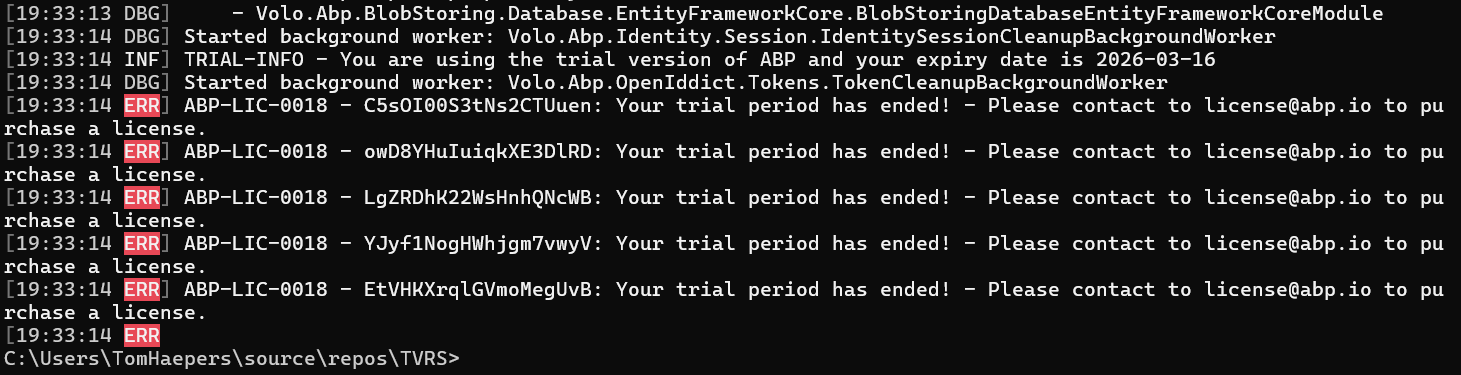
But I have a production license.
I had a working solution in ABP Suite. Everything was fine during the ABP Trial period. Last monday the license expired while i was talking with your sales person Elif, and although she agreed to extend the trial period, i was not able to run the solution anymore.
What happens: I can start ABP Studio I can start the docker container for Redis I cannot start the AuthServer. It fails with error -42 and then it restarts. I cannot start my HttpApi.Host, same problem
Mainwhile I already paid for the license, and the production license is active now, but nothing changed. Error stays I already removed the license and logged in again, no success
My colleague has the exact same problem since the exact same time, so it must be something with the license that expired.
Exception message and full stack trace: 17:52:46.175 Information Initialized Scheduler Signaller of type: Quartz.Core.SchedulerSignalerImpl 17:52:46.177 Information Quartz Scheduler created 17:52:46.177 Information JobFactory set to: Quartz.Simpl.MicrosoftDependencyInjectionJobFactory 17:52:46.224 Information RAMJobStore initialized. 17:52:46.224 Information Quartz Scheduler 3.15.0.0 - '483ca290-1e37-4461-95cd-e436393cfc4c' with instanceId 'NON_CLUSTERED' initialized 17:52:46.224 Information Using thread pool 'Quartz.Simpl.DefaultThreadPool', size: 10 17:52:46.224 Information Using job store 'Quartz.Simpl.RAMJobStore', supports persistence: False, clustered: False 17:52:46.230 Information Adding 0 jobs, 0 triggers. 17:52:46.245 Information Scheduler 483ca290-1e37-4461-95cd-e436393cfc4c_$_NON_CLUSTERED started. 17:52:46.829 Information Starting ABP Studio Backend... 17:52:46.889 Information MCP Server started on http://localhost:38280"/mcp"/ 17:52:46.999 Information Initialized all ABP modules. 17:52:47.024 Information Application started. Press Ctrl+C to shut down. 17:52:47.024 Information Hosting environment: "Production" 17:52:47.025 Information Content root path: "C:\Users\TomHaepers\AppData\Local\abp-studio\current" 17:52:52.521 Information Trying to connect to ABP Studio Backend: "http://localhost:38271" 17:52:57.345 Information Starting task execution: "Checking for the new version of ABP Studio" 17:53:00.076 Information [VPK] Creating HttpClient for AbpIoFileDownloader 17:53:00.409 Information No updates, remote version (2.2.1) is not newer than current version (2.2.1) and / or downgrade is not enabled. 17:53:08.940 Information [VPK] No updates available. 17:53:08.941 Information Completed task execution: "Checking for the new version of ABP Studio" 17:53:08.943 Information Starting task execution: "Checking pre-requirements" 17:53:09.498 Information CLI command executed. Command: "dotnet dev-certs https --check" Working directory: "C:\Users\TomHaepers\AppData\Local\abp-studio\current" CommandResult { ExitCode: 0, IsSuccess: True, StartTime: 03/19/2026 17:53:08 +01:00, ExitTime: 03/19/2026 17:53:09 +01:00, RunTime: 00:00:00.6558169 } 17:53:14.080 Information CLI command executed. Command: "abp cli version" Working directory: "C:\Users\TomHaepers\AppData\Local\abp-studio\current" CommandResult { ExitCode: 0, IsSuccess: True, StartTime: 03/19/2026 17:53:11 +01:00, ExitTime: 03/19/2026 17:53:14 +01:00, RunTime: 00:00:02.9754543 } 17:53:23.828 Information Completed task execution: "Checking pre-requirements" 17:53:23.829 Information Starting task execution: "Loading extensions" 17:53:23.842 Information Completed task execution: "Loading extensions" 17:53:55.923 Information CLI command executed. Command: "pwsh -Command "netsh interface ipv4 show excludedportrange protocol=Tcp"" Working directory: "C:\Users\TomHaepers\AppData\Local\abp-studio\current" CommandResult { ExitCode: 0, IsSuccess: True, StartTime: 03/19/2026 17:53:55 +01:00, ExitTime: 03/19/2026 17:53:55 +01:00, RunTime: 00:00:00.7171635 } 17:53:55.946 Information Starting the application: TVRS.AuthServer 17:53:55.948 Information Running the project: C:\Users\TomHaepers\source\repos\TVRS\src\TVRS.AuthServer\TVRS.AuthServer.csproj 17:53:55.970 Information Project has been started: C:\Users\TomHaepers\source\repos\TVRS\src\TVRS.AuthServer\TVRS.AuthServer.csproj 17:53:55.970 Information Application has been started: TVRS.AuthServer17:54:34.183 Information TVRS.AuthServer exited with code: -42 17:54:36.218 Information Automatically restarting the application: TVRS.AuthServer 17:54:36.218 Information Running the project: C:\Users\TomHaepers\source\repos\TVRS\src\TVRS.AuthServer\TVRS.AuthServer.csproj 17:54:36.230 Information Project has been started: C:\Users\TomHaepers\source\repos\TVRS\src\TVRS.AuthServer\TVRS.AuthServer.csproj 17:54:36.230 Information Application has been restarted: TVRS.AuthServer 17:54:46.706 Information Stopping the application: TVRS.AuthServer 17:54:46.717 Information Stopping the project: C:\Users\TomHaepers\source\repos\TVRS\src\TVRS.AuthServer\TVRS.AuthServer.csproj 17:54:46.926 Information Application has been stopped: TVRS.AuthServer
Steps to reproduce the issue:
Open ABP Suite Open existing solution that worked before Start Redit docker Start AuthServer ==> FAIL AuthServer keeps on restarting
Solution info:









