It seems when using the Angular UI and creating Navigation properties, ABP Suite tries to invent the type "Guid" in Angular/Typescript even though that does not exist (at least not by default). If you change it to string it will work both development time and run time it seems.
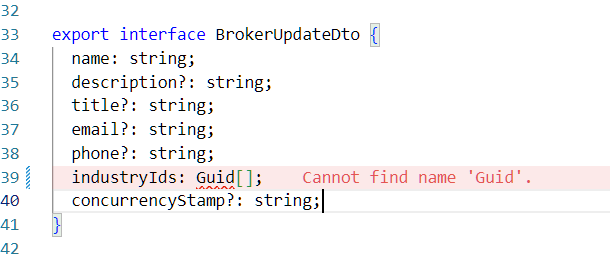
We are seeing the exact same problem and investigating it. Not sure if it is actually a ABP problem yet or might have other causes as this project used to work last week. Did do some ABP Suite updates since then though that could have caused this.
Update, this seem to occur only with latest version of Chrome based on our testing, but works fine in Firefox and Edge. Seems like you can get it to work in Chrome by clearing cache, not sure what caused it though and if it might come back.
We are seeing the exact same problem and investigating it. Not sure if it is actually a ABP problem yet or might have other causes as this project used to work last week. Did do some ABP Suite updates since then though that could have caused this.
You can follow the release notes that is announced here.
Thanks, but that does not answer my question about when updated templates will be available :)
Have you confirmed that the produced projects from the current template works as mobile apps even though they do not seem to work as Expo Web (which is the only thing we tried so far)?
Thanks.
These issues should not disrupt the core functionality of the app directly in the current version, but we recommend keeping an eye out for the next updates, which will resolve these points and improve overall compatibility.
This is probably true but mostly because of the fact that at least we could not get it to work at all. We only tried running Expo Web in a newly created project which turned out to be a no go so never tried getting it to run as a mobile app.
When will the new release be available ?
Thanks.
Linking to this ticked as well related to the same topic
https://abp.io/support/questions/8706/abp-studio-0922-not-downloading-correct-react-native-template-with-microservices-template
As previously reported in the ABP 9 bug & features thread:
First error after having created a new project in ABP 0.9.22 and just running npx expo start and trying to browse Expo Web
Console:
Refused to execute script from 'http://localhost:8081/node_modules/expo/AppEntry.bundle?platform=web&dev=true&hot=false&transform.engine=hermes&transform.routerRoot=app&unstable_transformProfile=hermes-stable' because its MIME type ('application/json') is not executable, and strict MIME type checking is enabled.
Terminal:
Web Bundling failed 6705ms node_modules\expo\AppEntry.js (2320 modules) Unable to resolve "normalize-css-color" from "node_modules\native-base\lib\module\utils\react-native-web-fucntions\normalizeColor.js"
Output from Expo-doctor
npx expo-doctor
Enabled experimental React Native Directory checks. Unset the EXPO_DOCTOR_ENABLE_DIRECTORY_CHECK environment variable to disable this check. ✔ Check package.json for common issues ✔ Check Expo config for common issues ✔ Check native tooling versions ✔ Check if the project meets version requirements for submission to app stores ✔ Check for common project setup issues ✖ Check dependencies for packages that should not be installed directly ✔ Check for app config fields that may not be synced in a non-CNG project ✔ Check for issues with Metro config ✔ Check npm/ yarn versions ✖ Validate packages against React Native Directory package metadata ✖ Check Expo config (app.json/ app.config.js) schema ✔ Check that native modules do not use incompatible support packages ✔ Check for legacy global CLI installed locally ✔ Check that native modules use compatible support package versions for installed Expo SDK ✖ Check that packages match versions required by installed Expo SDK
Detailed check results:
Error: Problems validating fields in *********\react-native\app.json. Learn more: https://docs.expo.dev/workflow/configuration/ • Field: scheme - 'scheme' must match pattern "^[a-z][a-z0-9+.-]$". • Field: scheme - must be array. • Field: scheme - must match exactly one schema in oneOf.
The package "@types/react-native" should not be installed directly in your project, as types are included with the "react-native" package.
The following issues were found when validating your dependencies against React Native Directory: Untested on New Architecture: react-native-chart-kit Unmaintained: expo-random, react-native-chart-kit, reanimated-bottom-sheet, redux-persist No metadata available: prop-types, react-native-base64, redux-saga, yup Advice:
The following packages should be updated for best compatibility with the installed expo version: react-native@0.76.5 - expected version: 0.76.6 react-native-screens@4.1.0 - expected version: ~4.4.0 Your project may not work correctly until you install the expected versions of the packages. Found outdated dependencies Advice: Use 'npx expo install --check' to review and upgrade your dependencies.
One or more checks failed, indicating possible issues with the project.
For the layered Angular template, you at least get .tsx files it seems. You seem to be using 8.2 version though.

Please open up a new ticket for tracking possible errors etc. for the newly release React native/Expo templates as it would probably be better to track those outside of this thread.
First error after having created a new project in ABP 0.9.22 and just running npx expo start and trying to browse Expo Web
Console:
Refused to execute script from 'http://localhost:8081/node_modules/expo/AppEntry.bundle?platform=web&dev=true&hot=false&transform.engine=hermes&transform.routerRoot=app&unstable_transformProfile=hermes-stable' because its MIME type ('application/json') is not executable, and strict MIME type checking is enabled.Terminal:
Web Bundling failed 6705ms node_modules\expo\AppEntry.js (2320 modules) Unable to resolve "normalize-css-color" from "node_modules\native-base\lib\module\utils\react-native-web-fucntions\normalizeColor.js"Just for reference, this the now closed support ticket about the upgrade itself https://abp.io/support/questions/7625/React-Native--Expo-migration but probably better to have a new ticket for this.
Yes, we updated the React Native template versions in v0.9.22. I will create an internal issue regarding the problem you mentioned.
Please also create a pinned ticket here as it seems reasonable that there will me multiple errors, improvements etc. As mentioned by me and other before, there is no way for us customers to track you internal tickets so we have no idea of whats going on there. Thanks.
When i see the mobile folder in the downloaded template with abp studio 0.9.22 it still have all the JS files and not tsx files. Did you get the same js files or tsx files when you downloaded.
Not sure what you mean with the "mobile folder", you mean for the template rather than the generated solution?
As we were not even able to run the solution created by the template we honestly did not give it much more time for now, especially with the thread about it being closed quickly without a new one being opened.
Has anyone here given the new React Native / Expo template a bit more time and if so, does it feel ready to use for production?
Edit:
I see that you have created a separate ticket for this, good.









