We're currently updating our framework version from 8.2.2, following the migration guides step by step.
Upon updating from 9.2.0 to 9.3.0, the following Exception occurs:
System.ArgumentException: The path in 'value' must start with '/'. (Parameter 'value')
   at Microsoft.AspNetCore.Http.PathString..ctor(String value)
   at Microsoft.AspNetCore.Mvc.Routing.UrlHelperBase.Content(HttpContext httpContext, String contentPath)
   at Volo.Abp.AspNetCore.Mvc.UI.Bundling.TagHelpers.AbpTagHelperScriptService.AddHtmlTag(ViewContext viewContext, TagHelper tagHelper, TagHelperContext context, TagHelperOutput output, BundleFile file, IFileInfo fileInfo)
   at Volo.Abp.AspNetCore.Mvc.UI.Bundling.TagHelpers.AbpTagHelperResourceService.ProcessAsync(ViewContext viewContext, TagHelper tagHelper, TagHelperContext context, TagHelperOutput output, List`1 bundleItems, String bundleName)
   at Volo.Abp.AspNetCore.Mvc.UI.Bundling.TagHelpers.AbpBundleTagHelperService`2.ProcessAsync(TagHelperContext context, TagHelperOutput output)
   at Microsoft.AspNetCore.Razor.Runtime.TagHelpers.TagHelperRunner.<RunAsync>g__Awaited|0_0(Task task, TagHelperExecutionContext executionContext, Int32 i, Int32 count)
   at Ipoox.Omm.Blazor.Pages.Pages__Host.<>c__DisplayClass22_0.<<ExecuteAsync>b__1>d.MoveNext()
--- End of stack trace from previous location ---
   at Microsoft.AspNetCore.Razor.Runtime.TagHelpers.TagHelperExecutionContext.SetOutputContentAsync()
   at Ipoox.Omm.Blazor.Pages.Pages__Host.ExecuteAsync() in C:\Users\LBA\source\repos\omm\src\Ipoox.Omm.Blazor\Pages\_Host.cshtml:line 16
   at Microsoft.AspNetCore.Mvc.Razor.RazorView.RenderPageCoreAsync(IRazorPage page, ViewContext context)
   at Microsoft.AspNetCore.Mvc.Razor.RazorView.RenderPageAsync(IRazorPage page, ViewContext context, Boolean invokeViewStarts)
   at Microsoft.AspNetCore.Mvc.Razor.RazorView.RenderAsync(ViewContext context)
   at Microsoft.AspNetCore.Mvc.ViewFeatures.ViewExecutor.ExecuteAsync(ViewContext viewContext, String contentType, Nullable`1 statusCode)
   at Microsoft.AspNetCore.Mvc.ViewFeatures.ViewExecutor.ExecuteAsync(ViewContext viewContext, String contentType, Nullable`1 statusCode)
   at Microsoft.AspNetCore.Mvc.Infrastructure.ResourceInvoker.<InvokeNextResultFilterAsync>g__Awaited|30_0[TFilter,TFilterAsync](ResourceInvoker invoker, Task lastTask, State next, Scope scope, Object state, Boolean isCompleted)
   at Microsoft.AspNetCore.Mvc.Infrastructure.ResourceInvoker.Rethrow(ResultExecutedContextSealed context)
   at Microsoft.AspNetCore.Mvc.Infrastructure.ResourceInvoker.ResultNext[TFilter,TFilterAsync](State& next, Scope& scope, Object& state, Boolean& isCompleted)
   at Microsoft.AspNetCore.Mvc.Infrastructure.ResourceInvoker.<InvokeResultFilters>g__Awaited|28_0(ResourceInvoker invoker, Task lastTask, State next, Scope scope, Object state, Boolean isCompleted)
   at Microsoft.AspNetCore.Mvc.Infrastructure.ResourceInvoker.<InvokeNextResourceFilter>g__Awaited|25_0(ResourceInvoker invoker, Task lastTask, State next, Scope scope, Object state, Boolean isCompleted)
   at Microsoft.AspNetCore.Mvc.Infrastructure.ResourceInvoker.Rethrow(ResourceExecutedContextSealed context)
   at Microsoft.AspNetCore.Mvc.Infrastructure.ResourceInvoker.Next(State& next, Scope& scope, Object& state, Boolean& isCompleted)
   at Microsoft.AspNetCore.Mvc.Infrastructure.ResourceInvoker.<InvokeFilterPipelineAsync>g__Awaited|20_0(ResourceInvoker invoker, Task lastTask, State next, Scope scope, Object state, Boolean isCompleted)
   at Microsoft.AspNetCore.Mvc.Infrastructure.ResourceInvoker.<InvokeAsync>g__Logged|17_1(ResourceInvoker invoker)
   at Microsoft.AspNetCore.Mvc.Infrastructure.ResourceInvoker.<InvokeAsync>g__Logged|17_1(ResourceInvoker invoker)
   at Microsoft.AspNetCore.Routing.EndpointMiddleware.<Invoke>g__AwaitRequestTask|7_0(Endpoint endpoint, Task requestTask, ILogger logger)
   at Volo.Abp.AspNetCore.Serilog.AbpSerilogMiddleware.InvokeAsync(HttpContext context, RequestDelegate next)
   at Microsoft.AspNetCore.Builder.UseMiddlewareExtensions.InterfaceMiddlewareBinder.<>c__DisplayClass2_0.<<CreateMiddleware>b__0>d.MoveNext()
--- End of stack trace from previous location ---
   at Volo.Abp.AspNetCore.Auditing.AbpAuditingMiddleware.InvokeAsync(HttpContext context, RequestDelegate next)
   at Volo.Abp.AspNetCore.Auditing.AbpAuditingMiddleware.InvokeAsync(HttpContext context, RequestDelegate next)
   at Microsoft.AspNetCore.Builder.UseMiddlewareExtensions.InterfaceMiddlewareBinder.<>c__DisplayClass2_0.<<CreateMiddleware>b__0>d.MoveNext()
--- End of stack trace from previous location ---
   at Swashbuckle.AspNetCore.SwaggerUI.SwaggerUIMiddleware.Invoke(HttpContext httpContext)
   at Swashbuckle.AspNetCore.Swagger.SwaggerMiddleware.Invoke(HttpContext httpContext, ISwaggerProvider swaggerProvider)
   at Microsoft.AspNetCore.Authorization.AuthorizationMiddleware.Invoke(HttpContext context)
   at Volo.Abp.AspNetCore.Uow.AbpUnitOfWorkMiddleware.InvokeAsync(HttpContext context, RequestDelegate next)
   at Microsoft.AspNetCore.Builder.UseMiddlewareExtensions.InterfaceMiddlewareBinder.<>c__DisplayClass2_0.<<CreateMiddleware>b__0>d.MoveNext()
--- End of stack trace from previous location ---
   at Volo.Abp.AspNetCore.ExceptionHandling.AbpExceptionHandlingMiddleware.InvokeAsync(HttpContext context, RequestDelegate next)
   at Volo.Abp.AspNetCore.ExceptionHandling.AbpExceptionHandlingMiddleware.InvokeAsync(HttpContext context, RequestDelegate next)
   at Microsoft.AspNetCore.Builder.UseMiddlewareExtensions.InterfaceMiddlewareBinder.<>c__DisplayClass2_0.<<CreateMiddleware>b__0>d.MoveNext()
--- End of stack trace from previous location ---
   at Volo.Abp.AspNetCore.MultiTenancy.MultiTenancyMiddleware.InvokeAsync(HttpContext context, RequestDelegate next)
   at Microsoft.AspNetCore.Builder.UseMiddlewareExtensions.InterfaceMiddlewareBinder.<>c__DisplayClass2_0.<<CreateMiddleware>b__0>d.MoveNext()
--- End of stack trace from previous location ---
   at Microsoft.AspNetCore.Builder.ApplicationBuilderAbpOpenIddictMiddlewareExtension.<>c__DisplayClass0_0.<<UseAbpOpenIddictValidation>b__0>d.MoveNext()
--- End of stack trace from previous location ---
   at Microsoft.AspNetCore.Authentication.AuthenticationMiddleware.Invoke(HttpContext context)
   at Volo.Abp.AspNetCore.Security.AbpSecurityHeadersMiddleware.InvokeAsync(HttpContext context, RequestDelegate next)
   at Microsoft.AspNetCore.Builder.UseMiddlewareExtensions.InterfaceMiddlewareBinder.<>c__DisplayClass2_0.<<CreateMiddleware>b__0>d.MoveNext()
--- End of stack trace from previous location ---
   at Volo.Abp.AspNetCore.Tracing.AbpCorrelationIdMiddleware.InvokeAsync(HttpContext context, RequestDelegate next)
   at Microsoft.AspNetCore.Builder.UseMiddlewareExtensions.InterfaceMiddlewareBinder.<>c__DisplayClass2_0.<<CreateMiddleware>b__0>d.MoveNext()
--- End of stack trace from previous location ---
   at Microsoft.AspNetCore.Localization.RequestLocalizationMiddleware.Invoke(HttpContext context)
   at Microsoft.AspNetCore.RequestLocalization.AbpRequestLocalizationMiddleware.InvokeAsync(HttpContext context, RequestDelegate next)
   at Microsoft.AspNetCore.Builder.UseMiddlewareExtensions.InterfaceMiddlewareBinder.<>c__DisplayClass2_0.<<CreateMiddleware>b__0>d.MoveNext()
--- End of stack trace from previous location ---
   at Microsoft.AspNetCore.Diagnostics.DeveloperExceptionPageMiddlewareImpl.Invoke(HttpContext context)
What we did for this to occur:
abp update -v 9.3.0 on our 9.2.0 solutionWhat we've tried:
Update our solution according to this thread, i.e. replace _Host.cshtml with App.razor according to 10.1.0 template.
This partially resolved the issue - the above exception is no longer thrown.
Problems that remain:
AuthorizeRouteView.DefaultLayout in the new Routes.razor. The 10.1.0 template, using LeptonX theme, injects IOptions<LeptonXThemeBlazorOptions> and uses it's Layout property which the old Lepton theme does not seem to have an analogous way of doingIndex.razor generated by abp update has the error 'PageLayout' does not contain a definition for 'ShowToolbar'How can we resolve these problems?
Is there something wrong with our approach of replacing _Host.cshtml with App.razor?
Do we have to migrate from the old Lepton theme?
We're having a problem with antiforgery when trying to verify a users email (under "/Account/Manage" -> Personal info).
The value of XSRF-TOKEN is added to request headers as value for RequestVerificationToken
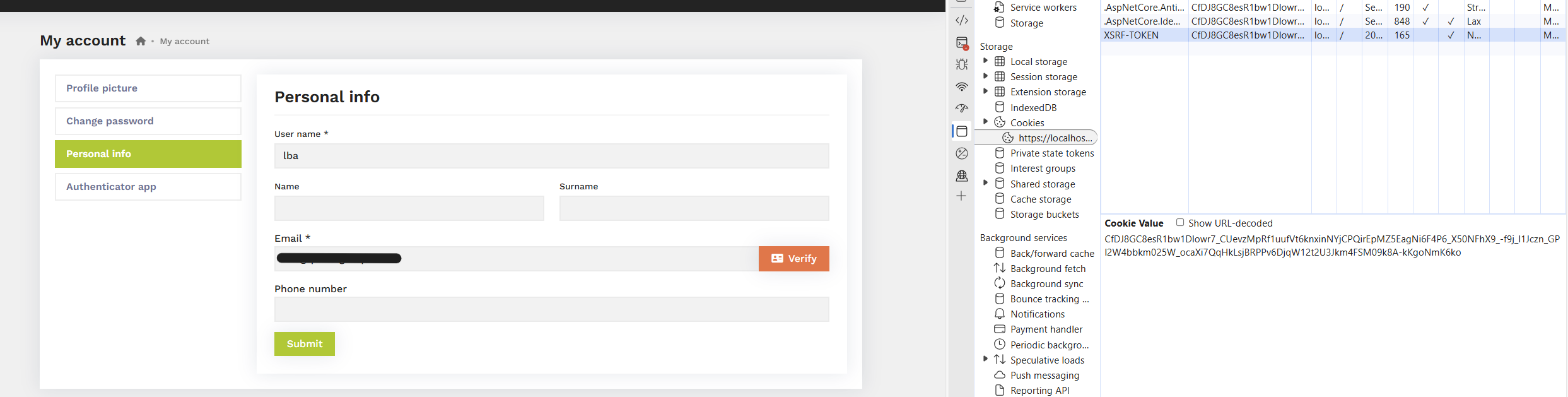
But the application responds with an error and logs a warning "The antiforgery cookie token and request token do not match".
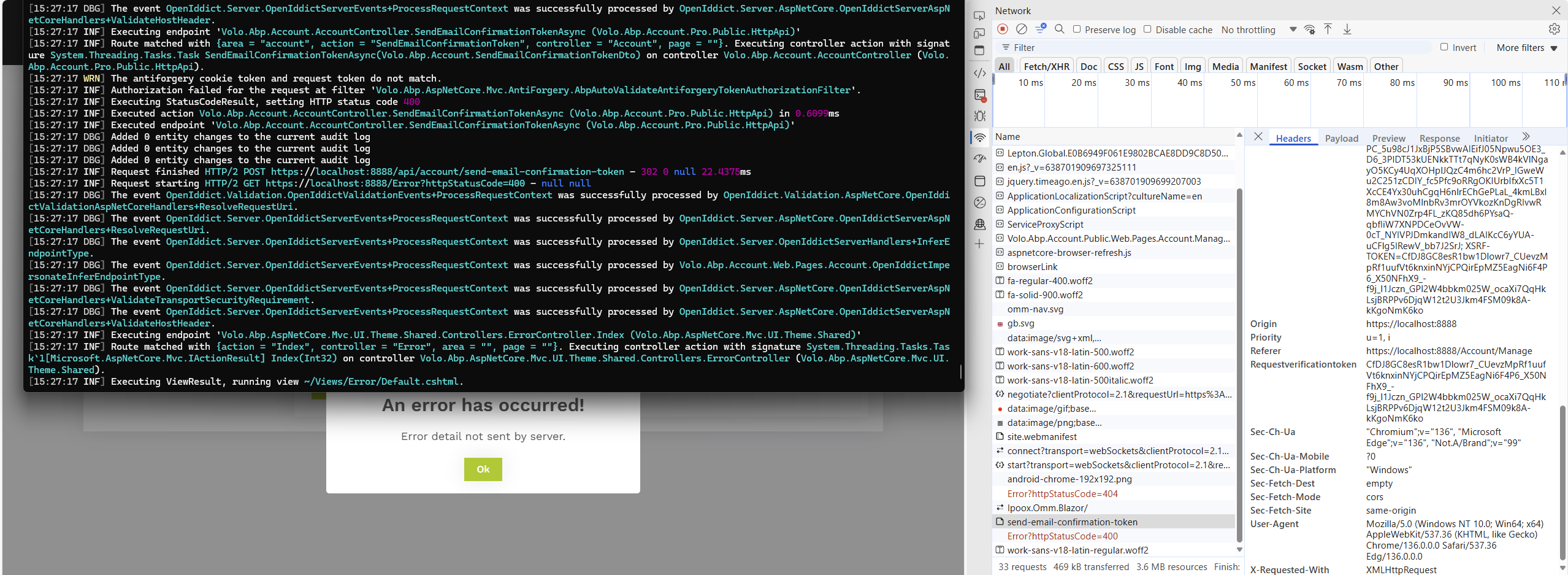
Upon retrying to request email verification, everything works as expected.
Previously, we configured AbpAntiForgeryOptions as follows:
Configure<AbpAntiForgeryOptions>(options =>
{
    options.TokenCookie.SameSite = Microsoft.AspNetCore.Http.SameSiteMode.None;
    options.TokenCookie.SecurePolicy = Microsoft.AspNetCore.Http.CookieSecurePolicy.Always;
});
Without the above code, RequestVerificationToken would not get added to request headers and email verification did not work at all.
Interestingly, the problem exists only in production environment. No errors occur in development environment.
We look forward to any input on this matter.
When using the navigation bar to navigate, the corresponding MenuItem is set as "current".


We use custom CSS to indicate to the user which part of the application they're currently at (green underline, as seen in the images above). The user may also be redirected to a different part of the application when interacting with elements outside of the navigation bar. In that case, the corresponding MenuItem is not set as "current" (as shown in the image below).

How can this behaviour of setting a MenuItem as "current" be replicated when using other means (like HTML anchor element) to navigate to the same page?
When using Volo.LanguageManagement to update texts, the changes are not reflected when switching between tenants.
Example We want to change the text from "New Project" in the header to "hello"

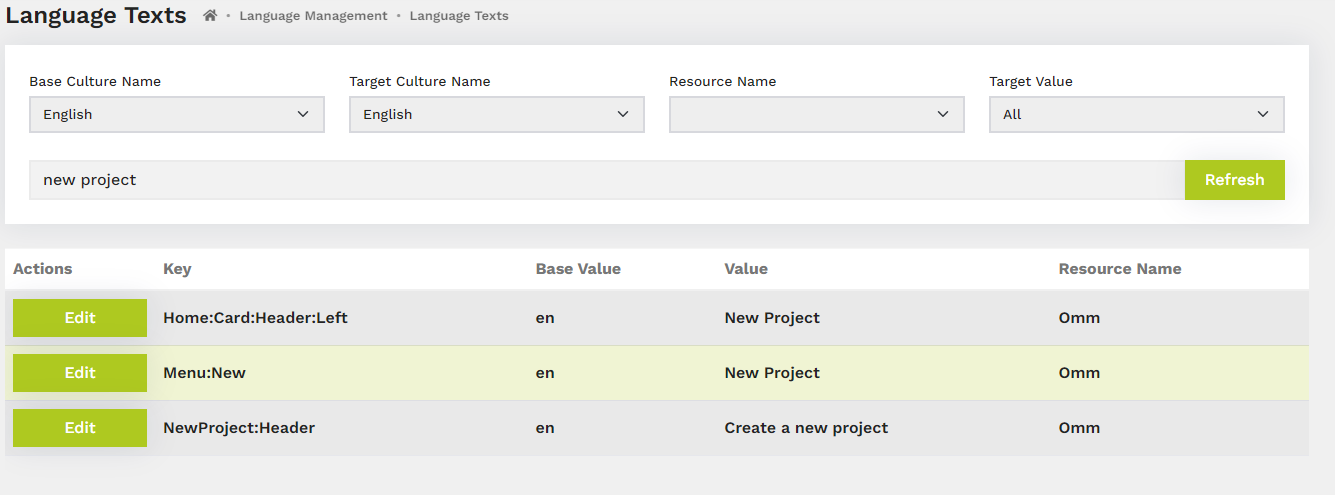
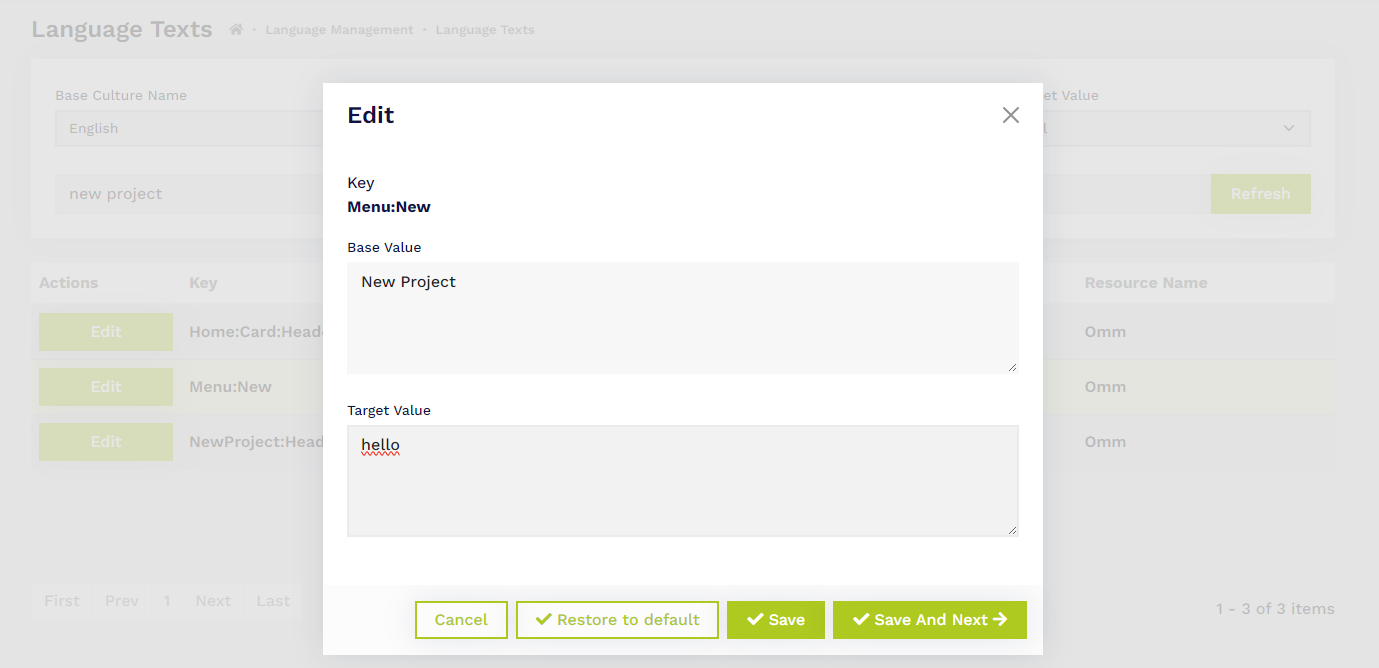

Upon saving, the text was changed without any issues.
However, when logging in with a tenant, the header still displays "New Project", as the value appears unchanged in the language management module.
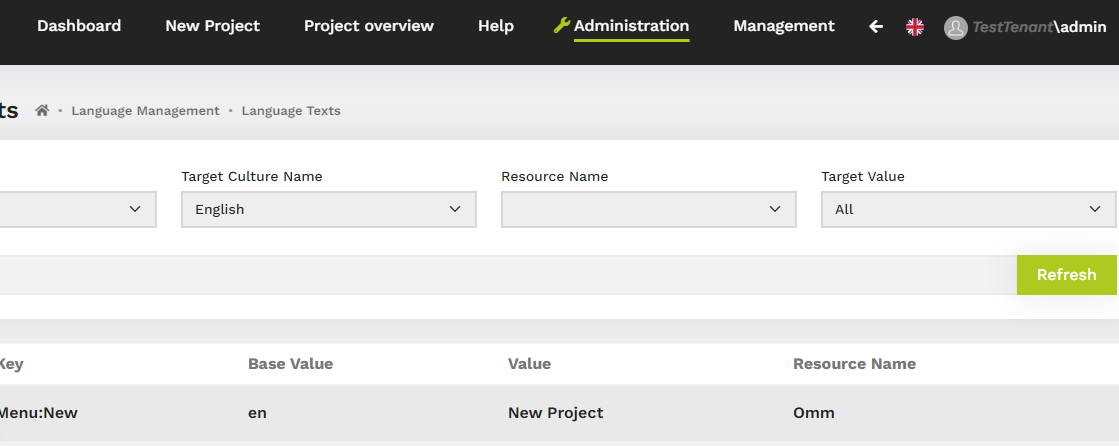
How can we use the language management module for tenant-independent localization?









