Hi,
But I didn't do anything without more information.
You can try this: https://docs.abp.io/en/commercial/latest/abp-suite/how-to-uninstall Delete all local ABP CLI and SUITE caches and login again
Hi,
Is there any error logs?
Hi,
You can try adding those to global-styles.css:
.was-validated .form-control:invalid, .form-control.input-validation-error {
    border-color: #c00d49;
    padding-right: calc(1.5em + 1.35rem);
    background-image: url("data:image/svg+xml,%3csvg xmlns='http://www.w3.org/2000/svg' viewBox='0 0 12 12' width='12' height='12' fill='none' stroke='%23c00d49'%3e%3ccircle cx='6' cy='6' r='4.5'/%3e%3cpath stroke-linejoin='round' d='M5.8 3.6h.4L6 6.5z'/%3e%3ccircle cx='6' cy='8.2' r='.6' fill='%23c00d49' stroke='none'/%3e%3c/svg%3e");
    background-repeat: no-repeat;
    background-position: right calc(0.375em + 0.3375rem) center;
    background-size: calc(0.75em + 0.675rem) calc(0.75em + 0.675rem);
  }
  .was-validated .form-control:invalid:focus, .form-control.input-validation-error:focus {
    border-color: #c00d49;
    box-shadow: 0 0 0 0 rgba(192, 13, 73, 0.25);
  }

  .was-validated textarea.form-control:invalid, textarea.form-control.input-validation-error {
    padding-right: calc(1.5em + 1.35rem);
    background-position: top calc(0.375em + 0.3375rem) right calc(0.375em + 0.3375rem);
  }

  .was-validated .form-select:invalid, .form-select.input-validation-error {
    border-color: #c00d49;
  }
  .was-validated .form-select:invalid:not([multiple]):not([size]), .was-validated .form-select:invalid:not([multiple])[size="1"], .form-select.input-validation-error:not([multiple]):not([size]), .form-select.input-validation-error:not([multiple])[size="1"] {
    padding-right: 6.875rem;
    background-image: url("data:image/svg+xml,%3csvg xmlns='http://www.w3.org/2000/svg' viewBox='0 0 16 16'%3e%3cpath fill='none' stroke='%23343a40' stroke-linecap='round' stroke-linejoin='round' stroke-width='2' d='m2 5 6 6 6-6'/%3e%3c/svg%3e"), url("data:image/svg+xml,%3csvg xmlns='http://www.w3.org/2000/svg' viewBox='0 0 12 12' width='12' height='12' fill='none' stroke='%23c00d49'%3e%3ccircle cx='6' cy='6' r='4.5'/%3e%3cpath stroke-linejoin='round' d='M5.8 3.6h.4L6 6.5z'/%3e%3ccircle cx='6' cy='8.2' r='.6' fill='%23c00d49' stroke='none'/%3e%3c/svg%3e");
    background-position: right 1.25rem center, center right 3.75rem;
    background-size: 16px 12px, calc(0.75em + 0.675rem) calc(0.75em + 0.675rem);
  }
  .was-validated .form-select:invalid:focus, .form-select.input-validation-error:focus {
    border-color: #c00d49;
    box-shadow: 0 0 0 0 rgba(192, 13, 73, 0.25);
  }

  .was-validated .form-control-color:invalid, .form-control-color.input-validation-error {
    width: calc(3rem + calc(1.5em + 1.35rem));
  }

  .was-validated .form-check-input:invalid, .form-check-input.input-validation-error {
    border-color: #c00d49;
  }
  .was-validated .form-check-input:invalid:checked, .form-check-input.input-validation-error:checked {
    background-color: #c00d49;
  }
  .was-validated .form-check-input:invalid:focus, .form-check-input.input-validation-error:focus {
    box-shadow: 0 0 0 0 rgba(192, 13, 73, 0.25);
  }
Yes, can configurable for each tenant and per user.
Hi,
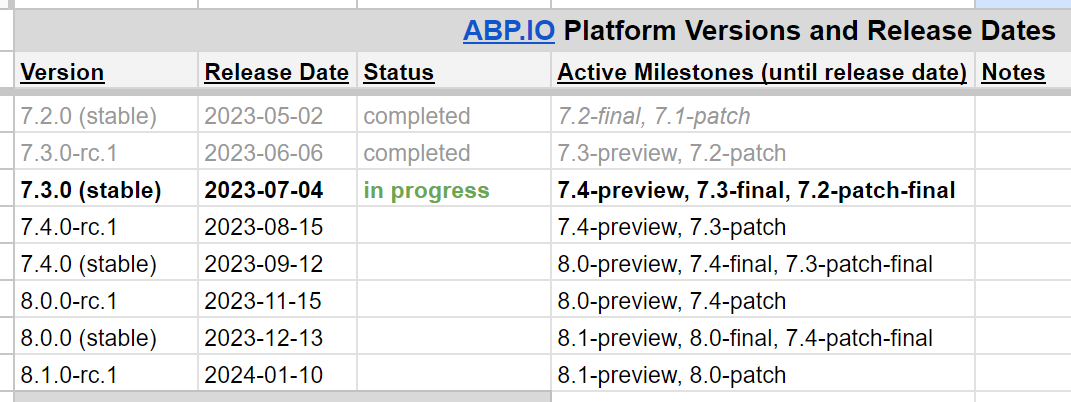
This feature will be available in 7.4.
https://github.com/abpframework/abp/issues/12249
Currently, you need to customize the profile page: https://docs.abp.io/en/commercial/latest/ui/angular/manage-profile-page-tabs
Hi,
ABP theme team on holiday in Turkey and will check your question next week
Hi,
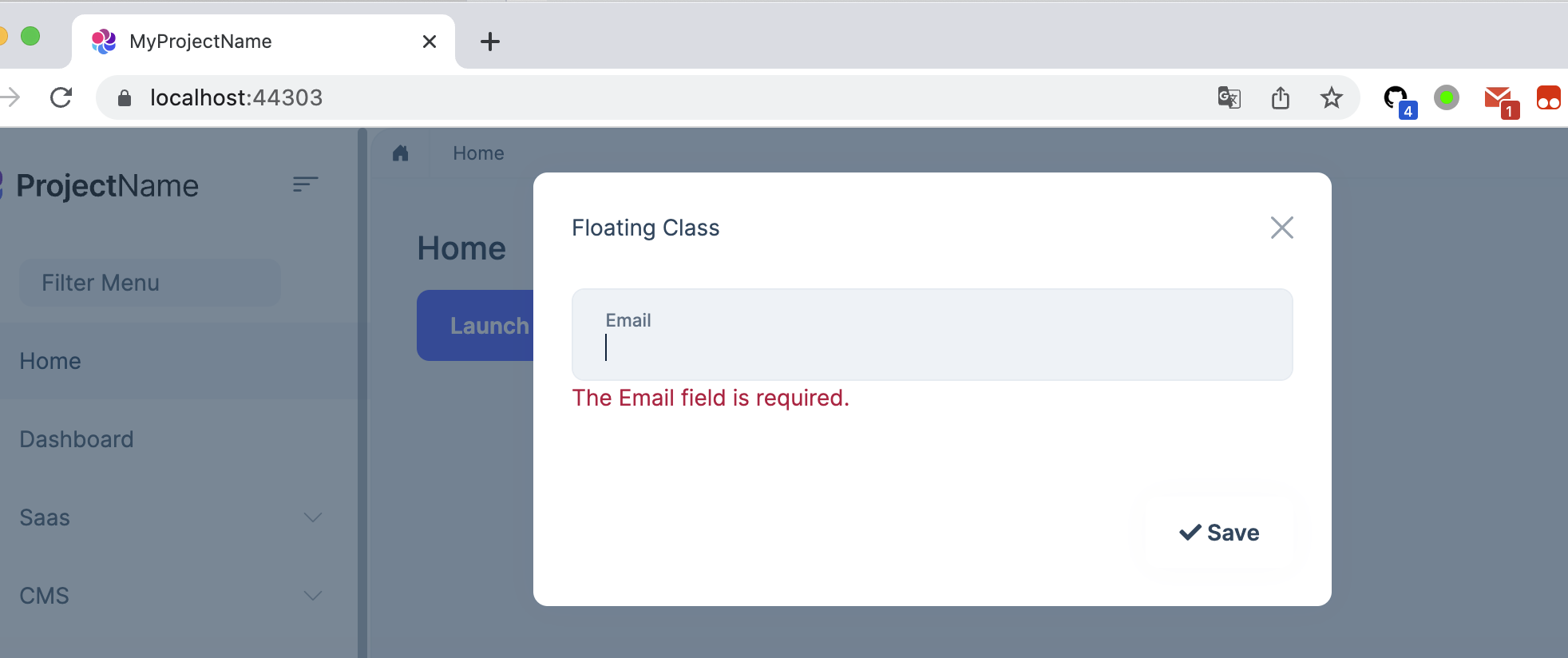
You can try:
<form data-ajaxForm="true" asp-page="/Contact" autocomplete="off" id="testForm">
    <abp-modal id="exampleModal">
        <abp-modal-header>
            <span>Floating Class</span>
        </abp-modal-header>
        <abp-modal-body>
            <div class="col position-relative">
                <div class="form-floating mb-3">
                    <input type="email"
                           class="form-control"
                           id="email"
                           name="email"
                           placeholder="Email"
                           data-val="true"
                           data-val-required="The Email field is required."/>
                    <label class="form-label" for="email">Email</label>
                    <span class="text-danger field-validation-valid" data-valmsg-for="email" data-valmsg-replace="true"></span>
                </div>
            </div>
        </abp-modal-body>
        <abp-modal-footer>
            <button type="submit" class="btn" busy-data-text="Saving...">
                <i class="fa fa-check"></i><span> Save</span>
            </button>
        </abp-modal-footer>
    </abp-modal>
</form>
Hi,
You can custom the login page to redirect to external login.
For example:
[Dependency(ReplaceServices = true)]
[ExposeServices(typeof(LoginModel))]
public class MyLoginModel : LoginModel
{
    public MyLoginModel(IAuthenticationSchemeProvider schemeProvider, IOptions<AbpAccountOptions> accountOptions, IAbpRecaptchaValidatorFactory recaptchaValidatorFactory, IAccountExternalProviderAppService accountExternalProviderAppService, ICurrentPrincipalAccessor currentPrincipalAccessor, IOptions<IdentityOptions> identityOptions, IOptionsSnapshot<reCAPTCHAOptions> reCaptchaOptions) : base(schemeProvider, accountOptions, recaptchaValidatorFactory, accountExternalProviderAppService, currentPrincipalAccessor, identityOptions, reCaptchaOptions)
    {
    }

    [UnitOfWork]
    public override async Task<IActionResult> OnGetAsync()
    {
        await GetExternalProviders();

        var azureAdProvider = VisibleExternalProviders.First();

        var redirectUrl = Url.Page("./Login", pageHandler: "ExternalLoginCallback", values: new { ReturnUrl, ReturnUrlHash });
        var properties = SignInManager.ConfigureExternalAuthenticationProperties(azureAdProvider.AuthenticationScheme, redirectUrl);
        properties.Items["scheme"] = azureAdProvider.AuthenticationScheme;

        return await Task.FromResult(Challenge(properties, azureAdProvider.AuthenticationScheme));

    }
}
Hi,
Yes, this is planned. But this is preview version. We plan to release a stable version on September 12th.