ok, you can create a new tenant and set all service connection strings.
Thanks.
hi
Try to update XXXSaasServiceModule and SaasServiceDatabaseMigrationEventHandler as below:
Then set connection strings for each microserver in a tenant.
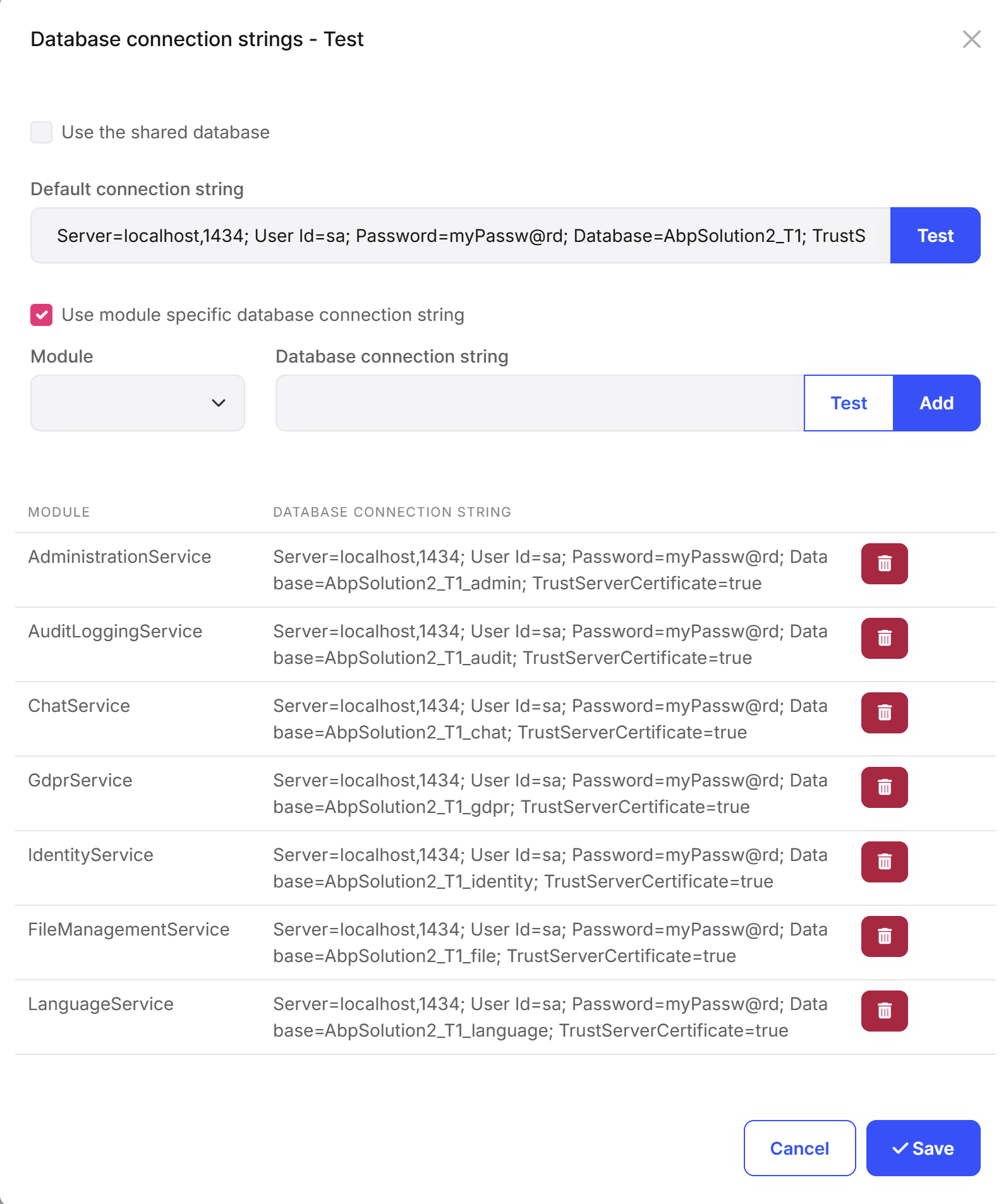
Configure<AbpDbConnectionOptions>(options =>
{
    options.Databases.Configure("AdministrationService", database =>
    {
        database.MappedConnections.Add(AbpPermissionManagementDbProperties.ConnectionStringName);
        database.MappedConnections.Add(AbpFeatureManagementDbProperties.ConnectionStringName);
        database.MappedConnections.Add(AbpSettingManagementDbProperties.ConnectionStringName);
    });

    options.Databases.Configure("AuditLoggingService", database =>
    {
        database.MappedConnections.Add(AbpAuditLoggingDbProperties.ConnectionStringName);
    });

    options.Databases.Configure("ChatService", database =>
    {
        database.MappedConnections.Add("ChatService");
    });

    options.Databases.Configure("GdprService", database =>
    {
        database.MappedConnections.Add("GdprService");
    });

    options.Databases.Configure("IdentityService", database =>
    {
        database.MappedConnections.Add("IdentityService");
    });

    options.Databases.Configure("FileManagementService", database =>
    {
        database.MappedConnections.Add("FileManagementService");
    });

    options.Databases.Configure("LanguageService", database =>
    {
        database.MappedConnections.Add(LanguageManagementDbProperties.ConnectionStringName);
    });
});
using Volo.Abp.EntityFrameworkCore.Migrations;
using Volo.Abp.EventBus.Distributed;
using Volo.Abp.DistributedLocking;
using Volo.Abp.MultiTenancy;
using Volo.Abp.Uow;
using Volo.Abp.Data;

namespace AbpSolution2.SaasService.Data;

public class SaasServiceDatabaseMigrationEventHandler : EfCoreDatabaseMigrationEventHandlerBase<SaasServiceDbContext>
{
    private readonly SaasServiceDataSeeder _dataSeeder;

    public SaasServiceDatabaseMigrationEventHandler(
        ILoggerFactory loggerFactory,
        ICurrentTenant currentTenant,
        IUnitOfWorkManager unitOfWorkManager,
        ITenantStore tenantStore,
        IAbpDistributedLock abpDistributedLock,
        IDistributedEventBus distributedEventBus,
        SaasServiceDataSeeder dataSeeder
    ) : base(
        SaasServiceDbContext.DatabaseName,
        currentTenant,
        unitOfWorkManager,
        tenantStore,
        abpDistributedLock,
        distributedEventBus,
        loggerFactory)
    {
        _dataSeeder = dataSeeder;
    }

    public override Task HandleEventAsync(TenantCreatedEto eventData)
    {
        return Task.CompletedTask;
    }

    public override Task HandleEventAsync(ApplyDatabaseMigrationsEto eventData)
    {
        return Task.CompletedTask;
    }

    public override Task HandleEventAsync(TenantConnectionStringUpdatedEto eventData)
    {
        return Task.CompletedTask;
    }

    protected override async Task SeedAsync(Guid? tenantId)
    {
        await _dataSeeder.SeedAsync(tenantId);
    }
}
hi
You can try to replace this line:
@(await Component.InvokeAsync<ContentAlertsViewComponent>())
to
@(await Component.InvokeAsync<PageAlertsViewComponent>())
hi
I found the problem. I will provide a solution soon.
Thanks.
hi
Sent by https://wetransfer.com/
Thanks. I'm checking them.
hi
After login use tenant,throw the exception:
Can you share the logs after this exception?
I checked the logs. The databases have migrated successfully.
Thanks.
hi
All the modules can work without an inbox and an outbox. You can enable/disable them in your app code. See https://abp.io/docs/latest/framework/infrastructure/event-bus/distributed#outbox-inbox-for-transactional-events
I have shared the StripePaymentGateway.cs with you. Can you check and try to override its methods? eg HandleCustomerSubscriptionUpdatedAsync
Thanks.
hi
[20:47:08 ERR] Value cannot be null. (Parameter 'serviceType')
System.ArgumentNullException: Value cannot be null. (Parameter 'serviceType')
   at System.ThrowHelper.Throw(String paramName)
Do you have such code in your module?
Configure<AbpDistributedEventBusOptions>(options =>
{
    options.Outboxes.Configure(config =>
    {
        config.UseDbContext<YourDbContext>();
    });

    options.Inboxes.Configure(config =>
    {
        config.UseDbContext<YourDbContext>();
    });
});
Thanks.




