ok. Please share a screenshot of your organization page with liming.ma@volosoft.com
https://abp.io/my-organizations
Thanks
hi
Please send an email to liming.ma@volosoft.com
I will share the IdentityServer.Pro v8.2.3 module source code with you.
Thanks.
hi
Please check the appsettings.jons content in different environments.
Also can you share your website URL? so I can check the error online.
Thanks. liming.ma@volosoft.com
hi
Please do this:
logs.txt file. "Logging": {
"MinimalLevel": "Information",
"EnableConsole": true,
"EnableDebug": true,
"EnableLocal": true,
"Overrides": {
"Abp": "Debug",
"Elastic": "Warning",
"Hangfire": "Warning",
"HealthChecks": "Warning",
"IdentityServer4": "Warning",
"Microsoft": "Debug",
"Microsoft.EntityFrameworkCore": "Debug",
"OpenIddict": "Warning",
"System.Net.Http.HttpClient": "Warning",
"Volo": "Information"
}
},
ououif you still have a problem, Please share your logs.txt with liming.ma@volosoft.com
Thanks.
hi
You can try to install the suite by abp suite install command.
https://abp.io/docs/latest/suite/how-to-install
hi
The code exists in the Identity.Pro module.
Volo.Abp.Identity.Pro.Application/Volo/Abp/Identity/IdentitySettingsAppService.cs
Volo.Abp.Identity.Pro.HttpApi/Volo/Abp/Identity/IdentitySettingsController.cs
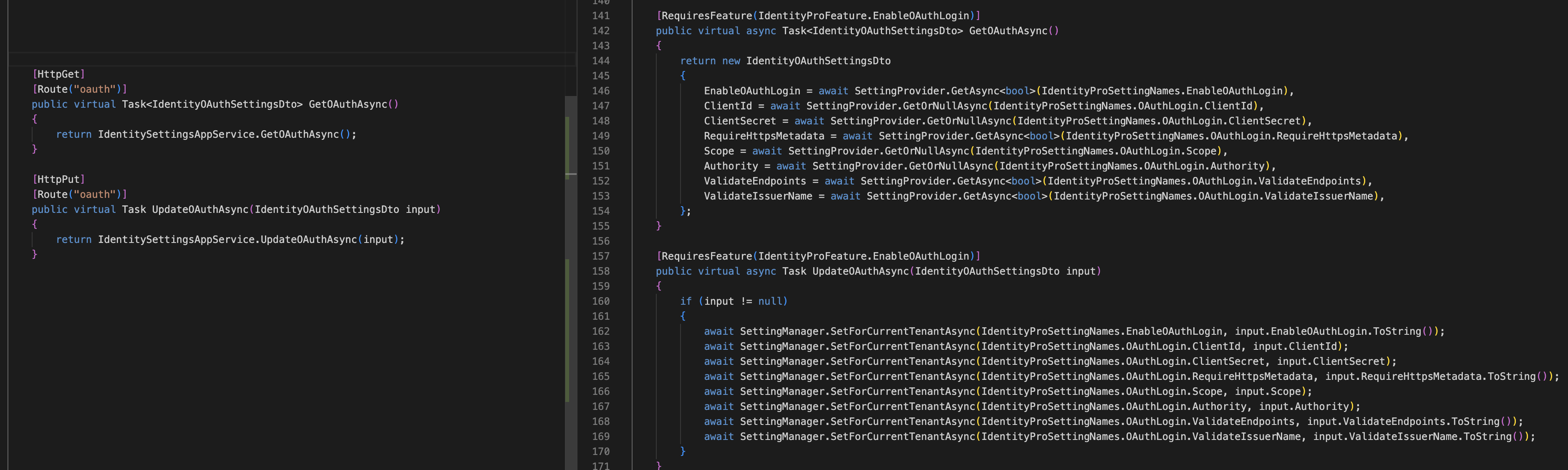
hi
The new translation texts, will be available in next 9.0 patch version:
Thank you for your text!


hi
You need to add your custom API endpoints to update the setting value.
You can also add a GET endpoint to get the setting value. Just like oauth

all the applications have an angular UI, a ".Http.Api.Host" API project and an "Authserver"
hi
Your application is an API project/website , which means there is no page. It is authenticated by a JWT token.
The SSO will use cookies for authentication. But angular will use JWT token.
If your angular app uses Authorization Code Flow to get tokens. then you can do:
https://abp.io/docs/latest/framework/ui/angular/authorization#authorization-code-flow
You have a lot of angular and API websites. But there is only one authserver project.
If one of your angular => login => redirect to authserver => signed => redirect to angular localhost:4200?code=xyz => angular get the token.
The other angulars do not need to sign again on the authserver website. It will get a token automatically.
hi
We have introduced the session management feature in >=8.2.0
https://abp.io/docs/latest/modules/identity/session-management https://abp.io/docs/latest/modules/account/session-management




