hi
You should make the remember feature invalidate when the user's 2fa changes. This can be complicated.
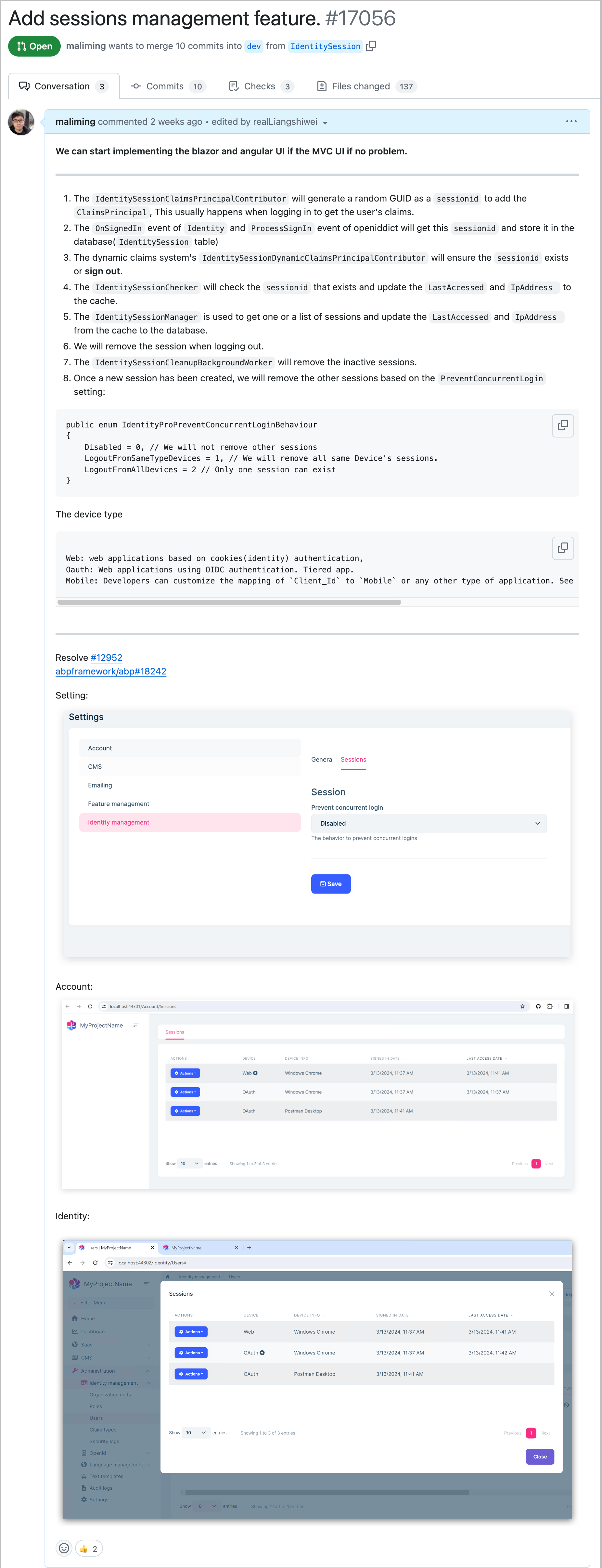
We will introduce the session management feature in 8.2.
hi
the existing database will still be used by other systems so we don't need to change it,
You don't need to change the database and tables.
You need to :
DbContext class. DbSetOnModelCreating method of DbContexthi
Our project is just a net core app. You can build it locally, which means it is no problem.
Is it possible to compile your trial project with bitbucket runner?
You can try following:
dotnet build /graphBuild to replace dotnet build command.hi
You can add the scope to your TokenRequest parameter.
https://github.com/abpframework/abp/blob/dev/templates/app/aspnet-core/src/MyCompanyName.MyProjectName.Web.Host/MyProjectNameWebModule.cs#L168
Example:
ar client = new HttpClient();

var response = await client.RequestTokenAsync(new TokenRequest
{
    Address = "https://demo.identityserver.io/connect/token",
    GrantType = "custom",

    ClientId = "client",
    ClientSecret = "secret",

    Parameters =
    {
        { "custom_parameter", "custom value"},
        { "scope", "api1" }
    }
});
hi
You can add your code to MyExtensionProperties.razor
MyExtensionProperties.razor
@typeparam TEntityType
@typeparam TResourceType
@using Volo.Abp.Data
@using Volo.Abp.ObjectExtending
@inherits Volo.Abp.BlazoriseUI.Components.ObjectExtending.ExtensionProperties<TEntityType, TResourceType>

@{
    Entity.SetDefaultsForExtraProperties();

    foreach (var propertyInfo in ObjectExtensionManager.Instance.GetProperties<TEntityType>())
    {
        if (!propertyInfo.Name.EndsWith("_Text"))
        {
            if (propertyInfo.Type.IsEnum)
            {
                <SelectExtensionProperty PropertyInfo="@propertyInfo" Entity="@Entity" TEntity="TEntityType" TResourceType="TResourceType" LH="@LH" />
            }
            else if (!propertyInfo.Lookup.Url.IsNullOrEmpty())
            {
                <LookupExtensionProperty PropertyInfo="@propertyInfo" Entity="@Entity" TEntity="TEntityType" TResourceType="TResourceType" LH="@LH" />
            }
            else
            {
                var inputType = BlazoriseUiObjectExtensionPropertyInfoExtensions.GetInputType(propertyInfo);
                __builder.OpenComponent(0, inputType.MakeGenericType(new[] { typeof(TEntityType), typeof(TResourceType) }));
                __builder.AddAttribute(1, "PropertyInfo", propertyInfo);
                __builder.AddAttribute(2, "Entity", Entity);
                __builder.AddAttribute(3, "LH", LH);
                __builder.AddAttribute(4, "ModalType", ModalType);
                __builder.CloseComponent();
            }
        }
    }
}
MyExtensionProperties.razor.cs
using Volo.Abp.BlazoriseUI.Components.ObjectExtending;
using Volo.Abp.Data;

namespace BookStore.Blazor.Components;

public partial class MyExtensionProperties<TEntityType, TResourceType> : ExtensionProperties<TEntityType, TResourceType>
    where TEntityType : IHasExtraProperties
{

}
Replace the ExtensionProperties in DI.
public override void ConfigureServices(ServiceConfigurationContext context)
{
    context.Services.Replace(ServiceDescriptor.Transient(
        typeof(ExtensionProperties<IdentityUserCreateDto, IdentityResource>),
        typeof(MyExtensionProperties<IdentityUserCreateDto, IdentityResource>)));

    context.Services.Replace(ServiceDescriptor.Transient(
        typeof(ExtensionProperties<IdentityUserUpdateDto, IdentityResource>),
        typeof(MyExtensionProperties<IdentityUserUpdateDto, IdentityResource>)));
}
hi
I will share the code. wait a monent.
hi
Could we modify in both razor and code behind?
Yes.
Where do I put this code line?
In your blazor project, eg the Component folder.
hi
We are working on it. Sorry for that.
hi
I tried again and I get same error Object Disposed when attempt to use FirstOrDefaultAsync method without UnitOfManager.Begin method but I use UOW.Begin method then no problem code work fine. I added an image relation to error.
Can you share a new template project to reproduce this error? liming.ma@volosoft.com
Thanks.
hi
We have a problem with the abp.io website, which will be fixed ASAP.




