Hi @liangshiwei, thanks for your quick response. I am able to resolve the problem by clear browser cookies in the latest version 4.0.2.
However, I still got the unauthentication problem with version 3.3.2 due to missing access token
[21:56:21 WRN] Authorization failed! Given policy has not granted.
Volo.Abp.Authorization.AbpAuthorizationException: Authorization failed! Given policy has not granted.
please let me know is there a way to add the token in swagger like version 4.x
Thank you.
Hi @gterdem, I have overrided the methods and found the root caue, the loginInfo is returned null if I login with the Identity Server A as authentication provider:
var loginInfo = await SignInManager.GetExternalLoginInfoAsync();
            if (loginInfo == null)
            {
                Logger.LogWarning("External login info is not available");
                return RedirectToPage("./Login");
            }
I have added Google authentication provider to check, it was able to retrieve the loginInfo and proceed redirect to /Register page to register new user while the Identity Server could not retrieve the info and redirected to /.Login page:
Google log:
[10:28:16 INF] Executing handler method internetAbp.Pages.Account.CustomLoginModel.OnGetExternalLoginCallbackAsync - ModelState is Valid
[10:28:17 DBG] Added 0 entity changes to the current audit log
[10:28:17 DBG] Added 0 entity changes to the current audit log
[10:28:17 INF] Executed handler method OnGetExternalLoginCallbackAsync, returned result Microsoft.AspNetCore.Mvc.RedirectToPageResult.
[10:28:17 DBG] Added 0 entity changes to the current audit log
[10:28:17 INF] Executing RedirectToPageResult, redirecting to ./Register.
Identity Server A log:
[10:30:30 INF] Executing handler method internetAbp.Pages.Account.CustomLoginModel.OnGetExternalLoginCallbackAsync - ModelState is Valid
[10:30:33 WRN] External login info is not available
[10:30:33 INF] Executed handler method OnGetExternalLoginCallbackAsync, returned result Microsoft.AspNetCore.Mvc.RedirectToPageResult.
[10:30:33 INF] Executing RedirectToPageResult, redirecting to ./Login.
[10:30:33 INF] Executed page /Account/Login in 3398.5971ms
[10:30:33 INF] Executed endpoint '/Account/Login'
Full Log:
Could you please help me check.
Hi @gterdem, yes, the returnUrl was in address bar after navigated to Application A login page:
https://localhost:44306/Account/Login?ReturnUrl=%2Fconnect%2Fauthorize%2Fcallback%3Fclient_id%3Dinternetprovider%26redirect_uri%3Dhttps%253A%252F%252Flocalhost%253A44366%252Fsignin-oidc%26response_type%3Dcode%26scope%3Dopenid%2520profile%2520email%26code_challenge....
Below is the log details in Identity Server B, there is a line "ModelState is invalid", could you help me check:
[00:41:39 INF] Request starting HTTP/2.0 POST https://localhost:44366/Account/Login?returnUrl=%2Fconnect%2Fauthorize%2Fcallback%3Fresponse_type%3Dcode%26client_id%3DinternetAbp_App%26state%3DNTdhV1BhekxYTjFQakFyMzAwWFhMeW9CRHAzVURfMEVUbk4weVl-aVZhZmtw%26redirect_uri%3Dhttp%253A%252F%252Flocalhost%253A4200%26scope%3Dopenid%2520offline_access%2520internetAbp%26code_challenge%3DdQlDYtTlRIf4QVskwYTFtNSzSLEHKkZ2Vi5tLCO3nMk%26code_challenge_method%3DS256%26nonce%3DNTdhV1BhekxYTjFQakFyMzAwWFhMeW9CRHAzVURfMEVUbk4weVl-aVZhZmtw&handler=ExternalLogin application/x-www-form-urlencoded 651 [00:41:39 INF] CORS policy execution failed. [00:41:39 INF] Request origin https://localhost:44366 does not have permission to access the resource. [00:41:39 INF] No CORS policy found for the specified request. [00:41:39 INF] Executing endpoint '/Account/Login' [00:41:39 INF] Route matched with {page = "/Account/Login", area = "", action = "", controller = ""}. Executing page /Account/Login [00:41:39 INF] Skipping the execution of current filter as its not the most effective filter implementing the policy Microsoft.AspNetCore.Mvc.ViewFeatures.IAntiforgeryPolicy [00:41:39 INF] Executing handler method Volo.Abp.Account.Public.Web.Pages.Account.LoginModel.OnPostExternalLogin - ModelState is Invalid [00:41:39 INF] Executed handler method OnPostExternalLogin, returned result Microsoft.AspNetCore.Mvc.ChallengeResult. [00:41:39 INF] Executing ChallengeResult with authentication schemes (["oidc"]). [00:41:39 INF] AuthenticationScheme: oidc was challenged. [00:41:39 INF] Executed page /Account/Login in 136.7324ms [00:41:39 INF] Executed endpoint '/Account/Login' [00:41:39 DBG] Added 0 entity changes to the current audit log [00:41:39 DBG] Added 0 entity changes to the current audit log [00:41:39 INF] Request finished in 159.1755ms 302
Hi @alper, I have found the root cause, I forgot to update the "audience" in HttpApi.Host project. Thanks
Hi @christophe.baille, I got the same issue, is there any work around for this issue?
Hi, I managed to make the login working by changing the code below:
context.Services.AddAuthentication()
                .AddOpenIdConnect("oidc", "Intranet OpenID Connect", options =>
                {
                    options.Authority = "https://localhost:44306/";
                    options.ClientId = "internetprovider";
                    options.ResponseType = OpenIdConnectResponseType.CodeIdToken;
                    options.ClientSecret = "secret";
                    options.RequireHttpsMetadata = false;
                    options.SaveTokens = true;
                    options.GetClaimsFromUserInfoEndpoint = true;
                    options.Scope.Add("email");
                })
the page had navigated to the Identity Server A login page, I logged in successfully, however, it keeps navigate back to the Identity Server B login page, it should redirect me to application page or registration page if user is new.
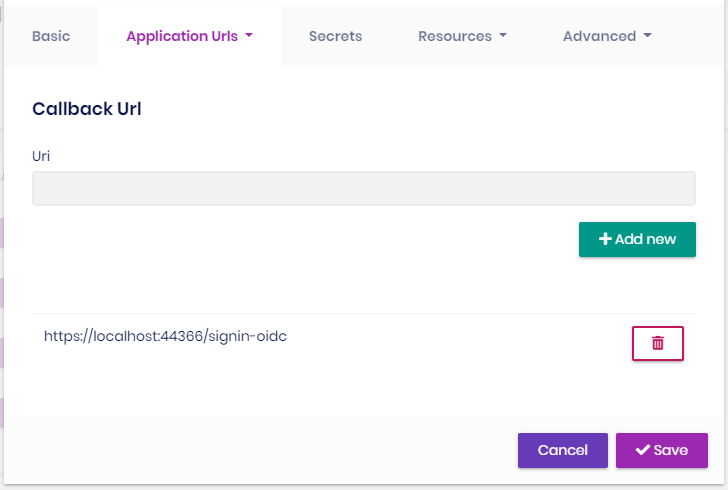
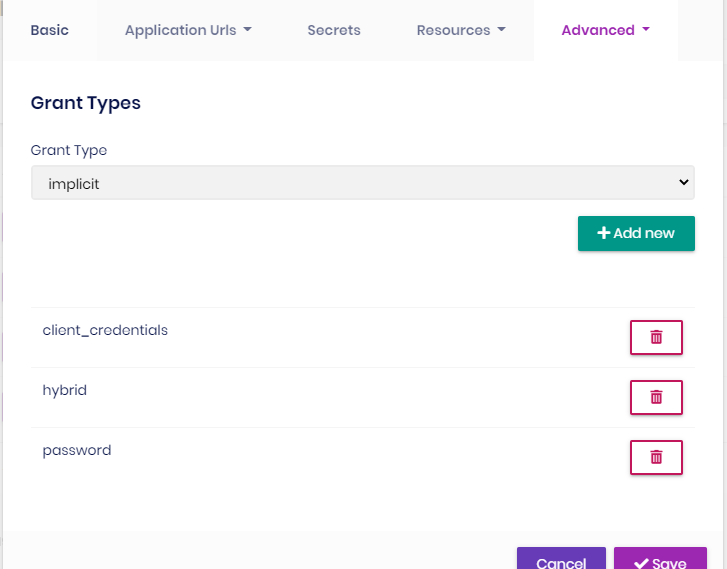
This is the client configuration in Identity Server A:
Callback:
Grant Types:
Any help is appreciated
Hi, I got this issue when generate CRUD with Augular UI and seperated Identity Server options:
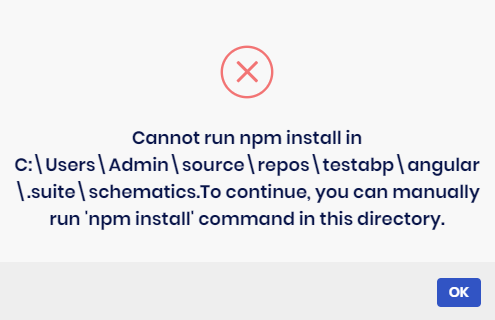
I had tried to manually run 'npm install' in that folder and generated again, it showed successfully but the Angular UI was not updated, I did try @Alper work around as well but no luck: https://support.abp.io/QA/Questions/626#answer-f02d209c-0bb8-e1bd-a4d6-39f940b19df6
Below is the log content:
2020-12-11 15:57:38.101 +08:00 [WRN] Cannot run npm install in C:\Users\Admin\source\repos\TestAbp\angular.suite\schematics.To continue, you can manually run 'npm install' command in this directory. Volo.Abp.UserFriendlyException: Cannot run npm install in C:\Users\Admin\source\repos\TestAbp\angular.suite\schematics.To continue, you can manually run 'npm install' command in this directory. at Volo.Abp.Suite.Areas.AbpSuite.CrudPageGenerator.Services.AngularSchematicsService.unfJM7yjv7(String ) at Volo.Abp.Suite.Areas.AbpSuite.CrudPageGenerator.Services.AngularSchematicsService.lnAJAtU9SV(String , Solution ) at Volo.Abp.Suite.Areas.AbpSuite.CrudPageGenerator.Services.AngularSchematicsService.SetupSchematicsAsync(Solution solution) at Volo.Abp.Suite.Areas.AbpSuite.CrudPageGenerator.Commands.AngularUiGenerateWithSchematicsCommand.ExecuteAsync(CrudPageCommandOptions options) at Volo.Abp.Suite.Areas.AbpSuite.CrudPageGenerator.CommandManager.ExecuteAllAsync(CrudPageCommandOptions options) at Volo.Abp.Suite.Areas.AbpSuite.CrudPageGenerator.Commands.CrudPageGenerator.GenerateAsync(EntityModel entity, Solution solution) at Volo.Abp.Suite.Controllers.CrudPageGeneratorController.SaveAndGenerateEntityAsync(Guid solutionId, EntityModel entity) at lambda_method1472(Closure , Object ) at Microsoft.AspNetCore.Mvc.Infrastructure.ActionMethodExecutor.TaskOfActionResultExecutor.Execute(IActionResultTypeMapper mapper, ObjectMethodExecutor executor, Object controller, Object[] arguments) at Microsoft.AspNetCore.Mvc.Infrastructure.ControllerActionInvoker.<InvokeActionMethodAsync>g__Awaited|12_0(ControllerActionInvoker invoker, ValueTask`1 actionResultValueTask) at Microsoft.AspNetCore.Mvc.Infrastructure.ControllerActionInvoker.









