I'm not sure I follow. Calling the Microsoft Logout https://login.microsoftonline.com/{tenant}/oauth2/v2.0/logout logs me out of Microsoft Entra, but I still need to call Abp's Logout Endpoint somehow, so I don't see how using post_logout_redirect_uri= https://localhost:44372 would accomplish that.
Here's what the login endpoint looks like, it requires me to click on the account that I'm using to logout.
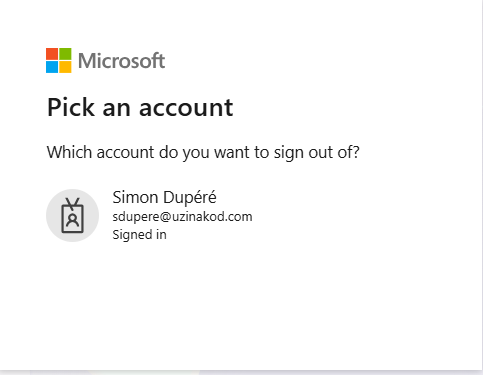 So I'm trying another approach. I saw that I can supply my url https://login.microsoftonline.com/{tenant}/oauth2/v2.0/logout?post_logout_redirect_uri={callback_uri} with a callback uri. So I'm thinking that maybe I can have a logout url that points to my app's logout.I have tried different url but I can't get it to work, For exemple if I set my callback url to https://localhost:44372/authentication/logout (where localhost:44372 is my blazor WASM front-end), then I get the following result.
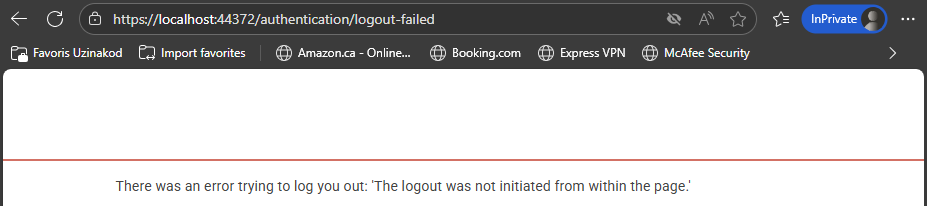 Is there any other endpoint that I could use as a callback url that will succesffuly log me out?
Upon further investigation, the signout url provided by Microsoft which is https://login.microsoftonline.com/{tenant}/oauth2/v2.0/logout requires an interaction with the user, so I don't think the iframe is the desired solution here
I'm not sure about the iframe solution, as we submit the MAUI Blazor App to the app stores, and the app stores will often reject apps that have iframes
Hi,
Yes, it is logged out of the application.
Here's the Microsoft Entra Configuration. Please note that I'm using two different Microsoft Entra accounts
var authBuilder = context.Services.AddAuthentication();

if (!string.IsNullOrEmpty(configuration["AzureEntraMembers:ClientId"]) &&
!string.IsNullOrEmpty(configuration["AzureEntraMembers:ClientSecret"]) &&
!string.IsNullOrEmpty(configuration["AzureEntraMembers:MicrosoftLoginUrl"]))
{
	var tenantUrl = configuration["AzureEntraMembers:MicrosoftLoginUrl"];
	tenantUrl = tenantUrl.TrimEnd('/');
	authBuilder.AddMicrosoftAccount(PSACAuthenticationSchemes.MembersEntra, options =>
	{
		options.ClientId = configuration["AzureEntraMembers:ClientId"]!;
		options.ClientSecret = configuration["AzureEntraMembers:ClientSecret"]!;
		options.AuthorizationEndpoint = $"{tenantUrl}/oauth2/v2.0/authorize";
		options.TokenEndpoint = $"{tenantUrl}/oauth2/v2.0/token";
		options.ClaimActions.MapCustomJson("picture", _ => "[https://graph.microsoft.com/v1.0/me/photo/$value");](https://graph.microsoft.com/v1.0/me/photo/$value");)
		options.SaveTokens = true;
	});
}

if (!string.IsNullOrEmpty(configuration["AzureEntraWorkforce:ClientId"]) &&
     !string.IsNullOrEmpty(configuration["AzureEntraWorkforce:ClientSecret"]) &&
     !string.IsNullOrEmpty(configuration["AzureEntraWorkforce:MicrosoftLoginUrl"]))
 {
     var staffTenantUrl = configuration["AzureEntraWorkforce:MicrosoftLoginUrl"];
     staffTenantUrl = staffTenantUrl.TrimEnd('/');
     authBuilder.AddMicrosoftAccount(PSACAuthenticationSchemes.WorkforceEntra, options =>
     {
         options.ClientId = configuration["AzureEntraWorkforce:ClientId"]!;
         options.ClientSecret = configuration["AzureEntraWorkforce:ClientSecret"]!;
         options.CallbackPath = "/signin-microsoft-workforce";
         if (!string.IsNullOrEmpty(staffTenantUrl))
         {
             options.AuthorizationEndpoint = $"{staffTenantUrl}/oauth2/v2.0/authorize";
             options.TokenEndpoint = $"{staffTenantUrl}/oauth2/v2.0/token";
         }
         options.SaveTokens = true;
     });
 }
I also have generated the har file while doing the logout, how do I share it with you? (It's 16 MB)
I was also able to get the following error through the Azure event log
EventId: 1 SpanId: c2c679515a9491fd TraceId: 6f1fd8a38b0d964b37ec6b4a8be97680 ParentId: 0000000000000000 RequestId: 400000d8-0000-9800-b63f-84710c7967bb RequestPath: /signin-microsoft-workforce An unhandled exception has occurred while executing the request. Exception: Microsoft.AspNetCore.Authentication.AuthenticationFailureException: An error was encountered while handling the remote login. ---> Microsoft.AspNetCore.Authentication.AuthenticationFailureException: The oauth state was missing or invalid. --- End of inner exception stack trace --- at Microsoft.AspNetCore.Authentication.RemoteAuthenticationHandler`1.HandleRequestAsync() at Microsoft.AspNetCore.Authentication.AuthenticationMiddleware.Invoke(HttpContext context) at Volo.Abp.AspNetCore.Security.AbpSecurityHeadersMiddleware.InvokeAsync(HttpContext context, RequestDelegate next) at Microsoft.AspNetCore.Builder.UseMiddlewareExtensions.InterfaceMiddlewareBinder.<>c__DisplayClass2_0.<<CreateMiddleware>b__0>d.MoveNext() --- End of stack trace from previous location --- at Microsoft.AspNetCore.Diagnostics.ExceptionHandlerMiddlewareImpl.<Invoke>g__Awaited|10_0(ExceptionHandlerMiddlewareImpl middleware, HttpContext context, Task task)
[maliming] said: hi
/signin-microsoft-workforce/signin-microsoft-workflowIs there a spelling mistake?
Thanks.
Yes, I apologize, /signin-microsoft-workforce is the callback url that's actually used









