Hello,
Thank you for providing these details about your problem. I have checked your case and could not produce the same on my end. It is expected to work as the problem mentioned in this ticket is resolved in this PR: https://github.com/abpframework/abp/pull/22853. May I also know whether you still face the garbage query problem on your side and the exact ABP version you are using?
This issue is related to the package manager that you have used since I produced the same problem after using npm instead of yarn. I can suggest you to try again after explicitly adding this dependency
"@volosoft/abp.ng.theme.lepton-x": "~2.2.2",
This version may be installed in a wrong way
"@volosoft/abp.ng.theme.lepton-x": "^2.2.0",
can you try this instead with ~ that would install the latest patch for this version?
"@volosoft/abp.ng.theme.lepton-x": "~2.2.0",
Thank you for the response. I am glad to hear that the problem is solved.
Thank you for providing a sample. There may be a path resolution problem. So, could you try adding these paths to your tsconfig.json
  "compilerOptions": {
    "paths": {
        "@angular/*":["node_modules/@angular/*"],
        "@abp/*":["node_modules/@abp/*"],
        "@volo/*":["node_modules/@volo/*"],
        "@volosoft/*":["node_modules/@volosoft/*"],
        "@swimlane/*": ["node_modules/@swimlane/*"],
        "@ngx-validate/core":["node_modules/@ngx-validate/core"],
        "@ng-bootstrap/ng-bootstrap": ["node_modules/@ng-bootstrap/ng-bootstrap"],
        "product-service": ["projects/product-service/src/public-api.ts"],
        "product-service/config": ["projects/product-service/config/src/public-api.ts"]
    }
  },
Thank you for providing extra details. I have checked your versions and I did not see anything problematic except this version
"@volosoft/abp.ng.theme.lepton-x": "~4.0." --> should be "~4.0.0"
If this does not solve your problem, you can send a minimal reproducible example through this e-mail address: sumeyye.kurtulus@volosoft.com.
Thank you for your cooperation.
Hello,
Could you please provide version details in your package.json ? May also know whether you have migrated to the new builder system for Angular app?
Hello again,
This error depends on this project you added as qrspc. That is why, I cannot produce the problem on my side. That would be the best if you could provide more details about the issue.
Hello again, I have sent a dropbox link via e-mail.
Hello again,
Sure, this is possible. However, you will need to keep some files that are the part of the extension system.
I suggest you to keep these files for this example:
You should update the imports in these files. You need to use the exact path for the component and the library paths for the ones that you are not overriding.
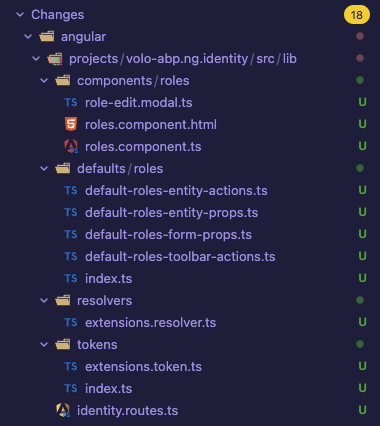
In addition, you need to update the routes file like this:
// app.routes.ts
export const APP_ROUTES: Routes = [
  {
    path: 'identity',
    loadChildren: () =>
      import('../../projects/volo-abp.ng.identity/src/lib/identity.routes').then(c =>
        c.createRoutes()
      ),
  },
];
If you need a sample for such approach, I can provide it via e-mail.
Thank you for your cooperation.









