Hello,
Thank you for taking the time to share such detailed feedback. I understand the frustration behind it, and I want to acknowledge it clearly before anything else: your concerns are valid.
The issues you listed (outdated or unused packages, mixed JS/TS usage, broken references, dependency resolution problems such as normalize-css-color, and out-of-the-box build failures) have been identified, addressed, and fixed internally.
These fixes are part of the upcoming ABP Studio release, which includes fully updated and verified React Native / Expo templates. The goal of this release is exactly what you are asking for:
generating a project that builds and runs out of the box, with consistent dependencies, cleaned-up architecture, and updated documentation.
Once the release is published, you will be able to verify the changes yourself via the official release notes here: https://abp.io/docs/latest/studio/release-notes
We do take feedback seriously—even when it’s critical—but there are real people on the other side of these products who care deeply about their quality. The React Native / Expo template has admittedly lagged behind our other UI stacks, and that gap is precisely what this upcoming release is meant to close.
If, after the next Studio release, you still encounter blockers or regressions, we absolutely want to hear about them—preferably with concrete repro steps so we can act quickly.
Thank you again for being candid, and for holding us to a high standard.
In Kubernetes the application name from the ConfigMap (dynamic-env.json, e.g. .Values.global.application.name) is loaded correctly via remoteEnv and merged into the Angular environment. However, ABP’s Angular theme reads environment only once at bootstrap (from environment.prod.ts) and doesn’t re‑apply it after remoteEnv runs, so visual elements like the app name still come from environment.prod.ts. In other words, the ConfigMap is correct and affects the runtime env, but the current theme code doesn’t use the application.name from dynamic-env.json unless you add custom code that does so.
You can let us know if you need further assistance. Thank you for your cooperation.
Thank you for taking your time for trying and responding. The project should work with this setup. However, this problem may occur because of your configurations in tsconfig.json or angular.json If you do not prefer sharing these details in this thread, you can send a mail to this address sumeyye.kurtulus@volosoft.com.
Thank you again for your cooperation.
Hello,
Thank you for providing extra details about your problem. However, I cannot produce the same issue on my end. That would be the best if you could provide dependencies declared in you package.json.
Thank you for your cooperation.
Hello,
Thank you for explaining the problem with details. I have seen that some of the packages are not correctly resolved and it installs the ABP version 9.3.x instead. Could you try updating the resolutions object in your package.json like this
    "**/@abp/ng.core": "~9.2.4",
    "**/@abp/ng.theme.shared": "~9.2.4",
    "**/@abp/ng.setting-management": "~9.2.4",
    "**/@volo/abp.commercial.ng.ui": "~9.2.4",
    "**/@volo/abp.ng.account": "~9.2.4"
You can let us know if you need further assistance. Thank you for your cooperation.
I have granted the access. You should be able to reach now.
You can reach the project via this link. It contains a separate structure for managing different upload types.
You can also let us know if you need further assistance.
Hello,
We will be checking this and releasing a fix for this. You can check the process here:
I can also share a sample project containing a fixed version if you prefer.
Thank you for your cooperation.
Hello again,
I am sharing the project via this link https://drive.google.com/file/d/16OROyNT2T3lwIOakvXAu0x4SGnopYpv6/view?usp=sharing I have only updated these two files and it should work as expected.
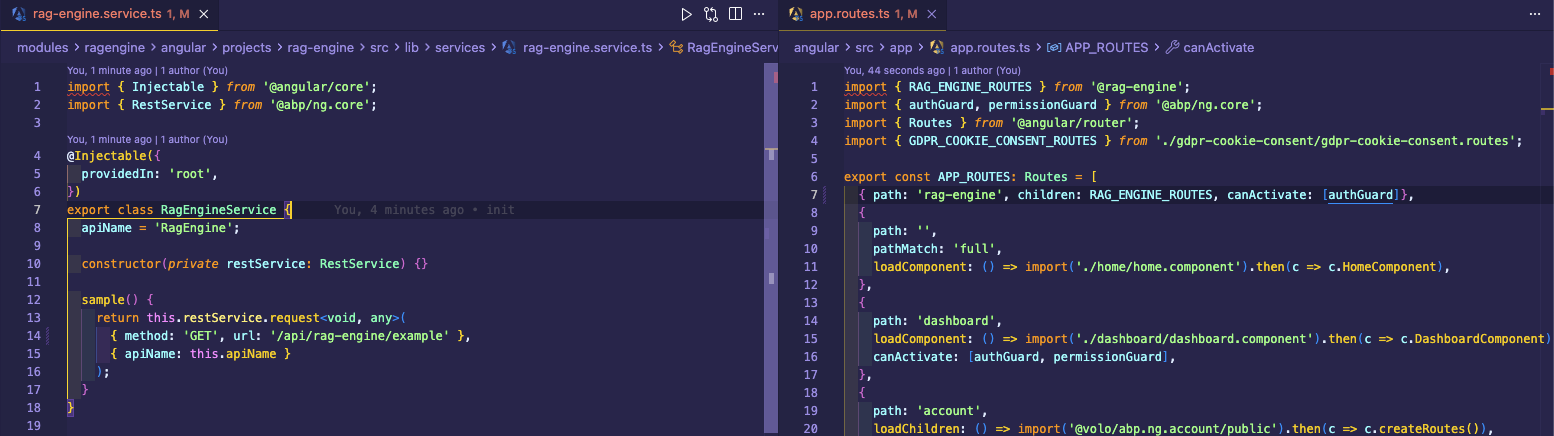
Thank you for your cooperation.
Can you try changing the request url in RagEngineService since backend expects this url /api/rag-engine/example instead of this /api/rag-engine/sample?
//modules/ragengine/src/RagEngine.HttpApi/Samples/ExampleController.cs
[Route("api/rag-engine/example")]
public class ExampleController : RagEngineController, ISampleAppService
{
[HttpGet]
    [Route("authorized")]
    [Authorize]
    public async Task GetAuthorizedAsync()
    {
        return await _sampleAppService.GetAsync();
    }
}









