ABP Version: 10.4.1 (Identity Pro)
Module: Volo.Abp.Identity (IdentityUserAppService)
Reproduction steps:
IIdentityUserAppService.UpdateAsync(id, input) where input.RoleNames is set (e.g. changing the user's role) but input.OrganizationUnitIds is left null (i.e. the caller isn't touching OU membership at all — a very natural shape for a UI that has a separate "roles" tab).AbpIdentity.Users.Update.ManageRoles and AbpIdentity.Users.Update.ManageOU.Expected: the user's OU membership is left untouched, since OrganizationUnitIds was never provided.
Actual: the user's OU membership is deleted entirely (empty).
Root cause:
UpdateUserByInput (Volo/Abp/Identity/IdentityUserAppService.cs):
if (await PermissionChecker.IsGrantedAsync(IdentityPermissions.Users.ManageRoles) && input.RoleNames != null)
{
    await UpdateUserRolesBasedOnOrganizationUnits(user, input);
    var effectiveRoles = await FilterRolesByCurrentUserAsync(user, input.RoleNames);
    (await UserManager.SetRolesAsync(user, effectiveRoles)).CheckErrors();
}

if (await PermissionChecker.IsGrantedAsync(IdentityPermissions.Users.ManageOU) && input.OrganizationUnitIds != null)
{
    await UserManager.SetOrganizationUnitsAsync(user, input.OrganizationUnitIds);
}
UpdateUserRolesBasedOnOrganizationUnits (called from the first block, above) does:
protected virtual async Task UpdateUserRolesBasedOnOrganizationUnits(IdentityUser user, IdentityUserCreateOrUpdateDtoBase input)
{
    input.OrganizationUnitIds ??= Array.Empty<Guid>();
    ...
}
This mutates the shared input.OrganizationUnitIds from null to [] as a side effect of updating roles. The second if block above then sees input.OrganizationUnitIds != null (now true, since it's [] not null) and calls SetOrganizationUnitsAsync(user, []), clearing all OU membership — even though the caller never intended to touch OUs at all.
Suggested fix: UpdateUserRolesBasedOnOrganizationUnits should operate on a local/temporary variable instead of mutating input.OrganizationUnitIds in place (e.g. var organizationUnitIds = input.OrganizationUnitIds ?? Array.Empty<Guid>();), so the caller's original "did not specify OUs" intent (null) is preserved for the later ManageOU check.
How we found it: integration test creating a user in an OU, then calling UpdateAsync with only RoleNames set — a follow-up GetAsync showed the OU membership gone.
Question about https://abp.io/studio/ai-agent#security
I think this needs to be officially stated by abp.io before any "big business" organization should use the abp studio based Ai features.
Documentation read: https://github.com/abpframework/abp/blob/dev/docs/en/framework/api-development/integration-services.md https://abp.io/community/articles/integration-services-explained-what-they-are-when-to-use-them-and-how-they-behave-lienmsy8#gsc.tab=0 Support notes: https://abp.io/support/questions/8012/Service-to-Service-communication
Problem description:
My excpectation is that the same permissions are to be used also when integrationservice is accessed. What might be the reaso for this; and what is the solution to overcome ? Please advice.
Integrationservice example below:
` [Authorize] // If this is removed then access without token possible, fatal security risk. public class IotintegrationAppService: IotAppService, IIotIntegrationApiService { protected IDistributedCache<IotCombinedDataDownloadTokenCacheItem, string> _downloadTokenCache; protected IIotCombinedDataRepository _iotCombinedDataRepository; protected IotCombinedDataManager _iotCombinedDataManager;
    public IotintegrationAppService(IIotCombinedDataRepository iotCombinedDataRepository, IotCombinedDataManager iotCombinedDataManager, IDistributedCache<IotCombinedDataDownloadTokenCacheItem, string> downloadTokenCache)
    {
        _downloadTokenCache = downloadTokenCache;
        _iotCombinedDataRepository = iotCombinedDataRepository;
        _iotCombinedDataManager = iotCombinedDataManager;

    }

    [Authorize(IotPermissions.IotCombinedDatas.Default)] // If this is removed then I can call this API point.
    public virtual async Task<PagedResultDto<IotCombinedDataDto>> GetListAsync(GetIotCombinedDatasInput input)
    {
        var totalCount = await _iotCombinedDataRepository.GetCountAsync(input.FilterText, input.Status, input.StorageTimeMin, input.StorageTimeMax, input.WorkPhaseOn);
        var items = await _iotCombinedDataRepository.GetListAsync(input.FilterText, input.Status, nput.StorageTimeMin, input.StorageTimeMax, input.WorkPhaseOn, input.Sorting, input.MaxResultCount, input.SkipCount);

        return new PagedResultDto<IotCombinedDataDto>
        {
            TotalCount = totalCount,
            Items = ObjectMapper.Map<List<IotCombinedData>, List<IotCombinedDataDto>>(items)
        };
    }
}


[IntegrationService]
public interface IIotIntegrationApiService : IApplicationService
{
    Task<PagedResultDto<IotCombinedDataDto>> GetListAsync(GetIotCombinedDatasInput input);
}
`
source: trialing https://easycrm.abp.io/ demo
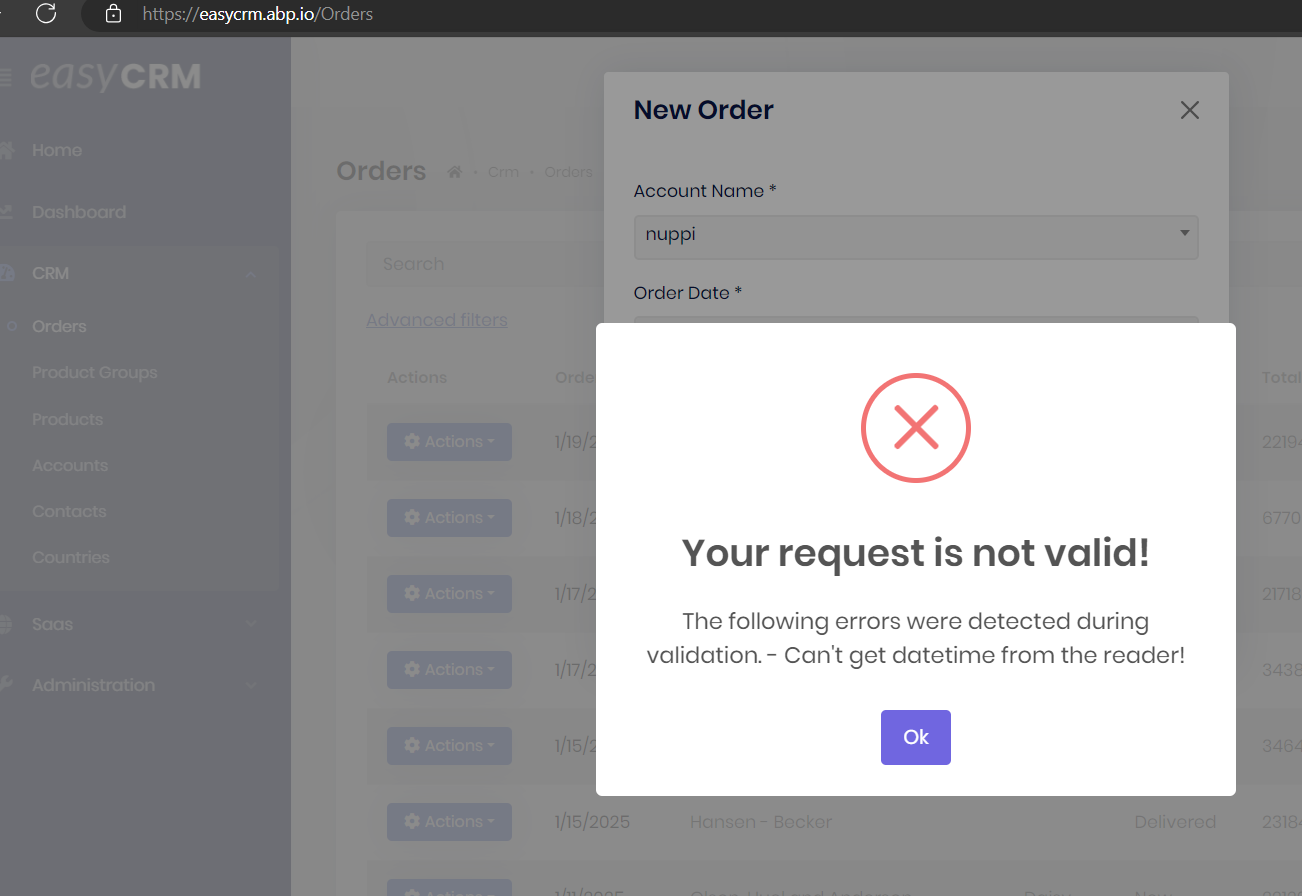
Further: source code seems to be on Net8 level; any plans to update to 9 ?
Is this issue known, and when planned to be fixed ? My expectation for the wanted behavior is: if filter was changed, page index is reset first then search done with the filter.
Best regards Tapio Muikku
Background: using of geolocation with abp.io. NetTopologySuite.IO.GeoJSON nuget Spatial Data - EF Core | Microsoft Learn
Question 1: How can I use Location datatype with abp suite entity generator ?
Question 2: Any example how to include NetTopologySuite with abp.io solution ? If you had any advices on this it is very wellcome.
Best regards, Tapio Muikku
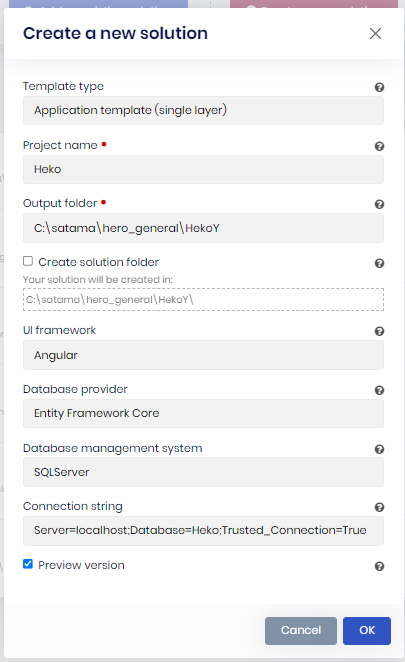
[10:11:22 ERR] Error getting value from 'DefaultNamespace' on 'Volo.Abp.Suite.Models.Solution'. Newtonsoft.Json.JsonSerializationException: Error getting value from 'DefaultNamespace' on 'Volo.Abp.Suite.Models.Solution'. ---> System.ArgumentNullException: Value cannot be null. (Parameter 'path') at System.IO.Directory.InternalEnumeratePaths(String path, String searchPattern, SearchTarget searchTarget, EnumerationOptions options) at System.IO.Directory.GetFiles(String path, String searchPattern, EnumerationOptions enumerationOptions) at System.IO.Directory.GetFiles(String path, String searchPattern, SearchOption searchOption) at Volo.Abp.Suite.Models.Solution.get_DefaultNamespace() at Newtonsoft.Json.Serialization.ExpressionValueProvider.GetValue(Object target) --- End of inner exception stack trace --- at Newtonsoft.Json.Serialization.ExpressionValueProvider.GetValue(Object target) at Newtonsoft.Json.Serialization.JsonSerializerInternalWriter.CalculatePropertyValues(JsonWriter writer, Object value, JsonContainerContract contract, JsonProperty member, JsonProperty property, JsonContract& memberContract, Object& memberValue)
I'm doing Finnish translation over abp.io pro. Is it possible to contribute it with the commecial solution ? If this is okay, how to proceed ?
What is the right resouce of translating texts of AbpUiResource ? Now I did it in this way: // Extend localization of AbpUiResource with Finnish. options.Resources .Get<AbpUiResource>() .AddVirtualJson("/Localization/AbpUi"); But I havw feeling that I should use some of the pro resouces. Please advice ?
Workaround: unload projects: Volo.Abp.LeptonTheme.Blazor.Host and Volo.Abp.LeptonTheme.Management.Blazor
Check the docs before asking a question: https://docs.abp.io/en/commercial/latest/ Check the samples, to see the basic tasks: https://docs.abp.io/en/commercial/latest/samples/index Related material found: https://community.abp.io/articles/using-angular-material-components-with-the-abp-framework-af8ft6t9
ABP Framework version: v4.2.2 UI type: Angular DB provider: EF Core Identity Server Separated (Angular): yes
Question: Anyone used angular templates with ABP suite to generate components based on MaterialUI on top of abp.io Angular UI ? Reason to ask: We have existing products done with material, including some ready made components.
If you had experiences, it would be great to hear about experiences Does it work well ? Did you find any worries, i.e. with themes integration, flexible layouts, load due more component framework included ?









