At the beginning, when I just create module (module B) it looked like the picture below, and the starting time from 08:28:04.967 to 08:29:24.584
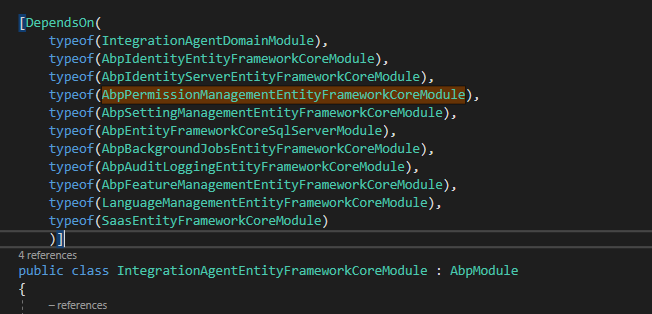
But when I add my another module (module A) and now the starting time is increasing from 08:34:14.715 to 08:36:37.550
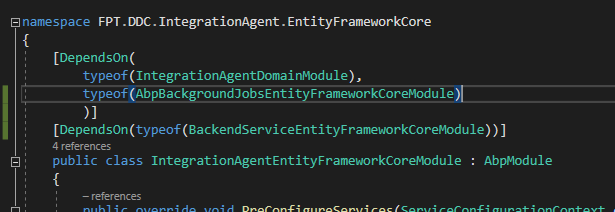
When I run (module A) dependently, the starting time is from 08:29:55.925 to 08:30:36.810
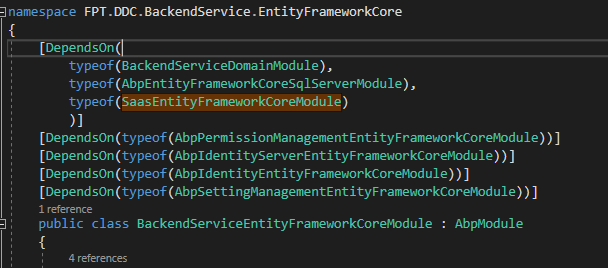
Module A contains many models (about 100), I don't know if it affects ?
P.s: The starting time that I mentioned is got from first 2 lines of the log
2020-06-16 08:29:55.925 +07:00 [INF] Starting *******.HttpApi.Host. 2020-06-16 08:30:36.810 +07:00 [INF] User profile is available.
Hi alper,
I'm working on debug env, I have multiple projects use abp, I run project A is okay but the project B (that I've posted above) is very slow, I don't know why
Hi,
I don't know if it is the bug of version 2.9.0. I start the project and it takes long time to start. Here is the log
2020-06-15 **13:20:33.324** +07:00 [INF] Starting web host. 2020-06-15 **13:22:59.040** +07:00 [INF] User profile is available. Using 'C:\Users\admin\AppData\Local\ASP.NET\DataProtection-Keys' as key repository and Windows DPAPI to encrypt keys at rest. 2020-06-15 13:22:59.142 +07:00 [INF] Loaded ABP modules: 2020-06-15 13:22:59.142 +07:00 [INF] - Volo.Abp.VirtualFileSystem.AbpVirtualFileSystemModule 2020-06-15 13:22:59.142 +07:00 [INF] - Volo.Abp.Localization.AbpLocalizationAbstractionsModule 2020-06-15 13:22:59.142 +07:00 [INF] - Volo.Abp.Security.AbpSecurityModule 2020-06-15 13:22:59.142 +07:00 [INF] - Volo.Abp.Validation.AbpValidationAbstractionsModule 2020-06-15 13:22:59.142 +07:00 [INF] - Volo.Abp.ObjectExtending.AbpObjectExtendingModule 2020-06-15 13:22:59.142 +07:00 [INF] - Volo.Abp.Uow.AbpUnitOfWorkModule 2020-06-15 13:22:59.142 +07:00 [INF] - Volo.Abp.Data.AbpDataModule 2020-06-15 13:22:59.142 +07:00 [INF] - Volo.Abp.MultiTenancy.AbpMultiTenancyModule 2020-06-15 13:22:59.142 +07:00 [INF] - Volo.Abp.Settings.AbpSettingsModule 2020-06-15 13:22:59.142 +07:00 [INF] - Volo.Abp.Localization.AbpLocalizationModule 2020-06-15 13:22:59.142 +07:00 [INF] - Volo.Abp.Validation.AbpValidationModule 2020-06-15 13:22:59.142 +07:00 [INF] - Volo.Saas.SaasDomainSharedModule 2020-06-15 13:22:59.142 +07:00 [INF] - Volo.Abp.Users.AbpUsersDomainSharedModule 2020-06-15 13:22:59.142 +07:00 [INF] - Volo.Abp.Identity.AbpIdentityDomainSharedModule 2020-06-15 13:22:59.142 +07:00 [INF] - Volo.Abp.IdentityServer.AbpIdentityServerDomainSharedModule 2020-06-15 13:22:59.142 +07:00 [INF] - Volo.Abp.PermissionManagement.AbpPermissionManagementDomainSharedModule 2020-06-15 13:22:59.142 +07:00 [INF] - Volo.Abp.SettingManagement.AbpSettingManagementDomainSharedModule 2020-06-15 13:22:59.142 +07:00 [INF] - FPT.DDC.BackendService.BackendServiceDomainSharedModule 2020-06-15 13:22:59.142 +07:00 [INF] - FPT.DDC.SalesTransaction.SalesTransactionDomainSharedModule 2020-06-15 13:22:59.142 +07:00 [INF] - FPT.DDC.IntegrationAgent.IntegrationAgentDomainSharedModule 2020-06-15 13:22:59.142 +07:00 [INF] - Volo.Abp.FeatureManagement.AbpFeatureManagementDomainSharedModule 2020-06-15 13:22:59.142 +07:00 [INF] - Volo.Abp.Features.AbpFeaturesModule 2020-06-15 13:22:59.142 +07:00 [INF] - Volo.Abp.Threading.AbpThreadingModule 2020-06-15 13:22:59.142 +07:00 [INF] - Volo.Abp.Serialization.AbpSerializationModule 2020-06-15 13:22:59.142 +07:00 [INF] - Volo.Abp.Timing.AbpTimingModule 2020-06-15 13:22:59.142 +07:00 [INF] - Volo.Abp.Json.AbpJsonModule 2020-06-15 13:22:59.142 +07:00 [INF] - Volo.Abp.Caching.AbpCachingModule 2020-06-15 13:22:59.142 +07:00 [INF] - Volo.Abp.FeatureManagement.AbpFeatureManagementDomainModule 2020-06-15 13:22:59.142 +07:00 [INF] - Volo.Abp.Auditing.AbpAuditingModule 2020-06-15 13:22:59.142 +07:00 [INF] - Volo.Abp.EventBus.AbpEventBusModule 2020-06-15 13:22:59.142 +07:00 [INF] - Volo.Abp.Guids.AbpGuidsModule 2020-06-15 13:22:59.142 +07:00 [INF] - Volo.Abp.ObjectMapping.AbpObjectMappingModule 2020-06-15 13:22:59.142 +07:00 [INF] - Volo.Abp.Domain.AbpDddDomainModule 2020-06-15 13:22:59.142 +07:00 [INF] - Volo.Abp.AutoMapper.AbpAutoMapperModule 2020-06-15 13:22:59.142 +07:00 [INF] - Volo.Saas.SaasDomainModule 2020-06-15 13:22:59.142 +07:00 [INF] - Volo.Abp.Commercial.SuiteTemplates.VoloAbpCommercialSuiteTemplatesModule 2020-06-15 13:22:59.142 +07:00 [INF] - Volo.Abp.Users.AbpUsersAbstractionModule 2020-06-15 13:22:59.142 +07:00 [INF] - Volo.Abp.Users.AbpUsersDomainModule 2020-06-15 13:22:59.142 +07:00 [INF] - Volo.Abp.Identity.AbpIdentityDomainModule 2020-06-15 13:22:59.142 +07:00 [INF] - Volo.Abp.BackgroundWorkers.AbpBackgroundWorkersModule 2020-06-15 13:22:59.142 +07:00 [INF] - Volo.Abp.IdentityServer.AbpIdentityServerDomainModule 2020-06-15 13:22:59.142 +07:00 [INF] - Volo.Abp.Authorization.AbpAuthorizationModule 2020-06-15 13:22:59.142 +07:00 [INF] - Volo.Abp.PermissionManagement.AbpPermissionManagementDomainModule 2020-06-15 13:22:59.142 +07:00 [INF] - Volo.Abp.PermissionManagement.Identity.AbpPermissionManagementDomainIdentityModule 2020-06-15 13:22:59.142 +07:00 [INF] - Volo.Abp.PermissionManagement.IdentityServer.AbpPermissionManagementDomainIdentityServerModule 2020-06-15 13:22:59.142 +07:00 [INF] - Volo.Abp.SettingManagement.AbpSettingManagementDomainModule 2020-06-15 13:22:59.142 +07:00 [INF] - FPT.DDC.BackendService.BackendServiceDomainModule 2020-06-15 13:22:59.142 +07:00 [INF] - FPT.DDC.SalesTransaction.SalesTransactionDomainModule 2020-06-15 13:22:59.143 +07:00 [INF] - FPT.DDC.IntegrationAgent.IntegrationAgentDomainModule 2020-06-15 13:22:59.143 +07:00 [INF] - Volo.Abp.Application.AbpDddApplicationContractsModule 2020-06-15 13:22:59.143 +07:00 [INF] - Volo.Abp.Http.AbpHttpAbstractionsModule 2020-06-15 13:22:59.143 +07:00 [INF] - Volo.Abp.Application.AbpDddApplicationModule 2020-06-15 13:22:59.143 +07:00 [INF] - Volo.Saas.Host.SaasHostApplicationContractsModule 2020-06-15 13:22:59.143 +07:00 [INF] - Volo.Abp.PermissionManagement.AbpPermissionManagementApplicationContractsModule 2020-06-15 13:22:59.143 +07:00 [INF] - Volo.Abp.Identity.AbpIdentityApplicationContractsModule 2020-06-15 13:22:59.143 +07:00 [INF] - FPT.DDC.BackendService.BackendServiceApplicationContractsModule 2020-06-15 13:22:59.143 +07:00 [INF] - FPT.DDC.SalesTransaction.SalesTransactionApplicationContractsModule 2020-06-15 13:22:59.143 +07:00 [INF] - FPT.DDC.IntegrationAgent.IntegrationAgentApplicationContractsModule 2020-06-15 13:22:59.143 +07:00 [INF] - Volo.Abp.RabbitMQ.AbpRabbitMqModule 2020-06-15 13:22:59.143 +07:00 [INF] - Volo.Abp.EventBus.RabbitMq.AbpEventBusRabbitMqModule 2020-06-15 13:22:59.143 +07:00 [INF] - Volo.Saas.Host.SaasHostApplicationModule 2020-06-15 13:22:59.143 +07:00 [INF] - Volo.Abp.PermissionManagement.AbpPermissionManagementApplicationModule 2020-06-15 13:22:59.143 +07:00 [INF] - Volo.Abp.Identity.AbpIdentityApplicationModule 2020-06-15 13:22:59.143 +07:00 [INF] - FPT.DDC.BackendService.BackendServiceApplicationModule 2020-06-15 13:22:59.143 +07:00 [INF] - FPT.DDC.SalesTransaction.SalesTransactionApplicationModule 2020-06-15 13:22:59.143 +07:00 [INF] - FPT.DDC.IntegrationAgent.IntegrationAgentApplicationModule 2020-06-15 13:22:59.143 +07:00 [INF] - Volo.Abp.EntityFrameworkCore.AbpEntityFrameworkCoreModule 2020-06-15 13:22:59.143 +07:00 [INF] - Volo.Abp.EntityFrameworkCore.SqlServer.AbpEntityFrameworkCoreSqlServerModule 2020-06-15 13:22:59.143 +07:00 [INF] - Volo.Saas.EntityFrameworkCore.SaasEntityFrameworkCoreModule 2020-06-15 13:22:59.143 +07:00 [INF] - Volo.Abp.PermissionManagement.EntityFrameworkCore.AbpPermissionManagementEntityFrameworkCoreModule 2020-06-15 13:22:59.143 +07:00 [INF] - Volo.Abp.IdentityServer.EntityFrameworkCore.AbpIdentityServerEntityFrameworkCoreModule 2020-06-15 13:22:59.143 +07:00 [INF] - Volo.Abp.Users.EntityFrameworkCore.AbpUsersEntityFrameworkCoreModule 2020-06-15 13:22:59.143 +07:00 [INF] - Volo.Abp.Identity.EntityFrameworkCore.AbpIdentityEntityFrameworkCoreModule 2020-06-15 13:22:59.143 +07:00 [INF] - Volo.Abp.SettingManagement.EntityFrameworkCore.AbpSettingManagementEntityFrameworkCoreModule 2020-06-15 13:22:59.143 +07:00 [INF] - FPT.DDC.BackendService.EntityFrameworkCore.BackendServiceEntityFrameworkCoreModule 2020-06-15 13:22:59.143 +07:00 [INF] - FPT.DDC.IntegrationAgent.EntityFrameworkCore.IntegrationAgentEntityFrameworkCoreModule 2020-06-15 13:22:59.143 +07:00 [INF] - Volo.Abp.Minify.AbpMinifyModule 2020-06-15 13:22:59.143 +07:00 [INF] - Volo.Abp.Http.AbpHttpModule 2020-06-15 13:22:59.143 +07:00 [INF] - Volo.Abp.UI.AbpUiModule 2020-06-15 13:22:59.143 +07:00 [INF] - Volo.Abp.AspNetCore.AbpAspNetCoreModule 2020-06-15 13:22:59.143 +07:00 [INF] - Volo.Abp.ApiVersioning.AbpApiVersioningAbstractionsModule 2020-06-15 13:22:59.143 +07:00 [INF] - Volo.Abp.AspNetCore.Mvc.AbpAspNetCoreMvcContractsModule 2020-06-15 13:22:59.143 +07:00 [INF] - Volo.Abp.AspNetCore.Mvc.AbpAspNetCoreMvcModule 2020-06-15 13:22:59.143 +07:00 [INF] - FPT.DDC.IntegrationAgent.IntegrationAgentHttpApiModule 2020-06-15 13:22:59.143 +07:00 [INF] - Volo.Abp.Castle.AbpCastleCoreModule 2020-06-15 13:22:59.143 +07:00 [INF] - Volo.Abp.Autofac.AbpAutofacModule 2020-06-15 13:22:59.143 +07:00 [INF] - Volo.Abp.UI.Navigation.AbpUiNavigationModule 2020-06-15 13:22:59.143 +07:00 [INF] - Volo.Abp.AspNetCore.Mvc.UI.AbpAspNetCoreMvcUiModule 2020-06-15 13:22:59.143 +07:00 [INF] - Volo.Abp.AspNetCore.Mvc.UI.Bootstrap.AbpAspNetCoreMvcUiBootstrapModule 2020-06-15 13:22:59.143 +07:00 [INF] - Volo.Abp.AspNetCore.Mvc.UI.Bundling.AbpAspNetCoreMvcUiBundlingModule 2020-06-15 13:22:59.143 +07:00 [INF] - Volo.Abp.AspNetCore.Mvc.UI.Packages.AbpAspNetCoreMvcUiPackagesModule 2020-06-15 13:22:59.143 +07:00 [INF] - Volo.Abp.AspNetCore.Mvc.UI.Widgets.AbpAspNetCoreMvcUiWidgetsModule 2020-06-15 13:22:59.143 +07:00 [INF] - Volo.Abp.AspNetCore.Mvc.UI.Theme.Shared.AbpAspNetCoreMvcUiThemeSharedModule 2020-06-15 13:22:59.143 +07:00 [INF] - Volo.Abp.AspNetCore.MultiTenancy.AbpAspNetCoreMultiTenancyModule 2020-06-15 13:22:59.143 +07:00 [INF] - Volo.Abp.AspNetCore.Mvc.UI.MultiTenancy.AbpAspNetCoreMvcUiMultiTenancyModule 2020-06-15 13:22:59.143 +07:00 [INF] - Volo.Abp.AuditLogging.AbpAuditLoggingDomainSharedModule 2020-06-15 13:22:59.143 +07:00 [INF] - Volo.Abp.AuditLogging.AbpAuditLoggingDomainModule 2020-06-15 13:22:59.143 +07:00 [INF] - Volo.Abp.AuditLogging.EntityFrameworkCore.AbpAuditLoggingEntityFrameworkCoreModule 2020-06-15 13:22:59.143 +07:00 [INF] - Volo.Abp.BackgroundJobs.AbpBackgroundJobsDomainSharedModule 2020-06-15 13:22:59.143 +07:00 [INF] - Volo.Abp.BackgroundJobs.AbpBackgroundJobsAbstractionsModule 2020-06-15 13:22:59.143 +07:00 [INF] - Volo.Abp.BackgroundJobs.AbpBackgroundJobsModule 2020-06-15 13:22:59.143 +07:00 [INF] - Volo.Abp.BackgroundJobs.AbpBackgroundJobsDomainModule 2020-06-15 13:22:59.143 +07:00 [INF] - Volo.Abp.BackgroundJobs.EntityFrameworkCore.AbpBackgroundJobsEntityFrameworkCoreModule 2020-06-15 13:22:59.143 +07:00 [INF] - Volo.Abp.LanguageManagement.LanguageManagementDomainSharedModule 2020-06-15 13:22:59.143 +07:00 [INF] - Volo.Abp.LanguageManagement.LanguageManagementDomainModule 2020-06-15 13:22:59.143 +07:00 [INF] - Volo.Abp.LanguageManagement.EntityFrameworkCore.LanguageManagementEntityFrameworkCoreModule 2020-06-15 13:22:59.143 +07:00 [INF] - Volo.Abp.Swagger.AbpSwaggerModule 2020-06-15 13:22:59.143 +07:00 [INF] - FPT.DDC.IntegrationAgent.IntegrationAgentHttpApiHostModule 2020-06-15 13:23:00.709 +07:00 [DBG] Started background worker: Volo.Abp.IdentityServer.Tokens.TokenCleanupBackgroundWorker 2020-06-15 13:23:00.851 +07:00 [DBG] Started background worker: Volo.Abp.BackgroundJobs.BackgroundJobWorker 2020-06-15 13:23:01.543 +07:00 [INF] Initialized all ABP modules. 2020-06-15 13:23:01.578 +07:00 [INF] Application started. Press Ctrl+C to shut down.
Hi @liangshiwei, Thanks for your support. This unsecured ssl cause the problem. Now I can fix it
Hi @liangshiwei,
the complete dteps are publish IdentityServer project, publish *.Host project, puslish angular project and then deploy all to 1 server with IIS, configure connection string then browse. Its the common basic steps and I know that. and @DRPDEV got the same problem
If you can check, I will send the package privately to you for checking
@DRPDEV: you've got the same my issue. And I posted to another thread but still not resolve https://support.abp.io/QA/Questions/72/Angular-UI-Administration-menus-are-not-showed-abp-version-is-230
@liangshiwei: Can you refer to my link above to check ? I provided full of screenshots of the problem
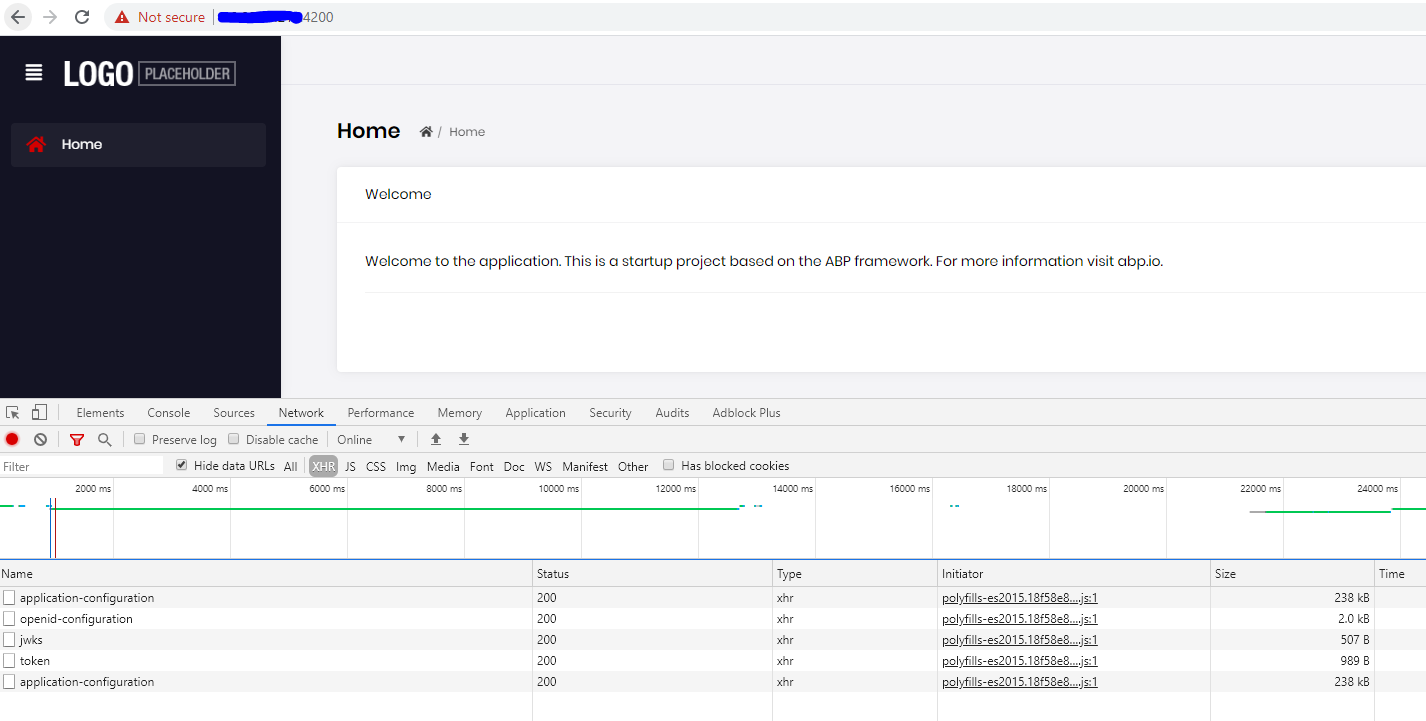
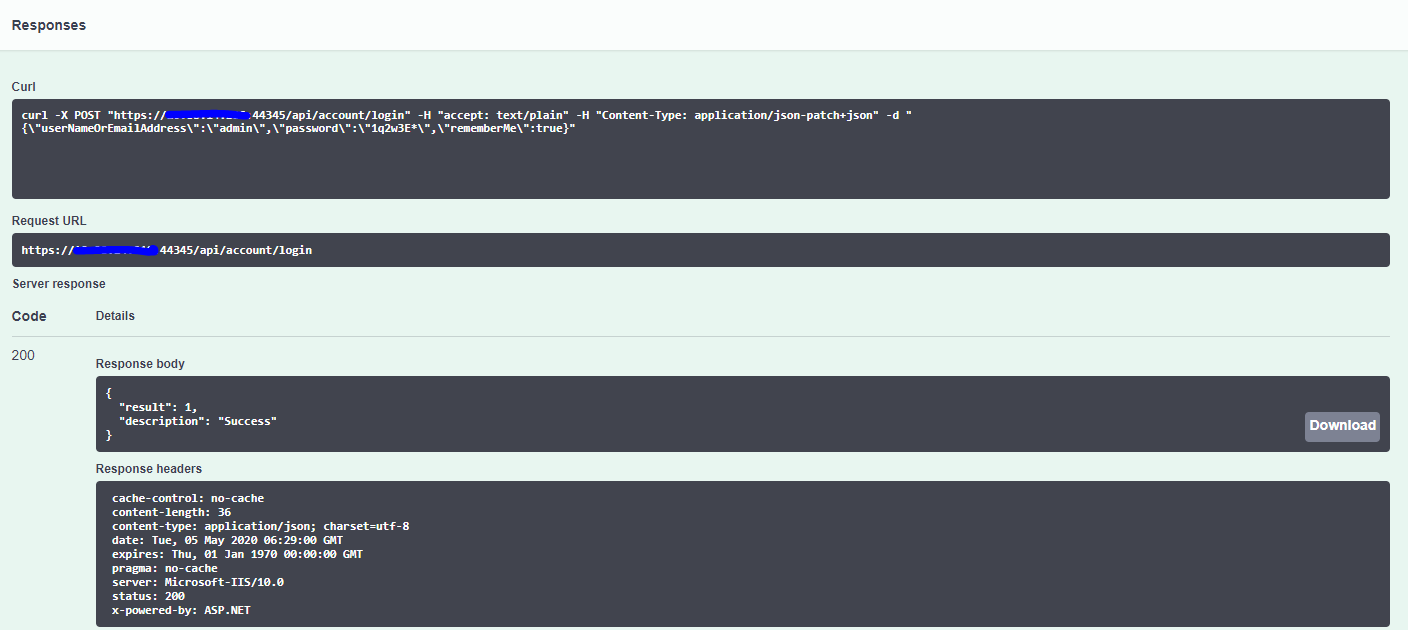
this is my response from try swagger
Everything is fine when I run in debug. This stuck me to deploy to Demo environment. Please help
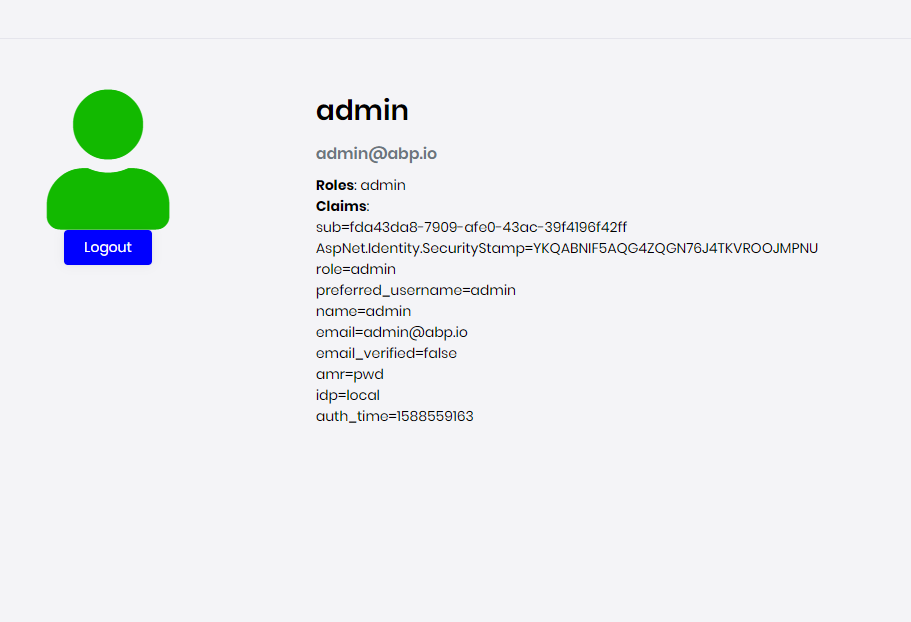
Yes, it's seperated. And I can login through it
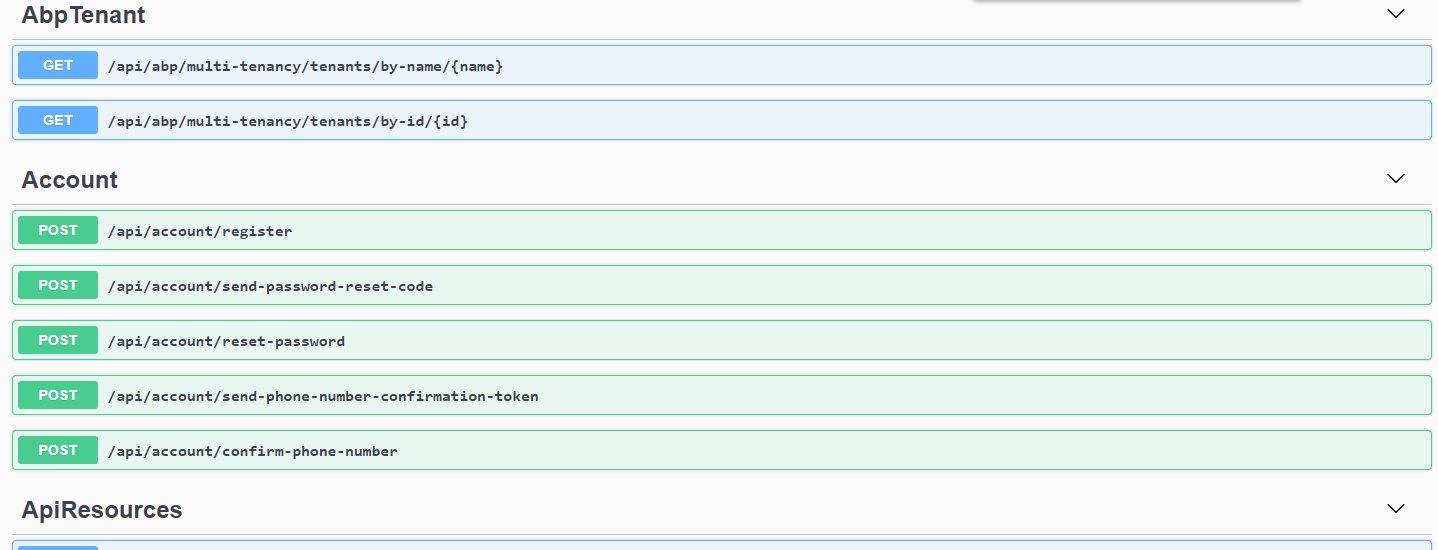
This is my swagger, there is no /api/account/login
I don't know why the isAuthenticated = false because when It redirects to /account/login, I can log in successfully









