Activities of "tim.delandtsheer"

Okay thanks!

Hi,

It seems to work with the given overrides. However, it's sad that by implementing these overrides we have the risks of possible missing feature updates and even future breaking changes.

Is this a temporary fix until a stable solution in the packages of ABP? Or will it be configurable in a next version?

Hi

We have both a many-to-many and a one-to-many on our test-entity, as shown on the screenshot below. The bug is about the one-to-many, when changing the dropdown on the "main"-tab.
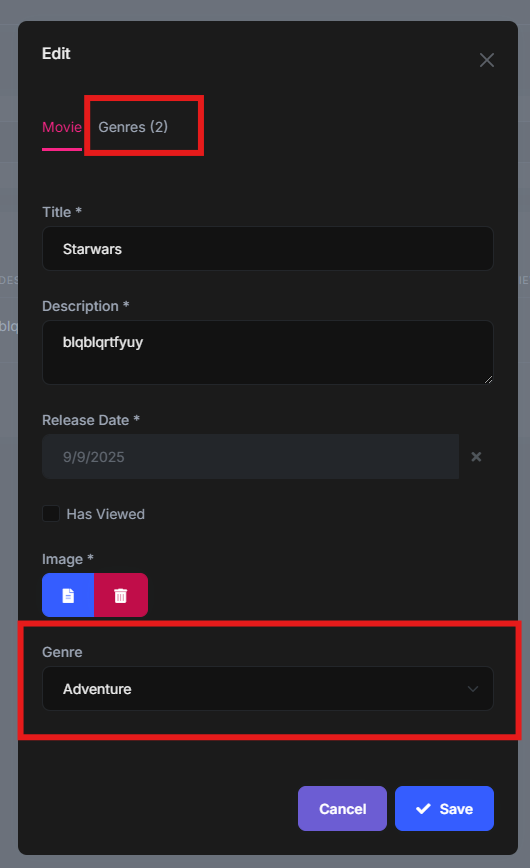
Hi, some steps for the test-project to reproduce

Getting project ready (its a simple ABP Starter)

  1. Instal libs (nuget, yarn)
  2. Run SQL-migrations (DbMigrator)
  3. Run Application (Host)

Reproduce issue

  1. Navigate to "Genres" and create 2 to 3 genres. They are required to select in the next steps.
  2. Navigate to "Books" and create a new book. Fill in a single genre in the dropdown and some other fields. In the database, creation-audit fields are filled in. (Expected)
  3. Open the edit modal of the book, edit some fields and save. In the database, modification-audit fields are filled in. (Expected)
  4. Open the edit modal again and ONLY update the genre dropdown: pick another value and save. In the database, modification-audit fields are not changed. We expect them to be updated, because the field GenreId is updated.

Hi,

We already tried suggestions of the AI-bot .

  • We are updating by ID. (no navigation property). In EF Core, the Id is configured as a foreign key by default.
  • We are using the default generated code from ABP-Suite. So tracked entity, explicit update. Not directly on the database.
Showing 1 to 5 of 5 entries
Boost Your Development
ABP Live Training
Packages
See Trainings
Mastering ABP Framework Book
The Official Guide
Mastering
ABP Framework
Learn More
Mastering ABP Framework Book
Made with ❤️ on ABP v10.1.0-preview. Updated on December 15, 2025, 06:08
1
ABP Assistant
🔐 You need to be logged in to use the chatbot. Please log in first.


