Hello,
We are currently unable to address the ABP 10.x version update, but we can consider modifying the ‘pending’ structure or the event flow as you have suggested.
Thanks.
Thank you for your support; I will consider the option of an update
However, we have now started encountering a different problem. Whenever we try to add a relationship to a table, it starts inserting tags in the format %%is-nullable%% and the build fails.


We're unable to run the migration because we're getting a build error


Hello, I think we’ve found the issue. We previously updated ABP Studio and the CLI to version 1.3.3, but the problem persisted. We observed that our method, which has a function return type, was causing an error during the proxy command. To address this, we previously had a method with a function return type on the Angular side. After cleaning up the service remnants in the proxy flow from generate-proxy.json, we added the [RemoteService(IsEnabled = false)] tag to exclude it from the proxy flow, we observed that the page was rendered in Angular.


C:\Users\.abp\suite\logs


[maliming] said: Hi,
The latest stable is 10.4 (2026-05-14). 10.5 is currently in RC and the only CMS Kit change in it is the CodeMirror 6 update. The items you listed (SEO meta, media gallery, RSS, content versioning, social streams) are listed in the road map backlog under "Application Modules / UI Themes" but not assigned to a specific release yet (SEO meta has its own feature request at https://github.com/abpframework/abp/issues/16342). When they land, you'll receive them through a regular version upgrade.
On the Angular side, CMS Kit support was introduced in 10.2 ("Angular: CMS Kit Module Features" in the release notes) and has been stable since then. Angular support here refers to the admin UI — from 10.2 onwards it covers:
- Open-source: Blogs, Blog Posts, Pages, Tags, Menus, Comments, Global Resources, CMS Settings
- Pro: Newsletters, Polls, FAQs, Page Feedbacks, URL Shorting, CMS Settings
So if you move from 9.3.5 to 10.4 you'll get the full admin set above on Angular. The public-facing pages and widgets (blog list/detail, commenting, ratings, reactions, popular tags, newsletter subscription, etc.) are served by the MVC public-web app that the microservice template already includes — that's the public website you enabled with
--public-website, where the CMS Kit MVC views and ViewComponents are wired up.A note on the upgrade itself: since you're on 9.3.5 (.NET 9), the main step is the move to .NET 10 in 10.0. Run through the 9.x → 10.x migration guide first, then go to 10.4.
For the integration steps in a microservice solution, the official guide covers everything you need (CLI command, EF migrations, static proxy, gateway routes, and connection string mapping):
- https://abp.io/docs/latest/guides/add-module-to-microservice
- https://abp.io/docs/latest/modules/cms-kit-pro (for enabling features via
GlobalFeatureConfigurator)Thanks
Thank you, I’ll look into it.
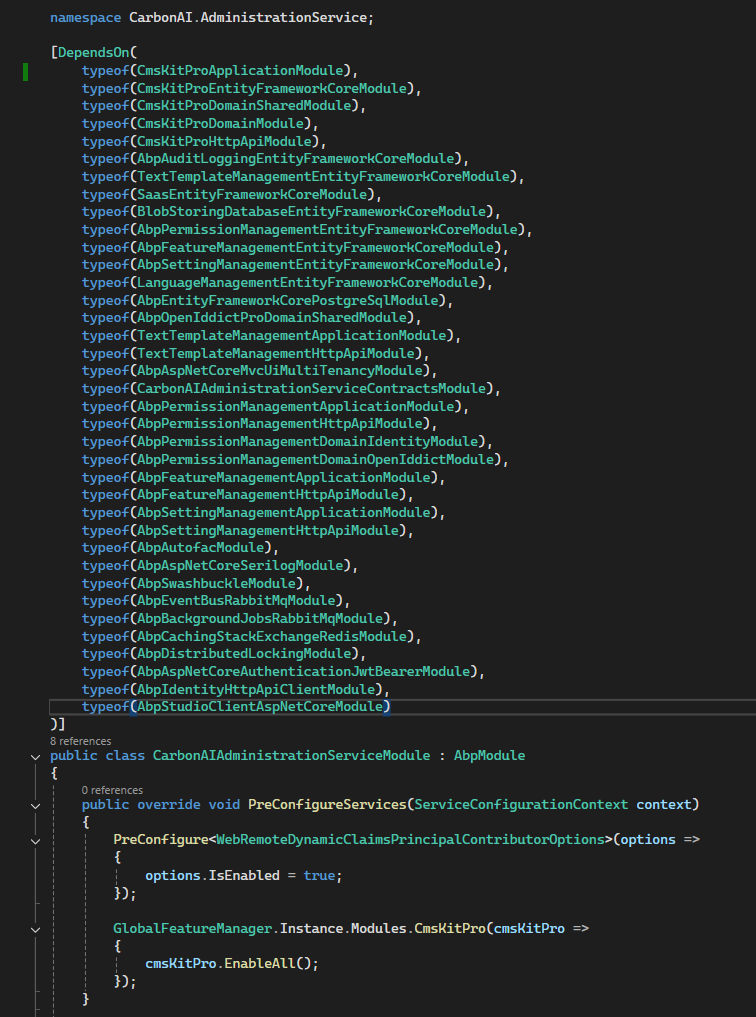
As you said, I added the Volo.CmsKit.Pro.Application package, but there was no change in the menus or redirects; the same errors persist.
We are waiting for your response so we can move forward with our project. Do you have an answer?
You're amazing, thank you.
I sent you the sample project. Could it be due to a missing application that should be installed on the computer or an incompatible version?
Unfortunately, neither option worked. Do you have any other suggestions?









