Now, I can control the menuitem with IFetureChecker. But another question ... can not change the feature value for a single tenant ater save the value for version.
OK. I see. I will try later.
another question, I have define features. But after I saved for tenant version. I can not change the value for a single tenant.

    public class RmsMenuContributor : IMenuContributor
    {

        public RmsMenuContributor()
        {
        }

        public async Task ConfigureMenuAsync(MenuConfigurationContext context)
        {
            bool isGranted = await context.AuthorizationService.IsGrantedAsync(Yee.Change.Common.Permissions.AdminPermissions.Admin.Default);

            if (!isGranted)
            {
                return;
            }

            this._L = context.GetLocalizer<RmsResource>();

            if (context.Menu.Name == StandardMenus.Main)
            {
                await ConfigureMainMenuAsync(context);
            }

            await SetAiRulesMenu(context);

            await SetDic(context);

            await SetZipingBazi(context);

            await SetLianshanMenus(context);

            await SetLiuyaoMenus(context);

            await SetKanyuMenus(context);

            await SetBasicMenu(context);

            await SetTestResultMenu(context);

            await SetOperationMenu(context);

            await SetProductsMenu(context);
        }

        [RequiresFeature(Yee.Change.ZipingBazi.Features.ZipingBaziFeature.IsEnabled)]
        public virtual async Task SetOperationMenu(MenuConfigurationContext context)
        {
            var operateMenu = AddOperateMenuItem(context);

            AddMenuItemPictures(context, operateMenu);

            AddMenuItemUploadPicture(context, operateMenu);
I replaced all abp.auth.isGranted('Config. with abp.auth.isGranted('ChangeConfig.
The problem has been resolved.

Otherwise, may ABP framework use a const string in Javascript , and this const string equals to this member:
public class ConfigPermissions
{
    public const string GroupName = "ChangeConfig";
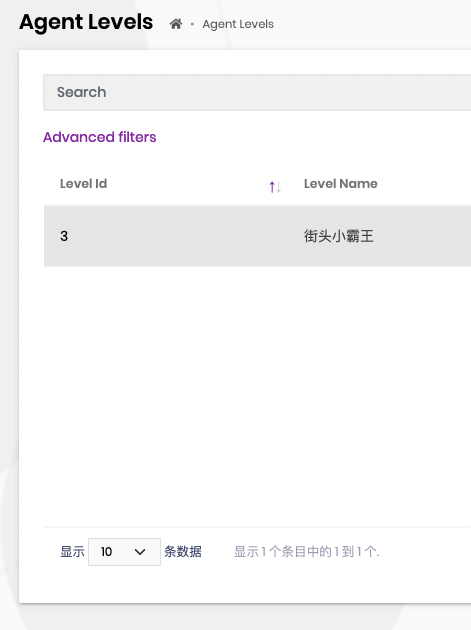
I have found the code which control the visibility of buttons in Actions column as below. the parameter are all started with "Config. If I modify from Config to ChangeConfig, it will be OK?
var dataTable = $("#AgentLevelsTable").DataTable(abp.libs.datatables.normalizeConfiguration({
        processing: true,
        serverSide: true,
        paging: true,
        searching: false,
        scrollX: true,
        autoWidth: false,
        scrollCollapse: true,
        order: [[1, "asc"]],
        ajax: abp.libs.datatables.createAjax(agentLevelService.getList, getFilter),
        columnDefs: [
            {
                rowAction: {
                    items:
                        [
                            {
                                text: l("Edit"),
                                visible: abp.auth.isGranted('Config.AgentLevels.Edit'),
                                action: function (data) {
                                    editModal.open({
                                     id: data.record.id
                                     });
                                }
                            },
                            {
                                text: l("Delete"),
                                visible: abp.auth.isGranted('Config.AgentLevels.Delete'),
                                confirmMessage: function () {
                                    return l("DeleteConfirmationMessage");
                                },
                                action: function (data) {
                                    agentLevelService.delete(data.record.id)
                                        .then(function () {
                                            abp.notify.info(l("SuccessfullyDeleted"));
                                            dataTable.ajax.reload();
                                        });
                                }
                            }
                        ]
                }
            },
			{ data: "levelId" },
			{ data: "levelName" },
			{ data: "desc" },
			{ data: "needFans" },
			{ data: "needConsumerAmount" },
            {
                data: "isActive",
                render: function (isActive) {
                    return isActive ? l("Yes") : l("No");
                }
            }
        ]
    }));
namespace Yee.Change.Config.Permissions;

public class ConfigPermissions
{
    public const string GroupName = "ChangeConfig";
hCheck the docs before asking a question: https://docs.abp.io/en/commercial/latest/ Check the samples, to see the basic tasks: https://docs.abp.io/en/commercial/latest/samples/index The exact solution to your question may have been answered before, please use the search on the homepage.
If you're creating a bug/problem report, please include followings:
private readonly IRepository<Product, Guid> _productRepository;
        private readonly IDataFilter _dataFilter;

        public ProductManager(
            IRepository<Product, Guid> productRepository,
            IDataFilter dataFilter)
        {
            _productRepository = productRepository;
            _dataFilter = dataFilter;
        }

        public async Task<long> GetProductCountAsync()
        {
            using (_dataFilter.Disable<IMultiTenant>())
            {
                return await _productRepository.GetCountAsync();
            }
        }
I found this attribute in TenantManagementDbContext. I want to use this function, ignore TenantId in a single query, not whole DbContext, How to do?
using Microsoft.EntityFrameworkCore;
using Volo.Abp.Data;
using Volo.Abp.EntityFrameworkCore;
using Volo.Abp.MultiTenancy;

namespace Volo.Abp.TenantManagement.EntityFrameworkCore;

[IgnoreMultiTenancy]
[ConnectionStringName(AbpTenantManagementDbProperties.ConnectionStringName)]
public class TenantManagementDbContext : AbpDbContext<TenantManagementDbContext>, ITenantManagementDbContext
{




