I have one additional question. Our development environment contains more Entity Framework Core migrations than the production environment because migrations are only applied to production after a feature has been fully tested and approved for deployment.
In this scenario, what would be the recommended approach? Is there a specific solution for managing this situation, or should we only archive the migrations that have already been applied to the production database while keeping the pending development migrations intact?
Do we need to repeat this process periodically? After a certain period, the issue seems to reoccur, requiring us to perform the same steps again
We are using an ABP application built on .NET Core with Entity Framework Core migrations for database schema management. Over time, the project has accumulated a large number of migration files. We are currently experiencing a performance issue during the build process. Building the project consumes a significant amount of system resources, with CPU utilization frequently reaching 98%, resulting in slow build times and reduced development efficiency. Could you assist in identifying whether the large number of Entity Framework Core migrations could be contributing to this issue? Additionally, I would appreciate recommendations on best practices for managing a large migration history and optimizing build performance without affecting the existing database schema or deployment process.
Yes, our whitelist supports subdomains
Is everything related to authentication as well? We need to whitelist all URLs associated with ABP.IO otherwise, if anything is missed, we may face the same issue again
Can you please share all the URLs so we can whitelist them on our end?
We need all authentication-related URLs for ABP.IO so we can whitelist them on our end, as we cannot keep Kaspersky disabled all the time
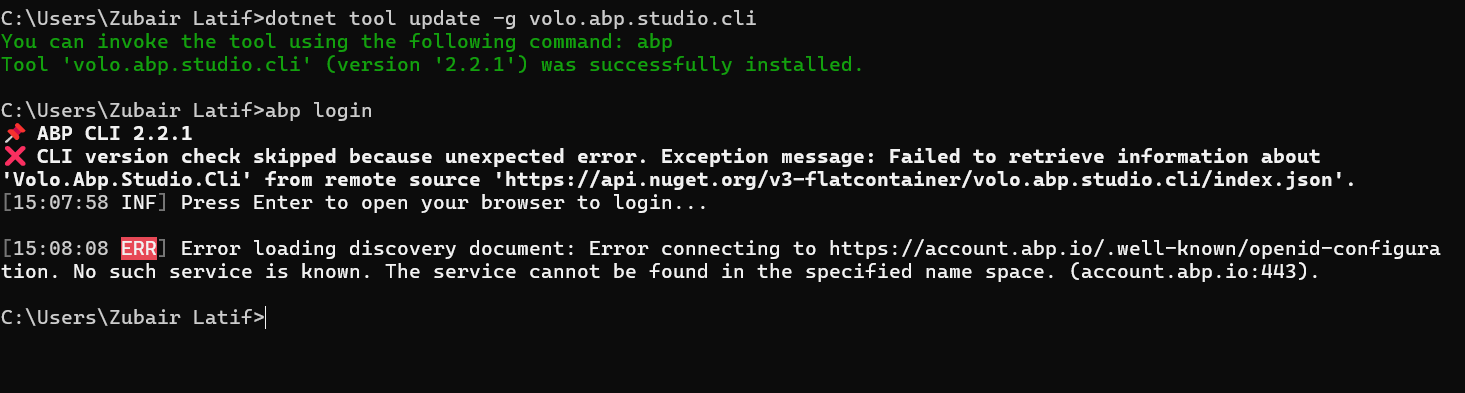
It is managed by our company. The issue has now been resolved. It was caused by Kaspersky restrictions impacting ABP Studio’s network communication. Necessary adjustments have been made. Thank you for your guidance and support throughout this issue and everything is now working as expected
We have been using Kaspersky on our system since the beginning, but the ABP issue has only started occurring today.