






 ABP Contributor Program

One Endpoint, Many AI Clients: Turning ABP Workspaces into OpenAI-Compatible Models
ABP's AI Management module already makes it easy to define and manage AI workspaces (provider, model, API key/base URL, system prompt, permissions, MCP tools, RAG settings, and more). With ABP v10.2, there is a major addition: you can now expose those workspaces through OpenAI-compatible endpoints under /v1.
That changes the integration story in a practical way. Instead of wiring every external tool directly to a provider, you can point those tools to ABP and keep runtime decisions centralized in one place.
In this post, we will walk through a practical setup with AnythingLLM and show why this pattern is useful in real projects.
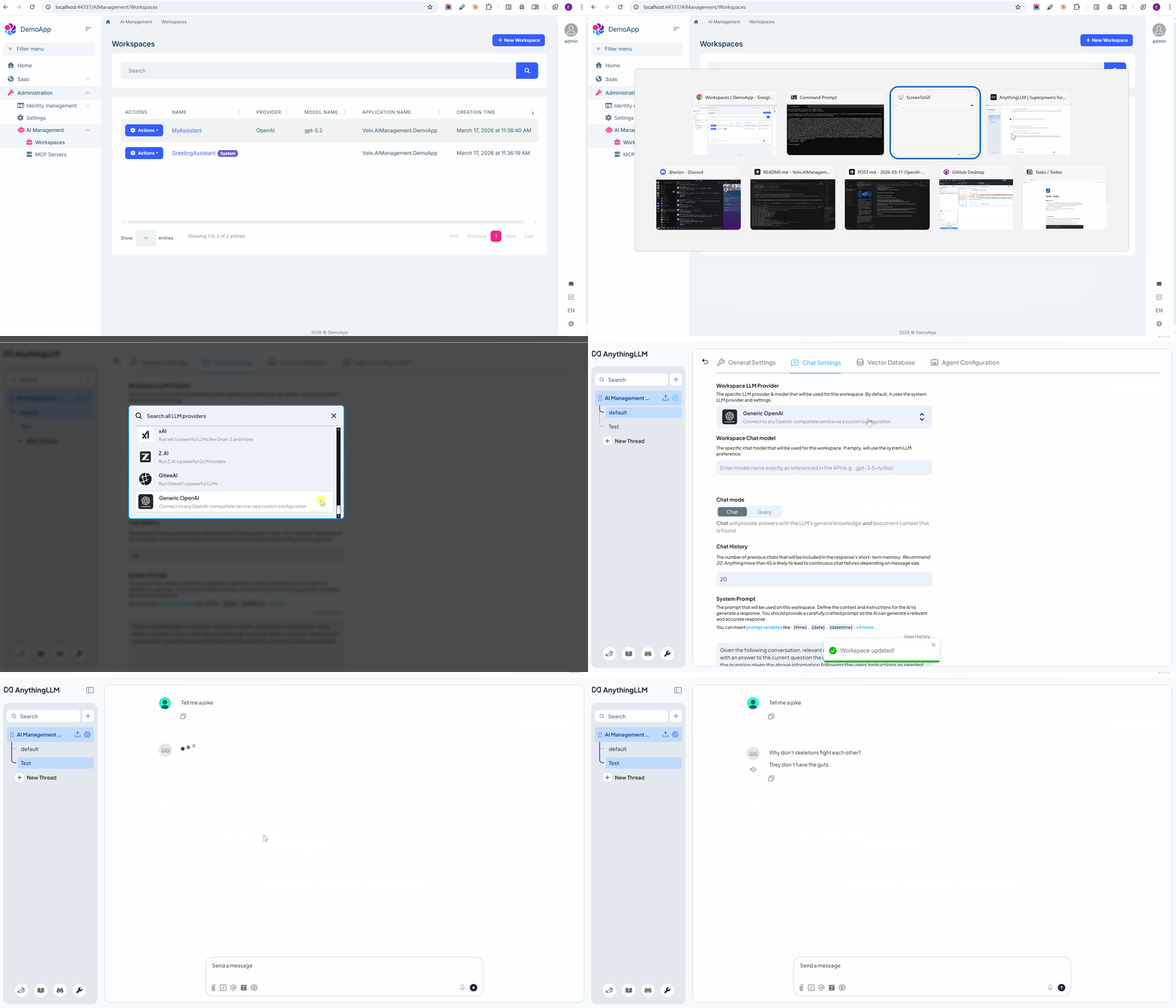
Before we get into the details, here's a quick look at the full flow in action:
See It in Action: AnythingLLM + ABP
The demo below shows the full flow: connecting an OpenAI-compatible client to ABP, selecting a workspace-backed model, and sending a successful chat request through /v1.
Why This Is a Big Deal
Many teams end up with AI configuration spread across multiple clients and services. Updating providers, rotating keys, or changing model behavior can become operationally messy.
With ABP in front of your AI traffic:
- Clients keep speaking the familiar OpenAI contract.
- ABP resolves the requested
modelto a workspace. - The workspace decides which provider/model settings are actually used.
This gives you a clean split: standardized client integration outside, governed AI configuration inside.
Key Concept: Workspace = Model
OpenAI-compatible clients send a model value.
In ABP AI Management, that model maps to a workspace name.
For example:
- Workspace name:
SupportAgent - Client request model:
SupportAgent
When the client calls /v1/chat/completions with "model": "SupportAgent", ABP routes the request to that workspace and applies that workspace's provider (OpenAI, Ollama etc.) and model configuration.
This is the main mental model to keep in mind while integrating any OpenAI-compatible tool with ABP.
Endpoints Exposed by ABP v10.2
The AI Management module exposes OpenAI-compatible REST endpoints at /v1.
| Endpoint | Method | Description |
|---|---|---|
/v1/chat/completions |
POST | Chat completions (streaming and non-streaming) |
/v1/completions |
POST | Legacy text completions |
/v1/models |
GET | List available models (workspaces) |
/v1/models/{modelId} |
GET | Get a single model (workspace) |
/v1/embeddings |
POST | Generate embeddings |
/v1/files |
GET | List files |
/v1/files |
POST | Upload a file |
/v1/files/{fileId} |
GET | Get file metadata |
/v1/files/{fileId} |
DELETE | Delete a file |
/v1/files/{fileId}/content |
GET | Download file content |
All endpoints require Authorization: Bearer <token>.
Quick Setup with AnythingLLM
Before configuration, ensure:
- AI Management is installed and running in your ABP app.
- At least one workspace is created and active.
- You have a valid Bearer token for your ABP application.
1) Get an access token
Use any valid token accepted by your app. In a demo-style setup, token retrieval can look like this:
curl -X POST http://localhost:44337/connect/token \
  -d "grant_type=password&username=admin&password=1q2w3E*&client_id=DemoApp_API&client_secret=1q2w3e*&scope=DemoApp"
Use the returned access_token as the API key value in your OpenAI-compatible client.
2) Configure AnythingLLM as Generic OpenAI
In AnythingLLM -> Settings -> LLM Preference, select Generic OpenAI and set:
| Setting | Value |
|---|---|
| Base URL | http://localhost:44337/v1 |
| API Key | <access_token> |
| Chat Model Selection | Select an active workspace |
In most OpenAI-compatible UIs, the app adds Bearer automatically, so the API key field should contain only the raw token string.
3) Optional: configure embeddings
If you want RAG flows through ABP, go to Settings -> Embedding Preference and use the same Base URL/API key values.
Then select a workspace that has embedder settings configured.
Validate the Flow
List models (workspaces)
curl http://localhost:44337/v1/models \
  -H "Authorization: Bearer <your-token>"
Chat completion
curl -X POST http://localhost:44337/v1/chat/completions \
  -H "Authorization: Bearer <your-token>" \
  -H "Content-Type: application/json" \
  -d '{
    "model": "MyWorkspace",
    "messages": [
      { "role": "user", "content": "Hello from ABP OpenAI-compatible endpoint!" }
    ]
  }'
Optional SDK check (Python)
from openai import OpenAI

client = OpenAI(
    base_url="http://localhost:44337/v1",
    api_key="<your-token>"
)

response = client.chat.completions.create(
    model="MyWorkspace",
    messages=[{"role": "user", "content": "Hello!"}]
)

print(response.choices[0].message.content)
Where This Fits in Real Projects
This approach is a strong fit when you want to:
- Keep ABP as the central control plane for AI workspaces.
- Let client tools integrate through a standard OpenAI contract.
- Switch providers or model settings without rewriting client-side integration.
If your team uses multiple AI clients, this pattern keeps integration simple while preserving control where it matters.


Comments
Ahmad Almunajjed 29 weeks ago
Well done! I have a suggestion: why do not you rename AI Management to Agent Module. It feels more aligned with what it actually does.