What does that mean exactly? It is not possible with Blazor? If yes, why? Or you have found a bug that you are going to fix?
Because for me your "solution" means that I can't output multilingual validation messages.
I have now been able to recreate the problem in a test project. I have emailed you the OneDrive download link for the test project.
In order for you to reproduce this, you need to create and save a new test element in my project.
I use the ObjectGraphDataAnnotationsValidator to validate a more complex object (doesn't make sense in the example, of course, but I had to include it since it's probably part of the problem).
Tests.razor (sorry, I had to change the HTML code so I could paste it here):
< EditForm id="CreateTestForm" EditContext="NewTestDataContext">

    < ObjectGraphDataAnnotationsValidator />

    < ModalHeader>
        < ModalTitle>@L["NewTest"]</ModalTitle>
        < CloseButton Clicked="CloseCreateTestModalAsync" />
    < /ModalHeader>
    < ModalBody>

        < Validation>
            < Field>
                < FieldLabel>@L["DocumentName"]</FieldLabel>
                < TextEdit @bind-Text="@NewTest.Document.DocumentName">
                    < Feedback>
                        < ValidationError />
                    < /Feedback>
                < /TextEdit>
            < /Field>
            < ValidationMessage For="() => NewTest.Document.DocumentValidation"></ValidationMessage>
        < /Validation>

    < /ModalBody>
    < ModalFooter>
        < Button Color="Color.Secondary" Clicked="CloseCreateTestModalAsync">
            @L["Cancel"]
        < /Button>
        < SubmitButton Form="CreateTestForm" Clicked="CreateTestAsync" />
    < /ModalFooter>
< /EditForm>
When validating DocumentDto.cs the error happens:
public IEnumerable<ValidationResult> Validate(ValidationContext validationContext)
{
    var results = new List<ValidationResult>();

    // This is not working when using EditContext !!!
    var l = validationContext.GetRequiredService<IStringLocalizer<Abp4146Resource>>();
    var errorMessage = l["Test:ValidationMessage"].Value;

    // Do some validation

    results.Add(new ValidationResult(errorMessage, new[] { nameof(DocumentValidation) }));

    return results;
}
Exception: System.InvalidOperationException: 'No service for type 'Microsoft.Extensions.Localization.IStringLocalizer`1[Abp4146.Localization.Abp4146Resource]' has been registered.'
What I found out: If I don't use the EditContext for the EditForm, but the model, then it works. But in my concrete project I need the EditContext...
This is working: <EditForm id="CreateTestForm" Model="@NewTest">
This is NOT working: <EditForm id="CreateTestForm" EditContext="NewTestDataContext">
I wanted to make an example project, but there it works. I haven't figured out where the difference is and why it doesn't work in my other project...
Unfortunately, I can no longer reply here because the ticket is locked. But you said that you will get in touch when the individual points are done. Unfortunately I have not heard anything more about 8 of 9 points. Are certain things already fixed or planned for when? Currently I have version 6.0.1.
Thanks!
Thank you Engincan.
Another problem that occurs with the top menu is the following: When I restart the application, the dropdown menu is not at the front level. I always have to refresh the page once first (F5) for the menu to appear fully. I have made a screencast about this:
Maybe you guys can fix that too. Thanks.
I see changes to version 1.0, so version 1.0.1 is being displayed.
But I use the top menu layout. Can you check it with that?
@EngincanV, hm... i have now ABP 6.0.1 and LeptonX 1.0.1 and the problem still occurs...
Volo.Abp.AspNetCore.Components.Server.LeptonXTheme: Version="1.0.1" Volo.Abp.AspNetCore.Mvc.UI.Theme.LeptonX: Version="1.0.1"
Would be great if I could get an answer on this topic. Thank you.
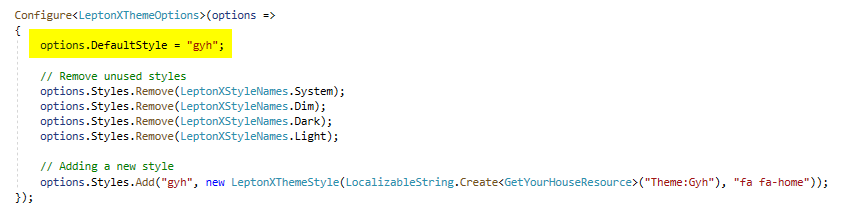
Oh, I did find the solution after several hours of searching - a lucky guess.
DefaultStyle must be set first, before the other styles are removed! No idea why that should matter, but that's how it works:
I would be happy if this question was not counted and you could increment my counter again.









