I wanted to make an example project, but there it works. I haven't figured out where the difference is and why it doesn't work in my other project...
Unfortunately, I can no longer reply here because the ticket is locked. But you said that you will get in touch when the individual points are done. Unfortunately I have not heard anything more about 8 of 9 points. Are certain things already fixed or planned for when? Currently I have version 6.0.1.
This is actually the same question as @balessi75 has already asked here: #3862
I want to use my string resources in a DTO (MyProject.Application.Contracts).
public IEnumerable<ValidationResult> Validate(ValidationContext validationContext)
{
    var results = new List<ValidationResult>();
    var l = validationContext.GetRequiredService<IStringLocalizer<MyProjectResource>>();
    var errorMessage = l["Entity:DocumentType:IsRequired:ValidationText"].Value;

    ...

    return results;
}
Unfortunately, I have not figured out how to register the IStringLocalizer correctly. I have read the mentioned documentation and searched for it, but somehow it doesn't work for me. I always get the following error message:
Unhandled exception rendering component: No service for type 'Microsoft.Extensions.Localization.IStringLocalizer`1[MyProject.Localization.MyProjectResource]' has been registered.
System.InvalidOperationException: No service for type 'Microsoft.Extensions.Localization.IStringLocalizer`1[MyProject.Localization.MyProjectResource]' has been registered.
   at Microsoft.Extensions.DependencyInjection.ServiceProviderServiceExtensions.GetRequiredService(IServiceProvider provider, Type serviceType)
   at Microsoft.Extensions.DependencyInjection.ServiceProviderServiceExtensions.GetRequiredService[T](IServiceProvider provider)
   at MyProject.Shared.DocumentDependentBase.Validate(ValidationContext validationContext) in
Can you tell me how to register it in my module?
Thanks!
Thank you Engincan.
Another problem that occurs with the top menu is the following: When I restart the application, the dropdown menu is not at the front level. I always have to refresh the page once first (F5) for the menu to appear fully. I have made a screencast about this:
Maybe you guys can fix that too. Thanks.
I see changes to version 1.0, so version 1.0.1 is being displayed.
But I use the top menu layout. Can you check it with that?
@EngincanV, hm... i have now ABP 6.0.1 and LeptonX 1.0.1 and the problem still occurs...
Volo.Abp.AspNetCore.Components.Server.LeptonXTheme: Version="1.0.1" Volo.Abp.AspNetCore.Mvc.UI.Theme.LeptonX: Version="1.0.1"
Would be great if I could get an answer on this topic. Thank you.
Oh, I did find the solution after several hours of searching - a lucky guess.
DefaultStyle must be set first, before the other styles are removed! No idea why that should matter, but that's how it works:
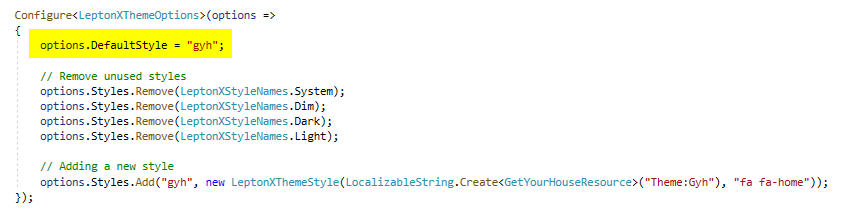
I would be happy if this question was not counted and you could increment my counter again.
Even though I got the MVC part to work, it doesn't work at all in the Blazor app. I have made a separate ticket for this.
Currently the ABP support doesn't seem to react that fast... hope I don't have to wait too long for an answer. But if you still have an idea, I would be very grateful :-)
https://support.abp.io/QA/Questions/4077/LeptonX-Problems-with-overwriting-styles




