Hello,
Thank you for reporting the problem. This problem seems to be solved in the new version, so you can update your solution by following the steps below:
abp update --version 9.1.0-rc.2 command in solution folderVolo.Abp.AspNetCore.Mvc.UI.Theme.LeptonX in all csproj files and change version to 4.1.0-rc.2OpenIddictConstants.Permissions.Endpoints.Logout to OpenIddictConstants.Permissions.Endpoints.EndSession
OpenIddictConstants.Permissions.Endpoints.Device to OpenIddictConstants.Permissions.Endpoints.DeviceAuthorization
Hello,
To reproduce the problem I created a Blazor Server project and did what you did. In my case it worked. In this case I think the problem is caused by the dependencies of your modules and host application. If your modules depend on the account module but you don't really need it, you can remove them. Similarly, such repetitive dependencies on both sides should be removed. The end application already depends on them and it should be its responsibility to manage this dependency.
Hello,
For this purpose, you can create a Blazor component in the Pages folder of the MyApp.Blazor.Client project as follows:
MyGeneralSettings.razor
@using Microsoft.Extensions.Localization
@using Microsoft.Extensions.Options
@using Volo.Abp.AspNetCore.Components.Web.LeptonXTheme.Navigation
@using Volo.Abp.LeptonX.Shared.Localization
@using Volo.Abp.Localization
@using System.Globalization
@using Volo.Abp.AspNetCore.Components.Web.LeptonXTheme.Components.ApplicationLayout.Common
@using Volo.Abp.DependencyInjection

@inherits Volo.Abp.AspNetCore.Components.Web.LeptonXTheme.Components.ApplicationLayout.Common.GeneralSettings
@attribute [ExposeServices(typeof(GeneralSettings))]
@attribute [Dependency(ReplaceServices = true)]

@inject ILanguagePlatformManager LanguagePlatformManager
@inject IStringLocalizer<LeptonXResource> L

<div class="lpx-settings" id="lpx-settings">

	@* @if (HasMultipleStyles) *@
	@* { *@
	@* 	<div id="appearance" class="setting-icon" data-lpx-setting-icon="appearance" *@
	@* 	data-lpx-setting-id="settings-context-menu"> *@
	@* 		<div class="setting"> *@
	@* 			<i class="bi bi-laptop-fill"></i> *@
	@* 		</div> *@
	@* 	</div> *@
	@* } *@

	@* @if (HasContainerWidth) *@
	@* { *@
	@* 	<div id="containerWidth" class="setting-icon" data-lpx-setting-icon="containerWidth" *@
	@* 	data-lpx-setting-id="settings-context-menu"> *@
	@* 		<div class="setting"> *@
	@* 			<i class="bi bi-layout-three-columns"></i> *@
	@* 		</div> *@
	@* 	</div> *@
	@* } *@

	@* @if(Languages.Count > 1) *@
	@* { *@
	@* 	<div id="language" class="setting-icon" data-lpx-setting-icon="language" *@
	@* 		data-lpx-setting-id="settings-context-menu"> *@
	@* 		<div class="setting"> *@
	@* 			@CurrentLanguageTwoLetters *@
	@* 		</div> *@
	@* 	</div> *@
	@* } *@

	@* <div class="setting-icon"> *@
	@* 	<i class="bi bi-gear-wide-connected" aria-hidden="true" data-lpx-ctx-toggle="settings-context-menu"></i> *@
	@* </div> *@
	@* <div class="lpx-context-menu" data-lpx-context-menu="settings-context-menu"> *@
	@* 	<ul class="lpx-nav-menu" id="settings-routes"> *@
	@* 		<li class="outer-menu-item"> *@
	@* 			<a class="lpx-menu-item-link lpx-menu-item"> *@
	@* 				<span class="lpx-menu-item-icon"> *@
	@* 					<i class="lpx-icon outer-icon bi bi-gear-wide-connected" aria-hidden="true"></i> *@
	@* 				</span> *@
	@* 				<span class="lpx-menu-item-text">@L["GeneralSettings"]</span> *@
	@* 				<span data-lpx-close="settings-context-menu"> *@
	@* 					<i class="lpx-icon bi bi-x outer-icon dd-icon" aria-hidden="true"></i> *@
	@* 				</span> *@
	@* 			</a> *@
	@* 		</li> *@
	@* *@
	@* 		@if (HasMultipleStyles) *@
	@* 		{ *@
	@* 			<li class="outer-menu-item"> *@
	@* 				<a class="lpx-menu-item-link lpx-menu-item" data-lpx-setting-group="appearance"> *@
	@* 					<span class="lpx-menu-item-icon"> *@
	@* 						<i class="lpx-icon bi bi-palette-fill" aria-hidden="true"></i> *@
	@* 					</span> *@
	@* *@
	@* 					<span class="lpx-menu-item-text hidden-in-hover-trigger">@L["Appearance"]</span> *@
	@* *@
	@* 					<i class="dd-icon hidden-in-hover-trigger lpx-caret bi-chevron-down" aria-hidden="true"></i> *@
	@* 				</a> *@
	@* *@
	@* 				<ul class="lpx-inner-menu hidden-in-hover-trigger collapsed" data-id="appearance"> *@
	@* 					@foreach (var style in ThemeOptions.Value.Styles) *@
	@* 					{ *@
	@* 						<li class="lpx-inner-menu-item"> *@
	@* 							<a class="lpx-menu-item-link lpx-menu-item" data-lpx-setting="@style.Key"> *@
	@* 								<span class="lpx-menu-item-icon"> *@
	@* 									<i class="lpx-icon @style.Value.Icon" aria-hidden="true"></i> *@
	@* 								</span> *@
	@* *@
	@* 								<span class="lpx-menu-item-text hidden-in-hover-trigger">@style.Value.DisplayName.Localize(LocalizerFactory).Value</span> *@
	@* 							</a> *@
	@* 						</li> *@
	@* 					} *@
	@* 				</ul> *@
	@* 			</li> *@
	@* 		} *@
	@* 		@if (HasContainerWidth) *@
	@* 		{ *@
	@* 			<li class="outer-menu-item"> *@
	@* 				<a class="lpx-menu-item-link lpx-menu-item" data-lpx-setting-group="containerWidth"> *@
	@* 					<span class="lpx-menu-item-icon"> *@
	@* 						<i class="lpx-icon bi bi-aspect-ratio" aria-hidden="true"></i> *@
	@* 					</span> *@
	@* *@
	@* 					<span class="lpx-menu-item-text hidden-in-hover-trigger">@L["ContainerWidth"]</span> *@
	@* *@
	@* 					<i class="dd-icon hidden-in-hover-trigger lpx-caret bi-chevron-down" aria-hidden="true"></i> *@
	@* 				</a> *@
	@* *@
	@* 				<ul class="lpx-inner-menu hidden-in-hover-trigger collapsed" data-id="containerWidth"> *@
	@* 					<li class="lpx-inner-menu-item"> *@
	@* 						<a class="lpx-menu-item-link lpx-menu-item" data-lpx-setting="boxed"> *@
	@* 							<span class="lpx-menu-item-icon"><i class="lpx-icon bi bi-square" *@
	@* 								aria-hidden="true"></i></span> *@
	@* *@
	@* 							<span class="lpx-menu-item-text hidden-in-hover-trigger">@L["ContainerWidth:Boxed"]</span> *@
	@* 						</a> *@
	@* 					</li> *@
	@* *@
	@* 					<li class="lpx-inner-menu-item"> *@
	@* 						<a class="lpx-menu-item-link lpx-menu-item selected" data-lpx-setting="fixed"> *@
	@* 							<span class="lpx-menu-item-icon"> *@
	@* 								<i class="lpx-icon bi bi-layout-three-columns" aria-hidden="true"></i> *@
	@* 							</span> *@
	@* *@
	@* 							<span *@
	@* 							class="lpx-menu-item-text hidden-in-hover-trigger">@L["ContainerWidth:Fixed"]</span> *@
	@* 						</a> *@
	@* 					</li> *@
	@* *@
	@* 					<li class="lpx-inner-menu-item"> *@
	@* 						<a class="lpx-menu-item-link lpx-menu-item selected" data-lpx-setting="full"> *@
	@* 							<span class="lpx-menu-item-icon"> *@
	@* 								<i class="lpx-icon bi bi-code-square" aria-hidden="true"></i> *@
	@* 							</span> *@
	@* *@
	@* 							<span *@
	@* 							class="lpx-menu-item-text hidden-in-hover-trigger">@L["ContainerWidth:Fluid"]</span> *@
	@* 						</a> *@
	@* 					</li> *@
	@* 				</ul> *@
	@* 			</li> *@
	@* 		} *@
	@* *@
	@* 		@if(Languages.Count > 1) *@
	@* 		{ *@
	@* 			<li class="outer-menu-item"> *@
	@* 				<a class="lpx-menu-item-link lpx-menu-item" data-lpx-setting-group="language"> *@
	@* 					<span class="lpx-menu-item-icon"><i class="lpx-icon bi bi-globe" aria-hidden="true"></i></span> *@
	@* *@
	@* 					<span class="lpx-menu-item-text hidden-in-hover-trigger">@L["Language"]</span> *@
	@* *@
	@* 					<i class="dd-icon hidden-in-hover-trigger lpx-caret bi-chevron-down" aria-hidden="true"></i> *@
	@* 				</a> *@
	@* *@
	@* 				<ul class="lpx-inner-menu hidden-in-hover-trigger collapsed" data-id="language"> *@
	@* 					@if (HasLanguages) *@
	@* 					{ *@
	@* 						@foreach (var language in Languages) *@
	@* 						{ *@
	@* 							<li class="lpx-inner-menu-item"> *@
	@* 								<a class="lpx-menu-item-link@(language.CultureName == CurrentLanguage.CultureName ? " selected" : string.Empty)" *@
	@* 							@onclick="() => ChangeLanguageAsync(language)"> *@
	@* 									<span class="lpx-menu-item-text hidden-in-hover-trigger">@language.DisplayName / @(new *@
	@* 								CultureInfo(language.CultureName).TwoLetterISOLanguageName.ToUpper())</span> *@
	@* 								</a> *@
	@* 							</li> *@
	@* 						} *@
	@* 					} *@
	@* 				</ul> *@
	@* 			</li> *@
	@* 		} *@
	@* 	</ul> *@
	@* </div> *@
</div>
Then add the following code block to the ConfigureServices method inside the Module class of the MyApp.Blazor project:
  context.Services.Replace(
            ServiceDescriptor.Transient<
                GeneralSettings,
                MyGeneralSettings
            >());
However, we need to able to enable like microsoft, twitter in external provider tab like your image first then will config on host project, right?
Yes, first you need to enable the relevant social login on the host, then on the tenant side, the tenant's administrator can see the relevant settings for the enabled providers.
However, you cannot see the External Provider tab setting on the host side, right? If so, can you send your project to berkan.sasmaz@volosoft.com?
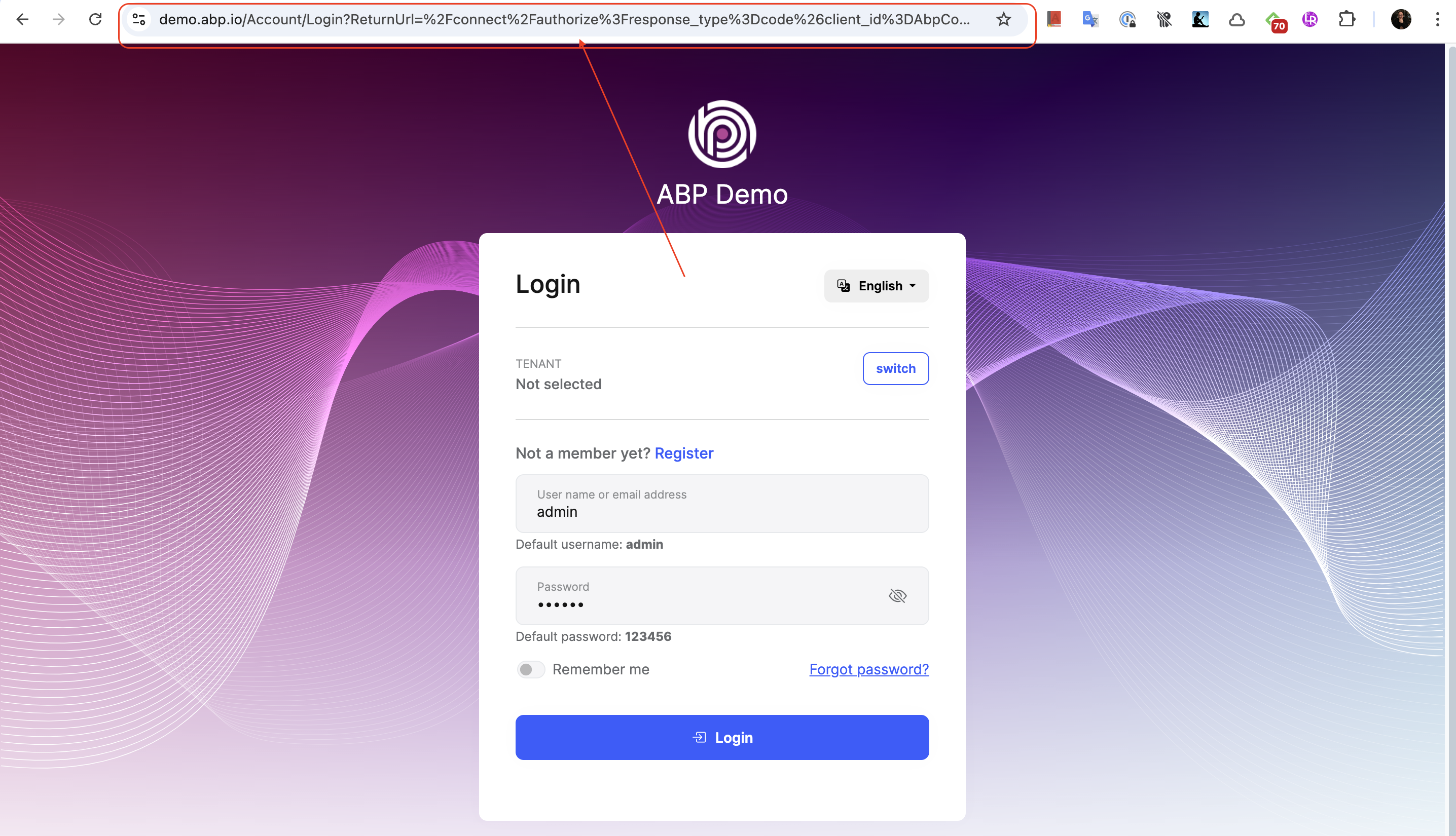
Can you specify what is the url when you are redirected to the login screen after clicking the login button from your application.
Hello, I examined your project in detail, but I can't say anything because I don't know much about MassTransit. However, I have a few suggestions:
Can you use the UnitOfWorkManager.Current.AddOrReplaceDistributedEvent method where you publish the event? If you can, can you try it like this?
You can see how to use it in the code example here: https://github.com/abpframework/abp/blob/8d1d89ac7fe3082e342add226e97f417e7f9d287/framework/src/Volo.Abp.Ddd.Domain/Volo/Abp/Domain/Entities/Events/EntityChangeEventHelper.cs#L128-L172
Note: By the way, you can use ABP's Inbox/Outbox feature without adding dependencies to your Domain layer. It's almost the same as what you did for MassTransit.
Hello,
For this, you can override the following CreateFilterExpression method in the MyAppDbContext class in the MyApp.EntityFrameworkCore project of your application as follows:
protected override Expression<Func<TEntity, bool>>? CreateFilterExpression<TEntity>(ModelBuilder modelBuilder)
    {
        Expression<Func<TEntity, bool>> expression = null;

        if (typeof(ISoftDelete).IsAssignableFrom(typeof(TEntity)))
        {
            var softDeleteColumnName = modelBuilder.Entity<TEntity>().Metadata.FindProperty(nameof(ISoftDelete.IsDeleted))?.GetColumnName() ?? "IsDeleted";
            expression = e => !IsSoftDeleteFilterEnabled || !EF.Property<bool>(e, softDeleteColumnName);
            if (UseDbFunction())
            {
                expression = e => AbpEfCoreDataFilterDbFunctionMethods.SoftDeleteFilter(((ISoftDelete)e).IsDeleted, true);
                modelBuilder.ConfigureSoftDeleteDbFunction(AbpEfCoreDataFilterDbFunctionMethods.SoftDeleteFilterMethodInfo, this.GetService<AbpEfCoreCurrentDbContext>());
            }
        }

        if (typeof(IMultiTenant).IsAssignableFrom(typeof(TEntity)) && typeof(TEntity) != typeof(LanguageText))
        {
            var multiTenantColumnName = modelBuilder.Entity<TEntity>().Metadata.FindProperty(nameof(IMultiTenant.TenantId))?.GetColumnName() ?? "TenantId";
            Expression<Func<TEntity, bool>> multiTenantFilter = e => !IsMultiTenantFilterEnabled || EF.Property<Guid>(e, multiTenantColumnName) == CurrentTenantId;
            if (UseDbFunction())
            {
                multiTenantFilter = e => AbpEfCoreDataFilterDbFunctionMethods.MultiTenantFilter(((IMultiTenant)e).TenantId, CurrentTenantId, true);
                modelBuilder.ConfigureMultiTenantDbFunction(AbpEfCoreDataFilterDbFunctionMethods.MultiTenantFilterMethodInfo, this.GetService<AbpEfCoreCurrentDbContext>());
            }
            expression = expression == null ? multiTenantFilter : QueryFilterExpressionHelper.CombineExpressions(expression, multiTenantFilter);
        }

        return expression;
    }
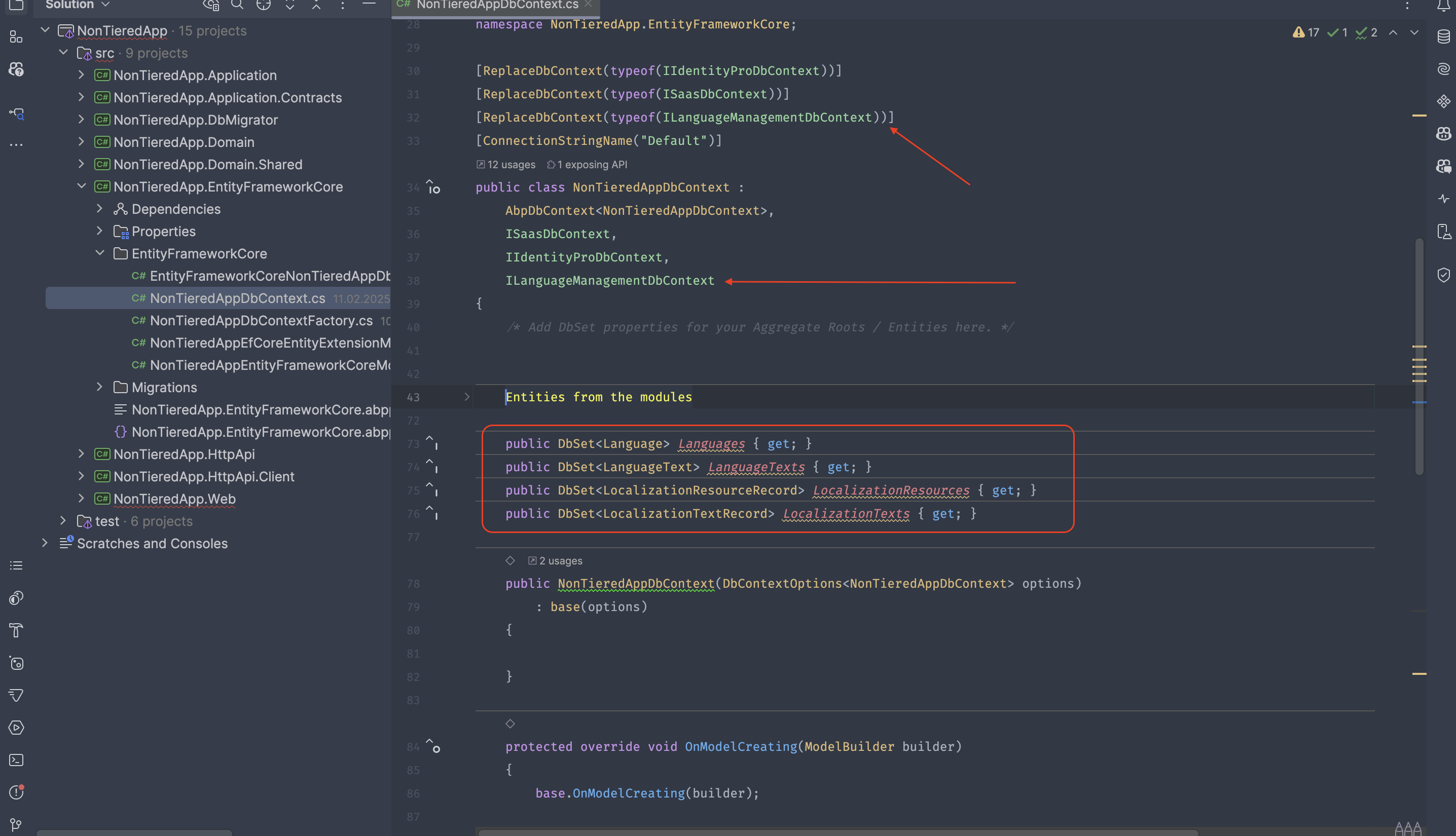
Then you need to replace the LanguageManagementDbContext from DI Container as in the picture below:
When I create a solution from scratch, I can see this screen as in the screen below:

However, you have stated that you have updated from ABP 8 to ABP 9. Therefore, in order to better understand your problem, can I ask which template you are using and its details? Also, if there is a method called ConfigureExternalProviders in the module class in the host project of your application, can you send its content?
I think this question and that(#8779) question are the same, so I'll close this one and we can go from there. If you think it's not the same, feel free to open it again.
Hello,
To better understand your question, does the template you are using have a Tiered architecture? I created a non-tiered Blazor Web App project and tried to reproduce the problem, but I had almost no wait time. Below you can see a GIF about this experience.

How can I reproduce the problem through the startup template, what are the steps you have followed for this?
To better understand the problem, I would like to leave some information about Blazor Web App:
A Blazor Web App UI consists of two main projects: Blazor and Blazor.Client:
Blazor: This is actually a Blazor Server project. When the application is first opened in a browser, it runs on the server and renders the initial UI. Communication between the client and the server happens through SignalR, ensuring that UI elements like menus appear without noticeable delay.
Blazor.Client: This functions as a Blazor WebAssembly (WASM) project. After the initial page load, the application begins downloading the .NET runtime into the browser. This process may take some time depending on the internet speed. However, since the UI has already been rendered by the Blazor Server, the user does not experience significant delays. Once the WebAssembly runtime is fully loaded, it seamlessly takes over execution from the Blazor Server, allowing the app to function as a client-side WebAssembly application.
Let us examine your problem in this direction:
When clicking the refresh I can see the full left side menu but didn't see the application logo and the application was blocked I cannot click on any menu.
In this case, if you put Logo only in the Client project's assets, it is very normal that you cannot see it when the page is first loaded. Also, as you can see in the gif I provided, I was not able to reproduce the issue of not being able to click somewhere, I think this problem may be caused by your interactivity selection of components or page. But as I said, I am not sure.









