Activities of "yazilim.ithinka"

Hello,

We are currently unable to address the ABP 10.x version update, but we can consider modifying the ‘pending’ structure or the event flow as you have suggested.

Thanks.

  • Template: microservice
  • Created ABP Studio Version: 1.3.3
  • Current ABP Studio Version: 1.3.3
  • Multi-Tenancy: Yes
  • UI Framework: angular
  • Theme: leptonx
  • Theme Style: system
  • Theme Menu Placement: side
  • Run Install Libs: Yes
  • Database Provider: ef
  • Database Management System: postgresql
  • Mobile Framework: react-native
  • Public Website: Yes
  • Social Login: Yes
  • Include Tests: Yes
  • Dynamic Localization: Yes
  • Kubernetes Configuration: Yes
  • Grafana Dashboard: Yes
  • Use Local References: No
  • Aspire: Yes
  • Optional Modules:
    • GDPR
    • FileManagement
    • TextTemplateManagement
    • AuditLogging
    • OpenIddictAdmin
  • Selected Languages: English, Turkish
  • Default Language: English
  • Create Command: abp new CarbonAI -t microservice --ui-framework angular --mobile react-native --database-provider ef --database-management-system postgresql --theme leptonx --skip-migrator --public-website --without-cms-kit --aspire --dont-run-bundling -no-language-management -file-management

Hi,

Environment

  • ABP 9.3.5, .NET 9
  • Volo.Abp.EventBus.RabbitMQ with Inbox & Outbox enabled (UseDbContext)

Summary When a distributed event handler throws an exception (intentionally, to trigger an inbox retry), the InboxProcessor stops processing the rest of the batch and retries the SAME failing event on every cycle. As a result, that one failing event blocks ALL later events in the same inbox indefinitely (head-of-line blocking).

Scenario (leads to a permanent deadlock)

  • Two distributed events end up in the same service inbox:
    • Event A: its handler needs entities that are created by Event B.
    • Event B: its handler creates those entities.
  • A and B are published by two independent services, so their arrival/creation order is not guaranteed.
  • When Event A has a slightly older CreationTime than Event B, the InboxProcessor processes A first. A's handler throws ("data not ready yet, will be retried").
  • Because the inbox is processed in FIFO order and the exception is rethrown, Event B is never reached, the entities are never created, so A keeps failing forever — and every later event in the inbox is permanently stuck.

Observed

  • Log prints "Found N events in the inbox." on every cycle, with N never decreasing.
  • Stack trace: ... EventBusBase.ThrowOriginalExceptions -> RabbitMqDistributedEventBus.ProcessFromInboxAsync -> InboxProcessor.RunAsync

Questions

  1. Is this head-of-line blocking the intended behavior of the inbox processor?
  2. Is there a configuration to make the inbox skip a failing event and continue with the others (retrying the failed one independently/later), instead of blocking the whole inbox?
  3. Is there a built-in max-retry / dead-letter mechanism for inbox events?
  4. What is the recommended pattern when one event handler depends on data produced by another event, while using the inbox? Should we avoid "throw-to-retry" entirely and implement our own pending/retry mechanism?

Thanks.

Thank you for your support; I will consider the option of an update

However, we have now started encountering a different problem. Whenever we try to add a relationship to a table, it starts inserting tags in the format %%is-nullable%% and the build fails.

We're unable to run the migration because we're getting a build error

Hello, I think we’ve found the issue. We previously updated ABP Studio and the CLI to version 1.3.3, but the problem persisted. We observed that our method, which has a function return type, was causing an error during the proxy command. To address this, we previously had a method with a function return type on the Angular side. After cleaning up the service remnants in the proxy flow from generate-proxy.json, we added the [RemoteService(IsEnabled = false)] tag to exclude it from the proxy flow, we observed that the page was rendered in Angular.

C:\Users\.abp\suite\logs

Answer

[maliming] said: Hi,

The latest stable is 10.4 (2026-05-14). 10.5 is currently in RC and the only CMS Kit change in it is the CodeMirror 6 update. The items you listed (SEO meta, media gallery, RSS, content versioning, social streams) are listed in the road map backlog under "Application Modules / UI Themes" but not assigned to a specific release yet (SEO meta has its own feature request at https://github.com/abpframework/abp/issues/16342). When they land, you'll receive them through a regular version upgrade.

On the Angular side, CMS Kit support was introduced in 10.2 ("Angular: CMS Kit Module Features" in the release notes) and has been stable since then. Angular support here refers to the admin UI — from 10.2 onwards it covers:

  • Open-source: Blogs, Blog Posts, Pages, Tags, Menus, Comments, Global Resources, CMS Settings
  • Pro: Newsletters, Polls, FAQs, Page Feedbacks, URL Shorting, CMS Settings

So if you move from 9.3.5 to 10.4 you'll get the full admin set above on Angular. The public-facing pages and widgets (blog list/detail, commenting, ratings, reactions, popular tags, newsletter subscription, etc.) are served by the MVC public-web app that the microservice template already includes — that's the public website you enabled with --public-website, where the CMS Kit MVC views and ViewComponents are wired up.

A note on the upgrade itself: since you're on 9.3.5 (.NET 9), the main step is the move to .NET 10 in 10.0. Run through the 9.x → 10.x migration guide first, then go to 10.4.

For the integration steps in a microservice solution, the official guide covers everything you need (CLI command, EF migrations, static proxy, gateway routes, and connection string mapping):

  • https://abp.io/docs/latest/guides/add-module-to-microservice
  • https://abp.io/docs/latest/modules/cms-kit-pro (for enabling features via GlobalFeatureConfigurator)

Thanks

Thank you, I’ll look into it.

  • Template: microservice
  • Template Type: Classic
  • Created ABP Studio Version: 1.3.3
  • Current ABP Studio Version: 3.0.4
  • Multi-Tenancy: Yes
  • UI Framework: angular
  • Theme: leptonx
  • Theme Style: system
  • Theme Menu Placement: side
  • Database Provider: ef
  • Database Management System: postgresql
  • Mobile Framework: react-native
  • Public Website: Yes
  • Social Login: Yes
  • Include Tests: Yes
  • Dynamic Localization: Yes
  • Kubernetes Configuration: Yes
  • Grafana Dashboard: Yes
  • Use Local References: No
  • Aspire: Yes
  • Optional Modules:
    • GDPR
    • FileManagement
    • TextTemplateManagement
    • AuditLogging
    • OpenIddictAdmin
  • Selected Languages: English, Turkish
  • Default Language: English
  • Create Command: abp new CarbonAI -t microservice --ui-framework angular --mobile react-native --database-provider ef --database-management-system postgresql --theme leptonx --skip-migrator --public-website --without-cms-kit --aspire --dont-run-bundling -no-language-management -file-management

Hello, We are creating a table via the ABP Suite, but Angular isn’t performing any operations it isn’t generating pages or proxies. Where might the problem lie, or could this be a version-related issue? We would appreciate your assistance.

Question
  • Template: microservice
  • Template Type: Classic
  • Created ABP Studio Version: 1.3.3
  • Current ABP Studio Version: 3.0.4
  • Multi-Tenancy: Yes
  • UI Framework: angular
  • Theme: leptonx
  • Theme Style: system
  • Theme Menu Placement: side
  • Database Provider: ef
  • Database Management System: postgresql
  • Mobile Framework: react-native
  • Public Website: Yes
  • Social Login: Yes
  • Include Tests: Yes
  • Dynamic Localization: Yes
  • Kubernetes Configuration: Yes
  • Grafana Dashboard: Yes
  • Use Local References: No
  • Aspire: Yes
  • Optional Modules:
    • GDPR
    • FileManagement
    • TextTemplateManagement
    • AuditLogging
    • OpenIddictAdmin
  • Selected Languages: English, Turkish
  • Default Language: English
  • Create Command: abp new CarbonAI -t microservice --ui-framework angular --mobile react-native --database-provider ef --database-management-system postgresql --theme leptonx --skip-migrator --public-website --without-cms-kit --aspire --dont-run-bundling -no-language-management -file-management

Hello, We wanted to add the CMS Kit module to our microservices project, but it was stated that Angular support would be available in a future release. In the 10.2 (24 February 2026) release notes, we saw that ‘Angular: CMS Kit Module Features’ had been added; however, we also noted that certain features of the CMS Kit module such as meta information for SEO, media gallery, RSS feed, content versioning, and social media streams are scheduled to be added in version 10.5. If we update our project version now, can we use the CMS Kit features within our Angular architecture, even if they are incomplete, or should we wait for version 10.5? Furthermore, we have been unable to locate any documentation regarding how the CMS Kit module integrates fully with the microservices and Angular architecture. If an integration document exists, we would appreciate it if you could share it; otherwise, we would be grateful for guidance on how to proceed.
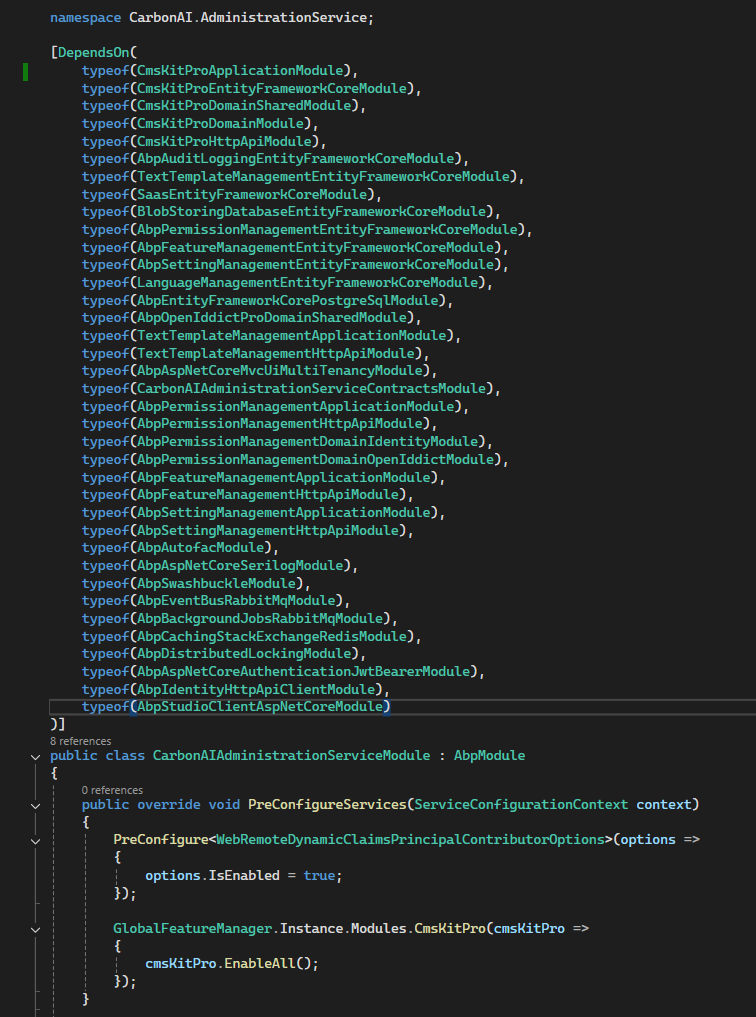
As you said, I added the Volo.CmsKit.Pro.Application package, but there was no change in the menus or redirects; the same errors persist.

We are waiting for your response so we can move forward with our project. Do you have an answer?

Showing 1 to 10 of 31 entries
Boost Your Development
ABP Live Training
Packages
See Trainings
Mastering ABP Framework Book
The Official Guide
Mastering
ABP Framework
Learn More
Mastering ABP Framework Book
Made with ❤️ on ABP v10.8.0-preview. Updated on September 28, 2026, 11:44
1
ABP Assistant
🔐 You need to be logged in to use the chatbot. Please log in first.


