






ABP Suite starts and runs on Windows ARM, but throws an exception when opening a project. Tried opening it directly from a terminal and from the ABP Studio, getting the same results.
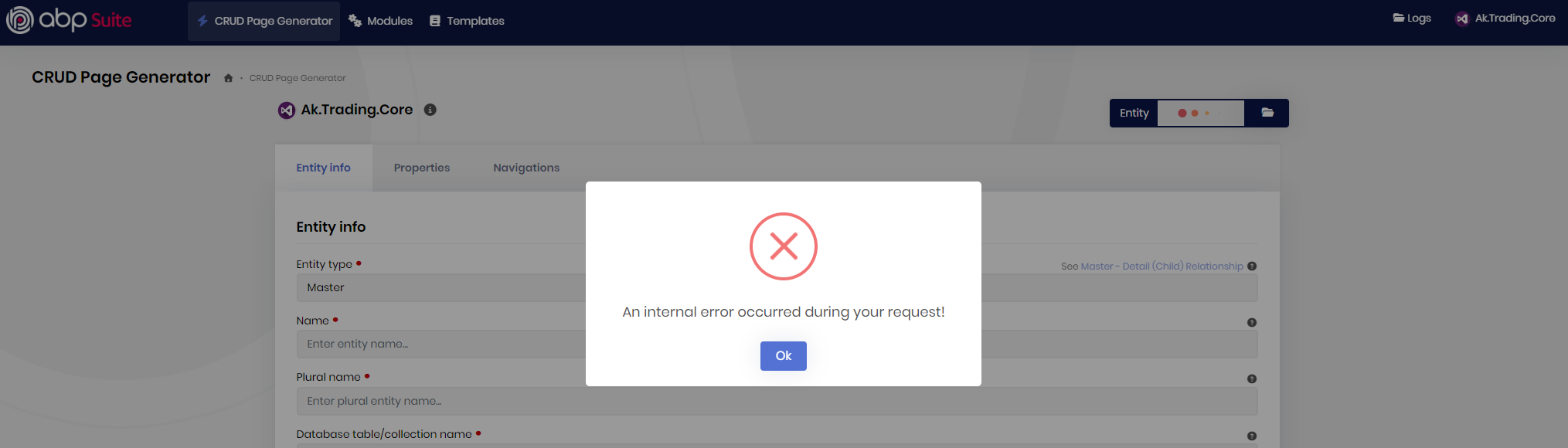
The stack trace:
2025-11-28 11:21:19.175 +05:00 [ERR] An exception was thrown while activating Volo.Abp.Suite.Controllers.CrudPageGeneratorController -> Volo.Abp.Suite.Areas.AbpSuite.CrudPageGenerator.Commands.CrudPageGenerator -> Volo.Abp.Suite.Areas.AbpSuite.CrudPageGenerator.Services.CustomCodeFileNestingService -> Volo.Abp.Suite.Areas.AbpSuite.CrudPageGenerator.Services.TemplateService -> λ:Volo.Abp.Suite.Areas.AbpSuite.CrudPageGenerator.Helpers.CodeFormatting.ICodeFormatter -> Volo.Abp.Suite.Areas.AbpSuite.CrudPageGenerator.Helpers.CodeFormatting.CodeFormatter -> Volo.Abp.Suite.Areas.AbpSuite.CrudPageGenerator.Helpers.CodeFormatting.JavascriptPrettierFormatter.
Autofac.Core.DependencyResolutionException: An exception was thrown while activating Volo.Abp.Suite.Controllers.CrudPageGeneratorController -> Volo.Abp.Suite.Areas.AbpSuite.CrudPageGenerator.Commands.CrudPageGenerator -> Volo.Abp.Suite.Areas.AbpSuite.CrudPageGenerator.Services.CustomCodeFileNestingService -> Volo.Abp.Suite.Areas.AbpSuite.CrudPageGenerator.Services.TemplateService -> λ:Volo.Abp.Suite.Areas.AbpSuite.CrudPageGenerator.Helpers.CodeFormatting.ICodeFormatter -> Volo.Abp.Suite.Areas.AbpSuite.CrudPageGenerator.Helpers.CodeFormatting.CodeFormatter -> Volo.Abp.Suite.Areas.AbpSuite.CrudPageGenerator.Helpers.CodeFormatting.JavascriptPrettierFormatter.
---> Autofac.Core.DependencyResolutionException: An exception was thrown while invoking the constructor 'Void .ctor(Volo.Abp.VirtualFileSystem.IVirtualFileProvider)' on type 'JavascriptPrettierFormatter'.
---> System.TypeLoadException: Cannot load ClearScript V8 library. Load failure information for ClearScriptV8.win-arm64.dll:
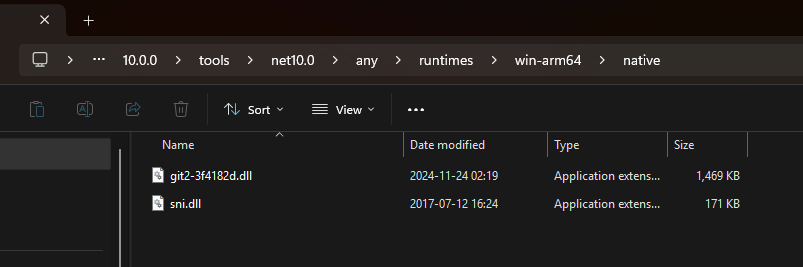
C:\Users\merda\.dotnet\tools\.store\volo.abp.suite\10.0.0\volo.abp.suite\10.0.0\tools\net10.0\any\runtimes\win-arm64\native\ClearScriptV8.win-arm64.dll: Unable to load DLL 'C:\Users\merda\.dotnet\tools\.store\volo.abp.suite\10.0.0\volo.abp.suite\10.0.0\tools\net10.0\any\runtimes\win-arm64\native\ClearScriptV8.win-arm64.dll' or one of its dependencies: The specified module could not be found. (0x8007007E)
C:\Users\merda\.dotnet\tools\.store\volo.abp.suite\10.0.0\volo.abp.suite\10.0.0\tools\net10.0\any\ClearScriptV8.win-arm64.dll: Unable to load DLL 'C:\Users\merda\.dotnet\tools\.store\volo.abp.suite\10.0.0\volo.abp.suite\10.0.0\tools\net10.0\any\ClearScriptV8.win-arm64.dll' or one of its dependencies: The specified module could not be found. (0x8007007E)
at Microsoft.ClearScript.V8.V8Proxy.LoadNativeLibrary(String baseName, String platform, String architecture, String extension)
at Microsoft.ClearScript.V8.V8Proxy.LoadNativeAssembly()
at Microsoft.ClearScript.V8.V8Proxy.OnEntityHolderCreated()
at Microsoft.ClearScript.V8.SplitProxy.V8EntityHolder..ctor(String name, Func`1 acquireHandle)
at Microsoft.ClearScript.V8.SplitProxy.V8IsolateProxyImpl..ctor(String name, V8RuntimeConstraints constraints, V8RuntimeFlags flags, Int32 debugPort)
at Microsoft.ClearScript.V8.V8IsolateProxy.Create(String name, V8RuntimeConstraints constraints, V8RuntimeFlags flags, Int32 debugPort)
at Microsoft.ClearScript.V8.V8Runtime..ctor(String name, V8RuntimeConstraints constraints, V8RuntimeFlags flags, Int32 debugPort)
at Microsoft.ClearScript.V8.V8Runtime..ctor(String name, V8RuntimeConstraints constraints, V8RuntimeFlags flags)
at Microsoft.ClearScript.V8.V8Runtime..ctor(String name, V8RuntimeConstraints constraints)
at Microsoft.ClearScript.V8.V8ScriptEngine..ctor(V8Runtime runtime, String name, V8RuntimeConstraints constraints, V8ScriptEngineFlags flags, Int32 debugPort)
at Microsoft.ClearScript.V8.V8ScriptEngine..ctor(String name, V8RuntimeConstraints constraints, V8ScriptEngineFlags flags, Int32 debugPort)
at Microsoft.ClearScript.V8.V8ScriptEngine..ctor(V8ScriptEngineFlags flags, Int32 debugPort)
at Microsoft.ClearScript.V8.V8ScriptEngine..ctor(V8ScriptEngineFlags flags)
at Volo.Abp.Suite.Areas.AbpSuite.CrudPageGenerator.Helpers.CodeFormatting.JavascriptPrettierFormatter..ctor(IVirtualFileProvider vfs)
at lambda_method922(Closure, Object[])
at Autofac.Core.Activators.Reflection.BoundConstructor.Instantiate()
--- End of inner exception stack trace ---
at Autofac.Core.Activators.Reflection.BoundConstructor.Instantiate()
at Autofac.Core.Activators.Reflection.ReflectionActivator.<>c__DisplayClass14_0.<UseSingleConstructorActivation>b__0(ResolveRequestContext context, Action`1 next)
at Autofac.Core.Resolving.Middleware.DelegateMiddleware.Execute(ResolveRequestContext context, Action`1 next)
at Autofac.Core.Resolving.Pipeline.ResolvePipelineBuilder.<>c__DisplayClass14_0.<BuildPipeline>b__1(ResolveRequestContext context)
at Autofac.Core.Resolving.Middleware.DisposalTrackingMiddleware.Execute(ResolveRequestContext context, Action`1 next)
at Autofac.Core.Resolving.Pipeline.ResolvePipelineBuilder.<>c__DisplayClass14_0.<BuildPipeline>b__1(ResolveRequestContext context)
at Autofac.Builder.RegistrationBuilder`3.<>c__DisplayClass41_0.<PropertiesAutowired>b__0(ResolveRequestContext context, Action`1 next)
at Autofac.Core.Resolving.Middleware.DelegateMiddleware.Execute(ResolveRequestContext context, Action`1 next)
at Autofac.Core.Resolving.Pipeline.ResolvePipelineBuilder.<>c__DisplayClass14_0.<BuildPipeline>b__1(ResolveRequestContext context)
at Autofac.Extensions.DependencyInjection.KeyedServiceMiddleware.Execute(ResolveRequestContext context, Action`1 next)
at Autofac.Core.Resolving.Pipeline.ResolvePipelineBuilder.<>c__DisplayClass14_0.<BuildPipeline>b__1(ResolveRequestContext context)
at Autofac.Core.Resolving.Middleware.ActivatorErrorHandlingMiddleware.Execute(ResolveRequestContext context, Action`1 next)
--- End of inner exception stack trace ---
at Autofac.Core.Resolving.Middleware.ActivatorErrorHandlingMiddleware.Execute(ResolveRequestContext context, Action`1 next)
at Autofac.Core.Resolving.Pipeline.ResolvePipelineBuilder.<>c__DisplayClass14_0.<BuildPipeline>b__1(ResolveRequestContext context)
at Autofac.Core.Pipeline.ResolvePipeline.Invoke(ResolveRequestContext context)
at Autofac.Core.Resolving.Middleware.RegistrationPipelineInvokeMiddleware.Execute(ResolveRequestContext context, Action`1 next)
at Autofac.Core.Resolving.Pipeline.ResolvePipelineBuilder.<>c__DisplayClass14_0.<BuildPipeline>b__1(ResolveRequestContext context)
at Autofac.Core.Resolving.Middleware.SharingMiddleware.Execute(ResolveRequestContext context, Action`1 next)
at Autofac.Core.Resolving.Pipeline.ResolvePipelineBuilder.<>c__DisplayClass14_0.<BuildPipeline>b__1(ResolveRequestContext context)
at Autofac.Core.Resolving.Pipeline.ResolvePipelineBuilder.<>c__DisplayClass14_0.<BuildPipeline>b__1(ResolveRequestContext context)
at Autofac.Core.Resolving.Middleware.CircularDependencyDetectorMiddleware.Execute(ResolveRequestContext context, Action`1 next)
at Autofac.Core.Resolving.Pipeline.ResolvePipelineBuilder.<>c__DisplayClass14_0.<BuildPipeline>b__1(ResolveRequestContext context)
at Autofac.Core.Pipeline.ResolvePipeline.Invoke(ResolveRequestContext context)
at Autofac.Core.Resolving.ResolveOperation.GetOrCreateInstance(ISharingLifetimeScope currentOperationScope, ResolveRequest& request)
at Autofac.Core.Resolving.ResolveOperation.ExecuteOperation(ResolveRequest& request)
at Autofac.Core.Resolving.ResolveOperation.Execute(ResolveRequest& request)
at Autofac.Core.Lifetime.LifetimeScope.ResolveComponent(ResolveRequest& request)
at Autofac.Core.Lifetime.LifetimeScope.Autofac.IComponentContext.ResolveComponent(ResolveRequest& request)
at Autofac.ResolutionExtensions.TryResolveService(IComponentContext context, Service service, IEnumerable`1 parameters, Object& instance)
at Autofac.ResolutionExtensions.ResolveService(IComponentContext context, Service service, IEnumerable`1 parameters)
at Autofac.ResolutionExtensions.Resolve(IComponentContext context, Type serviceType, IEnumerable`1 parameters)
at Autofac.ResolutionExtensions.Resolve(IComponentContext context, Type serviceType)
at Autofac.Extensions.DependencyInjection.AutofacServiceProvider.GetRequiredService(Type serviceType)
at Microsoft.AspNetCore.Mvc.Controllers.ControllerFactoryProvider.<>c__DisplayClass6_0.<CreateControllerFactory>g__CreateController|0(ControllerContext controllerContext)
at Microsoft.AspNetCore.Mvc.Infrastructure.ControllerActionInvoker.Next(State& next, Scope& scope, Object& state, Boolean& isCompleted)
at Microsoft.AspNetCore.Mvc.Infrastructure.ControllerActionInvoker.InvokeInnerFilterAsync()
--- End of stack trace from previous location ---
at Microsoft.AspNetCore.Mvc.Infrastructure.ResourceInvoker.<InvokeNextExceptionFilterAsync>g__Awaited|26_0(ResourceInvoker invoker, Task lastTask, State next, Scope scope, Object state, Boolean isCompleted)
2025-11-28 11:21:19.208 +05:00 [ERR] ---------- Exception Data ----------
ActivatorChain = Volo.Abp.Suite.Controllers.CrudPageGeneratorController -> Volo.Abp.Suite.Areas.AbpSuite.CrudPageGenerator.Commands.CrudPageGenerator -> Volo.Abp.Suite.Areas.AbpSuite.CrudPageGenerator.Services.CustomCodeFileNestingService -> Volo.Abp.Suite.Areas.AbpSuite.CrudPageGenerator.Services.TemplateService -> λ:Volo.Abp.Suite.Areas.AbpSuite.CrudPageGenerator.Helpers.CodeFormatting.ICodeFormatter -> Volo.Abp.Suite.Areas.AbpSuite.CrudPageGenerator.Helpers.CodeFormatting.CodeFormatter -> Volo.Abp.Suite.Areas.AbpSuite.CrudPageGenerator.Helpers.CodeFormatting.JavascriptPrettierFormatter
And this is what I have in that folder:
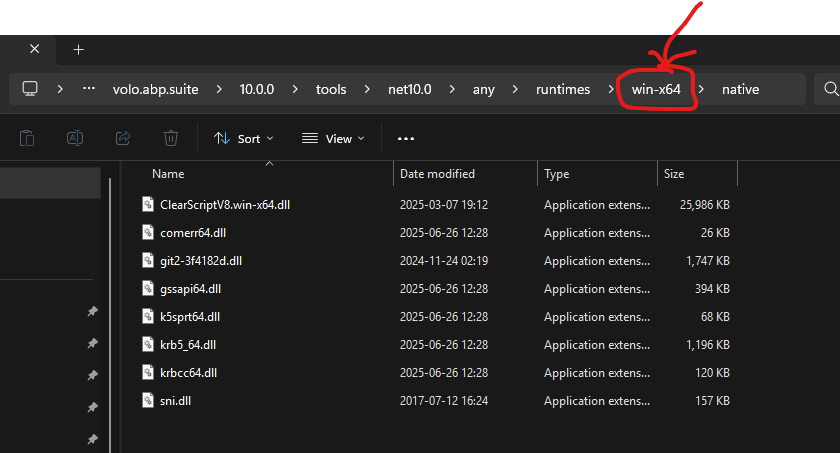
I think some DLLs are not packed correctly as Windows x64 version has the missing DLL:
4 Answer(s)
-
0
- Solution
Root cause
- ABP Suite v10.0.0 bundles ClearScript (V8) for code formatting (Prettier) inside the CRUD Page Generator. On Windows ARM64, the native ClearScriptV8.win-arm64 binaries are not present under the win-arm64 runtime folder, so the JavascriptPrettierFormatter fails to load V8 and Suite throws Autofac activation errors when opening a project.
Temporary workarounds (pick one)
Run Suite under x64 compatibility
- Install ABP Suite into an x64 .NET environment and run it as a win-x64 process (on Windows ARM devices that can run x64 apps via emulation).
- Command:
- abp suite remove
- abp suite install
- Then start Suite from an x64 terminal (Windows on ARM can emulate x64; this lets Suite use the existing win-x64 ClearScript binaries).
Disable JavaScript code formatting in Suite (bypass ClearScript)
- Suite’s CRUD generator uses the Prettier-based formatter only to beautify generated JS/TS files. You can bypass it to avoid loading V8:
- Close Suite.
- Open the Suite appsettings.json under your tool store. For 10.0.0 it is typically: %USERPROFILE%.dotnet\tools.store\volo.abp.suite\10.0.0\volo.abp.suite\10.0.0\tools\net10.0\any\appsettings.json
- Add/ensure a setting to disable JS formatting: { "CodeFormatting": { "UsePrettier": false } }
- Start Suite again. CRUD generation will skip Prettier and avoid ClearScript.
- Suite’s CRUD generator uses the Prettier-based formatter only to beautify generated JS/TS files. You can bypass it to avoid loading V8:
Use ABP Studio’s integrated Suite in x64 mode
- Launch ABP Studio in x64 mode (if your Windows ARM supports x64 emulation) and open Suite from the top menu. This uses the same tool but ensures the process runs as x64 so the win-x64 ClearScript binaries load.
Recommended next steps
- This is a packaging gap for Windows ARM64. Until an official build of Suite ships with ClearScriptV8.win-arm64 binaries, use one of the workarounds above.
- If you continue hitting issues, reinstall Suite cleanly:
- abp suite remove
- dotnet tool uninstall Volo.Abp.Suite -g (if previously installed directly)
- dotnet nuget locals all --clear
- abp suite install
- Verify ABP Studio prerequisites if launching via Studio:
- https checks, .NET SDK installed by Studio; then open Suite again.
- Sources
- ABP Suite documentation
- https://abp.io/docs/latest/suite/
- ABP Studio documentation (running Suite from Studio)
- https://abp.io/docs/latest/studio/overview
- Microsoft ClearScript project (V8 engine host)
- https://github.com/Microsoft/ClearScript
- Windows on ARM overview
- https://learn.microsoft.com/en-us/windows/arm/
This response was generated by AI. If it didn’t solve your problem, feel free to post a new answer — our support team will jump in to help you soon.
Markdown supported.Copy, paste, or drag & drop images and files (max 100 MB per file, 100 MB total per post) -
0
Manually downloading Microsoft.ClearScript.V8.Native.win-arm64 nuget package and extracting
ClearScriptV8.win-arm64.dllto the..\volo.abp.suite\10.0.0\tools\net10.0\any\runtimes\win-arm64\nativefolder fixed the issue.While this workaround works, still keeping this issue open so that an ABP developer can fix this in future releases.
Markdown supported.Copy, paste, or drag & drop images and files (max 100 MB per file, 100 MB total per post) -
0
[merdan] said: Manually downloading Microsoft.ClearScript.V8.Native.win-arm64 nuget package and extracting
ClearScriptV8.win-arm64.dllto the..\volo.abp.suite\10.0.0\tools\net10.0\any\runtimes\win-arm64\nativefolder fixed the issue.While this workaround works, still keeping this issue open so that an ABP developer can fix this in future releases.
Hi @merdan, thanks for the quick reply. We will fix this asap, thanks for reporting. (refunded your ticket)
Markdown supported.Copy, paste, or drag & drop images and files (max 100 MB per file, 100 MB total per post) -
0
Hello again, I got a quick update:
We released v10.0.1 yesterday, so you can update your ABP Suite version and generate CRUD pages as before.Regards.
Markdown supported.Copy, paste, or drag & drop images and files (max 100 MB per file, 100 MB total per post)



