






Hi,
My solution is the tired for Balzor server, after upgraded to v10 I found the issue when deploy to docker the blazor project is missing _framework cause when open blazor page cannot login or do anything. I tried to publish on local still see this folder. Is this .Net 10 issue or related to ABP Framework. How can fix it or work around solution?
Thanks, Dhamar
9 Answer(s)
-
0
- Solution
Root cause
- In Blazor Server, the “_framework” folder is part of the static web assets (Blazor runtime files) served by ASP.NET Core from the published output. If your Docker image doesn’t contain the published output of the Blazor Server project at the correct path and/or the container serves a different working directory, the “_framework” files won’t be found, causing login/UI to fail.
Fix: publish and copy the correct output into the runtime image
- Publish the Blazor Server project for Release inside the Docker build and copy the publish directory into the final image:
# Build & publish FROM mcr.microsoft.com/dotnet/sdk:10.0 AS build WORKDIR /src COPY . . RUN dotnet restore RUN dotnet publish ./src/YourCompany.YourApp.Blazor/YourCompany.YourApp.Blazor.csproj -c Release -o /app/publish # Runtime FROM mcr.microsoft.com/dotnet/aspnet:10.0 AS final WORKDIR /app COPY --from=build /app/publish . ENTRYPOINT ["dotnet", "YourCompany.YourApp.Blazor.dll"]- Important: Ensure the DLL name matches your Blazor Server project DLL.
- Do not copy bin/… directly unless it’s the publish folder. The publish folder must include the static web assets used to serve “_framework”.
- If you already publish outside Docker, copy the exact publish directory:
FROM mcr.microsoft.com/dotnet/aspnet:10.0 AS final
  WORKDIR /app
  COPY ./src/YourCompany.YourApp.Blazor/bin/Release/net10.0/publish/ .
  ENTRYPOINT ["dotnet", "YourCompany.YourApp.Blazor.dll"]
Verify that the path exists locally and contains the “_framework” under wwwroot/_framework or in static web assets folders included by the publish output.
Additional checks
- Ensure you run dotnet publish (not just build). Publish produces the static web assets and manifest required for Blazor.
- Make sure the container’s WORKDIR matches where you copied the publish output, and you are starting the correct DLL.
- If you front the container with Nginx/Apache, confirm static files are not blocked and requests to “/_framework/*” are forwarded to Kestrel or served by the same app container without being intercepted.
- If you turned on trimming (PublishTrimmed) or single-file publish, try disabling trimming for Blazor Server or ensure proper trim settings—aggressive trimming can remove files needed by the Blazor runtime.
ABP-specific note
- The ABP Blazor Server app in a tiered solution is a single web app hosting both UI and the OpenIddict server by default. Use a multi-stage Dockerfile and copy from the publish output as shown above. ABP’s sample Dockerfile for Blazor Server also assumes copying from bin/Release/net10.0/publish into the aspnet base image.
- Sources
- ASP.NET Core Blazor static files fundamentals (how Blazor serves “_framework”):
- https://learn.microsoft.com/aspnet/core/blazor/fundamentals/static-files
- ABP layered solution deployment to Docker (Blazor Server sample Dockerfile and steps):
- https://abp.io/docs/10.0//solution-templates/layered-web-application/deployment/deployment-docker-compose
- ABP v10 migration and .NET 10 note:
- https://abp.io/docs/10.0//release-info/migration-guides/abp-10-0
This response was generated by AI. If it didn’t solve your problem, feel free to post a new answer — our support team will jump in to help you soon.
Markdown supported.Copy, paste, or drag & drop images and files (max 100 MB per file, 100 MB total per post) -
0
Sure Maliming, it is working well for v9.x just issue when upgraded to v10. My current docker file, even i tried on docker local still the same:
# ============================================
# HQSOFT.Xspire.Blazor - Standard Dockerfile
# Optimized for BuildKit caching with parallel builds
# With DevExpress License support
# ============================================

# ----------------------------
# Build stage - restore and compile
# ----------------------------
FROM mcr.microsoft.com/dotnet/sdk:10.0 AS build

# DevExpress License Build Argument
# This is passed from GitLab CI/CD via --build-arg
ARG DevExpress_License

# Set DevExpress License as environment variable (exact casing required)
# This makes the license available during dotnet build/publish
ENV DevExpress_License=${DevExpress_License}

# Set environment for build performance
ENV DOTNET_CLI_TELEMETRY_OPTOUT=1 \
    DOTNET_SKIP_FIRST_TIME_EXPERIENCE=1 \
    DOTNET_SYSTEM_GLOBALIZATION_INVARIANT=1 \
    NUGET_HTTP_TIMEOUT=180

WORKDIR /src

# Copy solution and project files first (for better layer caching)
COPY ["HQSOFT.Xspire.sln", "./"]
COPY ["NuGet.Config", "./"]
COPY ["common.props", "./"]

# Copy all project files for restore
COPY ["src/HQSOFT.Xspire.Blazor/HQSOFT.Xspire.Blazor.csproj", "src/HQSOFT.Xspire.Blazor/"]
COPY ["src/HQSOFT.Xspire.Application/HQSOFT.Xspire.Application.csproj", "src/HQSOFT.Xspire.Application/"]
COPY ["src/HQSOFT.Xspire.Application.Contracts/HQSOFT.Xspire.Application.Contracts.csproj", "src/HQSOFT.Xspire.Application.Contracts/"]
COPY ["src/HQSOFT.Xspire.Domain/HQSOFT.Xspire.Domain.csproj", "src/HQSOFT.Xspire.Domain/"]
COPY ["src/HQSOFT.Xspire.Domain.Shared/HQSOFT.Xspire.Domain.Shared.csproj", "src/HQSOFT.Xspire.Domain.Shared/"]
COPY ["src/HQSOFT.Xspire.EntityFrameworkCore/HQSOFT.Xspire.EntityFrameworkCore.csproj", "src/HQSOFT.Xspire.EntityFrameworkCore/"]
COPY ["src/HQSOFT.Xspire.HttpApi.Client/HQSOFT.Xspire.HttpApi.Client.csproj", "src/HQSOFT.Xspire.HttpApi.Client/"]

# Copy module project files
COPY ["modules/", "modules/"]

# Restore dependencies (this layer is cached if project files don't change)
RUN dotnet restore "src/HQSOFT.Xspire.Blazor/HQSOFT.Xspire.Blazor.csproj" \
    -r linux-x64 \
    --verbosity quiet

# Copy all source code
COPY ["src/", "src/"]

# Build the project (cached if source code doesn't change)
# DevExpress License is available via environment variable
RUN dotnet build "src/HQSOFT.Xspire.Blazor/HQSOFT.Xspire.Blazor.csproj" \
    -c Release \
    -r linux-x64 \
    --no-restore \
    --disable-build-servers \
    --verbosity quiet \
    /p:WarningLevel=0 \
    /consoleLoggerParameters:ErrorsOnly

# ----------------------------
# Publish stage
# ----------------------------
FROM build AS publish
# DevExpress License remains available in this stage from build stage
RUN dotnet publish "src/HQSOFT.Xspire.Blazor/HQSOFT.Xspire.Blazor.csproj" \
    -c Release \
    -r linux-x64 \
    -o /app/publish \
    --no-restore \
    --verbosity quiet \
    /p:WarningLevel=0 \
    /consoleLoggerParameters:ErrorsOnly \
    /p:CopyStaticWebAssets=true \
    /p:IncludeStaticWebAssets=true

# ----------------------------
# Runtime stage
# ----------------------------
FROM mcr.microsoft.com/dotnet/aspnet:10.0 AS final

# Set timezone
ENV TZ=Asia/Ho_Chi_Minh
RUN ln -snf /usr/share/zoneinfo/$TZ /etc/localtime && echo $TZ > /etc/timezone

# Configure ASP.NET Core
ENV ASPNETCORE_URLS=http://+:8080 \
    ASPNETCORE_FORWARDEDHEADERS_ENABLED=true \
    UseHttpsRedirection=true \
    ASPNETCORE_PATHBASE=""

WORKDIR /app

# Install runtime dependencies for reporting and fonts
RUN apt-get update && apt-get install -y \
    libfontconfig1 \
    fontconfig \
    libicu-dev \
    libfreetype6 \
    libjpeg-turbo8 \
    libpng16-16 \
    libgif7 \
    libx11-6 \
    libxcb1 \
    libxext6 \
    libgl1 \
    wget \
    --no-install-recommends && \
    rm -rf /var/lib/apt/lists/* /tmp/* /var/tmp/* && \
    mkdir -p /usr/share/fonts/truetype/msttcorefonts && \
    wget -q https://github.com/web-platform-tests/wpt/raw/master/fonts/Ahem.ttf -O /usr/share/fonts/truetype/Ahem.ttf && \
    fc-cache -f

# Create application directories
RUN mkdir -p /app/Logs /app/Reports && \
    chmod 755 /app/Logs /app/Reports

# Set shared library path
ENV LD_LIBRARY_PATH=/usr/lib/x86_64-linux-gnu:/usr/lib:/app

# Copy published application
COPY --from=publish /app/publish .

# Copy Reports folder if it exists (using RUN with mount for optional copy)
RUN --mount=type=bind,from=build,source=/src/src/HQSOFT.Xspire.Blazor/Reports,target=/tmp/reports \
    if [ -d /tmp/reports ]; then cp -r /tmp/reports/* /app/Reports/ || true; fi

# Health check
HEALTHCHECK --interval=30s --timeout=10s --start-period=60s --retries=5 \
    CMD wget -q --spider http://localhost:8080/health-status || exit 1

EXPOSE 8080

# Run the application
ENTRYPOINT ["dotnet", "HQSOFT.Xspire.Blazor.dll"]
Markdown supported.Copy, paste, or drag & drop images and files (max 100 MB per file, 100 MB total per post) -
0
hi、
I think this is unrelated to the ABP framework and might be related to your environment. You can try testing by publishing a Microsoft Blazor project to see if that works.
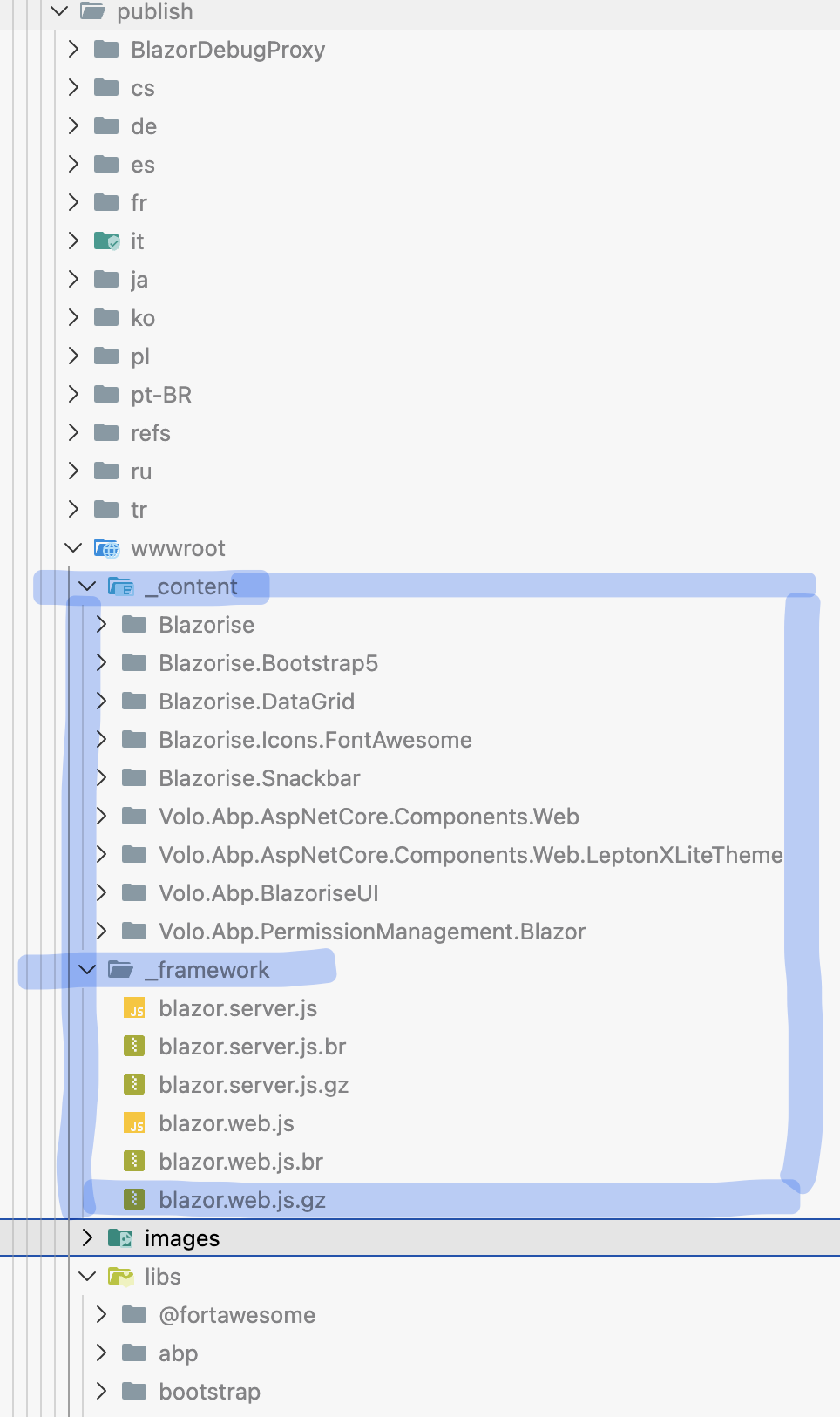
Thanks.
Markdown supported.Copy, paste, or drag & drop images and files (max 100 MB per file, 100 MB total per post) -
0
as i said before i try to publish on local machine ok, the issue only happened when publish to docker during docker build. even you publish to docker on local machine or on the server has the same issue
Markdown supported.Copy, paste, or drag & drop images and files (max 100 MB per file, 100 MB total per post) -
0
hi
I test a project in Docker Desktop, and it works.
FROM mcr.microsoft.com/dotnet/sdk:10.0 AS build WORKDIR /app COPY . . WORKDIR /app/src/AbpSolution1.Blazor RUN dotnet dev-certs https -v -ep openiddict.pfx -p df97f7cd-f499-4977-9c9c-6beeb4da13f8 RUN chmod 644 openiddict.pfx RUN dotnet build -c Release -o /app/build RUN dotnet publish -c Release -o /app/publish FROM mcr.microsoft.com/dotnet/aspnet:10.0 AS runtime RUN useradd --create-home appuser || true USER appuser WORKDIR /app ENV ASPNETCORE_URLS=http://+:8080 COPY --from=build /app/publish . EXPOSE 8080 ENTRYPOINT ["dotnet", "AbpSolution1.Blazor.dll"]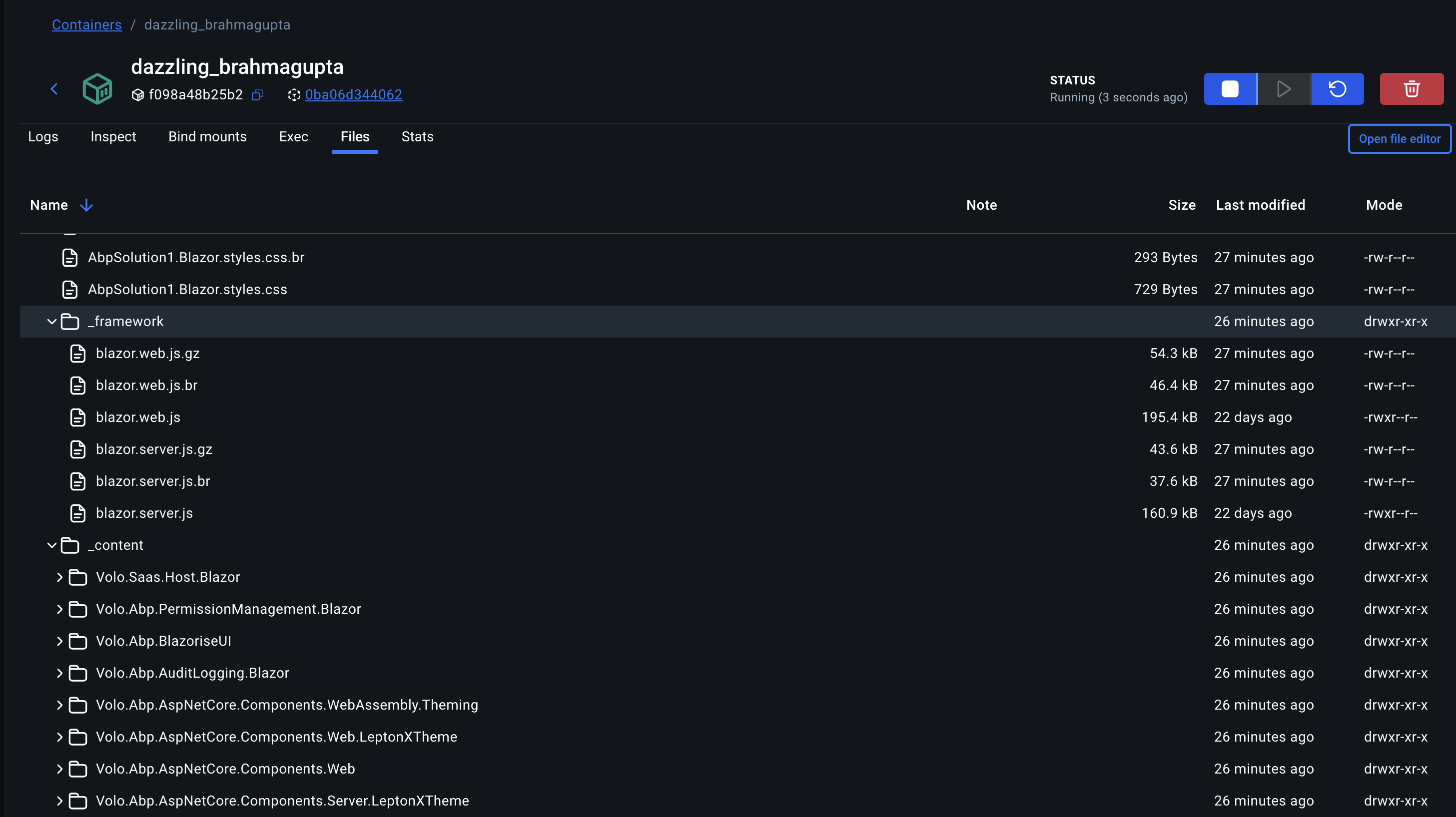 Markdown supported.Copy, paste, or drag & drop images and files (max 100 MB per file, 100 MB total per post)



