






- Template: app
- Created ABP Studio Version: 0.9.25
- Current ABP Studio Version: 1.4.1
- Tiered: Yes
- Multi-Tenancy: Yes
- UI Framework: blazor-server
- Theme: leptonx
- Theme Style: system
- Run Install Libs: Yes
- Database Provider: ef
- Database Management System: sqlserver
- Separate Tenant Schema: Yes
- Create Initial Migration: Yes
- Run Db Migrator: Yes
- Mobile Framework: maui
- Public Website: Yes
- Include Tests: Yes
- Kubernetes Configuration: No
- Distributed Event Bus: rabbitmq
- Use Local References: No
- Optional Modules:
- GDPR
- FileManagement
- TextTemplateManagement
- LanguageManagement
- AuditLogging
- Chat
- OpenIddictAdmin
- Exception message and full stack trace: Description:
Hello Abp.io Team,
I have encountered an issue with the GET endpoints generated by the ABP Suite for my entities containing child collections. My expectation is that when fetching an entity that has related child collections, these collections should be populated and returned in the response, as demonstrated in the auto-generated Swagger documentation.
Issue Details:
- According to the Swagger example response for
GET /product-items/{id}(see Figure 1), the returned object should include both theproductItemCulturesandproductItemAttributeListValuescollections alongside the mainProductItementity. - However, when making an actual API request (see Figure 2) for a specific item (
Cerveja Amstel Lager Puro Malte Lata 269ml), the response contains theProductItemdetails, but bothproductItemCulturesandproductItemAttributeListValuesarrays are empty, despite the related data existing. - As shown in Figure 3, these child data entries (attribute list values, for example) are indeed linked to the corresponding
ProductItemin the database/UI, but they are not being returned by the API.
Images:
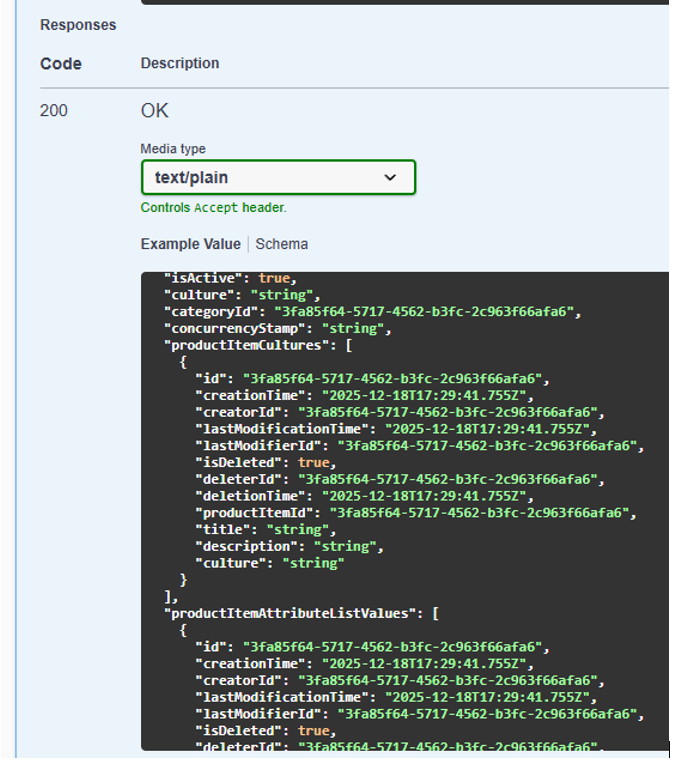
- Image 1: Example return in Swagger documentation (expected structure with child collections returned).
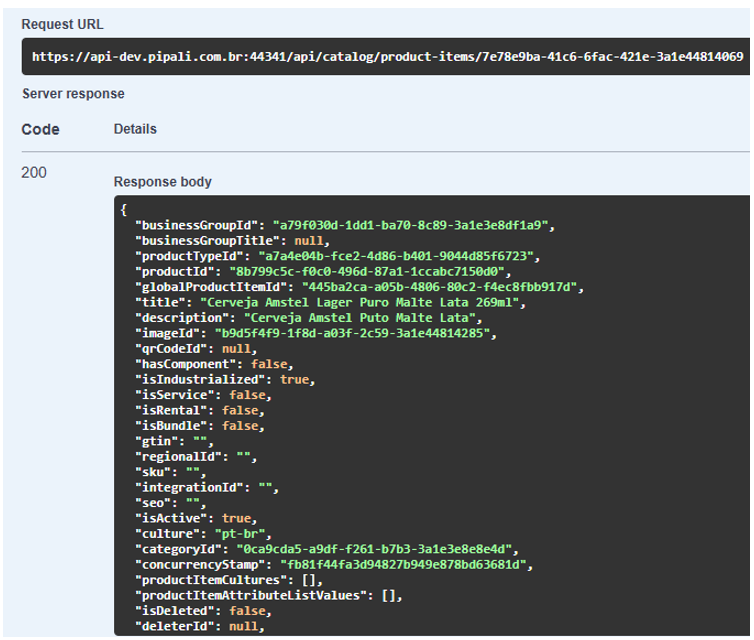
- Image 2: Actual API response (missing child collections, only main ProductItem information returned).
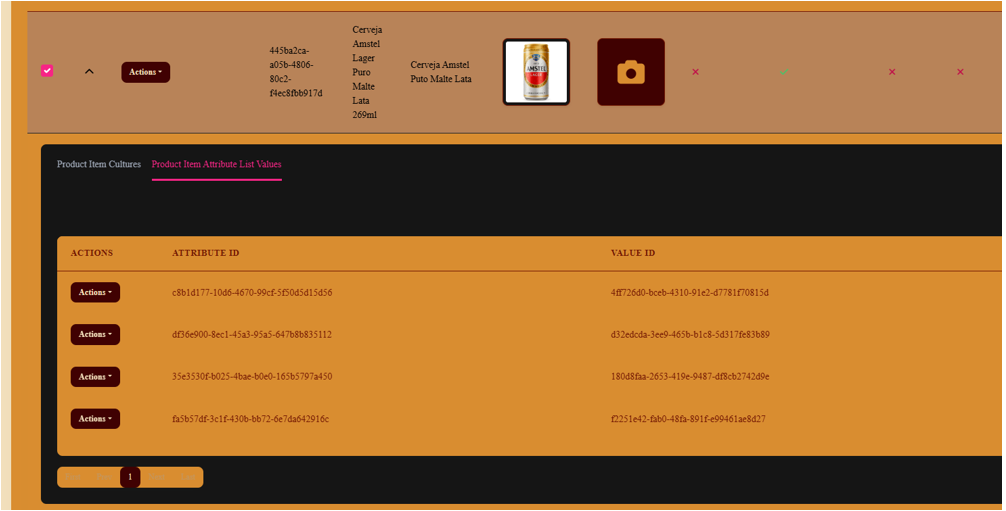
- Image 3: UI/database evidence that ProductItem has attached Attribute List Values and Cultures.
Code Context (generated by ABP Suite, unmodified):
ProductItemsAppService.cs:
public virtual async Task<ProductItemDto> GetAsync(Guid id)
{
   return ObjectMapper.Map<ProductItem, ProductItemDto>(await _productItemRepository.GetAsync(id));
}
ProductItemDto.cs:
public abstract class ProductItemDtoBase : FullAuditedEntityDto<Guid>, IHasConcurrencyStamp
{
   public string? BusinessGroupId { get; set; }
   public string? BusinessGroupTitle { get; set; }
   public string? ProductTypeId { get; set; }
   public string? ProductId { get; set; }
   public string? globalProductItemId { get; set; }
   public string Title { get; set; } = null!;
   public string? Description { get; set; }
   public Guid? ImageId { get; set; }
   public Guid? QRCodeId { get; set; }
   public bool HasComponent { get; set; }
   public bool IsIndustrialized { get; set; }
   public bool IsService { get; set; }
   public bool IsRental { get; set; }
   public bool IsBundle { get; set; }
   public string? GTIN { get; set; }
   public string? RegionalId { get; set; }
   public string? SKU { get; set; }
   public string? IntegrationId { get; set; }
   public string? SEO { get; set; }
   public bool IsActive { get; set; }
   public string? Culture { get; set; }
   public Guid CategoryId { get; set; }

   public string ConcurrencyStamp { get; set; } = null!;

   public List<ProductItemCultureDto> ProductItemCultures { get; set; } = new();
   public List<ProductItemAttributeListValueDto> ProductItemAttributeListValues { get; set; } = new();
}
ProductItem.cs:
public abstract class ProductItemBase : FullAuditedAggregateRoot<Guid>, IMultiTenant
{
   public virtual Guid? TenantId { get; set; }

   [CanBeNull]
   public virtual string? BusinessGroupId { get; set; }

   [CanBeNull]
   public virtual string? BusinessGroupTitle { get; set; }

   [CanBeNull]
   public virtual string? ProductTypeId { get; set; }

   [CanBeNull]
   public virtual string? ProductId { get; set; }

   [CanBeNull]
   public virtual string? globalProductItemId { get; set; }

   [NotNull]
   public virtual string Title { get; set; }

   [CanBeNull]
   public virtual string? Description { get; set; }

   public virtual Guid? ImageId { get; set; }

   public virtual Guid? QRCodeId { get; set; }

   public virtual bool HasComponent { get; set; }

   public virtual bool IsIndustrialized { get; set; }

   public virtual bool IsService { get; set; }

   public virtual bool IsRental { get; set; }

   public virtual bool IsBundle { get; set; }

   [CanBeNull]
   public virtual string? GTIN { get; set; }

   [CanBeNull]
   public virtual string? RegionalId { get; set; }

   [CanBeNull]
   public virtual string? SKU { get; set; }

   [CanBeNull]
   public virtual string? IntegrationId { get; set; }

   [CanBeNull]
   public virtual string? SEO { get; set; }

   public virtual bool IsActive { get; set; }

   [CanBeNull]
   public virtual string? Culture { get; set; }
   public Guid CategoryId { get; set; }
   public ICollection<ProductItemCulture> ProductItemCultures { get; private set; }
   public ICollection<ProductItemAttributeListValues.ProductItemAttributeListValue> ProductItemAttributeListValues { get; private set; }
}
The repository method used here is the default from ABP:
await _productItemRepository.GetAsync(id)
I have not made any modifications to the generated service, DTO, or entity code.
Expectation vs. Reality:
- Expected: The API response should return the associated child collections, matching the schema/example shown in the Swagger documentation (Image 1).
- Actual: The API response omits these child collections (they are empty), even though they are associated and visible in the database and UI (Images 2 & 3).
Request:
Could you please advise why the child collections are not being included in the returned DTO, and what needs to be adjusted in the generated code or mapping for them to be populated as expected? Is there an additional configuration required, or is this a known issue with the generated code?
I can provide further information if needed, including full code or additional screenshots.
Thank you for your assistance!
Best regards,
7 Answer(s)
-
0
- Solution
Why it happens
- EF Core does not enable lazy loading by default in ABP. The default repository GetAsync(id) loads only the aggregate root and not its navigation collections. Therefore, when the ObjectMapper maps ProductItem to ProductItemDto, the collections are not loaded and end up empty.
What to change
- Load related collections explicitly, then map. Use ABP’s repository WithDetails/WithDetailsAsync (or GetAsync(id, includeDetails: true) if your repository exposes it) to eagerly include navigation properties.
Option A: Use WithDetailsAsync in your AppService
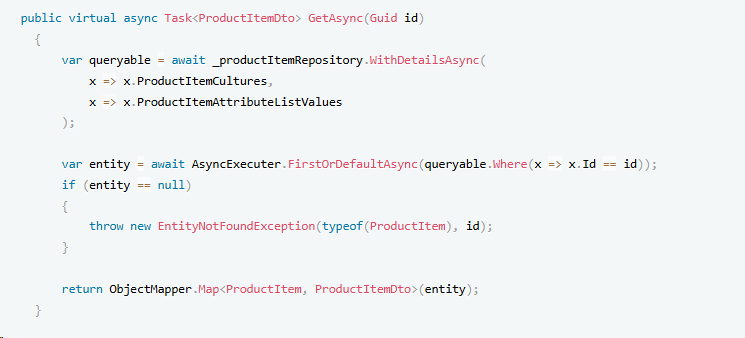
public virtual async Task<ProductItemDto> GetAsync(Guid id) { var queryable = await _productItemRepository.WithDetailsAsync( x => x.ProductItemCultures, x => x.ProductItemAttributeListValues ); var entity = await AsyncExecuter.FirstOrDefaultAsync(queryable.Where(x => x.Id == id)); if (entity == null) { throw new EntityNotFoundException(typeof(ProductItem), id); } return ObjectMapper.Map<ProductItem, ProductItemDto>(entity); }- Option B: Expose includeDetails on repository Get/Find
- If your repository inherits from EfCoreRepository, you can call:
public virtual async Task<ProductItemDto> GetAsync(Guid id) { var entity = await _productItemRepository.GetAsync(id, includeDetails: true); return ObjectMapper.Map<ProductItem, ProductItemDto>(entity); }- Then configure default details in a custom repository if needed:
public class ProductItemRepository
      : EfCoreRepository<MyDbContext, ProductItem, Guid>, IProductItemRepository
  {
      public ProductItemRepository(IDbContextProvider<MyDbContext> dbContextProvider)
          : base(dbContextProvider)
      {
      }

      public override async Task<IQueryable<ProductItem>> WithDetailsAsync()
      {
          return (await GetQueryableAsync())
              .Include(x => x.ProductItemCultures)
              .Include(x => x.ProductItemAttributeListValues);
      }
  }
With this, any GetAsync(id, includeDetails: true) will include those navigations by default.
Notes for multi-tenancy and filters
- Ensure the requested ProductItem and its children belong to the same Tenant (entities implement IMultiTenant). ABP’s data filters automatically apply tenant filtering; mismatched TenantId will result in not-found or empty collections.
- If any child entities are soft-deleted (ISoftDelete), ABP filters them out. Disable filters only if you need to see deleted children:
using (DataFilter.Disable<ISoftDelete>()) { // load with details here }- Summary
- Replace the generated GetAsync(id) call with an eager-loading variant (WithDetails/Include) so EF Core actually retrieves ProductItemCultures and ProductItemAttributeListValues before mapping. Swagger shows the DTO shape, not the loading behavior; you must include related data explicitly.
- Sources
- Validated reference (ABP EF Core, Loading Related Entities – WithDetails/WithDetailsAsync):
- https://abp.io/docs/latest/framework/data/entity-framework-core/
This response was generated by AI. If it didn’t solve your problem, feel free to post a new answer — our support team will jump in to help you soon.
Markdown supported.Copy, paste, or drag & drop images and files (max 100 MB per file, 100 MB total per post) -
0
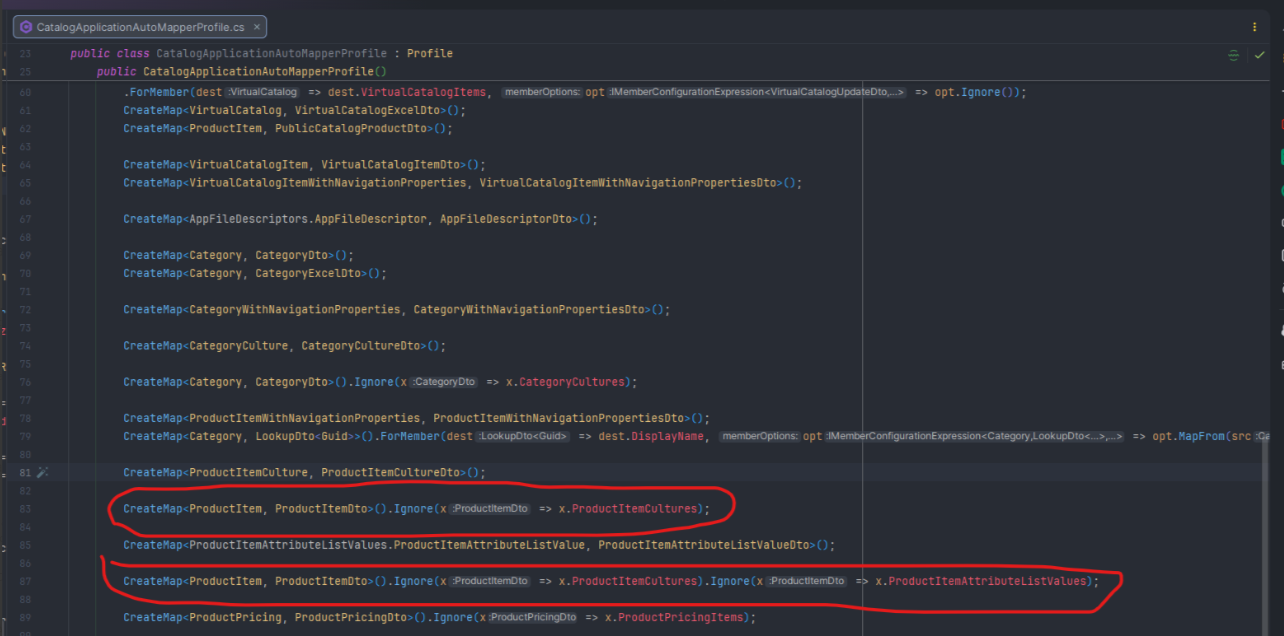
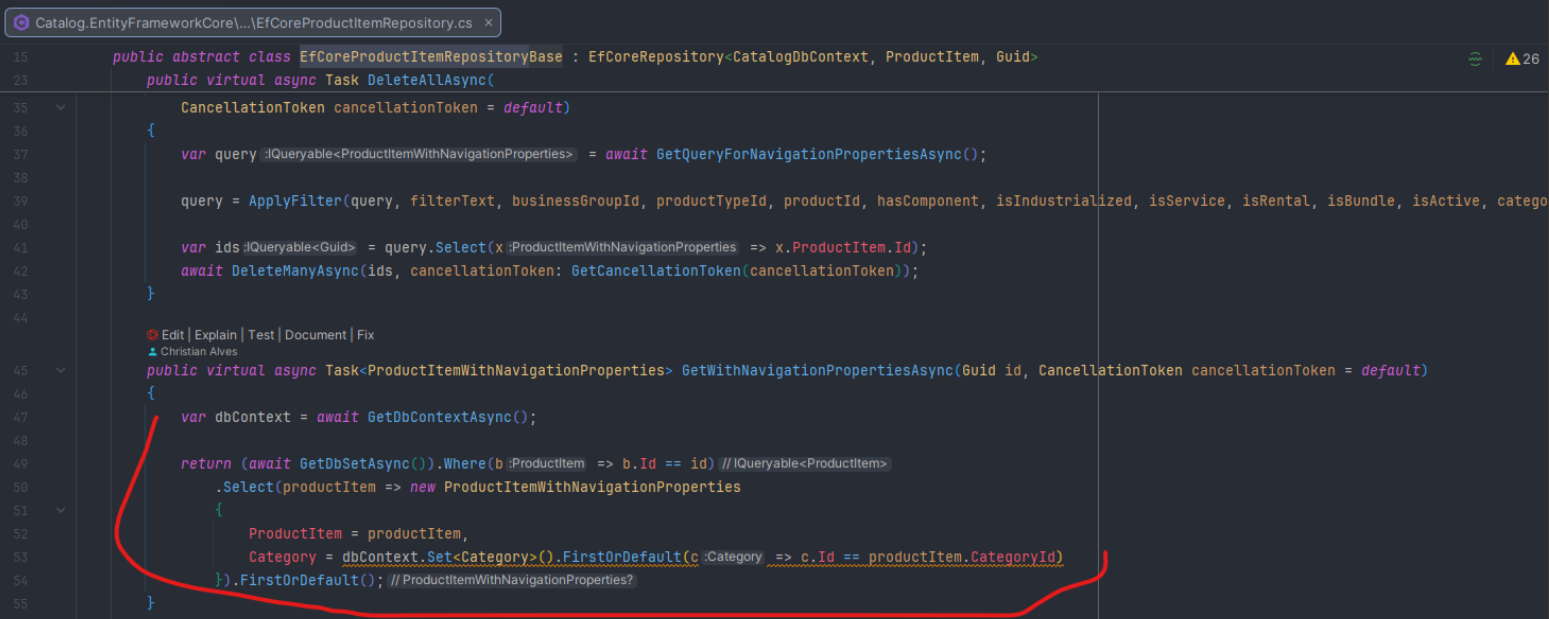
After trying to debug the issue, I found some possible cause:
a) The mapper created by ABP Suite is ignoring the child entities that I need to be returned. See the picture below:
b) Something is missing at the Repository created by default using ABP Suite.
 Markdown supported.Copy, paste, or drag & drop images and files (max 100 MB per file, 100 MB total per post)
 -
0
Hi @chrisalves,
This is the expected behavior in ABP Suite. The child collections are intentionally not loaded with the main entity for performance optimization purposes.
How it works: The UI fetches child items through separate API calls. If you check the network tab in your browser's developer tools, you'll see that the UI makes additional requests to endpoints.
You can use it in a similar way to what the AI bot suggested, like this:
 Markdown supported.Copy, paste, or drag & drop images and files (max 100 MB per file, 100 MB total per post)
 -
0
Hi!
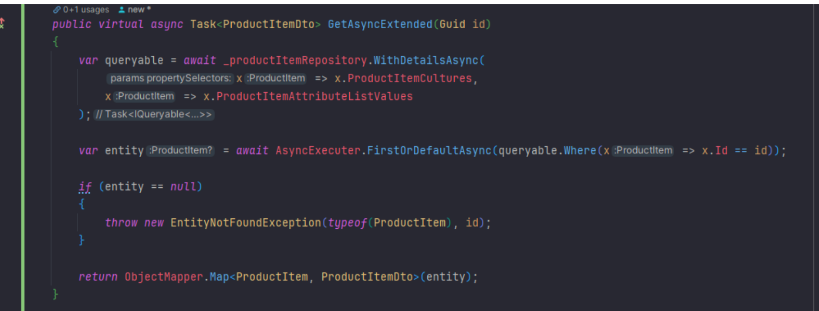
I tried to use the suggested way but the Mapper is set to Ignore the output.Can you please revisit the screenshots of the Mapper to ensure there is a right link between your suggestion and the existing Mapper. Just to enforce the context, the Mapper was created using ABP Suite templates.
 Markdown supported.Copy, paste, or drag & drop images and files (max 100 MB per file, 100 MB total per post)
 -
0
After you revisit the screenshots of the Mappers, you will see the
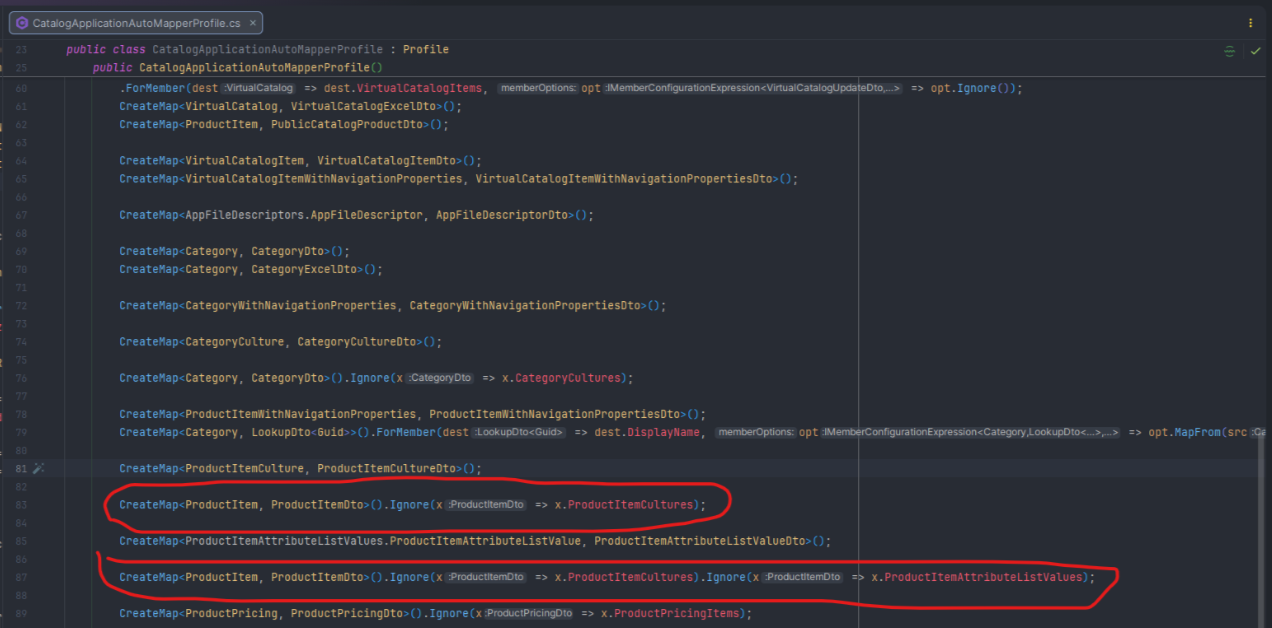
ignorefor the output. I believe this is the reason for this issue. If there is any complement on your suggestion above that handles correctly the output for the child please bring clearer than your previous response.Markdown supported.Copy, paste, or drag & drop images and files (max 100 MB per file, 100 MB total per post) -
0
 Markdown supported.Copy, paste, or drag & drop images and files (max 100 MB per file, 100 MB total per post)
 -
0
Hi @chrisalves,
Sorry for late reply. The parent child properties are intentionally ignored to prevent circular references and unnecessary data loading. Related collections are handled separately when needed to keep the DTO lightweight and improve performance.
If required, you can remove this ignore configuration from the mapper profile to include the related data in the output.
You can customize your suite templates if needed. https://abp.io/docs/latest/suite/editing-templates
Markdown supported.Copy, paste, or drag & drop images and files (max 100 MB per file, 100 MB total per post)



