






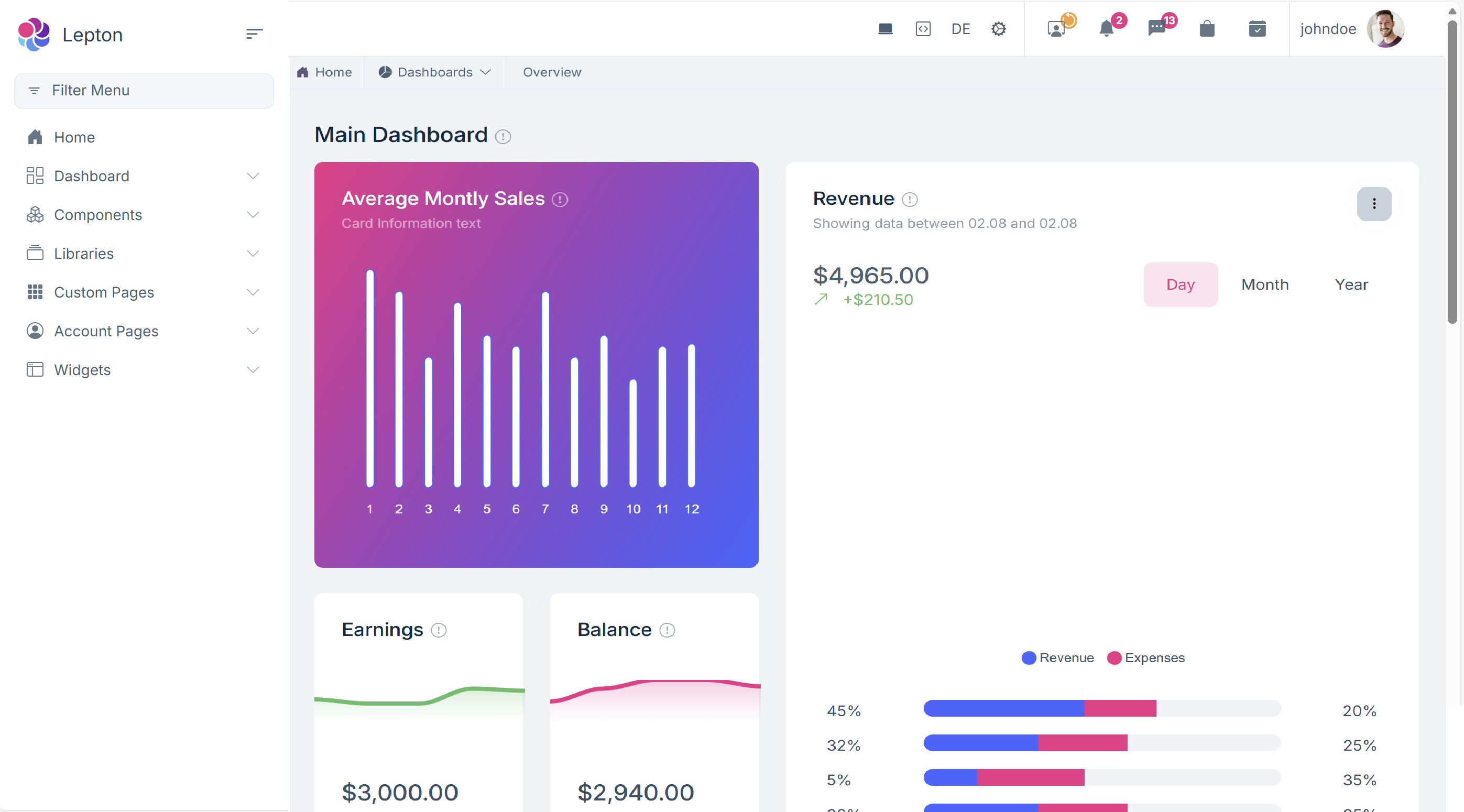
Hi ABP Team, I'm using ABP v10 and having an issue with Sidebar navigation menu and Main Toolbar. Currently as Leptonx standard theme if we select Side menu then both Navigation Menu and Main Toolbar are on both left and right side, for this case it take quite space of screen in wide especially for user using laptop does not have so much space for the main content. If we change to top menu both will be on top and user don't familiar with navigation menu on top. They requested to have an UI similar to as common software application with navigation menu on the left and main tool bar on the top to show avatar, notification, chat... is there any option or custom solution to meet this requirement?
 Thanks,
Dharma
Thanks,
Dharma
8 Answer(s)
-
0
- Solution
- LeptonX currently provides fixed layout combinations:
- Side menu layout → main toolbar is rendered on the right side.
- Top menu layout → both menu and toolbar are on the top.
- There is no built‑in configuration to keep:
- navigation menu on the left (side menu layout)
and at the same time - main toolbar on the top, like the old Lepton theme / desktop apps.
- navigation menu on the left (side menu layout)
To get that layout in ABP v10 you must implement your own custom layout based on LeptonX:
Copy an existing LeptonX layout
- For MVC: copy the LeptonX
_Layout(side‑menu layout) and its related partials from the theme package into your app’sPages(orViews) and register it as your layout. - For Angular: create your own layout components that wrap the LeptonX side‑menu layout.
- For MVC: copy the LeptonX
Move the toolbar rendering to the top header
- Keep the side navigation markup as is.
- Move the markup / component that renders
LeptonXToolbars.Maininto the top header area of your custom layout. - The toolbar system itself is independent; you can render
LeptonXToolbars.Mainwherever you want inside your custom layout.
Use component / layout replacement
- MVC: override LeptonX layout views with your own copies (same paths) so they are used instead of the packaged ones.
- Angular: create your own layout component and configure it via Component Replacement so it replaces the standard LeptonX layout component.
There is no simpler config switch; this requires a custom layout implementation.
- Sources
- LeptonX Angular Q&A confirming that “toolbar at top + side menu” layout is not supported and requires a custom layout / component replacement:
https://abp.io/support/questions/3746 - LeptonX MVC customization & toolbar docs (for understanding how layouts and toolbars are rendered and how to move them):
https://abp.io/docs/10.0/ui-themes/lepton-x/mvc - Angular component replacement (if you are on Angular UI):
https://abp.io/en/abp/latest/UI/Angular/Component-Replacement
This response was generated by AI. If it didn’t solve your problem, feel free to post a new answer — our support team will jump in to help you soon.
Markdown supported.Copy, paste, or drag & drop images and files (max 100 MB per file, 100 MB total per post) -
0
I'm using LeptonX theme for blazor server, I saw the old Lepton them can support as my requirement, we will custom LeptonX to support my requirement or we back to use the old Lepton version? Which is best solution for future maintenance, upgrading, extending... thanks,
Markdown supported.Copy, paste, or drag & drop images and files (max 100 MB per file, 100 MB total per post) -
0
- Solution
For long‑term maintenance and upgrades, it is better to stay on LeptonX and customize it, rather than going back to the old Lepton theme.
Reasons to prefer LeptonX:
- LeptonX is the current, actively developed commercial theme and gets new features (see the release notes showing new LeptonX features such as mobile toolbars, fluid layout, etc.).
- New ABP versions and Commercial features are designed and tested primarily with LeptonX.
- The layout you want (side menu + top toolbar) is not a built‑in option in LeptonX, but it is achievable by:
- copying the LeptonX Blazor layout (
MainLayout.razorand related components) into your solution, and - moving the toolbar rendering (the component that renders
LeptonXToolbars.Main) into a top header area while keeping the navigation menu on the left.
- copying the LeptonX Blazor layout (
- This is a one‑time customization and will be easier to maintain on a theme that continues to evolve, compared to reverting to Lepton, which does not receive the same new capabilities LeptonX does.
When would going back to Lepton make sense?
- Only if you need a very quick solution and do not plan to invest in custom layout work, and you are comfortable staying on a layout that is no longer the main focus of new feature development.
- Even in that case, you should expect to handle more manual work during future upgrades if Lepton diverges from new features available in LeptonX.
Recommended approach
- Keep LeptonX Blazor Server.
- Create a custom layout based on LeptonX:
- Copy the LeptonX
MainLayout.razor(and any related layout components) into your app. - Place the navigation menu region on the left as it is in the side‑menu layout.
- Move the main toolbar rendering to a top header row.
- Copy the LeptonX
- Keep this layout in your own project so you control the markup; LeptonX upgrades will then typically affect styling and components, not your overall layout structure.
This way you get the UX your users want plus the benefits of the newer, actively enhanced LeptonX theme.
- Sources
- LeptonX Blazor theme documentation (current theme and customization entry point):
https://abp.io/docs/latest/ui-themes/lepton-x/blazor - General LeptonX theme documentation (shows it as the new, feature‑rich theme and lists new features like fluid layout and mobile toolbars):
https://abp.io/docs/latest/ui-themes/lepton-x - Legacy Lepton theme docs (for comparison / fallback only):
https://abp.io/docs/latest/ui-themes/lepton
This response was generated by AI. If it didn’t solve your problem, feel free to post a new answer — our support team will jump in to help you soon.
Markdown supported.Copy, paste, or drag & drop images and files (max 100 MB per file, 100 MB total per post)



